
Repairing a corrupted MP4 or MOV file should not require complex software or technical skills. Both Repairit Video Repair Online and Online Converter MP4 Repair offer browser-based ways to fix unplayable videos without installing anything. This comparison walks through how each tool handles online video repair, where Online Converter MP4 Repair works best for quick MP4 fixes, and when a more guided workflow like Repairit Video Repair Online can make damaged clips playable again.
In this article
- Repairit Video Repair Online vs Online Converter MP4 Repair: Quick Verdict
- Repairit Video Repair Online vs Online Converter MP4 Repair: Key Differences
- Repairit Video Repair Online vs Online Converter MP4 Repair: Comparison Table
- What Repairit Video Repair Online and Online Converter MP4 Repair Are Best For
- Repairit Video Repair Online vs Online Converter MP4 Repair: Online Video Repair Capabilities
- Repairit Video Repair Online vs Online Converter MP4 Repair: Supported Formats and Use Cases
- Repairit Video Repair Online vs Online Converter MP4 Repair: Upload Workflow and Ease of Use
- Repairit Video Repair Online vs Online Converter MP4 Repair: Cloud Repair, Privacy, and File Handling
- Repairit Video Repair Online vs Online Converter MP4 Repair: Repair Quality and Limitations
- Who Should Choose Repairit Video Repair Online
- Who Should Choose Online Converter MP4 Repair
- Pros and Cons of Repairit Video Repair Online and Online Converter MP4 Repair
- How to Repair Corrupted Videos Online After Choosing the Right Tool
Repairit Video Repair Online vs Online Converter MP4 Repair: Quick Verdict
The main difference is that Repairit Video Repair Online focuses on a guided online workflow for repairing a range of corrupted, damaged, or unplayable videos, while Online Converter MP4 Repair is positioned as a lightweight MP4 fixer for minor corruption. In most real-world cases, your choice comes down to whether you want more help during the repair process or a bare-bones upload-and-fix page.
Repairit Video Repair Online is more suitable when you need step-based guidance to repair broken MP4 or MOV clips and may be dealing with more than a simple structure glitch. Online Converter MP4 Repair may be enough if you just have a single MP4 that used to play, now shows a basic playback error, and you want a quick browser repair without extra options.
Repairit Video Repair Online vs Online Converter MP4 Repair: Key Differences
The key difference is that Repairit Video Repair Online emphasizes a structured, beginner-friendly online video repair flow, while Online Converter MP4 Repair emphasizes speed and simplicity for lightly corrupted MP4 files. This matters if you are not technical and want the tool to guide you, instead of guessing which buttons to click.
Repairit Video Repair Online guides you from upload to preview and download, which can feel safer when you are nervous about losing a damaged recording. Online Converter MP4 Repair typically suits users who want to upload an MP4, let the system rebuild its structure, and download the result with minimal interaction, especially when the corruption seems minor.
Repairit Video Repair Online vs Online Converter MP4 Repair: Comparison Table
This comparison table shows how Repairit Video Repair Online and Online Converter MP4 Repair differ across common decision factors like best use case, workflow, repair capability, and privacy handling.
| Dimension | Repairit Video Repair Online | Online Converter MP4 Repair |
|---|---|---|
| Best for | Users who want a guided online workflow to repair corrupted MP4 or MOV clips with more help during the process. | Users quickly fixing broken MP4 playback files when only minor corruption is involved. |
| Online workflow | Step-based browser workflow focused on uploading, repairing, then previewing and saving repaired videos online. | Lightweight browser workflow: upload MP4, rebuild file structure, then download the repaired file. |
| Repair capability | Designed to handle a range of corrupted, damaged, or unplayable videos with guided options for different scenarios. | Positioned as a lightweight online MP4 repair utility for minor corruption issues and basic structure problems. |
| Ease of use | Beginner-friendly guidance that walks users through each step of repairing corrupted videos online. | Very simple flow aimed at users who want a fast repair process with no complex setup. |
| Privacy and file handling | Uses a cloud video repair workflow where files are uploaded, processed online, and then downloaded after repair. | Uploads MP4 files to rebuild their structure in the browser-based system before downloading the fixed video. |
| Strengths | Guided online repair, focus on fixing unplayable clips, and workflow designed for non-technical users. | Fast repair process, simple browser workflow, and no complex setup required for basic MP4 fixes. |
| Weaknesses | Online workflow may still struggle with extremely damaged recordings or severely incomplete files. | Limited repair depth and fewer supported formats, so more severe corruption may not be fully fixed. |
What Repairit Video Repair Online and Online Converter MP4 Repair Are Best For
Repairit Video Repair Online is a stronger choice for users who want a clearer, more guided way to repair corrupted or unplayable videos online, while Online Converter MP4 Repair is better suited to quick MP4 fixes for basic playback problems. In most cases, this difference in depth and guidance is what should drive your decision.
Online Converter MP4 Repair is described as a lightweight online MP4 repair utility positioned for minor corruption issues and quick fixes. It fits situations where you just need to repair a broken MP4 playback file and move on. In contrast, Repairit Video Repair Online focuses on a more guided online process to repair corrupted, damaged, or unplayable videos when users need extra help and clarity, especially across different video clips and formats.
Repairit Video Repair Online vs Online Converter MP4 Repair: Online Video Repair Capabilities
The key difference is that Online Converter MP4 Repair targets fast fixes for lightly corrupted MP4 files, while Repairit Video Repair Online focuses on guided online video repair for a wider variety of damaged clips. This becomes important when your video shows more than a simple playback glitch.
With Repairit Video Repair Online, users get:
- Provides a structured online process to repair corrupted or unplayable videos without complex setup.
- Helps beginners follow a clear sequence from upload through online repair to preview and download.
- Is more suitable when users want guidance for repairing damaged video files, not just quick MP4 structure fixes.
With Online Converter MP4 Repair, users get:
- Acts as a lightweight online MP4 repair utility mainly aimed at minor corruption issues.
- Follows a simple workflow where users upload an MP4, rebuild the file structure, and download the repaired video.
- May be enough if the video only shows basic playback errors and the corruption is not too severe.
In most real-world cases, Repairit Video Repair Online is more suitable when you are unsure how badly the file is damaged or you need more than a one-click MP4 structure repair.
Repairit Video Repair Online vs Online Converter MP4 Repair: Supported Video Formats and Use Cases
Repairit Video Repair Online is more suitable when you work with multiple video formats, while Online Converter MP4 Repair may be enough if you only need to fix a single MP4. This matters if your corrupted or unplayable files come from different devices.
Repairit Video Repair Online is designed for repairing corrupted or unplayable clips from common formats such as MP4, MOV, AVI, MKV, or 3GP in typical real-world scenarios. That broader coverage is helpful when you are not sure which format you will need to repair next. Online Converter MP4 Repair is positioned specifically around MP4 repair, especially when the main issue is broken playback rather than deep damage.
In most real-world cases, users choose based on whether they need broader format coverage or a focused MP4 structure repair. If you often repair broken MP4 or MOV files from phones and cameras, the versatility of Repairit Video Repair Online can be a practical advantage.
Repairit Video Repair Online vs Online Converter MP4 Repair: Upload Workflow and Ease of Use
Repairit Video Repair Online is more suitable when you want a step-by-step online repair experience, while Online Converter MP4 Repair may be enough if you are comfortable with a minimal upload form. Ease of use becomes critical when you are already stressed about a damaged recording.
With Online Converter MP4 Repair, the workflow is very direct: upload the MP4 file, let the tool rebuild the file structure, then download the repaired video. This can be convenient for users who value speed and simplicity over detailed guidance.
Repairit Video Repair Online also follows a browser-based workflow, but adds more guidance while you upload corrupted videos, start the online repair, and then Preview and save repaired videos the fixed file. Users often notice that this extra clarity reduces guesswork, especially if it is their first time trying to repair corrupted videos online.
Repairit Video Repair Online vs Online Converter MP4 Repair: Cloud Repair, Privacy, and File Handling
Both tools rely on a cloud video repair workflow where your videos are uploaded, processed, and then downloaded again, but users still need to check each services detailed privacy terms. The main difference in practice is how much guidance you get around this upload-and-repair process.
Both Repairit Video Repair Online and Online Converter MP4 Repair use online processing, meaning your corrupted or unplayable file is sent from your browser to remote servers for repair. Users often notice that upload time depends heavily on file size and connection speed, regardless of which service they choose.
Because specific privacy practices are not detailed here, users should review each tools upload and privacy terms before submitting sensitive or confidential video files. Repairit Video Repair Online frames this as part of its guided workflow, while Online Converter MP4 Repair keeps things lightweight and straightforward.
Repairit Video Repair Online vs Online Converter MP4 Repair: Repair Quality and Limitations
The main difference is that Repairit Video Repair Online aims to help with a wider range of corrupted or unplayable clips, whereas Online Converter MP4 Repair is positioned for minor MP4 corruption. This matters when your video is severely damaged or was interrupted during recording.
Online Converter MP4 Repair is positioned for minor corruption, so it may work well when only basic structure repair is needed but struggle with deeper damage. It is a practical option when the MP4 shows simple playback errors and you suspect the issue is not severe.
Repairit Video Repair Online is more suitable when the video is clearly unplayable and needs a more guided repair attempt. In both cases, severe corruption, missing metadata, interrupted recordings, or heavily damaged files can limit how much can be repaired, and users should keep expectations realistic for badly broken footage.
Who Should Choose Repairit Video Repair Online
Repairit Video Repair Online is more suitable when you want a guided browser-based process to repair corrupted, damaged, or unplayable videos without digging into technical settings. This is especially helpful if you repair videos only occasionally and do not feel confident about manual troubleshooting.
- Users who want a guided online workflow instead of a bare upload form for repairing corrupted videos.
- People dealing with a range of unplayable clips, not just lightly damaged MP4 files.
- Beginner users who prefer clear steps while they repair broken MP4 or MOV files online.
- Creators who often work with multiple formats and need more than a basic MP4 structure fix.
In most real-world cases, if you are unsure how to approach a corrupted file and want the service to walk you through upload, repair, and preview, Repairit Video Repair Online can be a better fit.
Who Should Choose Online Converter MP4 Repair
Online Converter MP4 Repair may be enough if you only need to repair a single MP4 with light corruption and prefer a minimal interface. This makes sense for one-off fixes where you do not need extra features or guidance.
- Users quickly fixing broken MP4 playback files with only minor corruption.
- People who want a fast repair process and simple browser workflow without extra options.
- Beginners who only need to upload an MP4, repair it once, and download the result.
- Anyone dealing with a single MP4 that will likely respond to basic structure rebuilding.
If your MP4 used to play correctly and recently began throwing an error, the lightweight approach of Online Converter MP4 Repair can be practical for a quick online attempt.
Pros and Cons of Repairit Video Repair Online and Online Converter MP4 Repair
This section highlights the main pros and cons of Repairit Video Repair Online and Online Converter MP4 Repair so you can quickly weigh guided online repair against fast, lightweight MP4 fixes.
Repairit Video Repair Online Pros and Cons
Online Converter MP4 Repair Pros and Cons
How to Repair Corrupted Videos Online After Choosing the Right Tool
After comparing Repairit Video Repair Online and Online Converter MP4 Repair, the next step is actually fixing your corrupted or unplayable video online. Once you know whether you prefer a guided repair flow or a lightweight MP4 utility, it becomes easier to follow a clear set of actions to get your clip playing again.
For users who want a structured, beginner-friendly process, Repairit Video Repair Online offers a practical way to upload broken MP4 or MOV files, run an online repair, and check the result before saving. Below is what that looks like in more detail.
Key Features
Repairit Video Repair Online focuses on making online video repair approachable for non-technical users while still supporting common real-world scenarios.
- Online repair process guided by clear steps from upload to download, suitable for non-technical users.
- Support for repairing a range of corrupted or unplayable clips commonly used in everyday recording devices.
- Cloud-based workflow that lets you repair videos directly in the browser instead of configuring complex tools.
Step-by-step guide
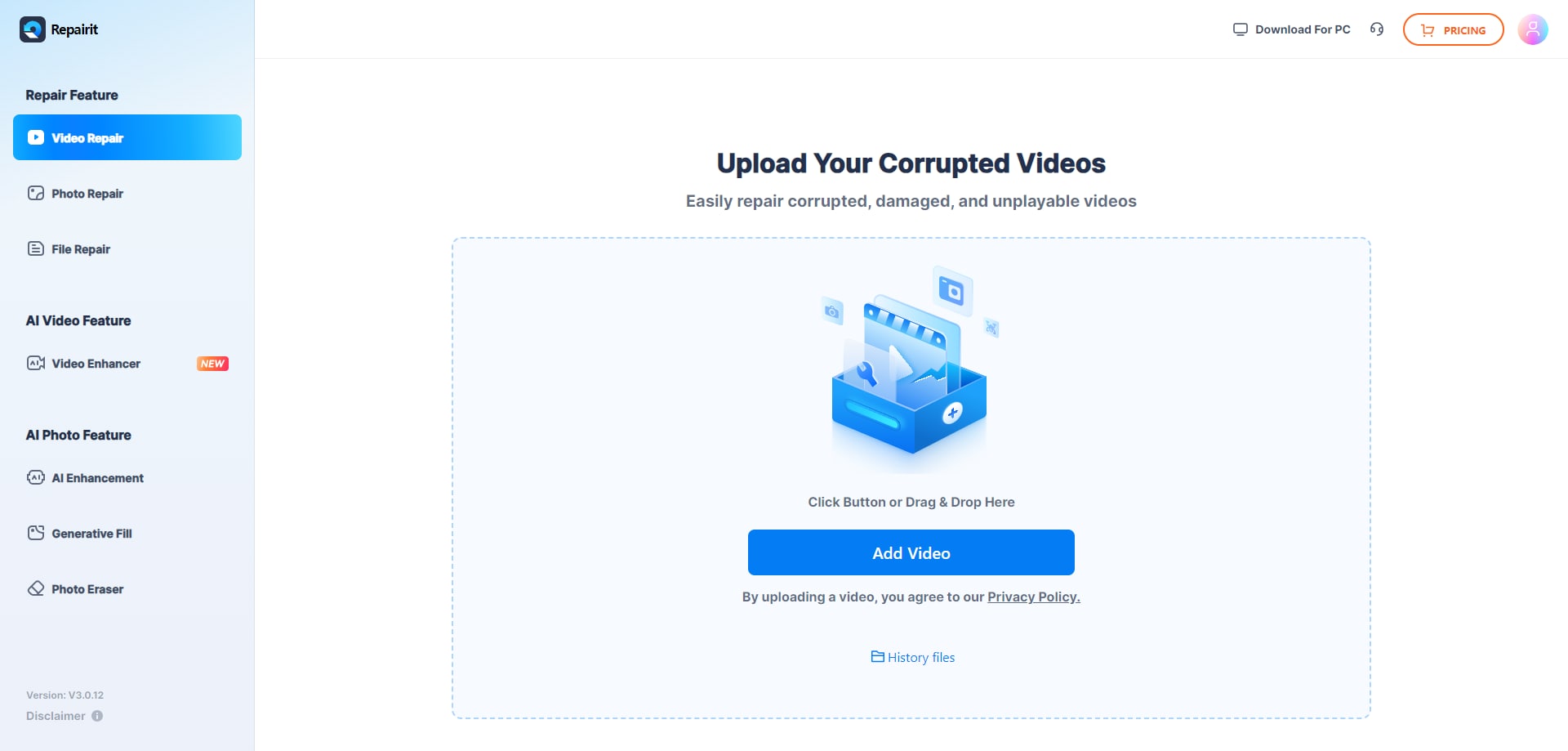
Step 1. Upload the damaged or unplayable videos you want to repair through Repairit Video Repair Online.
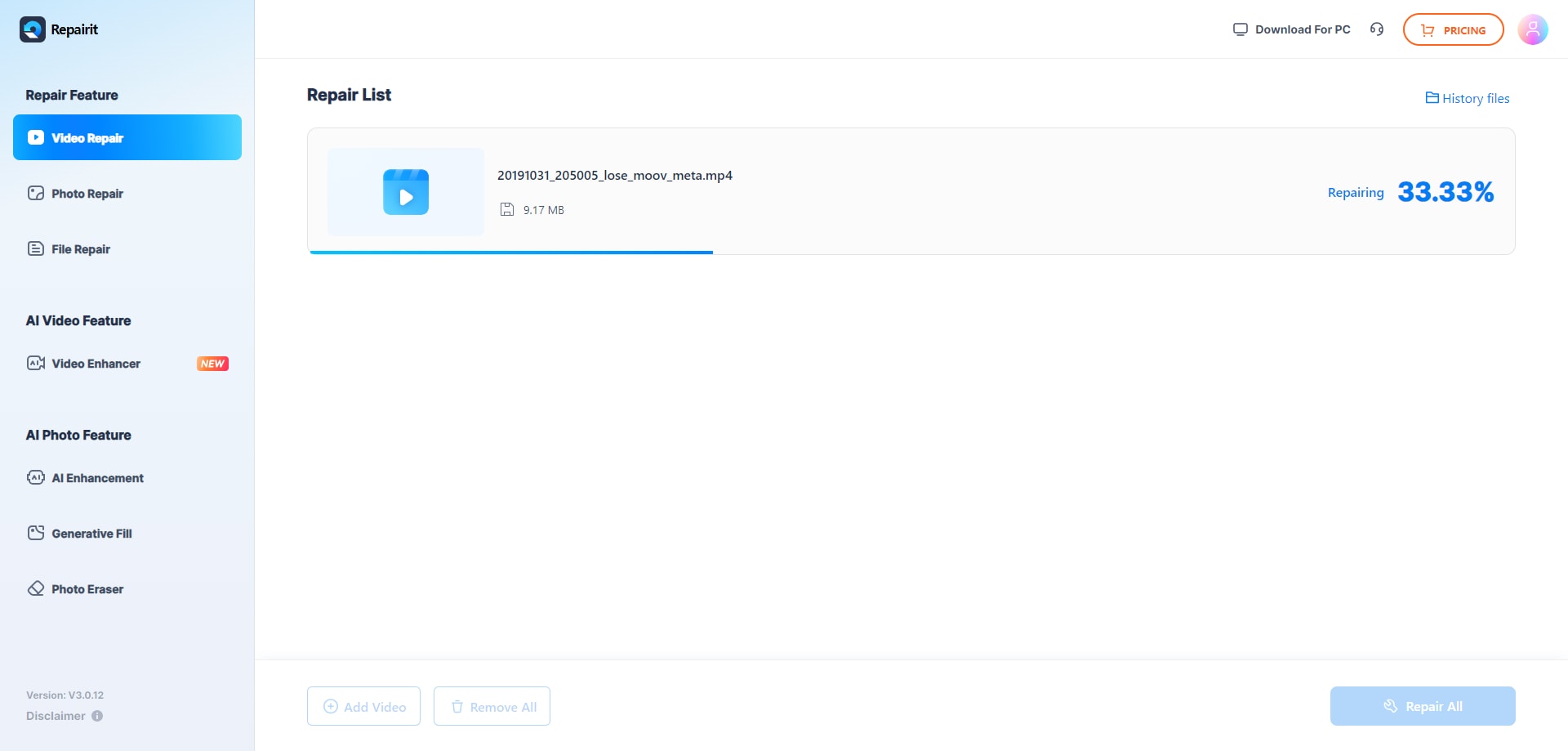
Step 2. Start the online repair process and let Repairit Video Repair Online analyze the corrupted video files.
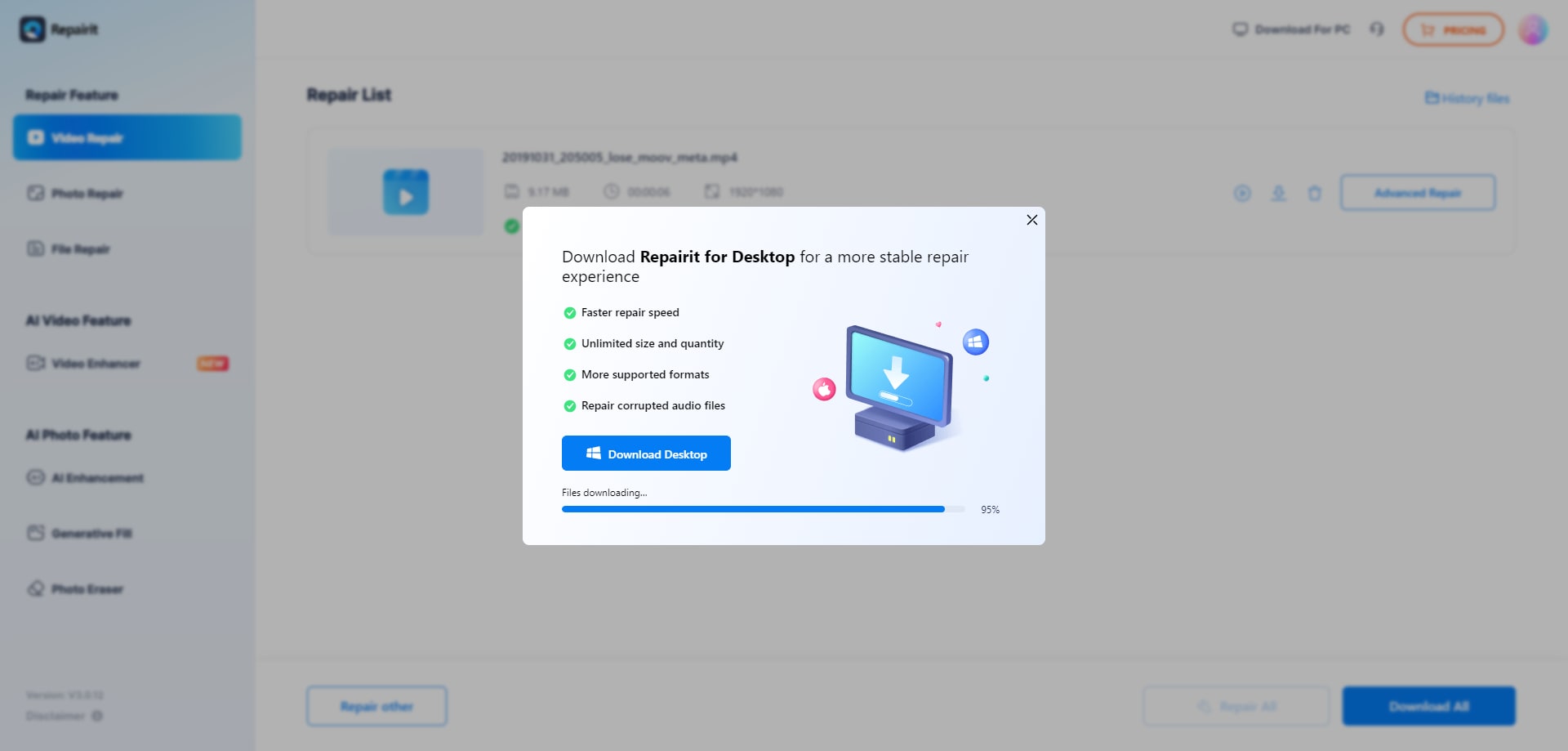
Step 3. Preview the repaired video result when available, then save the repaired videos to your device.
In most real-world cases, this straightforward flow is enough to attempt repairing broken MP4 or MOV clips that suddenly stopped playing or began throwing playback errors after transfer or export.
Final Verdict
The main difference between these tools is depth and guidance. Online Converter MP4 Repair is a lightweight online MP4 repair utility aimed at minor corruption, with a fast upload, rebuild, and download workflow. It may be enough if you only need to fix a single MP4 that stopped playing and you do not want extra steps.
Repairit Video Repair Online is more suitable when you need a guided browser-based workflow to repair corrupted, damaged, or unplayable videos, including MP4 and MOV clips. If your video shows persistent playback errors, you want clearer instructions, or you regularly handle different formats, Repairit Video Repair Online is likely the more practical day-to-day choice, while Online Converter MP4 Repair remains handy for quick, lightweight MP4 fixes.
Next: Repairit Video Repair Online vs Timbrica Video Repair
FAQ
-
1. Which is better for fixing corrupted MP4 files online, Repairit Video Repair Online or Online Converter MP4 Repair?
Neither tool is universally better for every corrupted MP4. Online Converter MP4 Repair may be enough if the MP4 has only minor corruption and you want a quick, lightweight repair. Repairit Video Repair Online is more suitable when you want a clearer, guided workflow for repairing corrupted or unplayable videos and may be dealing with more than a basic MP4 structure issue. -
2. When should I choose Online Converter MP4 Repair over Repairit Video Repair Online?
You should choose Online Converter MP4 Repair if you have a single MP4 that used to play fine, now fails to open, and you suspect only light corruption. Its simple browser workflow and fast repair process are aimed at users quickly fixing broken MP4 playback files without exploring extra options or formats. -
3. When is Repairit Video Repair Online a better fit than a lightweight MP4 repair utility?
Repairit Video Repair Online is a better fit when you want a guided browser-based process that walks you through uploading, repairing, and previewing damaged clips. This matters if you are not technical, you work with different formats such as MP4 or MOV, or your videos show more complex playback issues than a simple MP4 structure error.




