TL;DR
- Scan old Thanksgiving pictures at a useful resolution and save an untouched original.
- Identify fading, scratches, soft faces, and torn areas before choosing a restoration method.
- Use Repairit Old Photo Restoration, review family members' faces, and export a separate copy.
- Reuse the restored image for prints, greeting cards, family slideshows, or photo-to-video keepsakes.
Maybe you found a faded Thanksgiving family pic inside a photo album, or your relatives want to reprint a picture from a holiday dinner decades ago. Scratches, muted colors, and blurry faces can make these memories difficult to share. With a careful scan and AI-assisted restoration, you can prepare clearer Thanksgiving family pictures for an album, reunion, or greeting card without working directly on the only surviving copy.
In this article
Part 1. Why Do Old Thanksgiving Family Photos Fade or Get Damaged?
Old holiday prints often pass between homes, albums, drawers, and photo frames. Over the years, light exposure, humidity, handling, and aging paper can leave visible signs of wear. A Thanksgiving portrait taken near a window may lose contrast, while a photo stored loosely in a box may collect scratches or creases. Not every defect has the same cause or requires the same correction.
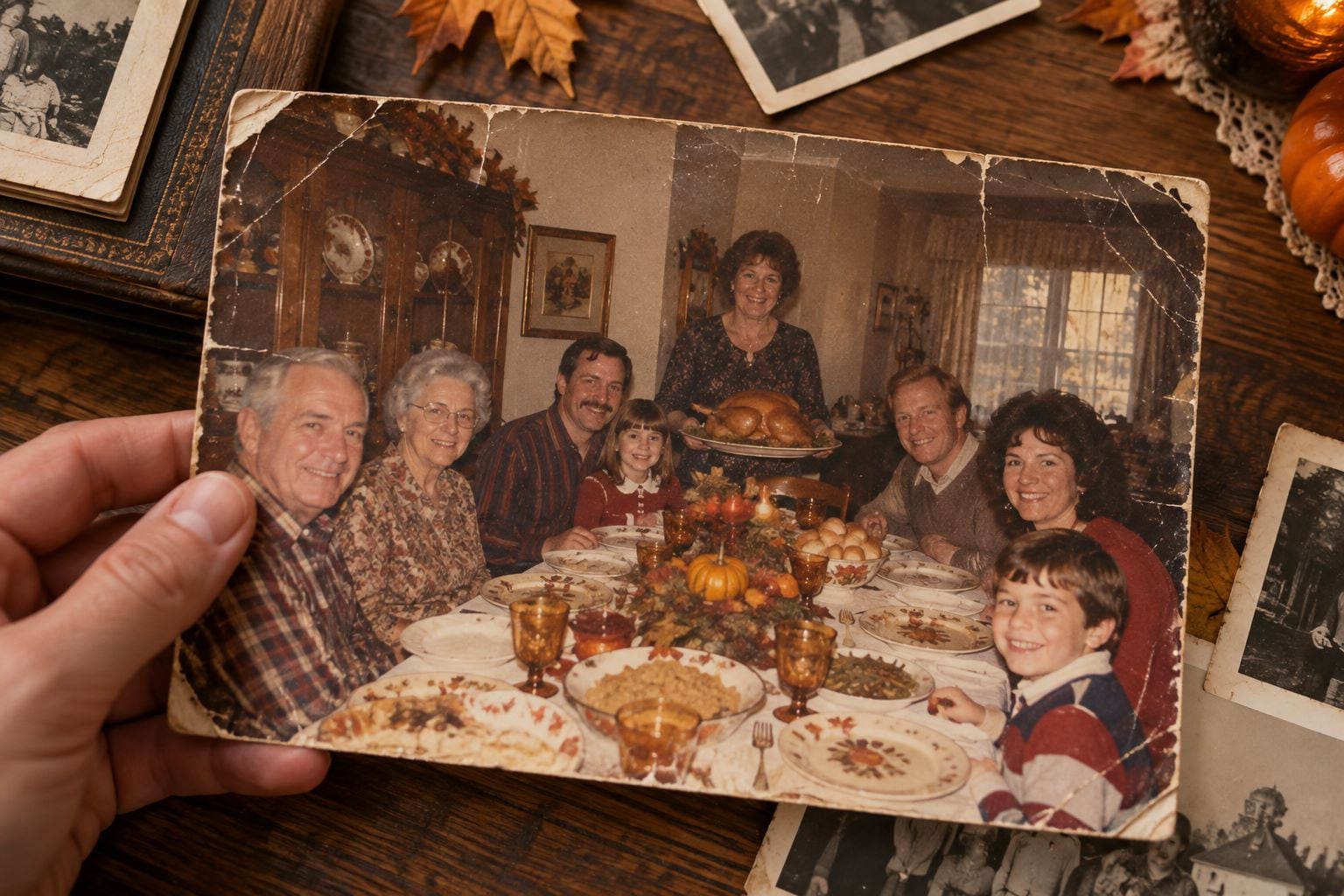
Common Problems With Old Thanksgiving Family Pictures
- Faded colors: Printed dyes can shift, leaving Thanksgiving decorations and clothing with washed-out tones.
- Scratches and stains: Scuffed surfaces, spots, and fold lines may cover faces or portions of the background.
- Blurry faces: Camera movement, shallow focus, or a low-quality copy may leave fine features indistinct.
- Low-resolution digital copies: Photos previously shared through messaging apps may have fewer usable details than the original print.
- Missing corners: Tears and clipped edges can remove important parts of a group picture.
Why Restore Pictures of Family Thanksgiving Gatherings?
A Thanksgiving family photograph may be the only image showing several generations around the same table. Restoration can make a damaged print easier to view and share, while a digital copy can be backed up and passed to other relatives. The goal is not to invent a perfect-looking family portrait: it is to preserve as much recognizable, trustworthy information as possible.
Part 2. How to Prepare Thanksgiving Family Pictures for AI Restoration
Preparation matters because an AI tool works from the pixels you supply. A flat, evenly lit scan usually gives it a better starting point than a quick, angled photo of an album page. These steps help protect your originals while producing a restoration-ready file.
Scan Old Thanksgiving Photos Without Losing Details
- Handle carefully: Hold prints by the edges and avoid using household cleaners on fragile photographic surfaces.
- Scan at a useful resolution: For many family prints, 300 dpi is sufficient for ordinary reproduction; 600 dpi may help with small prints or more detailed work, although it cannot recover detail that the print never contained.
- Keep the print flat: Avoid glare, shadows, cropped faces, and tilted phone captures.
- Save a master copy: Store the untouched scan separately, ideally in a lossless format such as TIFF or PNG, and create another copy for editing.
- Organize files: Add the approximate year, family event, and identified relatives to the filename or notes rather than altering the picture itself.
If you're preparing heritage photos for long-term storage, you canrestore scanned old photos for reprinting and archiving.
Choose the Right Repair Method for Each Family Photo Problem
| What you see | What to try first | What to check afterward |
|---|---|---|
| Faded or uneven colors | Color correction or careful colorization | Skin tones and original clothing colors |
| Scratches, stains, or fold marks | Old photo restoration | Whether important details were removed |
| Blurry faces | Gentle AI restoration or enhancement | Eyes, expressions, and personal identity |
| Small or low-resolution scan | Image upscaling after restoration | Artificial textures and distorted edges |
| Severely missing facial features | Conservative manual review | Whether AI guessed details without evidence |
For broader tips on damaged images, explore how to fix old photos. If preserving the appearance of a loved one matters most, read how to restore an old family photo without changing faces.
Part 3. How to Restore Old Thanksgiving Family Photos With Repairit AI
When your original family print has already been digitized, Wondershare Repairit Old Photo Restoration provides an AI-assisted workflow for treating common age-related damage. Its desktop restoration feature can help improve faded areas, visible blemishes, and overall image clarity. Results vary with the source image; the software cannot verify the original color of a shirt or reconstruct a face with historical certainty.
Key Features of Repairit Old Photo Restoration
- AI old photo restoration: Helps reduce visible age-related imperfections and improve readability of a damaged scan.
- Color restoration and colorization: Can produce a color interpretation of monochrome or faded pictures when appropriate.
- Clarity enhancement: Helps make some soft or low-detail areas easier to view, depending on the input quality.
- Before-and-after review: Allows you to examine the output before exporting, which is particularly important for faces.
Guide to Restore Thanksgiving Family Pictures With Repairit
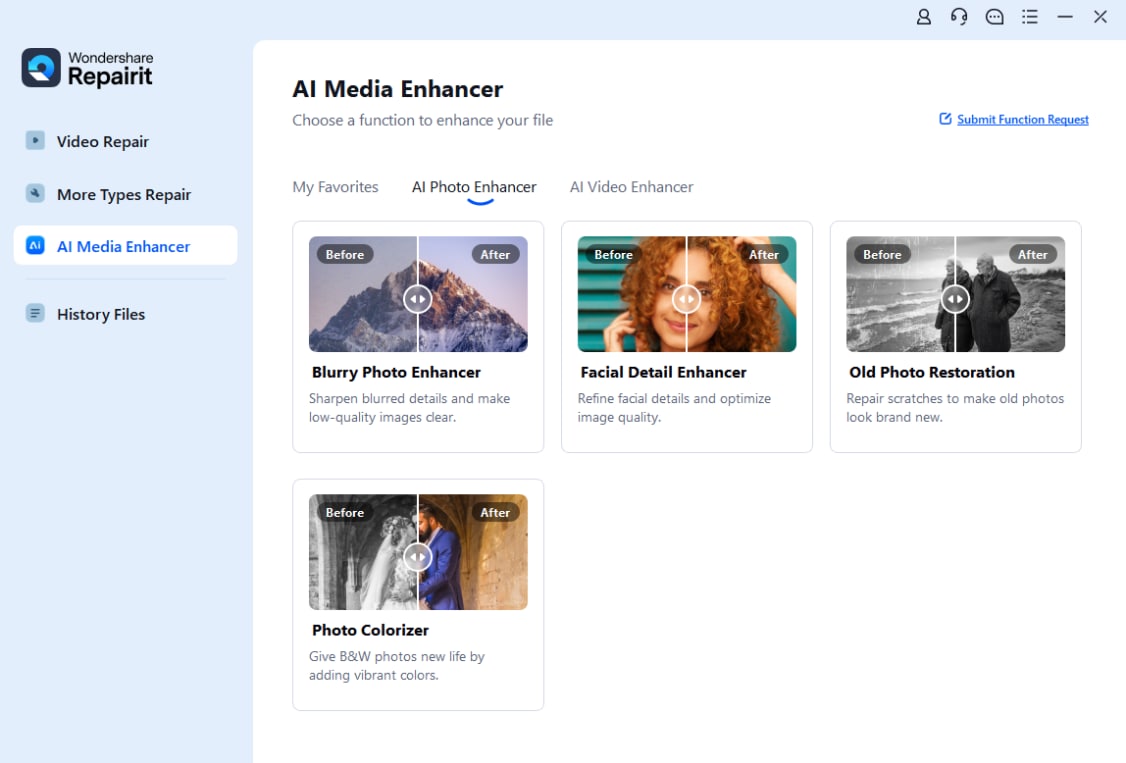
Step 1. Import Your Thanksgiving Family Photo. Launch Repairit on your computer. From AI Media Enhancer, open AI Photo Enhancer and select Old Photo Restoration. Click + Add to load your scanned holiday photograph.
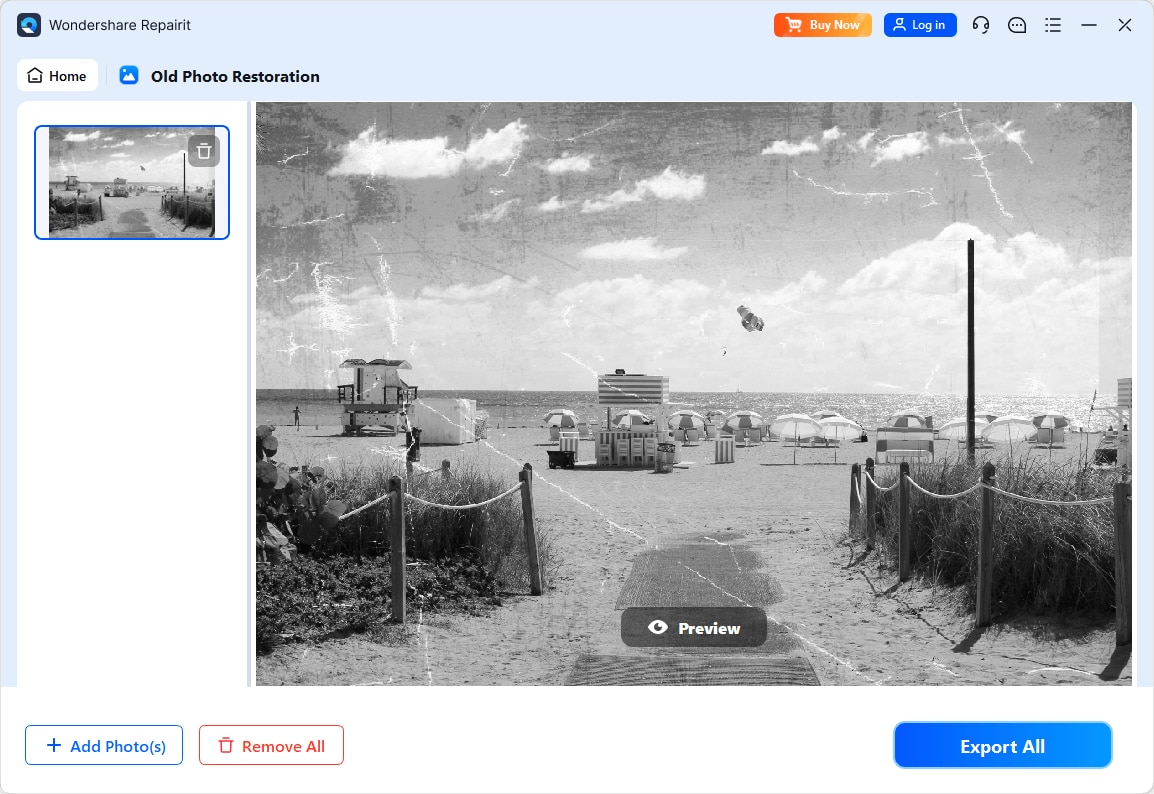
Step 2. Run AI Photo Restoration. After the image appears in the workspace, use the Preview control described in Repairit's current desktop guide to start processing. Review the result rather than assuming each reconstructed detail is historically accurate.
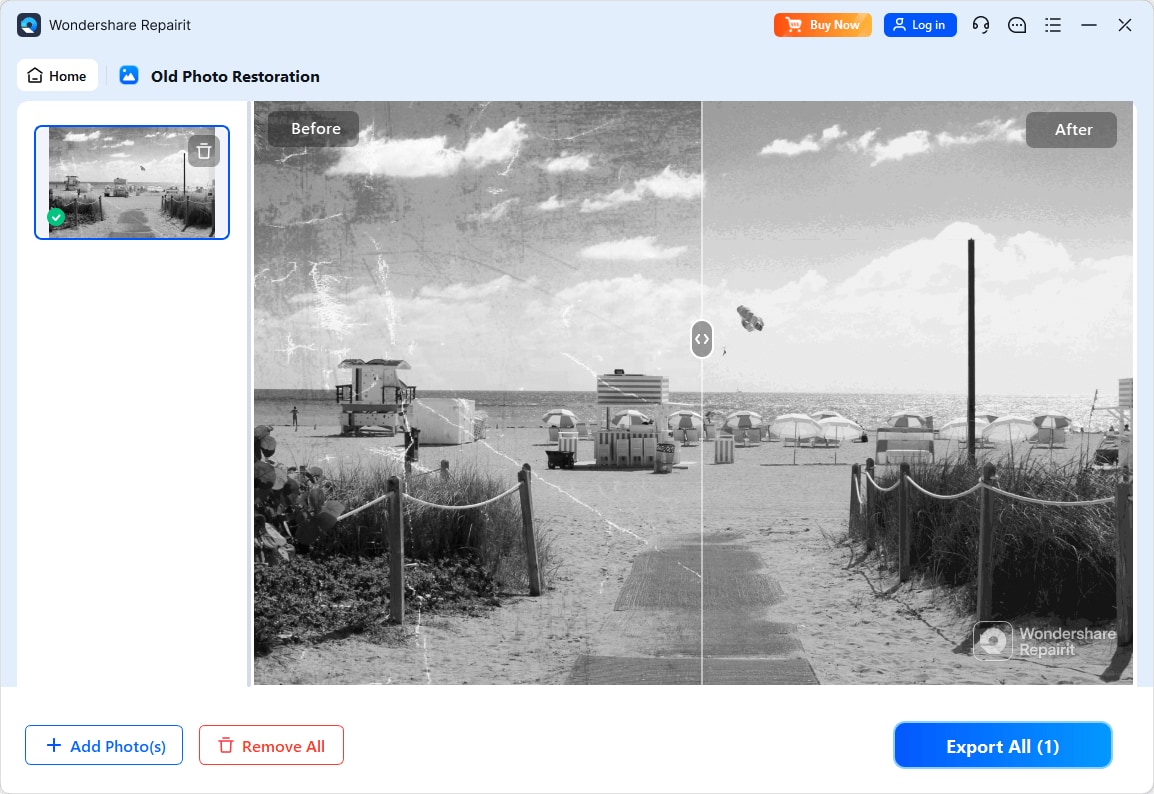
Step 3. Compare Faces and Export Your Picture. Examine the restored output beside the original scan. Check faces, glasses, hands, clothing, and the objects on the Thanksgiving table. If the result looks suitable, click Export All to save a new file while keeping the untouched master.
Preservation tip: AI restoration is an interpretation of the available pixels. If the picture will be part of a family archive, keep both the original scan and the restored copy, and identify which version has been edited.
Part 4. Creative Ways to Reuse Restored Thanksgiving Family Pictures
Once an older Thanksgiving image is easier to see, you can do more than leave it in a digital folder. Choose a format that fits your family's tradition, and keep the restored photograph recognizable rather than adding unnecessary effects to a precious historical record.
Make Holiday Cards From Restored Thanksgiving Family Photos
Add a short family message, the year of the original photo, and a warm seasonal frame. The restored picture can become a printed card for grandparents or a digital greeting for relatives who live far away. Leave plenty of margin so faces are not cropped by print services.
Create a Thanksgiving Family Photo Slideshow or Video
Arrange several Thanksgiving family pictures chronologically to show how the dinner table, traditions, and family members changed over time. If you want a short creative animation, you can also turn family photos into videos using an Image to Video feature. Keep the animated version separate from the archival original, since motion effects are creative interpretations rather than recovered historical footage.

Recreate Classic Thanksgiving Family Photoshoot Ideas
Try photographing the family in the same room, with similar poses or seating arrangements, as a memorable picture from years ago. Display the old and new images side by side at dinner. For fresh Thanksgiving family photoshoot ideas, explore seasonal layouts, decorations, and picture inspiration before gathering everyone for a new family portrait.
Print and Share a Family Thanksgiving Image Collection
A restored photo can fit into a small tabletop frame, a family history booklet, or a shared online album. Add names and dates where known; use “circa” when the year is uncertain. For large prints, inspect the exported file at its intended print size instead of trusting the image's on-screen appearance alone. Even a beautiful restoration may not support unlimited enlargement.
Conclusion: Preserve Your Thanksgiving Family Photos for Generations
Restoring old Thanksgiving family photos is as much about protecting memories as improving picture quality. Start with a careful scan, identify the actual damage, and use AI restoration only where it helps. Repairit Old Photo Restoration offers a practical desktop workflow for treating faded or imperfect family pictures, but your final quality check should always include the people and details you want to preserve. Save your original, keep a clearly labeled restored copy, and share the memories in a format your family will enjoy.
Frequently Asked Questions
-
1. Can AI Restore Old Thanksgiving Family Photos?
AI can help reduce scratches, fading, and some blur in scanned Thanksgiving family photographs. The quality of the original scan affects the result, and generated details should be checked against the source. -
2. How Can I Fix Blurry Faces in Old Thanksgiving Family Pictures?
Start with the highest-quality scan you have, try gentle restoration or face enhancement, and compare every person's appearance with the original. If details are missing, AI may estimate them rather than recover them. -
3. Can I Colorize Black-and-White Thanksgiving Family Photos?
Yes. AI colorization can produce a natural-looking color version, but the exact historical colors may be unknown. Save the original black-and-white photograph as well. -
4. How Do I Restore Old Family Photos Without Changing People's Faces?
Use a clean scan, avoid excessively strong enhancement, and review facial proportions, expressions, and identifying features. If a result changes someone's likeness, keep the original or try a more conservative edit. -
5. What Can I Do With Restored Thanksgiving Family Pictures?
Create greeting cards, printed albums, a family photo wall, or a slideshow. A creative Image to Video effect can make an engaging keepsake, but label animations separately from historical photographs.