
Repairit Old Photo Restoration vs HitPaw Photo Enhancer is a common comparison for anyone trying to bring old family albums, scanned prints, or historical photos back to life. Choosing between these tools usually comes down to how badly your photos are damaged and how much control you want over the restoration process.
Both applications rely on AI, but they are tuned for slightly different goals. Repairit Old Photo Restoration focuses on repairing visible damage such as scratches, cracks, stains, and faded colors. HitPaw Photo Enhancer leans more toward improving clarity through upscaling, denoise, and face enhancement when your photos are aged but not deeply damaged.
This guide walks through restoration strength, ease of use, and practical workflows so you can decide which tool aligns better with your old photos and your editing comfort level.
Restore Old Photos with Repairit
 Security Verified. Over 7,302,189 people have downloaded it.
In this article
- Repairit Old Photo Restoration vs HitPaw Photo Enhancer: Quick Verdict
- Repairit Old Photo Restoration vs HitPaw Photo Enhancer: Key Differences
- Repairit Old Photo Restoration vs HitPaw Photo Enhancer: Comparison Table
- What Repairit Old Photo Restoration and HitPaw Photo Enhancer Are Best For
- Repairit Old Photo Restoration vs HitPaw Photo Enhancer: Repair Capabilities and Damage Handling
- Repairit Old Photo Restoration vs HitPaw Photo Enhancer: Restoration Quality and Real Results
- Repairit Old Photo Restoration vs HitPaw Photo Enhancer: Workflow and Ease of Use
- Repairit Old Photo Restoration vs HitPaw Photo Enhancer: Pricing and Trial Options
- Who Should Choose Repairit Old Photo Restoration
- Who Should Choose HitPaw Photo Enhancer
- Pros and Cons of Repairit Old Photo Restoration and HitPaw Photo Enhancer
- How to Restore Old Photos After Choosing the Right Tool
Repairit Old Photo Restoration vs HitPaw Photo Enhancer: Quick Verdict
If your priority is to repair damaged old photos with visible scratches, cracks, stains, or seriously faded colors, Repairit Old Photo Restoration is generally the stronger choice because its tools and workflow are built around damage repair and restoration.
HitPaw Photo Enhancer can be a good fit when your scans are mostly intact but soft, grainy, or low-resolution. In that scenario its AI upscaling, denoise, and face enhancement may provide enough improvement without a lot of decisions.
In practical terms:
- Choose Repairit if you are fighting physical damage, faded tones, or you want to colorize black and white photos.
- Choose HitPaw if your photos look okay but need sharper details, less noise, and cleaner faces.
Repairit Old Photo Restoration vs HitPaw Photo Enhancer: Key Differences
The key difference between Repairit Old Photo Restoration and HitPaw Photo Enhancer is the depth of restoration they target.
Repairit focuses on old photo repair tasks such as fixing scratches, cracks, stains, and faded or yellowed colors. Its interface and AI options are laid out to guide you through restoring visibly damaged prints and scanned family photos.
HitPaw Photo Enhancer is more of an AI enhancement solution that improves sharpness and clarity on already decent scans. Its models emphasize upscaling, denoise, and face enhancement instead of targeted repair for torn or heavily stained areas.
This distinction matters if you are dealing with:
- Physical damage like tears, scratches, or spots where the paper has worn away.
- Severe fading or discoloration that hides details in faces and backgrounds.
- Relatively clean scans that mainly suffer from softness, noise, or low resolution.
Repairit Old Photo Restoration vs HitPaw Photo Enhancer: Comparison Table
| Aspect | Repairit Old Photo Restoration vs HitPaw Photo Enhancer |
|---|---|
| Best for | Repairit: Users focused on repairing old, damaged, or faded photos with guided AI restoration. HitPaw: Users improving and restoring old photos mainly through AI upscaling, denoise, and face enhancement. |
| Ease of use | Repairit: Very streamlined for restoration tasks, with workflows centered on old photo repair. HitPaw: Simple AI workflow but oriented around enhancement models rather than detailed damage repair. |
| Restoration quality focus | Repairit: Strong for fixing scratches, cracks, stains, and faded colors on typical old photos. HitPaw: Delivers sharp, clean results on relatively intact photos; less precise on heavy physical damage. |
| Workflow | Repairit: Import old photo, choose restoration options, preview, then export the repaired version. HitPaw: Upload photo, choose model, enhance, export, optimized for quick AI enhancement passes. |
| Main strengths | Repairit: Guided restoration for common damage types, including cracks, fading, and black-and-white colorization. HitPaw: AI upscaling, denoise, and face enhancement that can noticeably improve clarity in old portraits. |
| Main weaknesses | Repairit: Not a full manual editor for pixel-level retouching specialists. HitPaw: Less precise for heavy damage such as deep scratches, torn areas, and large stains. |
What Repairit Old Photo Restoration and HitPaw Photo Enhancer Are Best For
The two tools overlap around AI enhancement of scanned old photos, but their sweet spots differ.
According to the overview, Repairit Old Photo Restoration is positioned as an AI photo enhancer with restoration capabilities aimed at users dealing with visible damage: scratches, cracks, stains, and faded tones. Its role is to make old prints look more intact and readable without demanding advanced retouching skills.
HitPaw Photo Enhancer is also AI-based, but it emphasizes upscaling, denoise, and face enhancement. This makes it more suitable when your photos are aged yet not severely damaged, and you want to enhance clarity rather than fix deep physical flaws.
Both tools share several basic capabilities:
- AI enhancement of scanned old photos to improve sharpness and clarity.
- Simple import and export of common image formats such as JPG and PNG.
- Automatic adjustments that significantly reduce manual editing time for non-experts.
On top of that, more advanced features include:
- AI-assisted scratch and crack repair to make old prints appear more intact.
- Faded color restoration and optional colorization for black and white photos.
- Facial detail recovery that improves old portraits without extreme smoothing.
Repairit Old Photo Restoration vs HitPaw Photo Enhancer: Repair Capabilities and Damage Handling
When dealing with real-world damage on old prints, how each tool handles different flaws becomes critical.
Repairit Old Photo Restoration centers its toolset around common physical issues:
- Scratches and fine cracks across the surface of the photo.
- Stains and spots from moisture or aging paper.
- Faded or yellowed colors that hide details.
- Black and white images needing colorization to look more contemporary.
Its AI is tuned to detect and repair these defects so the image feels more complete and less obviously damaged, which is particularly useful if you are archiving family albums or restoring historical documents.
HitPaw Photo Enhancer tends to excel with:
- Old photos that are structurally intact but soft or noisy.
- Faces that need additional clarity or de-noising.
- Scans that benefit from upscaling to larger sizes for printing or sharing.
It can still improve the overall look of damaged photos, but deep scratches, torn edges, or large stains may remain visible because the focus is not on targeted physical repair.
In most cases:
- Choose Repairit when your main problems are cracks, stains, and heavy fading.
- Use HitPaw when you mostly need sharper, cleaner, less noisy versions of already decent scans.
Repairit Old Photo Restoration vs HitPaw Photo Enhancer: Restoration Quality and Real Results
Restoration quality is less about abstract metrics and more about whether faces, backgrounds, and textures look natural after repair.
With Repairit Old Photo Restoration, the emphasis is on making damaged areas blend into the rest of the image. When dealing with typical old prints:
- Scratches and cracks are often reduced so they are less distracting.
- Faded colors are brought closer to their original saturation and contrast.
- Black and white photos can be colorized to give a modern, more lifelike appearance.
- Facial details are enhanced carefully so that expressions remain recognizable.
Because it is damage-focused, you may get more consistent results on photos with visible surface wear or uneven exposure.
HitPaw Photo Enhancer usually shines when the photo does not need heavy reconstruction:
- Upscaling can make small old scans appear cleaner and more detailed.
- Denoise helps reduce grain in low-light or high-ISO film scans.
- Face enhancement models can make portraits pop, especially for social media or digital sharing.
On photos with serious tears or stains, however, HitPaw may still leave some defects in place, as its goal is more to enhance than to rebuild damaged regions.
Repairit Old Photo Restoration vs HitPaw Photo Enhancer: Workflow and Ease of Use
Both tools are aimed at non-professionals, but the workflows feel different.
Repairit Old Photo Restoration generally guides you through a repair-centric process:
- Import your old photo from your computer or device.
- Choose AI options such as scratch repair, color enhancement, or colorization.
- Run the AI and review a preview before saving changes.
- Export the restored version in your preferred format.
This approach is helpful for beginners who want a step-by-step repair experience focused on old, damaged photos rather than generic editing.
HitPaw Photo Enhancer uses a more model-based enhancement flow:
- Upload your scanned photo.
- Select an AI model (for example, general enhancement, denoise, or face enhancement).
- Run the enhancement and inspect the result.
- Export the improved image.
It feels streamlined and quick, especially if you like trying different AI models to see which one gives the best clarity, but it is less centered on specific damage types like cracks or stains.
In everyday use, both are beginner-friendly, but Repairit typically feels more like an old photo restoration assistant, whereas HitPaw behaves more like a general AI enhancer.
Repairit Old Photo Restoration vs HitPaw Photo Enhancer: Pricing and Trial Options
Pricing for AI restoration tools can vary by platform, plan length, and promotions, so exact numbers change over time. Instead of focusing on specific prices, it is more useful to consider value versus how often you restore photos.
Typically, both Repairit Old Photo Restoration and HitPaw Photo Enhancer provide:
- Some form of free trial or limited mode to test quality before paying.
- Paid plans that unlock full-resolution exports and more frequent usage.
From a decision standpoint:
- If you occasionally restore a few family photos each year, it may make sense to compare which tool gives you better results on heavily damaged images in its trial, then pay for short-term access.
- If you regularly enhance large batches of scans, also consider how each tool handles batch work, export limits, and long-term cost.
Who Should Choose Repairit Old Photo Restoration
Repairit Old Photo Restoration is a better fit if you are primarily dealing with old photos that show visible physical or color damage. You might lean toward Repairit if:
- You have scratched, cracked, or stained prints that need careful AI repair.
- Your albums include faded, yellowed, or low-contrast photos that no longer show details clearly.
- You want to colorize black and white family photos without learning advanced editing software.
- You prefer a guided, step-by-step workflow focused specifically on damaged photos instead of generic enhancement sliders.
For users who care about preserving family history or archiving historical images, this focus on damage handling and color restoration can make the process less intimidating and more predictable.
Who Should Choose HitPaw Photo Enhancer
HitPaw Photo Enhancer remains a reasonable choice when your priority is improving clarity rather than repairing severe damage. It may be the better fit if:
- Your old photos are mostly intact but look soft, noisy, or low-resolution.
- You want strong AI upscaling to enlarge old scans while keeping them sharp.
- You work a lot with portraits and group shots and need denoise and face enhancement more than damage repair.
- You like a fast pattern of upload, choose model, enhance, and export with minimal extra steps.
- You already have another editor for manual retouching and just want an extra AI pass to clean or sharpen images.
For creators who routinely share images online or integrate them into other creative projects, HitPaw can slot into an existing workflow as the AI enhancement stage, while more complex repairs might still call for a restoration-focused tool like Repairit.
Pros and Cons of Repairit Old Photo Restoration and HitPaw Photo Enhancer
Repairit Old Photo Restoration Pros and Cons
HitPaw Photo Enhancer Pros and Cons
How to Restore Old Photos After Choosing the Right Tool
After comparing Repairit Old Photo Restoration vs HitPaw Photo Enhancer, the next step is actually restoring your old photos. Once you know whether you need deep damage repair or mainly clarity enhancement, you can move from evaluation to action on your most important images.
If you decide that a guided, damage-focused workflow matches your needs, Repairit Old Photo Restoration offers a practical path from scanned print to repaired result without demanding advanced editing experience.
Key Features
Key capabilities in Repairit Old Photo Restoration that matter for old photo work include:
- AI tools to repair scratches, cracks, and stains that distract from faces and backgrounds.
- Faded color restoration to recover contrast and saturation in washed-out prints.
- Support for colorizing black and white photos and improving subtle facial details.
- Compatibility with everyday formats such as JPG and PNG from scanners or cameras.
- A browser and desktop-friendly experience in typical setups, so you can work on most modern devices.
Both Repairit and HitPaw work with common image formats and scanned sources, so you can import existing digital albums or fresh scans without special preparation.
Step-by-step guide
Step 1. Choose the AI restoration model based on your needs, such as repairing damaged photos or restoring old images.

Step 2. Import your old or damaged photos into Repairit to begin the restoration process.

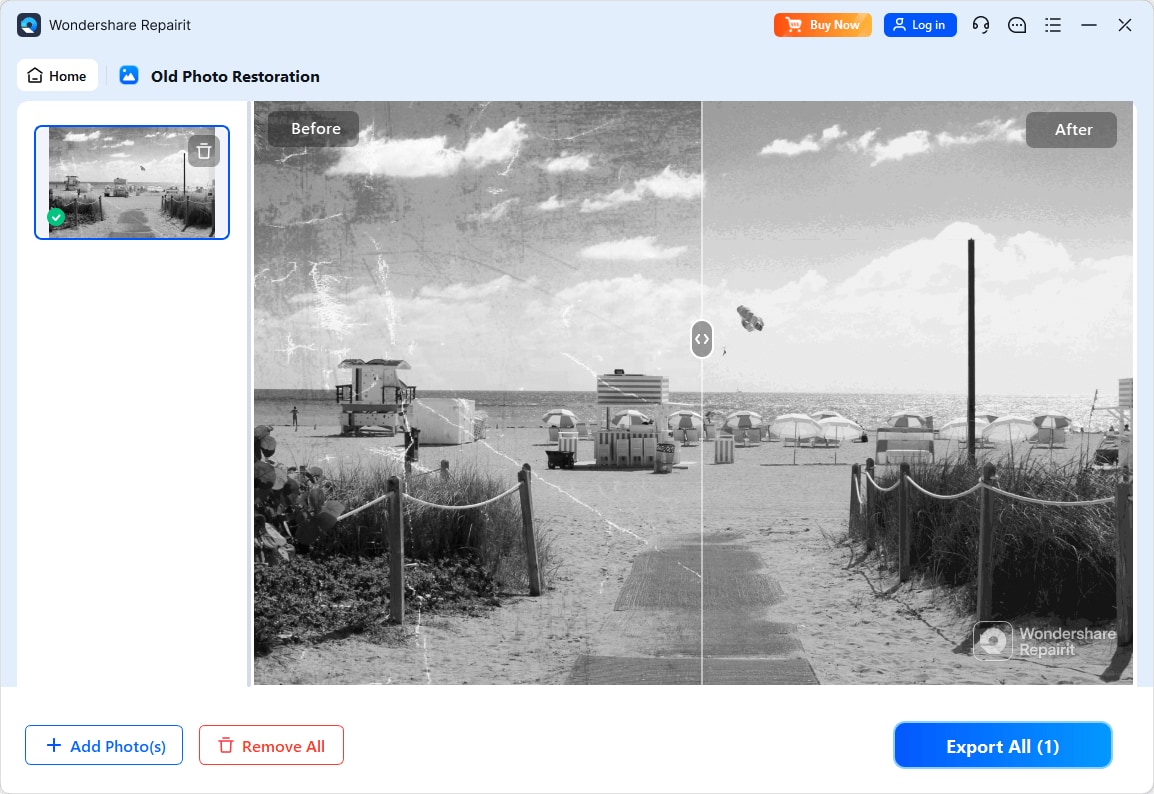
Step 3. Apply the old photo restoration model to fix scratches, restore colors, and improve image quality.
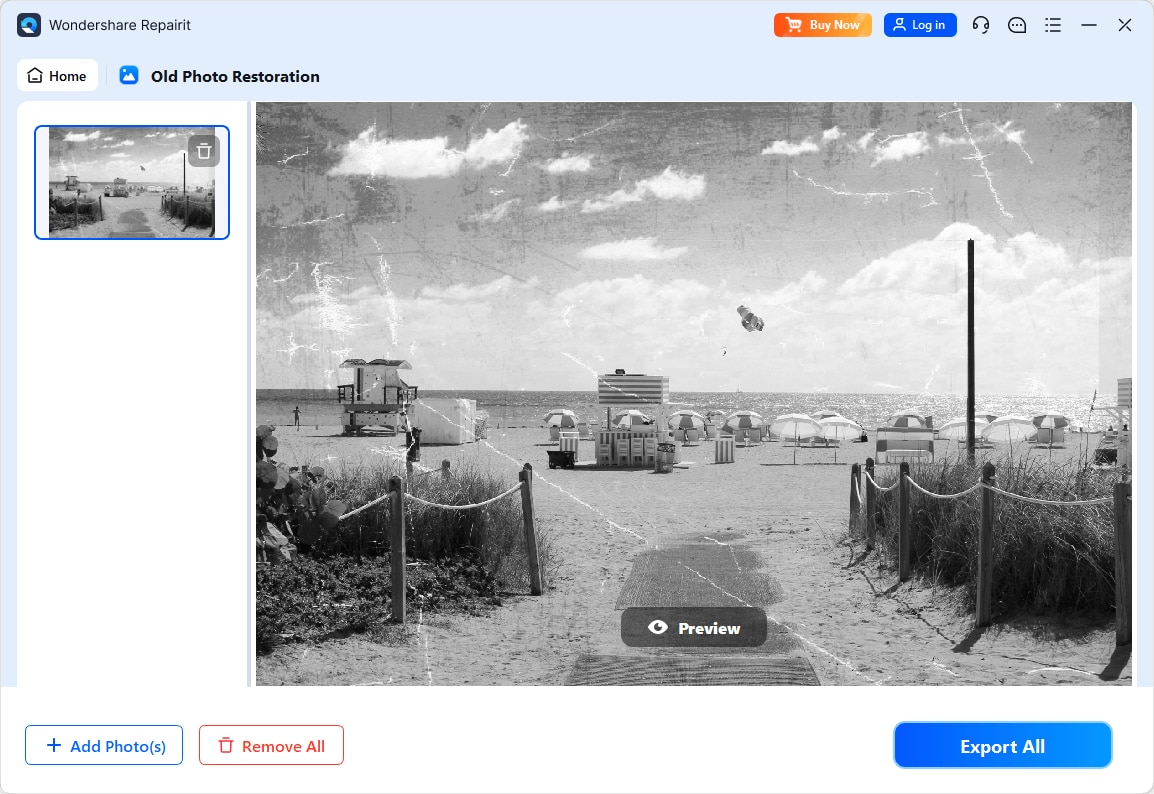
Step 4. Preview the restored result and save the repaired photo to your device.
Final Verdict
Both Repairit Old Photo Restoration and HitPaw Photo Enhancer can help you improve old photos, but they are optimized for different situations.
For most users who need to repair clearly damaged photos with scratches, cracks, stains, and notable fading, Repairit tends to be the more suitable option. Its guided workflow and damage-centric tools are built for restoring old albums, scanned prints, and historical photos without deep editing expertise.
HitPaw Photo Enhancer remains a useful choice when your images are mostly intact and you primarily need AI upscaling, denoise, and face enhancement. In that case, its quick upload, choose model, enhance, and export pattern may be enough, particularly if severe physical damage is not your main concern.
In practice, many users may combine approaches: rely on Repairit for heavy restoration work, and use HitPaw or other tools later for extra sharpening or creative adjustments. Your best choice depends on whether you are mainly fighting damage or just seeking better clarity.
Next: Repairit Old Photo Restoration vs Adobe Photoshop
FAQ
-
1. Is Repairit Old Photo Restoration better than HitPaw Photo Enhancer for scratched photos?
In most cases, Repairit Old Photo Restoration is stronger for visibly scratched or cracked photos because its AI tools are centered on repairing common damage, not just enhancing sharpness. HitPaw can still improve overall clarity, but deep surface flaws may remain more noticeable. -
2. Which is easier for beginners, Repairit Old Photo Restoration or HitPaw Photo Enhancer?
Both tools are approachable for beginners, but Repairit Old Photo Restoration usually feels more guided for old photo repair, with options labeled around scratches, fading, and colorization. HitPaw Photo Enhancer feels more like a quick AI enhancement tool where you pick a model and run it. -
3. Can HitPaw Photo Enhancer restore very damaged, torn old photos as well as Repairit?
HitPaw Photo Enhancer can improve clarity, reduce noise, and enhance faces, but it is generally less precise on heavily damaged or torn areas than a restoration-focused workflow like Repairit Old Photo Restoration. For tears, large stains, or strong cracks, Repairit is usually a better starting point.




