
Choosing between Repairit Old Photo Restoration vs Nero AI Photo Restoration largely depends on how much guidance you want while repairing damaged photos and how automated you prefer the process to be. Both tools can help you restore old photos, fix scratches and cracks, and improve faded prints, but they differ in workflow, control, and how focused they are on old photo specific issues.
The comparison below looks at real decision points: how each tool handles scratches, stains, and fading, how accurately they improve damaged facial details, and whether their interfaces feel comfortable for beginners working through family albums or historical archives. By understanding these differences, you can choose the option that fits your restoration style instead of spending time in a tool that does not match your needs.
Restore Old Photos with Repairit
 Security Verified. Over 7,302,189 people have downloaded it.
In this article
- Repairit Old Photo Restoration vs Nero AI Photo Restoration: Quick Verdict
- Repairit Old Photo Restoration vs Nero AI Photo Restoration: Key Differences
- Repairit Old Photo Restoration vs Nero AI Photo Restoration: Comparison Table
- What Repairit Old Photo Restoration and Nero AI Photo Restoration Are Best For
- Repairit Old Photo Restoration vs Nero AI Photo Restoration: Repair Capabilities and Damage Handling
- Repairit Old Photo Restoration vs Nero AI Photo Restoration: Restoration Quality and Real Results
- Repairit Old Photo Restoration vs Nero AI Photo Restoration: Workflow and Ease of Use
- Repairit Old Photo Restoration vs Nero AI Photo Restoration: Pricing and Trial Options
- Who Should Choose Repairit Old Photo Restoration
- Who Should Choose Nero AI Photo Restoration
- Pros and Cons of Repairit Old Photo Restoration and Nero AI Photo Restoration
- How to Restore Old Photos After Choosing the Right Tool
Repairit Old Photo Restoration vs Nero AI Photo Restoration: Quick Verdict
In a direct comparison of Repairit Old Photo Restoration vs Nero AI Photo Restoration, the key distinction is guidance versus automation. Repairit Old Photo Restoration emphasizes a guided, step based workflow tailored to typical old photo problems, while Nero AI Photo Restoration leans on a streamlined, highly automated AI pass.
For users restoring family archives with many scratched, faded, or stained photos, Repairit is usually a stronger choice because it offers clearer previews and controls tuned around old photo repair. Nero AI Photo Restoration can still be a reasonable option if you prefer a quick, automatic cleanup and already work inside the Nero ecosystem, especially for lighter damage or casual projects where you are comfortable letting AI decide most adjustments.
Repairit Old Photo Restoration vs Nero AI Photo Restoration: Key Differences
The main differences between these two AI tools come down to how they balance control, automation, and focus on old photo issues:
- Guided experience vs one pass automation: Repairit walks you through upload, AI repair, preview, and export with options aimed at old photo repair. Nero AI Photo Restoration typically runs most fixes in a single automated pass.
- Old photo specialization: Repairit focuses on repairing scratches, cracks, stains, fading, and facial detail in aged prints. Nero approaches restoration as part of a broader multimedia suite, which may feel less specialized for deep archival work.
- Fine tuning and previews: Repairit highlights before and after previews so you can judge how strong the restoration should be. Nero allows quick previews as well, but you generally have fewer ways to refine the result if the AI misreads textures or heavy damage.
- Learning curve: Both are accessible for non experts. Repairit tends to feel more beginner friendly for old photo projects, while Nero may appeal more to users already familiar with its environment who want fast, automatic fixes.
Repairit Old Photo Restoration vs Nero AI Photo Restoration: Comparison Table
| Dimension | Repairit Old Photo Restoration | Nero AI Photo Restoration |
|---|---|---|
| Best for | Users wanting guided old photo repair with AI help and simple controls | Users wanting automated restoration that runs most fixes in one AI pass |
| Ease of use | Very beginner friendly with a focused old photo repair flow | Easy once set up, but offers less guidance during restoration |
| Restoration quality | Consistent quality on scratches, fading, and facial detail in most cases | Good automated cleanups, but limited fine tuning for difficult damage |
| Workflow | Step based old photo restoration workflow from upload to export | Straightforward AI flow: import photo, apply AI restore, preview, export |
| Strengths | Balanced AI restoration, clear preview, options tailored to old photos | Fast AI restoration, colorization, and an efficient automatic workflow |
| Weaknesses | May feel limited to users wanting deep manual retouching controls | Less manual control when AI misinterprets details or heavy damage |
What Repairit Old Photo Restoration and Nero AI Photo Restoration Are Best For
Both tools aim to repair damaged photos and revive aged prints, but they shine in different situations.
Repairit Old Photo Restoration tends to be well suited for users who:
- Need a focused environment built around old photo scratch repair, crack removal, and stain cleanup.
- Want clearer previews before deciding whether to keep a restoration.
- Are handling family albums, portraits, and scanned prints where facial detail and subtle tones matter.
Nero AI Photo Restoration is better aligned with users who:
- Prefer fast, automatic restoration where AI handles most decisions.
- Already use Nero software and want AI based old photo repair inside the same ecosystem.
- Have relatively lightly damaged photos that mainly need scratch cleanup, noise reduction, or basic colorize black and white photos functions.
Repairit Old Photo Restoration vs Nero AI Photo Restoration: Repair Capabilities and Damage Handling
From an old photo perspective, the most important question is how each tool handles different kinds of damage.
Repairit Old Photo Restoration is designed to address common aging issues such as surface scratches, small cracks, and light stains. Its AI models aim to reconstruct missing details while preserving the character of old prints, which is helpful when you want to repair photos without making them look overly processed. In many cases, it offers:
- AI assisted fixes for fine scratches running across faces or backgrounds.
- Reduction of creases and minor tears once the photo has been scanned.
- Improvements to faded areas, including washed out edges or uneven exposure.
- Enhancement of facial features that have softened over time.
Nero AI Photo Restoration also targets typical age related defects, but its emphasis is on a single automated pass. This can work well for:
- Moderately scratched photos where you want a quick cleanup.
- Removing smaller specks, dust, or light surface marks.
- Combining repair with automatic colorization when you have black and white images.
When damage is heavier, such as deep cracks through faces or pronounced stains, Repairits more guided approach and old photo oriented focus generally give you a better chance of reaching a balanced result. Nero AI Photo Restoration may still help, but with less manual refinement if the AI does not guess the missing detail accurately.
Repairit Old Photo Restoration vs Nero AI Photo Restoration: Restoration Quality and Real Results
Neither tool can fully recreate information that no longer exists in the print, but they can make old photos more usable and shareable.
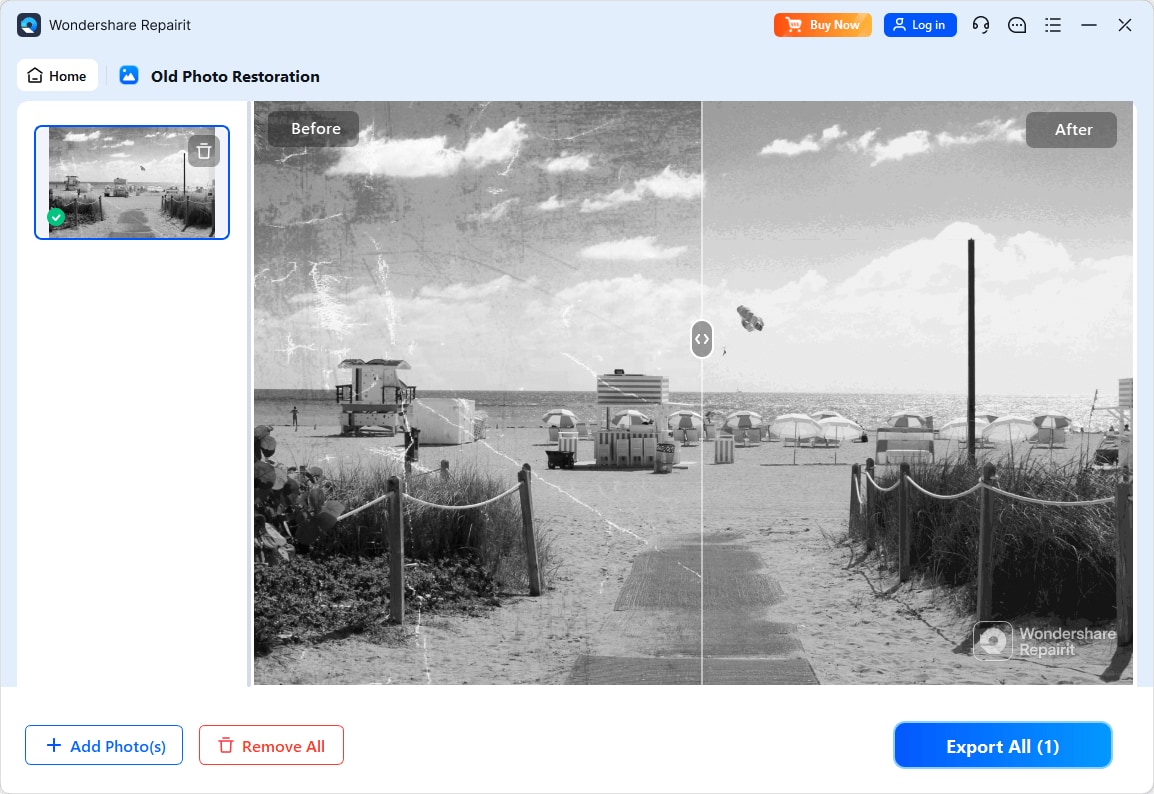
With Repairit Old Photo Restoration, the quality tends to be consistent for typical family photos: scratches and small cracks are reduced, faded colors regain some depth, and facial details become clearer without noticeably changing the people in the image in most cases. Because you can review before and after previews, it is easier to stop when the photo still looks natural.
Nero AI Photo Restoration often delivers good results for lighter damage and general cleanup. Its automated approach means it can quickly improve a batch of scanned photos, though on difficult images you might see:
- Over smoothed textures where film grain or paper detail is removed along with flaws.
- Colorization results that look slightly more generic or stylized, especially when there is little information to guide skin tones or clothing colors.
For historically important images or irreplaceable portraits where you want more predictable control, many users will find Repairit preferable. For casual cleanups or when speed dominates, Nero AI Photo Restoration can still be good enough.
Repairit Old Photo Restoration vs Nero AI Photo Restoration: Workflow and Ease of Use
Workflow is a major difference between these tools, especially if you are restoring an entire album.
Repairit Old Photo Restoration relies on a step based process: you upload, select the type of restoration, let the AI run, then compare the original and repaired images. This guided path is particularly friendly for beginners because it focuses attention on one decision at a time and keeps the interface centered on old photo repair tasks.
Nero AI Photo Restoration generally follows a simple import, AI restore, preview, and export sequence. Once configured, you can run this quickly, which is appealing if you prefer automation. However, it provides less context around old photo specific issues like heavy fading, paper texture, or partial tears, so you may feel more like you are pressing a single button than following a dedicated restoration workflow.
Both tools remain accessible to non experts, but if you value explanations, previews, and the ability to tweak your approach when a result looks off, Repairit is likely to feel more comfortable over long restoration sessions.
Repairit Old Photo Restoration vs Nero AI Photo Restoration: Pricing and Trial Options
Both products are typically offered on paid plans, sometimes with free trials or limited free versions. The exact pricing for Repairit Old Photo Restoration vs Nero AI Photo Restoration can vary by region, edition, and promotion, so it is best to check each vendor directly for current offers.
In general:
- Repairit Old Photo Restoration often presents straightforward access to its old photo tools, which is helpful if your primary goal is restoring scanned prints rather than editing videos or other media.
- Nero AI Photo Restoration may appear as one part of a broader Nero suite. This could be attractive if you also need other multimedia tools, but less ideal if you only want a focused old photo solution.
If cost is a concern, trying whichever free or trial options are available can help you see how each tool handles your specific scans before committing to a plan.
Who Should Choose Repairit Old Photo Restoration
Repairit is generally a better match if your main focus is carefully restoring older prints, portraits, and family archives. Based on the scenarios described, you will likely appreciate Repairit Old Photo Restoration if you are:
- Restoring many scratched, faded, or stained photos where consistent AI handling matters.
- Repairing portraits where facial details are important and you want to avoid over smoothing.
- A beginner or occasional restorer who prefers a focused interface instead of a full multimedia suite.
- Someone who values preview driven decisions and wants to see exactly how much scratch removal or color recovery is being applied.
For users who primarily care about old photo scratch repair, handling cracks around faces, and controlled colorize black and white photos workflows, Repairit tends to offer a more reassuring, guided experience.
Who Should Choose Nero AI Photo Restoration
Nero AI Photo Restoration can still be the right choice for certain users and projects. It is worth considering if you:
- Prefer highly automated AI passes where you spend minimal time adjusting settings.
- Already use Nero products and want to keep everything in the same ecosystem.
- Mostly handle lightly damaged or casual photos that need quick scratch removal and basic colorization rather than deep restoration.
- Are comfortable rerunning AI or switching tools when a difficult image does not restore as expected.
In these situations, Nero AI Photo Restoration may be sufficient, especially if you value speed and integration more than fine grained control over old photo specific problems.
Pros and Cons of Repairit Old Photo Restoration and Nero AI Photo Restoration
Repairit Old Photo Restoration Pros and Cons
Nero AI Photo Restoration Pros and Cons
How to Restore Old Photos After Choosing the Right Tool
Once you understand how Repairit Old Photo Restoration vs Nero AI Photo Restoration compare, the next step is actually restoring your old photos. At this stage, many users prefer a practical, guided option that walks them through repairing scratches, cracks, fading, and facial details without demanding advanced retouching skills.
Repairit Old Photo Restoration offers a straightforward way to turn scanned prints and digital copies into cleaner, more vibrant images while keeping the original character intact.
Key Features
When you are ready to restore old prints or scanned photos, these capabilities are particularly useful:
- AI focused tools for scratch, crack, and stain removal on old photos.
- Enhancement of faded colors and improvements to facial details.
- Simple preview driven workflow for adjusting restoration strength.
- Support for common image formats like JPG, PNG, and TIFF for scanned prints.
- Options to colorize black and white photos so vintage portraits look more lifelike.
Step-by-step guide
Step 1. Choose the AI restoration model based on your needs, such as repairing damaged photos or restoring old images.

Step 2. Import your old or damaged photos into Repairit to begin the restoration process.

Step 3. Apply the old photo restoration model to fix scratches, restore colors, and improve image quality.
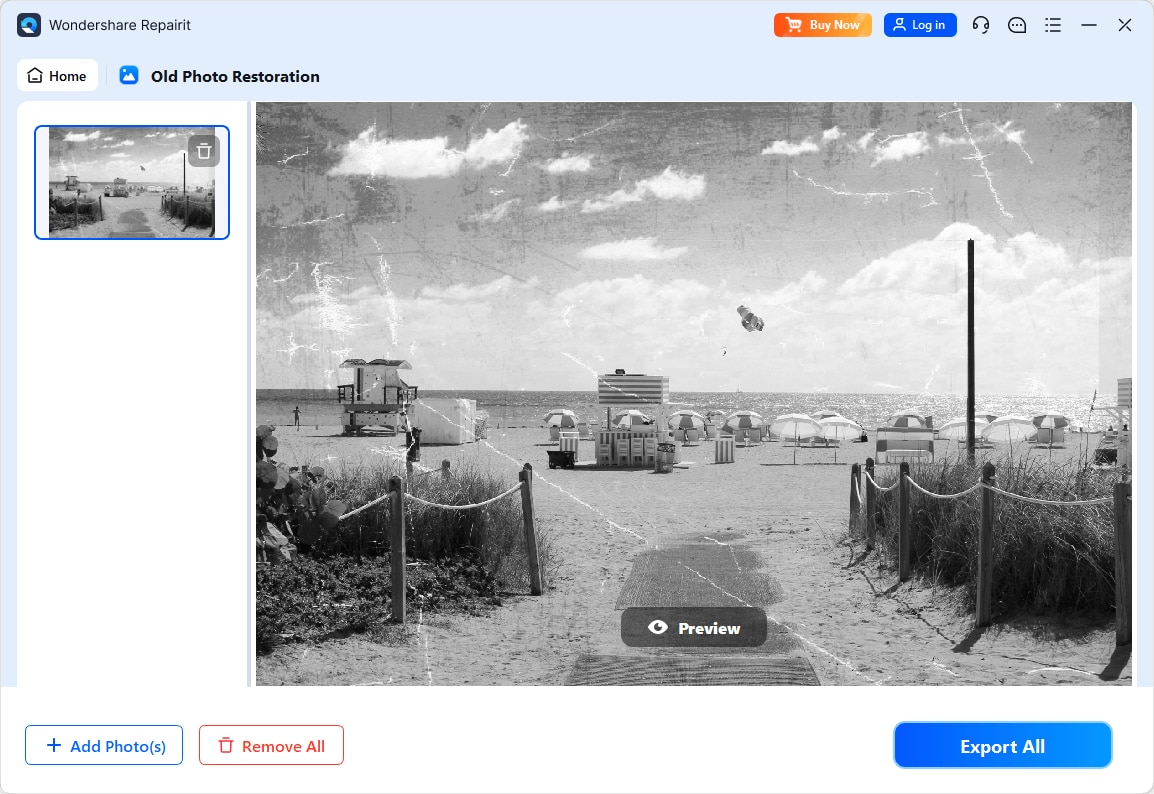
Step 4. Preview the restored result and save the repaired photo to your device.
Final Verdict
Comparing Repairit Old Photo Restoration vs Nero AI Photo Restoration comes down to how hands on you want to be and how specialized you need your tool to feel.
For most people working through family albums, portraits, or historically meaningful prints, Repairit Old Photo Restoration is usually the stronger option. Its AI is tuned around scratches, cracks, stains, fading, and facial detail, and its guided workflow with clear previews makes it easier to reach natural looking results without expert knowledge.
Nero AI Photo Restoration still has a place, especially if you are already using Nero software and want quick, automatic cleanups or simple colorization for lightly damaged photos. Its one pass style can be efficient, provided you are comfortable with less manual control.
Ultimately, if you want a focused, old photo centric workflow with previews and practical controls, Repairit is likely to be a better fit. If you prioritize speed inside an existing Nero environment and mostly deal with moderate damage, Nero AI Photo Restoration may be enough.
Next: Repairit Old Photo Restoration vs Softorbits Photo Retoucher
FAQ
-
1. Which is better for fixing deep scratches, Repairit Old Photo Restoration or Nero AI Photo Restoration?
Repairit Old Photo Restoration is generally more focused on handling typical old photo damage, including scratches and cracks, and often provides more reassuring previews when you are dealing with deeper marks. Nero AI Photo Restoration can still help with lighter defects, but it offers fewer ways to refine the result if the damage is severe. -
2. Is Nero AI Photo Restoration good for colorizing black and white photos compared to Repairit?
Both tools can colorize black and white photos. Repairit tends to emphasize natural looking tones for family and portrait photos, while Nero AI Photo Restoration focuses on running colorization automatically, which can be convenient for casual use but may be harder to fine tune if you want very specific colors. -
3. Which tool is easier for beginners restoring old family photos?
Most beginners find Repairit Old Photo Restoration easier because it uses a step by step workflow with clear before and after previews tailored to old photo repair. Nero AI Photo Restoration is also simple in terms of clicks, but it provides less guidance about what is happening during restoration.




