
Choosing between Repairit Old Photo Restoration and SoftOrbits Photo Retoucher comes down to how much automation versus control you want. Both help repair old, faded, or scratched photos, but they approach the job differently. Repairit Old Photo Restoration focuses on guided, AI-assisted restoration, while SoftOrbits Photo Retoucher leans on automatic touch-ups and quick object removal. This comparison walks through real differences in damage repair, quality, workflow, and who each tool is best for.
In this guide, you will see how each tool handles scratched prints, cracked portraits, faded family albums, and even black and white photos that need gentle restoration. The goal is to help you decide which workflow fits your skills and the condition of your photos.
Restore Old Photos with Repairit
 Security Verified. Over 7,302,189 people have downloaded it.
In this article
- Repairit Old Photo Restoration vs SoftOrbits Photo Retoucher: Quick Verdict
- Repairit Old Photo Restoration vs SoftOrbits Photo Retoucher: Key Differences
- Repairit Old Photo Restoration vs SoftOrbits Photo Retoucher: Comparison Table
- What Repairit Old Photo Restoration and SoftOrbits Photo Retoucher Are Best For
- Repairit Old Photo Restoration vs SoftOrbits Photo Retoucher: Repair Capabilities and Damage Handling
- Repairit Old Photo Restoration vs SoftOrbits Photo Retoucher: Restoration Quality and Real Results
- Repairit Old Photo Restoration vs SoftOrbits Photo Retoucher: Workflow and Ease of Use
- Repairit Old Photo Restoration vs SoftOrbits Photo Retoucher: Pricing and Trial Options
- Who Should Choose Repairit Old Photo Restoration
- Who Should Choose SoftOrbits Photo Retoucher
- Pros and Cons of Repairit Old Photo Restoration and SoftOrbits Photo Retoucher
- How to Restore Old Photos After Choosing the Right Tool
Repairit Old Photo Restoration vs SoftOrbits Photo Retoucher: Quick Verdict
For most users repairing clearly damaged, scratched, or heavily faded photos, Repairit Old Photo Restoration is usually the stronger choice because it focuses on AI-driven restoration for old prints and portraits.
SoftOrbits Photo Retoucher can still be a good fit if your images only need quick, automatic cleanup and basic object removal rather than deep restoration.
In summary:
- Repairit Old Photo Restoration is better suited for heavily scratched, cracked, or faded photos, especially portraits where facial detail matters.
- SoftOrbits Photo Retoucher fits users who want fast automatic corrections and simple removal of unwanted objects on lightly damaged photos.
- Both are approachable for beginners, but they differ in how much control and old-photo-specific guidance you get.
Repairit Old Photo Restoration vs SoftOrbits Photo Retoucher: Key Differences
Although both tools help repair damaged old photos, they are optimized for different priorities. Understanding these differences makes it easier to match the software to your photo collection.
- Focus of the tool: Repairit centers on old photo restoration and AI assistance for scratches, cracks, and faded colors. SoftOrbits focuses more on general auto clean-up and quick object or defect removal.
- Damage severity: Repairit is typically more suitable for heavily damaged photos with visible cracks, stains, or facial degradation. SoftOrbits is usually more comfortable with lighter damage such as small spots or minor distractions.
- Control vs automation: Repairit offers a guided, step-based workflow aimed at restoration decisions. SoftOrbits leans toward auto modes with fewer in-depth controls for complex historical photos.
- Portrait and facial detail: Repairit highlights AI models for improving damaged facial details in old photos, which matters for family portraits. SoftOrbits may help with light smoothing but is less focused on targeted facial reconstruction.
- Color and fading: Repairit includes tools aimed at restoring faded colors and enhancing clarity in yellowed or aged prints. SoftOrbits can help with basic improvement but is less specialized for serious color fading.
Repairit Old Photo Restoration vs SoftOrbits Photo Retoucher: Comparison Table
| Dimension | Repairit Old Photo Restoration | SoftOrbits Photo Retoucher |
|---|---|---|
| Best for | People focused on restoring heavily damaged or very old photos with guided, AI-assisted tools | Users wanting quick automated fixes and simple object removal on lightly damaged photos |
| Ease of use | Beginner friendly with a clear, guided restoration flow | Very simple auto mode: add photo, auto repair, adjust, export |
| Restoration quality focus | Strong on repairing scratches, cracks, and facial details in old photos | Good for basic cleanup, but less precise control on complex damage |
| Workflow style | Step based: import, choose restoration type, preview, then export | Streamlined: add photo → auto repair → adjust → export |
| Key strengths | AI guided repair, helpful presets for old photo damage, simple preview and export | Easy to use, automatic repair tools, convenient object and defect removal |
| Potential weaknesses | May feel less flexible for users who want detailed manual retouching on every area | Less precise control for advanced users who need fine, targeted restoration |
What Repairit Old Photo Restoration and SoftOrbits Photo Retoucher Are Best For
Both applications aim to repair damaged old photos, but they shine in different scenarios.
Repairit Old Photo Restoration is best for:
- Scanned family albums with scratches, cracks, and stains across the entire print.
- Very old portraits where facial details have become blurry or faded.
- Photos with significant yellowing or fading of colors that need careful enhancement.
- Users who want an AI-guided workflow rather than manual pixel-level retouching.
SoftOrbits Photo Retoucher is best for:
- Relatively intact photos that only need quick automated fixes.
- Images where the main task is object removal or cleaning up small defects.
- Beginners who prefer a very simple add-photo-and-auto-fix approach.
- Situations where you are satisfied with general cleanup rather than in-depth restoration.
In other words, choose Repairit when the damage is obvious and you want a restoration-focused experience. Choose SoftOrbits when your main concern is speed and convenience on lightly damaged images.
Repairit Old Photo Restoration vs SoftOrbits Photo Retoucher: Repair Capabilities and Damage Handling
The way each tool handles scratches, cracks, stains, and faded areas is often the deciding factor.
Repairit Old Photo Restoration emphasizes AI models for:
- Repairing scratches and cracks that run across faces, clothing, and backgrounds.
- Reducing the visual impact of small tears and worn edges in scanned prints.
- Addressing faded colors and low contrast in aged, yellowed photos.
- Improving facial details so eyes, mouths, and skin textures appear clearer.
These capabilities make it practical for restoring photos that have been handled a lot, stored poorly, or damaged by time.
SoftOrbits Photo Retoucher is described as an automatic photo restoration and object removal tool. In practice, this tends to mean:
- Automatic cleanup of small spots and defects.
- Convenient object removal when you want to hide distractions in otherwise intact photos.
- Automatic selection tools that can help with simple damage, though with less precise, area-by-area control for complex issues.
For photos with only light specks, dust, or a few marks, SoftOrbits may be enough. For collections with significant physical damage or large faded areas, Repairit is generally more aligned with those needs.
Repairit Old Photo Restoration vs SoftOrbits Photo Retoucher: Restoration Quality and Real Results
Restoration quality is less about flashy effects and more about whether the final image looks natural, legible, and emotionally satisfying.
With Repairit Old Photo Restoration, the AI-assisted tools are designed to:
- Reconstruct scratched facial areas so eyes and expressions remain recognizable.
- Balance contrast and color in faded prints without making skin tones look unnatural.
- Reduce noise and grain from older scans while keeping important details.
For many old portraits and group photos, this can make the difference between a barely usable scan and a print you can comfortably reprint or share.
SoftOrbits Photo Retoucher focuses more on:
- Delivering cleaner-looking photos via automatic touch-ups.
- Visually removing distracting objects or blemishes.
- Producing quick improvements where deep reconstruction is not required.
If your photos primarily need basic clean-up, SoftOrbits may deliver results that look good with minimal effort. If you work with severely faded or cracked images, you may find the more restoration-specific approach of Repairit helpful for achieving more detailed, photo-by-photo improvements.
Repairit Old Photo Restoration vs SoftOrbits Photo Retoucher: Workflow and Ease of Use
Both tools are accessible to non-experts, but the structure of the workflow is different and can influence which one feels more comfortable.
Repairit Old Photo Restoration uses a guided, step-based approach:
- Import an old or damaged photo.
- Choose a restoration option (for example, general damage repair or portrait enhancement).
- Let the AI process the image and preview the restored result.
- Make adjustments if needed, then export the repaired photo.
This makes it easier for beginners to focus on the type of damage they want to fix without manually painting over every defect.
SoftOrbits Photo Retoucher leans into automation:
- Add a photo to the software.
- Use an auto repair or automatic cleaning tool.
- Adjust a few settings, then export.
The difference is subtle but important: SoftOrbits prioritizes speed with fewer decisions, while Repairit offers more guided choices that are tailored to old photo restoration. If you prefer a clear, restoration-focused path, Repairit may feel more reassuring. If you like a simple automatic button, SoftOrbits may feel more direct.
Repairit Old Photo Restoration vs SoftOrbits Photo Retoucher: Pricing and Trial Options
Pricing for both tools can vary by version, license type, and promotions, and it may change over time. In general:
- Both Repairit Old Photo Restoration and SoftOrbits Photo Retoucher typically offer paid options.
- There may be trial versions or limited free modes to test restoration quality before purchasing.
- The most important difference for many users is not minor price gaps, but whether the tool can handle the level of damage repair you need.
Because pricing details change, it is safer to check the latest information directly from each vendor. If you work with a large archive of damaged photos, consider how often you will use the software and whether a restoration-focused tool like Repairit aligns better with your long-term needs.
Who Should Choose Repairit Old Photo Restoration
Repairit Old Photo Restoration tends to be a better match if you care primarily about breathing life back into severely aged images.
- Users with heavily scratched, cracked, or faded old family photos that need deeper restoration.
- People who want AI-assisted tools for improving damaged facial details in portraits.
- Anyone looking to restore faded colors or enhance clarity in scanned historical prints.
- Beginners who prefer a step-based workflow instead of manual brush-by-brush retouching.
Because it is designed specifically around old photo restoration, Repairit is often a good fit for families, genealogists, and hobbyists who regularly scan older albums and want consistent, guided results.
Who Should Choose SoftOrbits Photo Retoucher
SoftOrbits Photo Retoucher can be a reasonable choice when your restoration needs are lighter and you value rapid, automatic clean-up.
- Users wanting quick automated fixes for lightly damaged photos.
- People who mainly need automatic object removal or simple defect cleanup.
- Beginners who like a very simple add photo → auto repair → adjust → export workflow.
- Users who do not need very precise control and are satisfied with fast, automatic results.
If your photos are mostly intact and you occasionally need to clean dust, minor scratches, or remove an unwanted object, SoftOrbits Photo Retoucher may handle those tasks efficiently.
Pros and Cons of Repairit Old Photo Restoration and SoftOrbits Photo Retoucher
Repairit Old Photo Restoration Pros and Cons
SoftOrbits Photo Retoucher Pros and Cons
How to Restore Old Photos After Choosing the Right Tool
Once you understand how Repairit Old Photo Restoration and SoftOrbits Photo Retoucher compare, the next step is actually restoring your images. Regardless of which tool you pick for quick clean-up or deeper work, it helps to follow a clear, repeatable process for every old photo you digitize.
For users who want a practical, guided option tailored to old photo repair, Repairit Old Photo Restoration offers an accessible way to handle scratches, fading, and facial details without learning complex manual editing.
Key Features
Here are some of the core capabilities that make Repairit Old Photo Restoration suitable for old prints and portraits:
- AI assisted tools to repair scratches, cracks, and small tears in old photos.
- Enhancement options to improve faded colors, contrast, and facial clarity.
- Simple, guided workflow for importing, restoring, previewing, and exporting photos.
- Support for typical scanned photo formats so you can work with existing albums and archives.
Step-by-step guide
After scanning your prints and deciding that you will use Repairit for the restoration work, you can follow this streamlined process.
Step 1. Choose the AI restoration model based on your needs, such as repairing damaged photos or restoring old images.

Step 2. Import your old or damaged photos into Repairit to begin the restoration process.

Step 3. Apply the old photo restoration model to fix scratches, restore colors, and improve image quality.
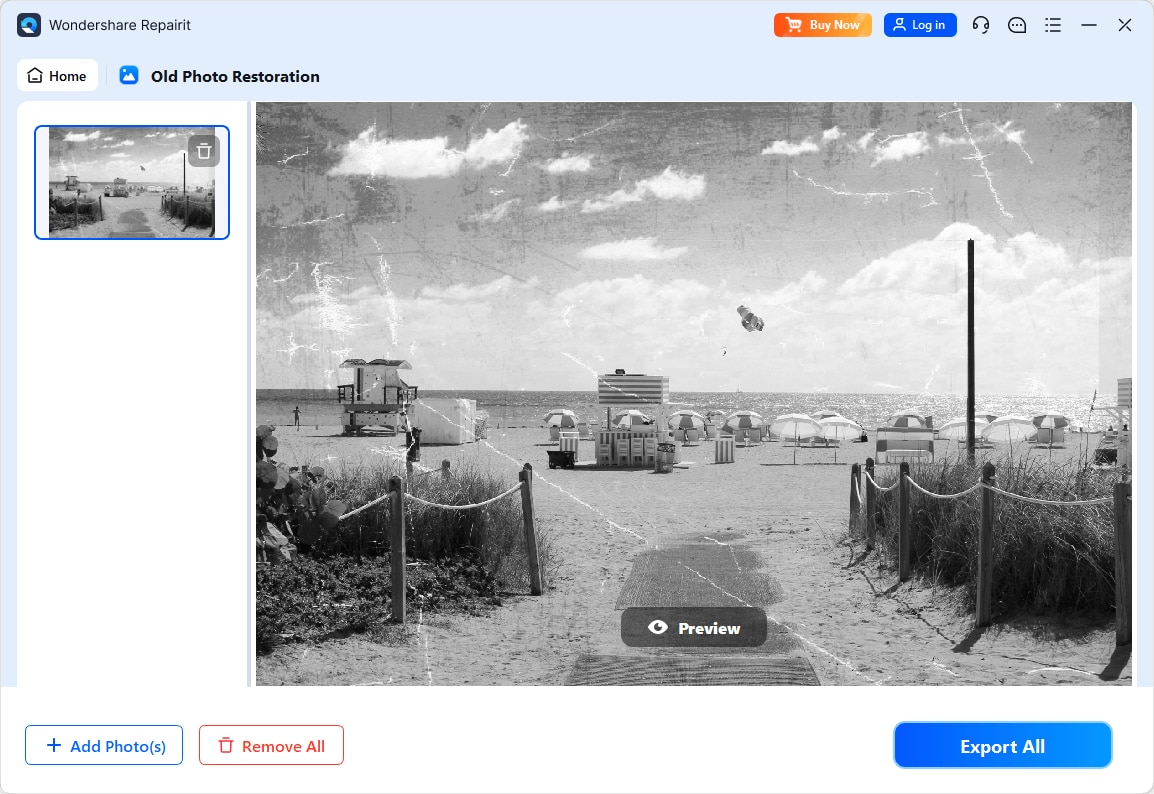
Step 4. Preview the restored result and save the repaired photo to your device.
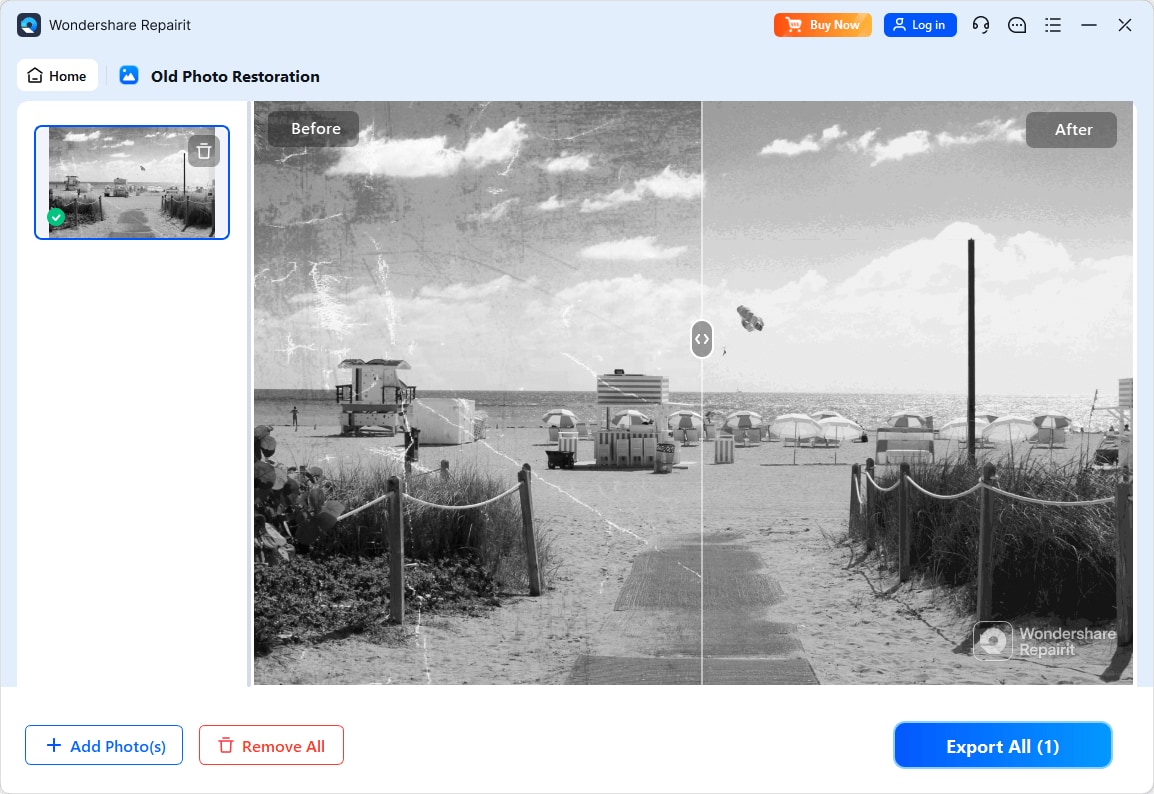
For best results, work on high quality scans, keep an unedited backup of every original, and compare the restored preview side by side with the scan to ensure faces and tones still look natural.
Final Verdict
Both Repairit Old Photo Restoration and SoftOrbits Photo Retoucher can help improve aging photos, but they are aimed at slightly different users and restoration problems.
In many cases, Repairit Old Photo Restoration is a more dedicated choice for:
- Photos with scratches, cracks, stains, and significant fading.
- Old portraits where facial detail recovery is important.
- Users who appreciate an AI-guided, step-based workflow geared toward historical and family photos.
SoftOrbits Photo Retoucher remains a reasonable option when:
- Your images are mostly intact and only require light defect removal.
- You need quick object removal and simple auto clean-up.
- You prefer a minimal, automatic workflow over more restoration-specific guidance.
For most people trying to bring old family photos back to life, Repairit Old Photo Restoration usually offers a more restoration-focused experience. SoftOrbits Photo Retoucher still has a place as a fast cleaner for easier cases, especially when object removal and simple auto improvements are enough.
Next: Repairit Old Photo Restoration vs Nero Ai Photo Restoration
FAQ
-
1. Is Repairit Old Photo Restoration better than SoftOrbits Photo Retoucher for heavily damaged old photos?
In many cases, yes. Repairit Old Photo Restoration is more focused on repairing scratches, cracks, and fading in old photos, while SoftOrbits Photo Retoucher is stronger as a quick automatic cleanup and object removal tool for lighter damage. -
2. Which is easier for beginners, Repairit Old Photo Restoration or SoftOrbits Photo Retoucher?
Both are beginner friendly. SoftOrbits Photo Retoucher has a very simple add photo → auto repair → adjust → export flow, while Repairit Old Photo Restoration offers a slightly more guided process that helps beginners focus on old photo specific damage. -
3. Which tool gives better results for restoring faded colors and facial details in old photos?
Repairit Old Photo Restoration is generally stronger for restoring faded colors and improving facial details in portraits, thanks to its AI guided approach. SoftOrbits Photo Retoucher can help with lighter fading but is less targeted for detailed facial restoration.




