
Choosing between Repairit Old Photo Restoration vs PhotoWorks can be confusing if you simply want to repair damaged old photos and bring faded memories back to life. This guide compares both tools on damage handling, restore faded colors, ease of use, and pricing so you can decide which workflow fits your level of experience and the condition of your photos.
While Repairit Old Photo Restoration centers its workflow on repairing aged, scratched, or faded prints, PhotoWorks approaches old photo restoration from the angle of a general photo editor. Understanding that difference helps you choose the tool that matches your images and how hands-on you want to be.
Restore Old Photos with Repairit
 Security Verified. Over 7,302,189 people have downloaded it.
In this article
- Repairit Old Photo Restoration vs PhotoWorks: Quick Verdict
- Repairit Old Photo Restoration vs PhotoWorks: Key Differences
- Repairit Old Photo Restoration vs PhotoWorks: Comparison Table
- What Repairit Old Photo Restoration and PhotoWorks Are Best For
- Repairit Old Photo Restoration vs PhotoWorks: Repair Capabilities and Damage Handling
- Repairit Old Photo Restoration vs PhotoWorks: Restoration Quality and Real Results
- Repairit Old Photo Restoration vs PhotoWorks: Workflow and Ease of Use
- Repairit Old Photo Restoration vs PhotoWorks: Pricing and Trial Options
- Who Should Choose Repairit Old Photo Restoration
- Who Should Choose PhotoWorks
- Pros and Cons of Repairit Old Photo Restoration and PhotoWorks
- How to Restore Old Photos After Choosing the Right Tool
Repairit Old Photo Restoration vs PhotoWorks: Quick Verdict
The main difference between Repairit Old Photo Restoration vs PhotoWorks is that Repairit is focused on old photo repair, while PhotoWorks is a general photo editor that happens to include restoration tools.
In most cases, Repairit Old Photo Restoration is a stronger choice if you need to fix scratches, cracks, heavy fading, or improve damaged facial details with guided automation. PhotoWorks can be enough when you mainly want to adjust colors and do light retouching on moderately aged photos inside a familiar editing interface.
If your priority is to quickly repair damaged old photos with minimal manual work, Repairit usually offers the more streamlined workflow. If you also edit modern digital photos and prefer manual control over sliders and brushes, PhotoWorks may fit your broader editing routine.
Repairit Old Photo Restoration vs PhotoWorks: Key Differences
The key distinctions between these two tools come down to focus and workflow:
- Specialization: Repairit is built specifically to repair damaged old photos, while PhotoWorks is a full editor that adds restoration on top of many other functions.
- Damage handling: Repairit concentrates on fixing scratches and cracks, stains, and severe fading. PhotoWorks is better suited to lighter defects and color fixes.
- Color work: Both can restore faded colors, but PhotoWorks emphasizes manual color correction sliders, whereas Repairit blends color recovery with structural repair.
- Workflow: Repairit uses a guided, step-based process focused on restoration. PhotoWorks follows the traditional import, edit, and export pattern of a desktop editor.
- Use cases: Repairit tends to fit family archives, portraits, and heavily worn prints. PhotoWorks is more about everyday editing plus light old photo improvement.
This difference matters if you are dealing with torn, scratched, or very faded originals, where a dedicated restoration flow such as Repairit can save time and trial-and-error in manual editing.
Repairit Old Photo Restoration vs PhotoWorks: Comparison Table
| Dimension | Repairit Old Photo Restoration |
|---|---|
| Best for | People focused on repairing heavily damaged, faded, or scratched old photos with guided tools. |
| Best for (PhotoWorks) | Users needing simple restoration and enhancement inside a general photo editor. |
| Ease of use | Streamlined, restoration-first interface with guided options for old photo repair. |
| Ease of use (PhotoWorks) | User-friendly photo editor; restoration tools are present but more manual. |
| Restoration quality | Designed to handle severe fading, scratches, and facial detail improvement in many cases. |
| Restoration quality (PhotoWorks) | Good color correction and light retouching for moderately damaged photos. |
| Workflow | Upload old photo, choose restoration options, preview, then download the repaired image. |
| Workflow (PhotoWorks) | Import photo -> adjust color -> retouch -> export, within a broader editing workspace. |
| Strengths | Focused old photo repair, scratch and crack fixing, colorizing and enhancing aged images. |
| Strengths (PhotoWorks) | Easy color adjustments, basic retouching, and enhancement in one editor. |
| Weaknesses | Less suited for general everyday photo editing beyond restoration tasks. |
| Weaknesses (PhotoWorks) | Not specialized for heavy damage or complex scratch and tear repair. |
What Repairit Old Photo Restoration and PhotoWorks Are Best For
At a high level, PhotoWorks is mainly a photo editor with restoration features, while Repairit Old Photo Restoration is built around repairing aged and damaged photos. That shapes which tool fits which type of user.
- Repairit Old Photo Restoration is best if your priority is to repair torn or stained old photos, reduce scratches and cracks, improve facial details, or colorize black and white photos with guidance.
- PhotoWorks is suited to users who want to correct exposure and color on a mix of old and new images, and who are dealing with only minor physical damage.
PhotoWorks stands out for user-friendly color correction but is less specialized for heavy physical damage. Repairit concentrates on restoration tasks, which can be a better match when working through large batches of scanned family prints.
If you mainly adjust brightness and colors and only occasionally fix small defects, PhotoWorks or even PhotoWorks within your existing editing setup may be enough. If many of your prints have deep scratches, cracks, or heavy fading, a dedicated option like Repairit is usually more practical.
Repairit Old Photo Restoration vs PhotoWorks: Repair Capabilities and Damage Handling
Repair capabilities determine how well a tool can deal with real-world issues such as creases, stains, and missing details.
Repairit Old Photo Restoration concentrates on repairing damaged old photos with tools tailored to scratches, cracks, fading, and facial details. It offers:
- Simple options to fix scratches and small cracks on scanned old photos.
- Guided tools for improving clarity and enhancing damaged facial areas in old portraits.
- Support for colorize black and white photos, which is useful when restoring family archives.
PhotoWorks approaches restoration from a manual editing angle:
- Spot and clone tools to reduce stains or small defects.
- Color and tone controls that help revive moderately faded images.
- Basic retouching that can smooth lighter scratches but may require more effort for serious damage.
In most cases, Repairit will be more efficient for heavily damaged, cracked, or very faded photos, while PhotoWorks may be adequate if damage is limited to small spots and mild fading.
Repairit Old Photo Restoration vs PhotoWorks: Restoration Quality and Real Results
Restoration quality is not only about how clean the photo looks, but also how natural the result appears.
With Repairit Old Photo Restoration, the workflow is designed to balance scratch removal, color recovery, and detail enhancement. That can help:
- Reduce visible cracks and dust without excessive blurring.
- Restore faded colors while keeping a realistic vintage look in many cases.
- Bring out facial details in portraits that have softened over time.
PhotoWorks tends to deliver its best results when you use its color sliders and retouching tools on images that are already largely intact. You can usually:
- Improve contrast and saturation in slightly faded prints.
- Clean up minor blemishes using localized retouching.
- Fine-tune tone to avoid overly harsh or artificial colors.
If your originals have severe physical damage, you may find that PhotoWorks demands more manual patching and still leaves some visible flaws, whereas a purpose-built option such as Repairit is better aligned with that workload.
Repairit Old Photo Restoration vs PhotoWorks: Workflow and Ease of Use
The workflow difference between these tools is important, especially for beginners or family members who do not edit photos often.
Repairit Old Photo Restoration provides a focused path:
- Upload your old photo.
- Apply repair options such as scratch removal, color enhancement, or facial detail improvement.
- Preview the result, then save the restored image.
This guided, restoration-first interface keeps you inside an old-photo mindset, without exposing you to unrelated editing controls.
PhotoWorks follows a traditional editor workflow:
- Import the photo into a multi-panel editing workspace.
- Adjust color, brightness, and contrast with manual sliders.
- Use retouching tools to work on specific areas.
- Export the final version.
Both are approachable, but for old photo repair specifically, Repairit tends to reduce the learning curve, while PhotoWorks gives more manual control at the cost of extra trial-and-error when damage is significant.
Repairit Old Photo Restoration vs PhotoWorks: Pricing and Trial Options
Pricing for both tools can change over time, so it is sensible to confirm details on the official sites. In general:
- Repairit Old Photo Restoration typically structures its pricing around restoration functions. Free or trial options often let you test how well it repairs damaged old photos before you commit.
- PhotoWorks tends to position its plans around its role as a general editor, with old photo restoration features included among many other tools.
If you mainly restore old prints and slides, it may make more sense to invest in a plan that focuses on restoration. If you also edit modern photos, design graphics, or create social media images, PhotoWorks pricing may feel more balanced across your broader tasks.
Who Should Choose Repairit Old Photo Restoration
Repairit is usually the better fit for users whose main goal is to bring heavily damaged memories back to life with minimal manual tweaking.
- Users with heavily faded, scratched, or cracked old photos that need targeted repair.
- People who want a guided, restoration-specific workflow rather than a full photo editor.
- Families digitizing archives who need to restore many old portraits and group photos.
- Anyone interested in enhancing facial details or colorize black and white photos with minimal manual work.
If you rarely work on modern digital images and almost all your time goes into repairing old prints, focusing on a restoration-centric tool such as Repairit is usually more efficient.
Who Should Choose PhotoWorks
PhotoWorks can still be a reasonable choice, especially when your images are not badly damaged and you prefer a classic photo editing environment.
- Beginners who want a user-friendly photo editor that can also handle simple old photo fixes.
- Users mostly doing color correction and light retouching on slightly faded or stained photos.
- People who already edit images regularly and prefer manual control over color and tone.
- Anyone who wants an all-purpose photo editor where restoration is just one part of their workflow.
Choosing PhotoWorks makes sense when you value having a single place to adjust exposure, manage effects, and lightly repair both old and recent images, as long as you are not facing extreme physical damage on your originals.
Pros and Cons of Repairit Old Photo Restoration and PhotoWorks
Looking at pros and cons side by side helps clarify where each tool fits best in real-world old photo projects.
Repairit Old Photo Restoration Pros and Cons
PhotoWorks Pros and Cons
How to Restore Old Photos After Choosing the Right Tool
Once you have compared Repairit Old Photo Restoration vs PhotoWorks and decided which better fits your needs, the next step is actually restoring your old photos. For users who want a practical, guided way to repair damaged old photos without learning complex manual retouching, Repairit Old Photo Restoration offers a straightforward path from scan to restored image.
Key Features
Some capabilities that matter when restoring old family photos and archives include:
- Scratch and crack reduction tools tailored to damaged old prints.
- Enhancement of faded colors and overall clarity in vintage photos.
- Options to improve facial details and colorize black and white portraits in many cases.
- Support for typical scanned photo formats such as JPG and PNG, so you can work with most flatbed or lab scans.
These features help you handle a range of issues from light discoloration to more obvious physical damage, without diving into layered manual editing.
Step-by-step guide
Step 1. Choose the AI restoration model based on your needs, such as repairing damaged photos or restoring old images.

Step 2. Import your old or damaged photos into Repairit to begin the restoration process.

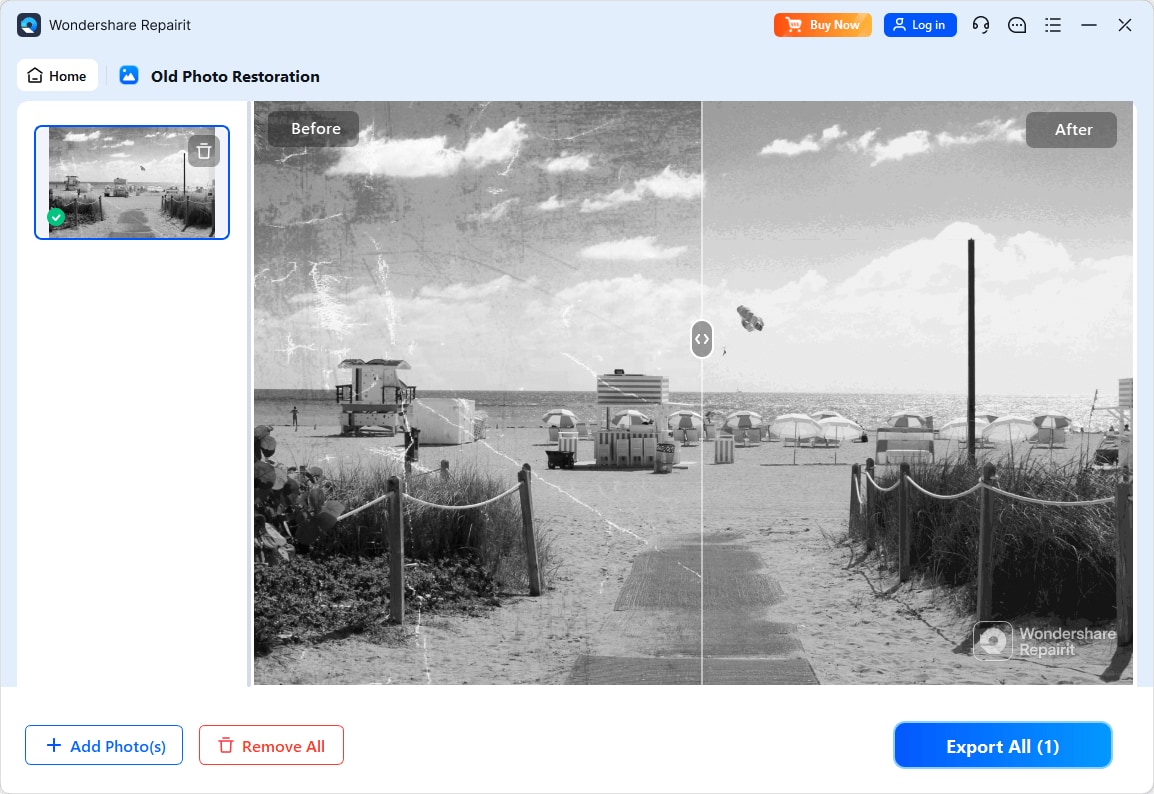
Step 3. Apply the old photo restoration model to fix scratches, restore colors, and improve image quality.
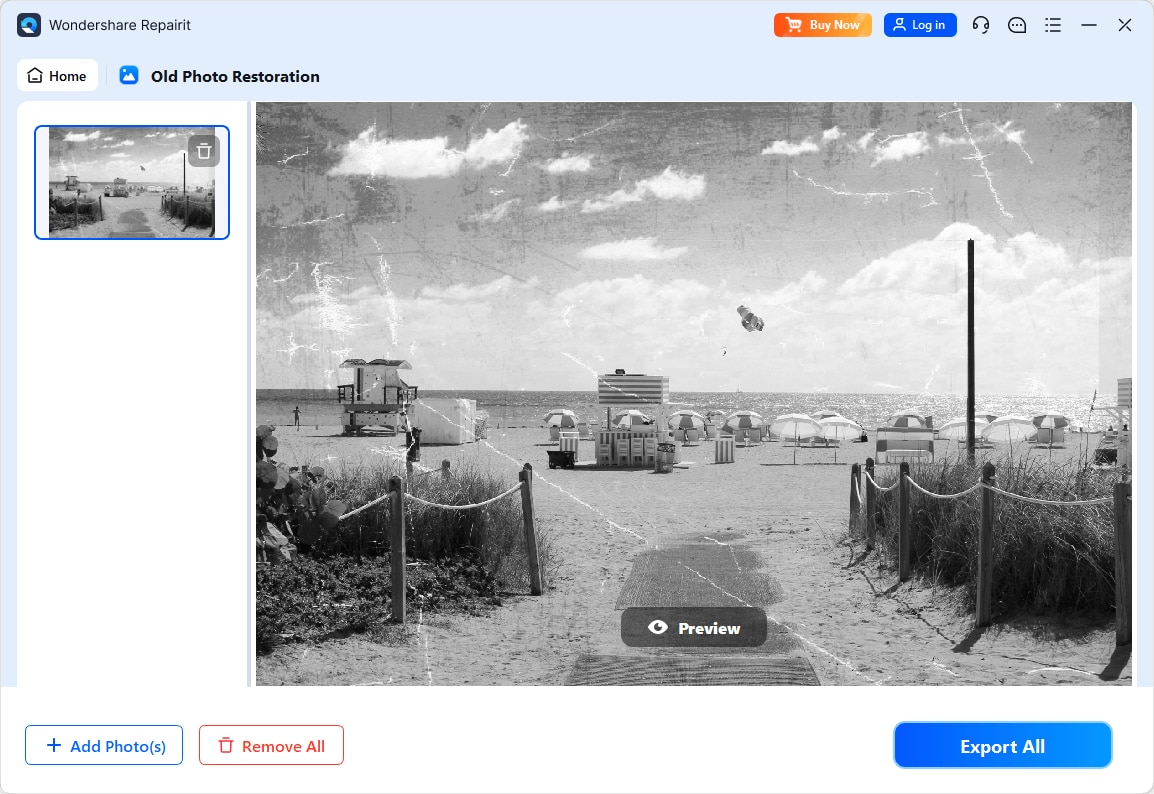
Step 4. Preview the restored result and save the repaired photo to your device.
Final Verdict
For most users dealing with visibly damaged, scratched, or heavily faded prints, Repairit Old Photo Restoration is usually the stronger choice because its workflow, tools, and guidance are centered on repairing old photos rather than general editing. It fits particularly well for family archives, portraits, and historical images that show cracks, stains, or severe fading.
PhotoWorks can still be enough if your photos are only lightly faded or slightly stained and you mainly want user-friendly color correction inside a familiar editor. If you frequently adjust exposure, colors, and everyday pictures, PhotoWorks offers broader editing flexibility, while Repairit remains the more targeted solution for serious old photo repair.
In practice, your decision should depend on how damaged your originals are and how much time you want to spend on manual edits. If your priority is a focused, guided way to repair damaged old photos, Repairit tends to align better with that goal. If you want a single tool for general editing plus modest restoration, PhotoWorks is a sensible alternative.
Next: Repairit Old Photo Restoration vs Gimp
FAQ
-
1. Is Repairit Old Photo Restoration better than PhotoWorks for fixing scratches and cracks?
In most cases, yes. Repairit Old Photo Restoration is built around repairing scratches, cracks, and other visible damage, while PhotoWorks is better for lighter retouching and color adjustments. -
2. Which is easier for beginners: Repairit Old Photo Restoration or PhotoWorks?
Both are approachable, but for old photo repair specifically, Repairit offers a more guided process, whereas PhotoWorks requires more manual retouching inside a full editor. -
3. Can PhotoWorks restore faded colors as well as Repairit Old Photo Restoration?
PhotoWorks has strong color correction tools that can work well on moderately faded photos, while Repairit combines color enhancement with broader damage repair for older and more degraded images.




