
Choosing between Repairit Old Photo Restoration vs PhotoScape X depends on how damaged your photos are and how comfortable you feel with manual editing. Repairit Old Photo Restoration focuses on repairing scratches, cracks, stains, and fading with a guided process, while PhotoScape X offers lighter editing tools that can help for mild cleanups. Understanding these differences makes it easier to match the tool to your family albums or historical images.
This comparison explains how each option handles common restoration tasks, including scratch removal, faded color repair, and improving damaged facial details. You will see where automated restoration helps most, when a lightweight editor is enough, and how each workflow suits beginners versus users who enjoy more manual control.
Restore Old Photos with Repairit
 Security Verified. Over 7,302,189 people have downloaded it.
In this article
- Repairit Old Photo Restoration vs PhotoScape X: Quick Verdict
- Repairit Old Photo Restoration vs PhotoScape X: Key Differences
- Repairit Old Photo Restoration vs PhotoScape X: Comparison Table
- What Repairit Old Photo Restoration and PhotoScape X Are Best For
- Repairit Old Photo Restoration vs PhotoScape X: Repair Capabilities and Damage Handling
- Repairit Old Photo Restoration vs PhotoScape X: Restoration Quality and Real Results
- Repairit Old Photo Restoration vs PhotoScape X: Workflow and Ease of Use
- Repairit Old Photo Restoration vs PhotoScape X: Pricing and Trial Options
- Who Should Choose Repairit Old Photo Restoration
- Who Should Choose PhotoScape X
- Pros and Cons of Repairit Old Photo Restoration and PhotoScape X
- How to Restore Old Photos After Choosing the Right Tool
Repairit Old Photo Restoration vs PhotoScape X: Quick Verdict
For users dealing with clearly visible scratches, cracks, stains, or heavy fading, Repairit Old Photo Restoration is usually the stronger choice because it is built specifically around old photo repair tasks and offers more guided help on damaged details.
PhotoScape X works better as a lightweight option for casual users who mainly want to brighten, crop, or lightly retouch older photos with minimal damage. Its free version and simple interface make it practical for quick touch ups.
In most cases, the decision comes down to damage level and expectations:
- Choose Repairit Old Photo Restoration if your images have deep scratches, severe fading, or faces that need more careful improvement.
- Choose PhotoScape X if your photos only need light improvements and you prefer a general editor you can also use for everyday pictures.
Repairit Old Photo Restoration vs PhotoScape X: Key Differences
The key difference between Repairit Old Photo Restoration vs PhotoScape X is their focus. Repairit concentrates on repairing age damage in scanned or digital copies of old prints, while PhotoScape X is a broader photo editor with some tools that can help old photos but does not center its design around restoration.
From a practical viewpoint:
- Repairit Old Photo Restoration offers automated repair steps for scratches, cracks, and stains, plus options to enhance facial details and restore faded colors or black and white images.
- PhotoScape X relies more on manual filters, brightness and contrast adjustments, and simple retouch tools that work well for mild fading or simple blemishes but may struggle with serious damage.
- Repairit uses a guided workflow built around old photo restoration, while PhotoScape X follows a general edit, adjust, and export pattern.
This distinction matters if you are working with fragile family archives or historical photos where deeper restoration and facial clarity are priorities.
Repairit Old Photo Restoration vs PhotoScape X: Comparison Table
| Dimension | Repairit Old Photo Restoration | PhotoScape X |
|---|---|---|
| Best for | Users focused on repairing heavily damaged, scratched, or faded old photos with a guided process | Casual users who want a lightweight photo editor with basic restoration tools |
| Ease of use | Simple, task-focused interface designed around old photo repair steps | Very easy interface for quick filters and simple adjustments |
| Restoration quality | Typically stronger on deep scratch repair, facial detail improvement, and serious fading | Reasonable for light touch ups but limited depth on severe damage |
| Workflow | Import old photos, choose restoration options, preview, then export the repaired image | Import photo, apply filters, adjust, and export, mainly for general editing |
| Strengths | Focused old photo repair tools, good for cracks, stains, and faded color restoration | Free version available and straightforward interface for quick edits |
| Weaknesses | Requires stable internet access and can be more than needed for very minor fixes | Limited control for deep restoration or challenging damage on archival photos |
What Repairit Old Photo Restoration and PhotoScape X Are Best For
Understanding what each tool is best suited for helps you avoid spending time on a workflow that does not match your image condition.
Repairit Old Photo Restoration is best for:
- Old photos with visible scratches, cracks, or small tears that need more than simple retouching.
- Restoring faded colors in aged color prints or improving tonal depth in black and white photos.
- Improving damaged facial details in portraits where expressions and eyes matter.
- Users who prefer a guided process instead of learning complex manual retouch tools.
PhotoScape X is better suited to:
- Basic cleanups like cropping, slight brightening, or minor contrast adjustments on older photos.
- Occasional restoration tasks where damage is light and quick fixes are enough.
- Users who want a free or low cost desktop editor that handles general image editing as well as simple restoration.
- People comfortable experimenting with filters and sliders to get acceptable results on lightly damaged pictures.
In practice, you might use PhotoScape X for everyday edits and rely on Repairit when you encounter important images that show noticeable age damage.
Repairit Old Photo Restoration vs PhotoScape X: Repair Capabilities and Damage Handling
The core question in any old photo repair software comparison is how each tool handles real world damage such as scratches, cracks, stains, and fading.
Repairit Old Photo Restoration focuses on:
- Automated repair for scratches and cracks on old prints that have been scanned or photographed.
- Reducing the visual impact of mild stains, small tears, or speckling common in aged photos.
- Enhancing damaged facial areas so that eyes, mouths, and skin texture look clearer without becoming overly artificial.
- Restoring faded color or adding depth to black and white images so they appear closer to a fresh print.
PhotoScape X typically offers:
- Filters and basic retouch tools that can help diminish small scratches or dust when damage is not too dense.
- Brightness, contrast, and color controls that improve overall visibility in slightly faded photos.
- Spot correction tools that may handle isolated blemishes but are less efficient on large areas of damage.
When you are dealing with heavily scratched, torn, or stained photos, Repairits more targeted approach often provides more reliable results. For images with only a few marks or mild fading, PhotoScape X can still be adequate, especially if you are comfortable tweaking settings manually.
Repairit Old Photo Restoration vs PhotoScape X: Restoration Quality and Real Results
Restoration quality depends on how well each tool balances damage removal with preserving natural detail.
With Repairit Old Photo Restoration, users can generally expect:
- More consistent filling of scratched or cracked areas, especially across faces and clothing.
- Improved clarity in key facial features such as eyes, hairlines, and expressions, which is important for family portraits.
- Smoother transitions in repaired regions, helping the restored photo look cohesive rather than patchy.
- Better support for making faded photos look richer and more legible, while still resembling the original print.
With PhotoScape X, restoration quality tends to be:
- Acceptable for light cleanup where damage is minimal and does not cut across important details.
- Dependent on the users patience with manual edits, since there is less automation directed specifically at old photo repair.
- More variable on serious issues like deep cracks through faces or large faded sections, which may still remain visible.
For cherished, unique images where restoration accuracy matters, Repairits focus on old photos can make it a more comfortable choice. For casual projects where perfection is not critical, PhotoScape X can still produce reasonable improvements.
Repairit Old Photo Restoration vs PhotoScape X: Workflow and Ease of Use
Workflow determines how quickly you can go from a damaged scan to a shareable restored photo.
Repairit Old Photo Restoration follows a guided, repair focused workflow:
- Upload a scanned or digital photo of the damaged print.
- Choose appropriate options, such as scratch repair, facial enhancement, or faded color improvement.
- Run the restoration and preview how cracks, stains, and faded areas have been handled.
- Export the restored version if you are satisfied, or adjust and reprocess as needed.
This approach keeps beginners on track, since the tool itself suggests a path from damage to repair.
PhotoScape X uses a general editing workflow:
- Import the photo, then move through tabs to crop, adjust exposure, and apply filters.
- Use basic retouch controls to spot fix small scratches or marks.
- Increase contrast, saturation, or sharpness to make older photos feel more vivid.
- Export the edited version when the image looks acceptable.
Both are accessible to non experts, but Repairit feels more tailored to users whose main goal is old photo restoration rather than broader image editing.
Repairit Old Photo Restoration vs PhotoScape X: Pricing and Trial Options
Cost and trial options can influence whether you rely on a tool for a one time project or long term archiving work.
PhotoScape X typically offers:
- A free version with enough tools for basic edits and light photo restoration tasks.
- Optional paid upgrades that unlock more advanced editing features, still within a general purpose editor.
Repairit Old Photo Restoration usually provides:
- A limited free experience or trial so you can test how it handles scratches, cracks, and fading on a few photos.
- Paid access for ongoing or higher volume use, without long term contracts in most cases.
If you only have a few lightly damaged images, the free tier of PhotoScape X may cover your needs. If you are planning a serious restoration project for many old photos, investing in Repairits deeper capabilities can be more efficient over time.
Who Should Choose Repairit Old Photo Restoration
You are more likely to benefit from Repairit Old Photo Restoration if your situation matches one or more of these scenarios:
- Restoring family archives with heavy scratches, cracks, or stains that basic filters cannot handle cleanly.
- Working with portraits where you want to improve damaged facial details while keeping the results natural.
- Dealing with severe fading in color or black and white photos that need more targeted tonal recovery.
- Preferring a guided, mostly automated workflow instead of learning detailed manual retouching techniques.
- Planning a larger project, such as scanning and repairing multiple albums or historical images.
For users in these groups, the focused feature set and guided steps in Repairit can save time and produce more reliable restorations.
Who Should Choose PhotoScape X
PhotoScape X remains a sensible choice for users whose needs are lighter or more general:
- Casual users who mainly want to brighten, crop, and lightly touch up old photos for sharing online.
- People who prefer a free or low cost desktop tool and are comfortable experimenting with manual adjustments.
- Users with a small number of slightly faded or mildly scratched images, where deep restoration is not critical.
- Anyone who wants a single app to handle both everyday photo edits and occasional old photo cleanups.
If your prints are mostly intact and you just want them to look a bit clearer and more colorful, PhotoScape X can be enough without adding new tools to your workflow.
Pros and Cons of Repairit Old Photo Restoration and PhotoScape X
Repairit Old Photo Restoration Pros and Cons
PhotoScape X Pros and Cons
How to Restore Old Photos After Choosing the Right Tool
After comparing Repairit Old Photo Restoration vs PhotoScape X, the next step is actually restoring your old photos. Regardless of which editor you prefer for quick tweaks, many users find that a guided restoration workflow makes it easier to tackle cracks, stains, and fading without advanced editing skills.
Repairit Old Photo Restoration offers a practical, step based process that focuses on repairing damaged photos. You can still keep PhotoScape X as a companion editor for cropping or extra adjustments, but using Repairit for the main restoration work can streamline your project.
Key Features
Key capabilities in Repairit Old Photo Restoration include:
- Automated repair for scratches, cracks, and mild stains on old photos to quickly reduce obvious visual distractions.
- Enhancement of facial details and clarity in aged portraits so features appear sharper and more recognizable.
- Improved color and contrast for faded or discolored historical images, helping them look balanced and readable.
- Support for both color and black and white photos, with tools aimed at making old prints look closer to their original state.
Step-by-step guide
Step 1. Choose the AI restoration model based on your needs, such as repairing damaged photos or restoring old images.

Step 2. Import your old or damaged photos into Repairit to begin the restoration process.

Step 3. Apply the old photo restoration model to fix scratches, restore colors, and improve image quality.
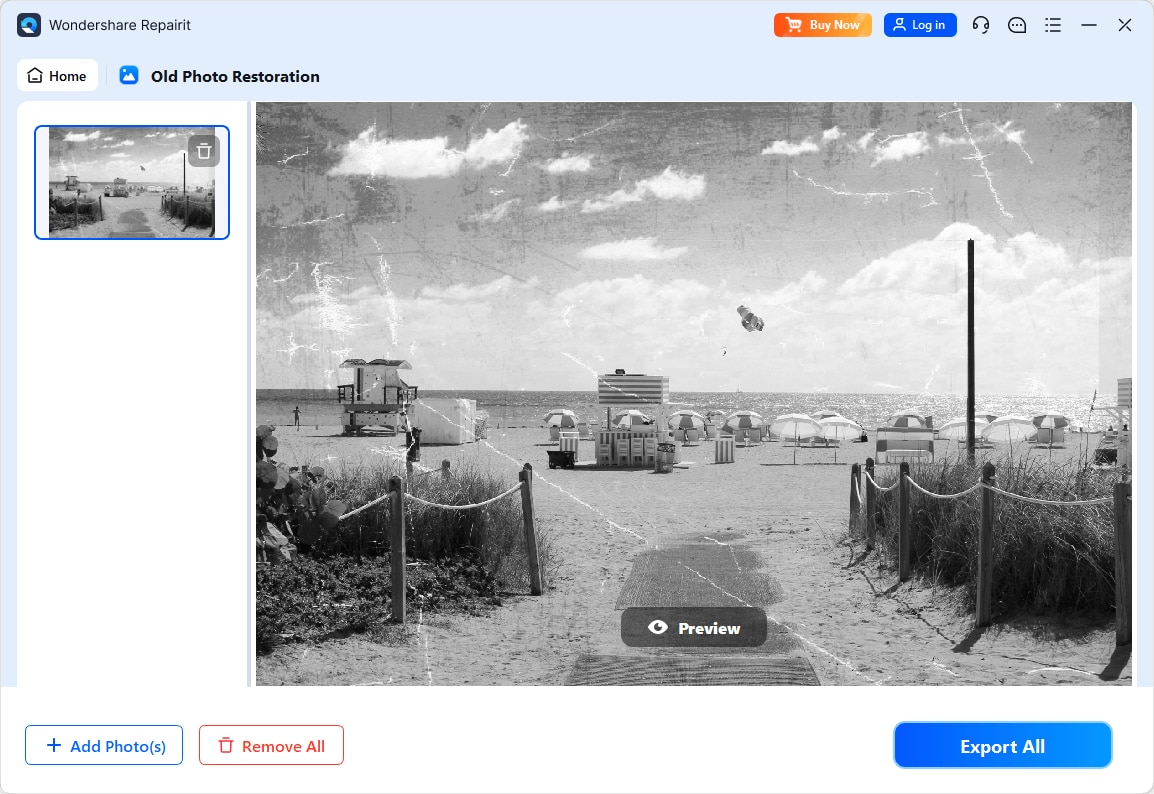
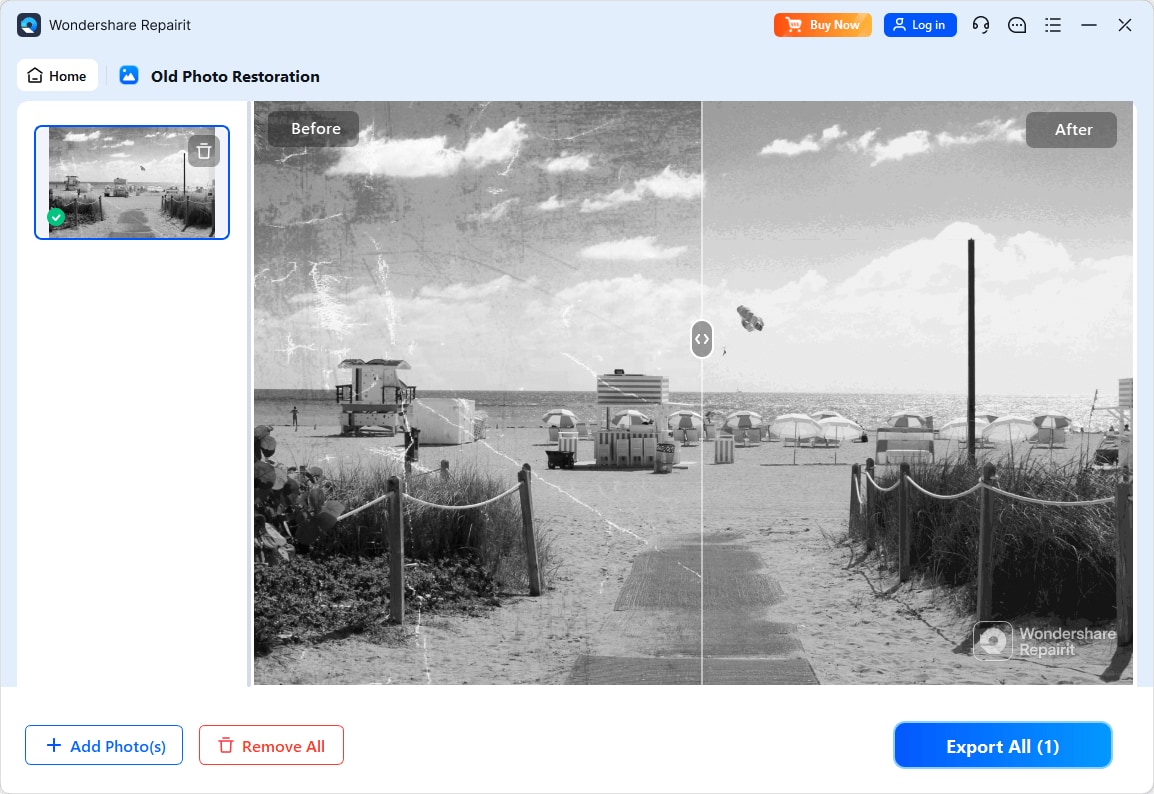
Step 4. Preview the restored result and save the repaired photo to your device.
Final Verdict
When comparing Repairit Old Photo Restoration vs PhotoScape X for repairing old photos, both tools can play useful but different roles.
Repairit Old Photo Restoration is generally the stronger option for users dealing with visible scratches, cracks, stains, or heavy fading. Its guided restoration workflow, focus on damaged facial details, and deeper handling of color and tone make it better suited for important family portraits or historical images where you want dependable repair.
PhotoScape X remains a reasonable choice for casual users, especially when photos are only mildly faded or have a few small imperfections. Its free version, lightweight desktop design, and easy interface make it convenient for quick touch ups and general photo editing.
In practical terms, you might reach for PhotoScape X when you just need a fast cleanup and keep Repairit Old Photo Restoration in mind whenever you encounter a treasured image that shows serious age damage or requires more careful restoration.
Next: Repairit Old Photo Restoration vs Fotor Desktop
FAQ
-
1. Is Repairit Old Photo Restoration better than PhotoScape X for fixing heavy scratches and cracks?
In most cases, yes. Repairit Old Photo Restoration is more focused on repairing noticeable scratches, cracks, and stains, while PhotoScape X is mainly a general photo editor with limited depth for severe damage. For deeply scratched or heavily marked photos, Repairits dedicated tools usually provide more dependable results. -
2. Can PhotoScape X restore very faded old photos as well as Repairit Old Photo Restoration?
PhotoScape X can improve brightness, contrast, and color for faded photos, which helps when the fading is moderate. However, Repairit Old Photo Restoration typically offers more targeted options for restoring faded colors and enhancing overall clarity, making it a better fit for severely faded prints. -
3. Which tool is easier for beginners who want to restore old family photos?
Both are approachable, but they feel different. Repairit Old Photo Restoration provides a guided, step oriented workflow centered on old photo repair tasks, which many beginners find easier. PhotoScape X is also simple but expects users to rely more on manual filters and adjustments to achieve similar results. -
4. How do these tools handle improving damaged facial details in portraits?
Repairit Old Photo Restoration is designed to enhance facial details and reduce the impact of scratches or fading on eyes, skin, and hair. PhotoScape X can sharpen or adjust contrast on faces, but it does not focus specifically on facial repair, so heavily damaged portraits may benefit more from Repairits approach. -
5. Can either tool help colorize or enhance black and white photos?
Repairit Old Photo Restoration is generally better suited to enhancing and, where available, improving color in older images, including black and white photos that need clearer tones. PhotoScape X can adjust brightness and contrast on black and white pictures and supports manual color tweaks, but achieving realistic colorization may require more effort and experience.




