
Choosing between Repairit Old Photo Restoration vs Fotor Desktop comes down to how damaged your old photos are and how much control you want over the repair process. Repairit Old Photo Restoration focuses on guided restoration for scratched, cracked, and heavily faded images, while Fotor Desktop old photo repair features sit inside a broader photo editor that is better suited to lighter cleanups and general enhancements. This comparison explains how each option handles damage, restoration quality, and workflow so you can choose a tool that fits your family archives or casual touch ups.
Restore Old Photos with Repairit
 Security Verified. Over 7,302,189 people have downloaded it.
In this article
- Repairit Old Photo Restoration vs Fotor Desktop: Quick Verdict
- Repairit Old Photo Restoration vs Fotor Desktop: Key Differences
- Repairit Old Photo Restoration vs Fotor Desktop: Comparison Table
- What Repairit Old Photo Restoration and Fotor Desktop Are Best For
- Repairit Old Photo Restoration vs Fotor Desktop: Repair Capabilities and Damage Handling
- Repairit Old Photo Restoration vs Fotor Desktop: Restoration Quality and Real Results
- Repairit Old Photo Restoration vs Fotor Desktop: Workflow and Ease of Use
- Repairit Old Photo Restoration vs Fotor Desktop: Pricing and Trial Options
- Who Should Choose Repairit Old Photo Restoration
- Who Should Choose Fotor Desktop
- Pros and Cons of Repairit Old Photo Restoration and Fotor Desktop
- How to Restore Old Photos After Choosing the Right Tool
Repairit Old Photo Restoration vs Fotor Desktop: Quick Verdict
In everyday use, the key distinction is depth of restoration. Repairit Old Photo Restoration is a stronger choice for repairing scratched, cracked, or significantly faded old photos where facial details matter. It provides a restoration first experience aimed at people who want to fix visible age related damage without manual retouching.
Fotor Desktop can be enough if your old photos mainly need light cleanups, such as mild fading or small spots, and you are already using it for regular photo editing. Its repair options are more limited, but the workflow is quick for simple adjustments and filters.
If you are deciding between Repairit Old Photo Restoration vs Fotor Desktop for a single treasured family portrait with obvious cracks and stains, Repairit will typically give you more targeted help. For a batch of lightly faded snapshots where you want faster edits and some creative styling, Fotor Desktop may fit better.
Repairit Old Photo Restoration vs Fotor Desktop: Key Differences
Both tools can improve old photos, but they are built for different priorities. Repairit focuses on restore old photos on desktop with automated repair options tuned to aging damage, while Fotor Desktop acts as a general editor with lighter old photo cleanup.
From a feature standpoint, Repairit concentrates on fixing scratches and cracks in old photos, reducing noise, and restoring faded colors and facial details in a guided flow. Fotor Desktop emphasizes basic retouching, exposure correction, and filters; it can help with mild fading but is not optimized for intricate crack removal or reconstructing damaged areas.
This difference matters most when you are working with fragile, one of a kind prints. If your scan shows heavy creases, stains, or missing details, a restoration focused tool like Repairit will generally be more appropriate than manually trying to patch everything inside a basic editor.
Repairit Old Photo Restoration vs Fotor Desktop: Comparison Table
| Dimension | Repairit Old Photo Restoration | Fotor Desktop |
|---|---|---|
| Best for | Users focused on repairing damaged, scratched, or heavily faded old photos with guided help. | Users needing quick edits and light restoration on old photos inside a general photo editor. |
| Ease of use | Simple, restoration focused interface with guided options for common old photo issues. | Straightforward photo editor; basic restoration tools are easy but less specialized. |
| Restoration quality | Designed to repair cracks, stains, and facial details in most everyday old photos. | Decent for minor fading and small flaws, but limited precision on serious damage. |
| Workflow | Import old photo, choose restoration options, preview, then export the repaired image. | Upload photo, apply adjustments and filters, then export for quick visual improvements. |
| Strengths | Focused old photo repair, helpful automation, and tools tuned for age related damage. | Simple workflow, multiple filters, and fast desktop edits for quick results. |
| Weaknesses | May feel specialized if you mainly need creative edits and design tools. | Limited repair precision and less control over deep cracks or complex damage. |
What Repairit Old Photo Restoration and Fotor Desktop Are Best For
Fotor Desktop is a desktop photo editor with basic restoration tools that works best when your images have only light wear. It suits users who mainly want brightness and color adjustments, filters, and casual cleanup, and only occasionally need to fix scratches and cracks in old photos.
Repairit Old Photo Restoration, by contrast, is better aligned with users who are actively trying to repair damaged photos from family collections. It focuses on fixing scratches, cracks, stains, and faded colors, and on improving damaged facial details where expressions and eyes are important to preserve.
If your priority is detailed restoration of a small number of important photos, Repairit will generally be more suitable. If you need broader editing tools and only modest restoration for a large batch of casual images, Fotor Desktop may be more convenient.
Repairit Old Photo Restoration vs Fotor Desktop: Repair Capabilities and Damage Handling
Both tools can improve old photos, but they differ in how they handle visible damage. According to the feature overview, Repairit Old Photo Restoration offers tools aimed at fixing scratches, cracks, and small tears in scanned prints, as well as targeted options to repair facial details and reduce heavy noise in aged images.
These capabilities make it more suitable when you are dealing with creases across faces, clear crack lines, or speckled noise from old paper. Repairit can also help restore faded colors and improve clarity in severely aged or yellowed images through a guided setup, which reduces guesswork for non experts.
Fotor Desktop, in comparison, provides basic retouching and adjustment tools: brightness, contrast, and color correction that can lift mild fading and make lightly worn photos look fresher. It can combine multiple filters and adjustments to approximate a restored look, but intricate crack or tear removal usually requires more manual effort and may not be as precise for complex damage.
If you are facing deep cracks, stains, or partially torn areas, relying solely on Fotor s general tools can be time consuming and may still leave artifacts. For moderate to heavy damage, Repairit s focused repair approach is likely to be more practical for most users.
Repairit Old Photo Restoration vs Fotor Desktop: Restoration Quality and Real Results
In terms of real world results, the difference often shows up in how natural the repaired photo looks and how well fine details are recovered.
With Repairit, the goal is to restore legibility and keep a realistic appearance. Its advanced options described in the overview help improve clarity in severely aged images and enhance damaged facial features such as eyes and skin texture. When you are working with portraits where expressions matter, this focus can make the final photo feel more lifelike.
Fotor Desktop can still deliver pleasing results on less damaged photos. Increasing contrast, adjusting color balance, and applying soft filters can make faded images more vibrant and can hide small flaws. However, when deeper cracks cross faces or important objects, the limitations of basic tools become more apparent, and repairs may look less seamless.
For many families, a sensible approach is to test both tools on the same photo. If Fotor Desktop s adjustments already achieve a result you are happy with, there is no need to switch. If cracks, stains, or detail loss remain distracting, a restoration focused solution like Repairit is more likely to meet your expectations.
Repairit Old Photo Restoration vs Fotor Desktop: Workflow and Ease of Use
Workflow is another major factor, especially for beginners or people digitizing large albums.
As described, Fotor Desktop follows a straightforward pattern: upload a photo, apply adjustments and filters, and export. This suits users already familiar with editing sliders and who like experimenting with different looks. For old photo repair, though, you may need to manually combine several tools to deal with fading and imperfections.
Repairit Old Photo Restoration narrows the process specifically to old photo repair. You import a damaged photo, choose restoration options such as repairing scratches, reducing noise, or enhancing facial details, then preview and export a cleaned up version. The focus on a small set of clearly labeled tasks can be less intimidating if your main goal is to restore old photos rather than redesign them.
For someone who rarely edits images but wants to revive family archives, Repairit s guided workflow will often feel easier to understand. For users who already manage a large image library and do regular editing, Fotor Desktop s integrated environment may fit better into their existing routine, as long as the damage level remains modest.
Repairit Old Photo Restoration vs Fotor Desktop: Pricing and Trial Options
Both tools typically provide some form of limited free use or trial so you can test basic restoration on a few images before paying. Specific pricing and plans can change, but they often include subscription options or one time licenses, depending on the version and platform.
A practical way to evaluate value is to run the same heavily aged photo through both tools during their trial periods. Compare how well each one handles scratches, stains, and facial details, and whether the improvement justifies the cost for your situation.
If you only have a handful of old photos and they are lightly faded, you may find that Fotor Desktop s existing tools are sufficient and that you do not need to invest in additional restoration specific software. If you are responsible for a larger family archive or have severely damaged prints, allocating budget to a dedicated restoration workflow like Repairit can make more sense over time.
Who Should Choose Repairit Old Photo Restoration
Repairit Old Photo Restoration is most suitable for users whose primary goal is bringing visibly damaged images back to life with minimal manual editing.
- People restoring heavily scratched, cracked, or stained family photos that need focused repair.
- Users who want help fixing faded colors and improving damaged facial details in old portraits.
- Anyone looking to colorize black and white photos as part of bringing family history back to life.
- Beginners who prefer a guided, restoration first workflow instead of a general editing toolbox.
If you are curating a digital archive for relatives, or preparing prints for display where damage is obvious, Repairit s focused repair capabilities and guided steps can save time and reduce the learning curve.
Who Should Choose Fotor Desktop
Fotor Desktop remains a reasonable option when your needs are broader than restoration and the damage on your old photos is relatively minor.
- Users needing quick edits on old photos with simple fading or minor flaws.
- People who already use Fotor Desktop for general photo editing and occasionally need light restoration.
- Beginners who want a simple upload, apply adjustments, export workflow with minimal setup.
- Users who prioritize creative filters and general enhancements over precise crack and scratch repair.
If you mostly want to refresh old snapshots for social media, slideshows, or digital frames, and only a few images show visible cracks, Fotor Desktop may offer enough control without adding another specialized tool.
Pros and Cons of Repairit Old Photo Restoration and Fotor Desktop
Repairit Old Photo Restoration Pros and Cons
Fotor Desktop Pros and Cons
How to Restore Old Photos After Choosing the Right Tool
Once you have compared Repairit Old Photo Restoration vs Fotor Desktop and decided which one fits your needs, the next step is actually restoring your scans. For users who want a guided process that focuses specifically on repairing age related damage, Repairit Old Photo Restoration offers a practical way to turn comparison into action.
Key Features
- Repair tools tuned for scratches, cracks, stains, and overall aging in scanned photos.
- Options to restore faded colors and improve clarity in old portraits and group shots.
- User friendly, guided workflow suitable for beginners handling valuable family archives.
Step-by-step guide
Step 1. Choose the AI restoration model based on your needs, such as repairing damaged photos or restoring old images.

Step 2. Import your old or damaged photos into Repairit to begin the restoration process.

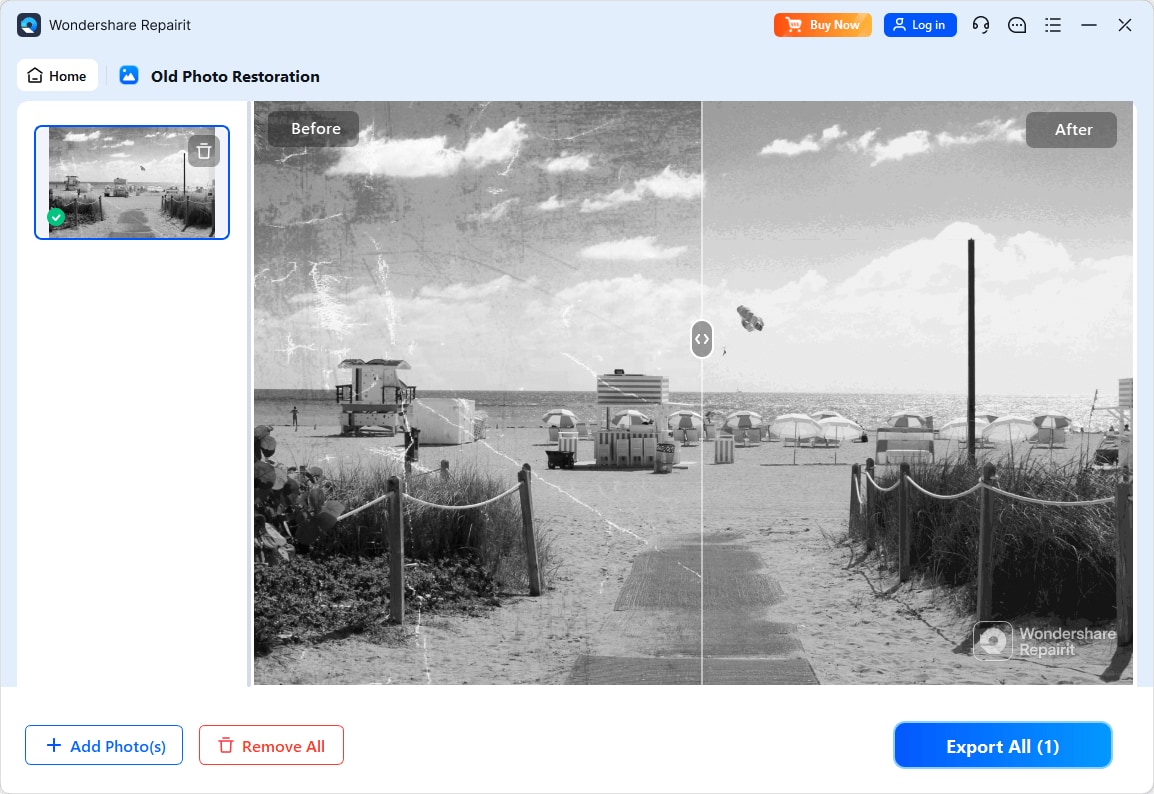
Step 3. Apply the old photo restoration model to fix scratches, restore colors, and improve image quality.
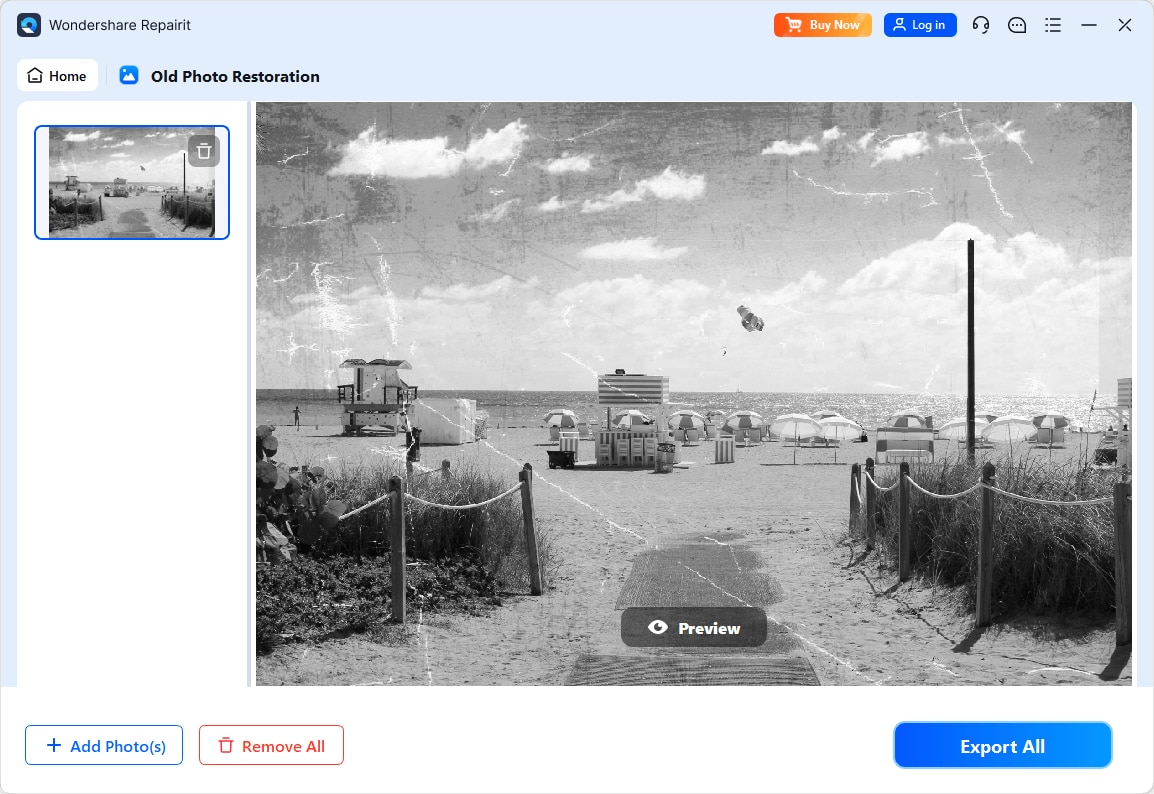
Step 4. Preview the restored result and save the repaired photo to your device.
Final Verdict
When comparing Repairit Old Photo Restoration vs Fotor Desktop, the right choice depends on how damaged your photos are and how much time you want to invest in manual editing.
For most users dealing with clearly scratched, cracked, or heavily faded prints, Repairit Old Photo Restoration is usually the stronger option because its tools and workflow are tuned specifically to restore old photos, improve damaged facial details, and handle age related defects. It turns many complex retouching steps into a guided process that feels approachable even for beginners.
Fotor Desktop remains a sensible choice when your photos show only mild fading or small imperfections and you already rely on it for everyday editing. In those situations, its basic repair tools and filters can deliver quick, visually pleasing improvements, even if they do not match the precision of a dedicated restoration solution.
In practice, you do not have to commit blindly. Testing both tools on one or two important photos will quickly show which workflow feels more comfortable and which output looks more natural for your specific images.
Next: Repairit Old Photo Restoration vs Nero Ai Photo Restoration
FAQ
-
1. Is Repairit Old Photo Restoration better than Fotor Desktop for fixing scratches and cracks?
In most cases, yes. Repairit focuses on repairing scratches, cracks, and stains in old photos with a restoration first workflow, while Fotor Desktop offers general editing tools that work best for mild flaws and light cleanups. -
2. Which is easier for beginners, Repairit Old Photo Restoration or Fotor Desktop?
Both are approachable, but for restoring old photos specifically, Repairit s guided repair options are usually simpler than manually combining adjustments and filters in Fotor Desktop, especially when dealing with visible damage. -
3. Can Fotor Desktop restore heavily faded or torn old photos as well as Repairit?
Fotor Desktop can help with fading and small defects, but it generally has limited precision for deep cracks, severe stains, or torn areas compared with a restoration focused tool like Repairit Old Photo Restoration.




