
Choosing between Repairit Photo Eraser and AKVIS Retoucher comes down to how you prefer to remove unwanted objects: fast, AI-driven cleanup or detailed, manual control. This comparison focuses on how each tool handles object removal, background fill, and day-to-day cleanup work so you can decide which fits your images, skills, and workflow without wasting time testing every option yourself.
Remove Unwanted Objects with Repairit Photo Eraser
 Security Verified. Over 7,302,189 people have downloaded it.
In this article
- Repairit Photo Eraser vs AKVIS Retoucher: Quick Verdict
- Repairit Photo Eraser vs AKVIS Retoucher: Key Differences
- Repairit Photo Eraser vs AKVIS Retoucher: Comparison Table
- What Repairit Photo Eraser and AKVIS Retoucher Are Best For
- Repairit Photo Eraser vs AKVIS Retoucher: Object Removal Capabilities
- Repairit Photo Eraser vs AKVIS Retoucher: Background Fill and Realism
- Repairit Photo Eraser vs AKVIS Retoucher: Workflow and Ease of Use
- Repairit Photo Eraser vs AKVIS Retoucher: Pricing and Trial Options
- Who Should Choose Repairit Photo Eraser
- Who Should Choose AKVIS Retoucher
- Pros and Cons of Repairit Photo Eraser and AKVIS Retoucher
- How to Remove Unwanted Objects After Choosing the Right Tool
Both Repairit Photo Eraser and AKVIS Retoucher focus on removing unwanted objects, distractions, and markings from photos. Where Repairit leans on AI to automate object detection and fill, AKVIS follows a more traditional, manual retouching approach. Understanding how each handles object removal, background reconstruction, and watermark or text cleanup will help you match the tool to your typical images and editing style.
Repairit Photo Eraser vs AKVIS Retoucher: Quick Verdict
If your priority is to erase people, text, logos, and small distractions with as few clicks as possible, Repairit Photo Eraser is likely to feel more efficient thanks to its AI-guided workflow and streamlined interface.
If you prefer to work slowly and precisely on specific areas, especially when you want to paint over distractions by hand and refine transitions manually, AKVIS Retoucher may be a better fit for your object removal tasks.
Repairit Photo Eraser vs AKVIS Retoucher: Key Differences
The core difference between these tools is how they approach object removal and cleanup:
- Workflow style: Repairit emphasizes a guided flow of upload, select, erase, and save, while AKVIS behaves more like a classic retouching module inside a desktop editor.
- Removal logic: Repairit relies heavily on AI-assisted object detection and context-aware fill. AKVIS centers on user-controlled selection and manual retouching tools to rebuild the background.
- Manual control: Repairit offers simple brush-based selection with some control but prioritizes automation. AKVIS provides more hands-on control over how each defect, distraction, or object is removed.
- Natural-looking results: In many everyday scenes, Repairits AI can produce natural-looking background fill quickly. AKVIS, by contrast, may require more time and skill to get similarly seamless results but can be more controllable when you need to refine specific areas.
In most cases, casual users will reach a share-ready result faster with Repairit, while users comfortable with manual retouching may appreciate AKVIS for more deliberate cleanup.
Repairit Photo Eraser vs AKVIS Retoucher: Comparison Table
| Criteria | Repairit Photo Eraser | AKVIS Retoucher |
|---|---|---|
| Best for | Everyday users who want to remove unwanted objects and distractions quickly with AI help. | Users restoring and cleaning old photos who need careful, manual object cleanup. |
| Ease of use | Simple interface focused on upload, select object, erase, and save. | More complex, with tools arranged for traditional retouching and restoration workflows. |
| Object removal | AI-powered eraser designed for fast removal of people, text, and small objects. | Manual selection and retouching tools that work well on scratches and localized defects. |
| Workflow | Streamlined flow: upload photo, mark objects, auto-fill background, export. | Structured flow: load image, select defects, retouch them, then export results. |
| Strengths | Speed, automation, and realistic background fill for common cleanup tasks. | Strong restoration tools and scratch removal for detailed cleanup on older images. |
| Weaknesses | Less granular manual control than some advanced editors. | Outdated UI, niche use, and slower for quick object removal tasks. |
What Repairit Photo Eraser and AKVIS Retoucher Are Best For
Repairit Photo Eraser and AKVIS Retoucher both help users clean up images by removing unwanted objects, background distractions, and small defects. Positioned as photo retouching solutions, they target slightly different use cases, especially when it comes to how much automation you want during object removal.
- Repairit Photo Eraser: Better suited for everyday object removal across social photos, product shots, travel images, and quick watermark or text cleanup. It focuses on AI assistance and minimal manual setup.
- AKVIS Retoucher: Better suited to more deliberate cleanup, especially when you want to paint over specific distractions, scratches, or marks and are comfortable refining the result step by step.
In practice, users who want fast distracting-object removal with minimal learning curve tend to align with Repairit, whereas those who prefer detailed manual work may lean toward AKVIS.
Repairit Photo Eraser vs AKVIS Retoucher: Object Removal Capabilities
Both tools are built to remove unwanted elements from photos, but the range of objects they handle most comfortably and how they approach removal differ.
Range of objects and distractions
- People and large objects: Repairits AI-based logic is generally well suited to removing people, signboards, or other prominent items from backgrounds where there is enough surrounding context for the algorithm to borrow from. AKVIS can also handle these removals, but the user typically needs to spend more time guiding the process with manual tools.
- Watermarks and logos: Repairit includes tools that can help delete watermarks, logos, and repeated text with minimal brushing. AKVIS can manage watermark removal too, but the user may need to selectively retouch areas in several passes to avoid visible traces.
- Text removal: For overlay text or small labels, Repairit can often remove these quickly by selecting the text and letting AI infer the hidden background. AKVIS again relies more on the user to paint over the text region and adjust the retouching strength.
- Scene complexity: In scenes with simple or repeating textures (such as skies, walls, or grass), Repairit tends to achieve clean results quickly. On highly complex scenes with intricate patterns, AKVIS manual tools may be preferable for users willing to refine the repair until it matches the surroundings.
Overall, Repairit Photo Eraser emphasizes speed and automation in the object removal stage, while AKVIS Retoucher expects more user involvement but gives additional control for those comfortable with manual work.
Repairit Photo Eraser vs AKVIS Retoucher: Background Fill and Realism
Object removal quality is not only about erasing the subject but also about how convincingly the background is reconstructed.
Repairit Photo Eraser background fill
- Uses AI and context-aware fill to infer what should appear behind the removed object.
- Often produces natural-looking results on uniform or lightly textured backgrounds such as roads, beaches, skies, or blurred bokeh.
- Can handle many day-to-day cleanup jobs in a single pass, reducing the need for manual touch-ups.
- Depending on the image, may still leave minor artifacts around edges when the background is extremely detailed, though these can sometimes be improved with a second pass.
AKVIS Retoucher background fill
- Relies more on local sampling and manual retouching, so the user can control exactly which areas influence the fill.
- May produce highly convincing transitions when the user takes time to refine strokes and adjust settings for each area.
- Can be more demanding for users who only want quick, automatic background reconstruction.
- In complex scenes, patient manual work may reduce artifacts but at the cost of speed and convenience.
For users aiming at natural-looking results with the least effort, Repairits automated background fill will generally feel more convenient. For those who prefer to sculpt the result region by region, AKVIS manual workflow leaves more room for fine tuning.
Repairit Photo Eraser vs AKVIS Retoucher: Workflow and Ease of Use
The two tools differ significantly in how you move from raw photo to finished, cleaned image.
Repairit Photo Eraser workflow and usability
- Follows a minimal-step approach: upload, select, erase, and download.
- The interface is focused on object removal rather than broad image editing, which reduces the amount of tools you need to learn.
- Brush-based selection is straightforward, and AI does much of the heavy lifting after you mark the unwanted regions.
- Well suited for users who want a direct, task-based workflow without navigating complex panels.
AKVIS Retoucher workflow and usability
- Aligns with classic desktop retouching workflows: open the file, carefully select defects or objects, then trigger retouch operations.
- Interface elements are more reminiscent of traditional image editors, which may feel familiar to experienced retouchers but less intuitive for beginners.
- Brush and selection tools offer control but may require experimentation to find the best settings for each type of distraction.
- Better matched to users who are comfortable managing multiple passes on the same area to achieve a refined outcome.
In effect, Repairit favors simplicity and speed, while AKVIS favors flexibility and manual refinement, especially within larger desktop editing setups.
Repairit Photo Eraser vs AKVIS Retoucher: Pricing and Trial Options
Both tools are paid solutions, but they use different approaches to pricing and access.
- Repairit Photo Eraser: Typically offered as part of a broader Repairit ecosystem, with plans designed to keep regular object removal tasks affordable. Depending on the plan, users can access AI-based cleanup features for recurring work without needing a separate full-scale editor.
- AKVIS Retoucher: Commonly sold as a license-based tool for desktop environments and, in some cases, as a plugin for other editors. The publisher often provides a trial version so potential users can test the manual object removal workflow and see how it integrates with their existing software.
Exact pricing, bundles, and trial limitations can change, so it is advisable to check each official website for up-to-date information and to confirm which features are available in trial mode before committing.
Who Should Choose Repairit Photo Eraser
Repairit Photo Eraser is a strong option for users who want to get from cluttered photo to clean result quickly, without learning a complex image editor.
- Users who want AI help to erase objects from photos with minimal manual work.
- Beginners who need a straightforward way to remove background distractions and clutter.
- People who often delete watermarks or text from social, product, or travel images.
- Anyone who values fast cleanup on many images rather than deep, manual retouching.
These users benefit most from an interface that keeps focus on object selection and automated background fill rather than multi-tool editing.
Who Should Choose AKVIS Retoucher
AKVIS Retoucher makes more sense for people who prioritize manual control and who are comfortable working within traditional retouching environments.
- Users restoring and cleaning old photos who prefer precise, hands-on edits.
- People who often remove scratches, dust, and small local defects from scanned images alongside unwanted objects.
- Editors who like a traditional photo retouching workflow on desktop software.
- Those willing to work with an older-style UI for more controlled cleanup tools.
For these scenarios, the slower but more controllable workflow of AKVIS can be an acceptable tradeoff.
Pros and Cons of Repairit Photo Eraser and AKVIS Retoucher
Repairit Photo Eraser Pros and Cons
AKVIS Retoucher Pros and Cons
How to Remove Unwanted Objects After Choosing the Right Tool
Once you know whether you prefer an automated AI eraser or a manual retouching workflow, the next step is to put that choice into practice on your own images. For users who value speed, simplicity, and natural-looking background fill for everyday cleanup tasks, Repairit Photo Eraser provides a focused environment for object removal, watermark deletion, and text cleanup.
Key Features
Repairit Photo Eraser combines a task-focused interface with AI-driven cleanup to handle common distractions and markings.
- AI object removal that automatically fills the background after you mark distractions.
- Easy controls for deleting text, logos, and small objects from photos.
- Lightweight workflow that lets you clean up and export images in a few clicks.
- Brush-based selection for targeting people, clutter, or watermarks.
- Preview-driven editing so you can confirm that the background fill looks natural before saving.
Step-by-step guide
Below is a simple three-step process you can follow to remove unwanted objects using Repairit Photo Eraser.
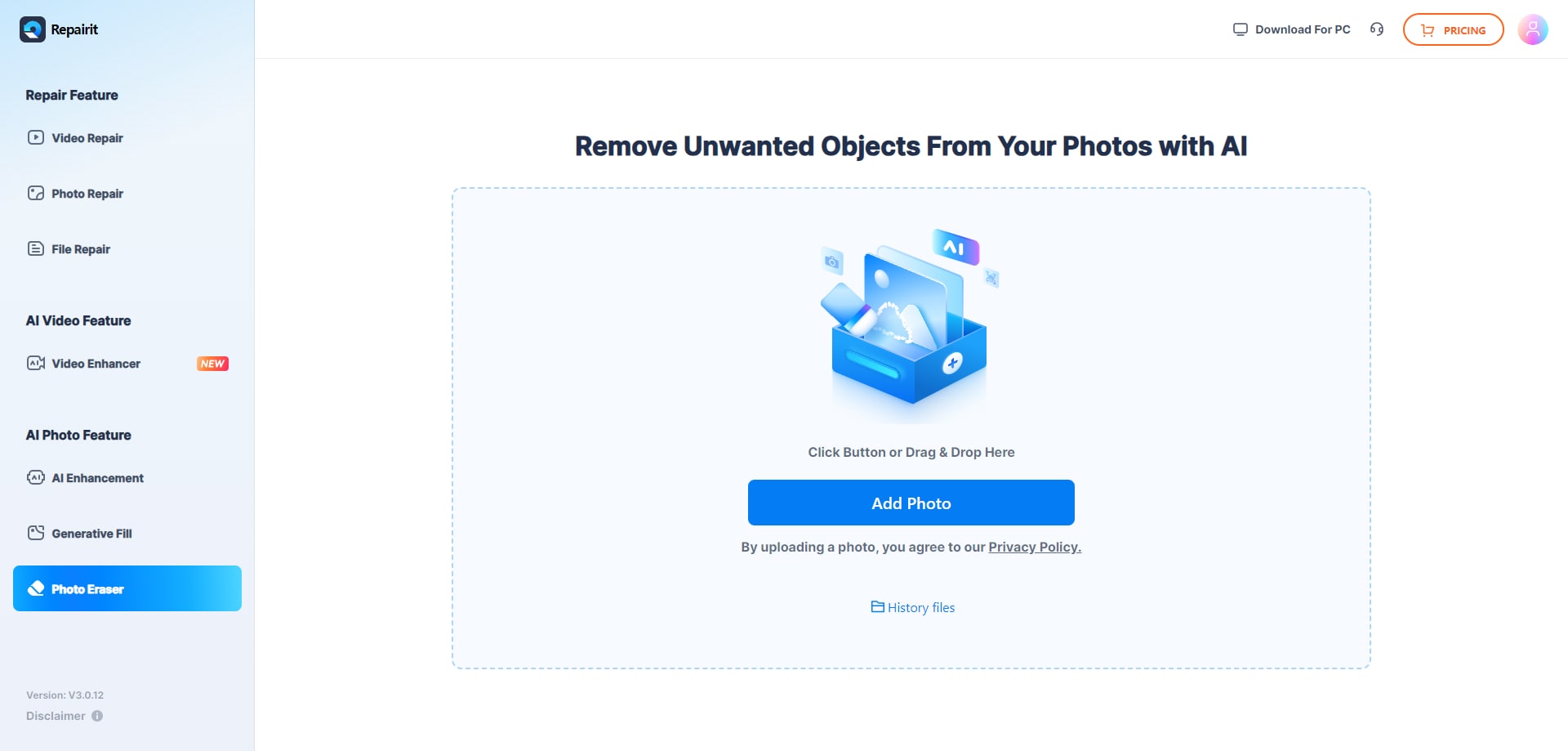
Step 1. Upload the photo you want to edit and start the object removal process.
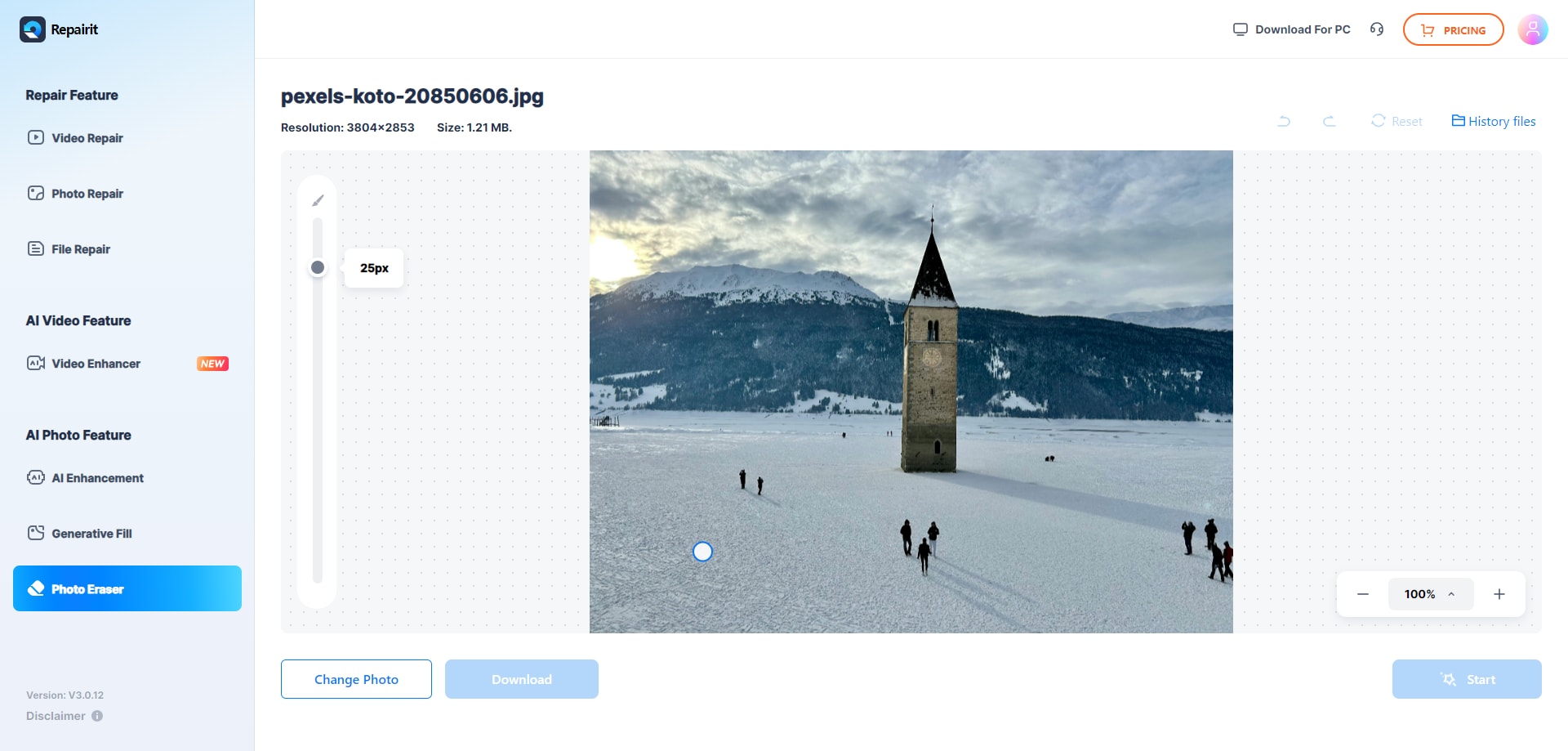
Step 2. Adjust the brush size and select the object or area you want to remove from the image.
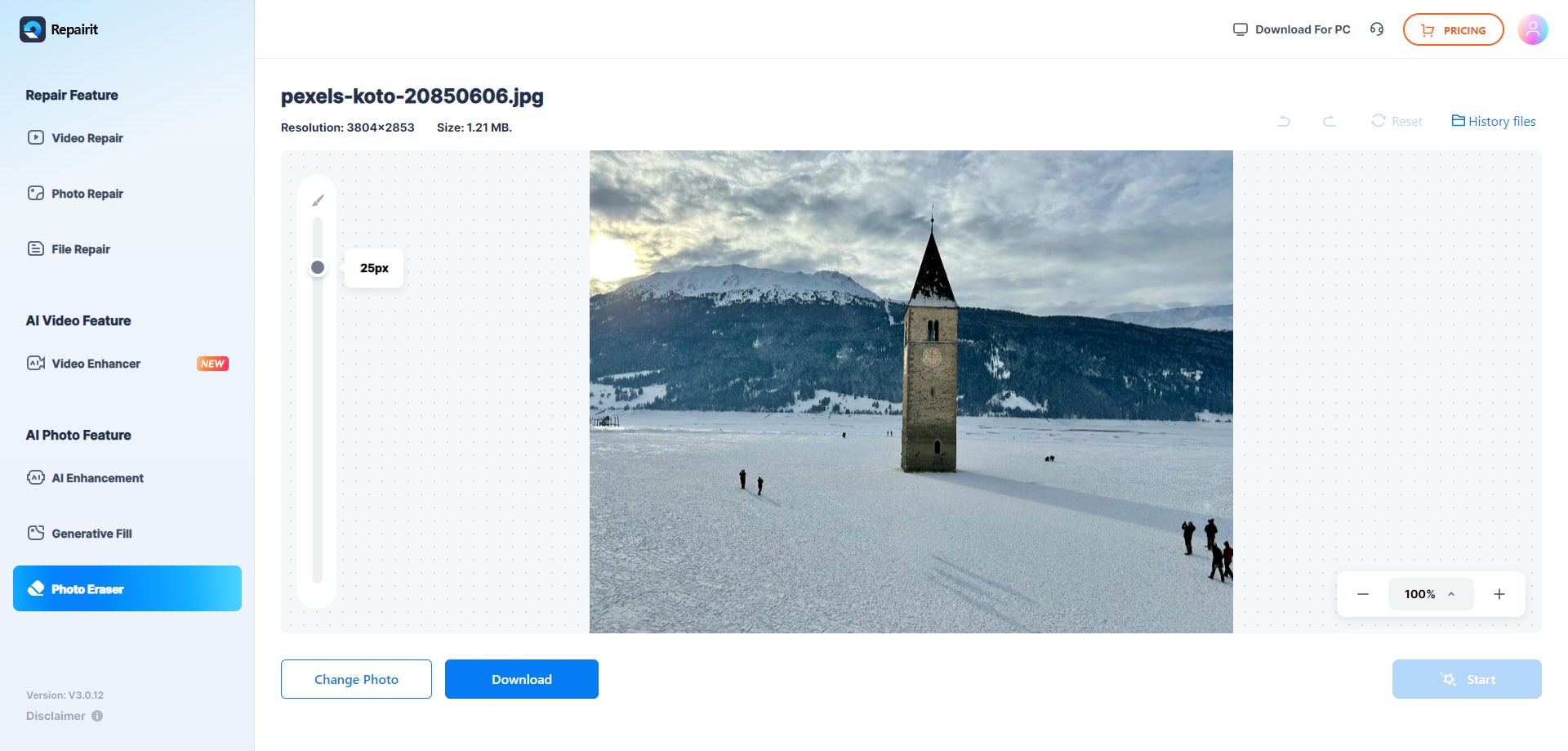
Step 3. Let the AI process the image and download the cleaned photo after the object is removed.
Final Verdict
Repairit Photo Eraser and AKVIS Retoucher both address the same core problem: removing unwanted content from photos and filling the resulting gaps convincingly. They differ, however, in how much they automate and how much control they demand from the user.
Repairit Photo Eraser emphasizes speed and accessibility. It is well suited to users who regularly remove people, clutter, watermarks, or text and who want AI to handle the heavy lifting with minimal manual intervention. In many everyday photos, it can produce natural-looking background fill after just a few brush strokes.
AKVIS Retoucher leans toward a more meticulous, manual style of object removal. It may appeal to users who already work inside desktop editing environments, do not mind an older-style UI, and are willing to fine-tune each area until the result blends as desired.
Instead of an absolute winner, the better choice depends on your workflow: choose Repairit when you value fast, AI-assisted cleanup and straightforward steps, and consider AKVIS when you want to stay close to a manual retouching process with more granular control over how each distraction is removed.
Next: Repairit Photo Eraser vs Gimp
FAQ
-
1. Is Repairit Photo Eraser easier to use than AKVIS Retoucher for object removal?
For most users, yes. Repairit Photo Eraser is designed around a simple flow of upload, select, erase, and save, while AKVIS Retoucher behaves more like a classic retouching tool that may feel slower for straightforward object removal tasks. -
2. Can both tools remove background distractions from photos?
Both tools can remove background distractions, but they do so differently. Repairit Photo Eraser leans on AI to erase distractions and auto-fill the background, whereas AKVIS Retoucher uses more manual retouching tools that require careful selection and adjustment. -
3. Which tool is better for deleting watermarks from images?
Repairit Photo Eraser is generally more convenient for deleting watermarks quickly thanks to its AI-driven fill. However, users who need precise, localized edits on complex backgrounds may prefer the manual control provided by AKVIS Retoucher. -
4. Should I choose Repairit Photo Eraser or AKVIS Retoucher for restoring old photos?
If your main goal is to restore old photos with many scratches and defects, AKVIS Retoucher may be suitable due to its focused retouching tools. If you mostly need to remove a few obvious objects or distractions on older photos, Repairit Photo Eraser can provide faster, more automated cleanup.




