
Choosing between Repairit Photo Eraser and SoftOrbits Photo Retoucher mostly comes down to how you prefer to remove unwanted objects. Repairit leans on AI to erase objects from photos quickly with minimal manual work. SoftOrbits offers a more traditional, step-by-step retouching approach with focused tools for object removal and scratch repair. This comparison looks at object removal quality, workflows, pricing, and who each tool is best for so you can pick the option that matches your editing style and experience level.
Remove Unwanted Objects with Repairit Photo Eraser
 Security Verified. Over 7,302,189 people have downloaded it.
In this article
- Repairit Photo Eraser vs SoftOrbits Photo Retoucher: Quick Verdict
- Repairit Photo Eraser vs SoftOrbits Photo Retoucher: Key Differences
- Repairit Photo Eraser vs SoftOrbits Photo Retoucher: Comparison Table
- What Repairit Photo Eraser and SoftOrbits Photo Retoucher Are Best For
- Repairit Photo Eraser vs SoftOrbits Photo Retoucher: Object Removal Capabilities
- Repairit Photo Eraser vs SoftOrbits Photo Retoucher: Background Fill and Realism
- Repairit Photo Eraser vs SoftOrbits Photo Retoucher: Workflow and Ease of Use
- Repairit Photo Eraser vs SoftOrbits Photo Retoucher: Pricing and Trial Options
- Who Should Choose Repairit Photo Eraser
- Who Should Choose SoftOrbits Photo Retoucher
- Pros and Cons of Repairit Photo Eraser and SoftOrbits Photo Retoucher
- How to Remove Unwanted Objects After Choosing the Right Tool
Introduction
Repairit Photo Eraser and SoftOrbits Photo Retoucher both focus on removing unwanted objects, watermarks, and distractions so your photos look cleaner and more intentional. Repairit relies on AI to erase objects and rebuild backgrounds with as little manual work as possible. SoftOrbits uses traditional selection and retouching tools that give you more hands-on control but usually require extra time. Understanding how each handles object removal, background fill, and workflow helps you decide which tool fits your daily editing tasks.
Repairit Photo Eraser vs SoftOrbits Photo Retoucher: Quick Verdict
If you want to remove people, wires, logos, or stray objects quickly with minimal tweaking, Repairit Photo Eraser is likely a better fit in most cases. Its AI-driven object removal and automatic background fill are designed to handle everyday photo cleanup with a few brush strokes.
For users who prefer to mark areas carefully and guide the cleanup process themselves, SoftOrbits Photo Retoucher may feel more comfortable. Its manual tools can be useful when you need controlled object removal or scratch and mark cleanup on specific regions of an image.
Repairit Photo Eraser vs SoftOrbits Photo Retoucher: Key Differences
The main difference between these tools is how they approach object removal and how much control you want over each change.
Workflow and automation. Repairit Photo Eraser leans on AI. You highlight what you do not want, let the algorithm erase objects, and get a cleaned version in one or two passes. SoftOrbits typically asks you to mark objects, run a removal command, and refine the result manually if needed.
Manual control. Repairit keeps the interface light, with fewer sliders and technical options. This speeds up simple cleanup but gives less pixel-level control. SoftOrbits offers more conventional retouching tools, which may suit users who like to zoom in, refine edges, and repeat passes until they are satisfied.
Natural-looking results. In many everyday scenes, Repairit aims to generate a plausible background fill automatically, which can be helpful for social media and quick product shots. Depending on the image, complex overlaps or textured backgrounds might still benefit from the additional manual adjustments that SoftOrbits makes possible.
Learning curve. Repairit focuses on a guided, beginner-friendly experience. SoftOrbits is still approachable but expects a bit more familiarity with selection and retouching concepts, especially when cleaning small details around edges or text.
Repairit Photo Eraser vs SoftOrbits Photo Retoucher: Comparison Table
| Criteria | Repairit Photo Eraser | SoftOrbits Photo Retoucher |
|---|---|---|
| Best for | Users who want to remove unwanted objects with a quick, largely automatic AI workflow. | Users comfortable with manual retouching who want control over object removal and scratch repair. |
| Ease of use | Very simple; upload, highlight, and let AI erase objects from photos. | Simple but more hands-on; users mark areas and run removal tools step by step. |
| Object removal | Optimized for fast cleanup of people, wires, and small background distractions with AI fill. | Capable of targeted object removal and cleaning scratches with manual adjustments. |
| Workflow | Streamlined: upload photo, select object, process, and save in a few clicks. | Workflow: add photo, mark object or defect, remove, then refine and save. |
| Strengths | Speed, automation, and realistic background fill for typical scenes. | Object removal, scratch repair tools, and predictable, guided workflow. |
| Weaknesses | Less granular manual control for pixel-level edits. | Limited AI capabilities and more reliance on user input for complex scenes. |
What Repairit Photo Eraser and SoftOrbits Photo Retoucher Are Best For
Repairit Photo Eraser and SoftOrbits Photo Retoucher are both focused on photo retouching and erasing tools that help users remove unwanted objects and clean up images. Repairit emphasizes an AI-driven experience for quickly erasing objects from photos, while SoftOrbits uses more traditional retouching tools centered on object removal and scratch repair.
Repairit Photo Eraser is generally best for users who:
- Need fast, repeatable cleanup of distractions across many images, such as travel or social content.
- Prefer an AI-based process with fewer manual steps and a simple interface.
- Want automatic handling of background fill when people, logos, or small objects are removed.
SoftOrbits Photo Retoucher is generally best for users who:
- Are comfortable with selection-based tools and methodical retouching workflows.
- Want to manually control how individual objects, scratches, or marks are removed.
- Typically work on fewer images but are willing to spend more time refining each result.
Repairit Photo Eraser vs SoftOrbits Photo Retoucher: Object Removal Capabilities
Both tools are built to remove unwanted elements, yet they differ in how they tackle specific cleanup scenarios.
Range of removable objects. Each tool can address common distractions such as stray people in the background, power lines, small props, and logos. Repairit aims to recognize and replace such areas using AI, which can be useful when you are dealing with many similar edits. SoftOrbits uses selection and retouching tools that rely more on your input and judgment.
Watermark and logo cleanup. For watermark or logo removal, both tools let you mark the area and attempt to reconstruct the underlying background. Repairit handles this through automated analysis of surrounding pixels, while SoftOrbits encourages you to carefully outline the watermark and then run its removal tools, potentially repeating the process for stubborn elements.
Text removal. When deleting text overlays, Repairit works well for straightforward cases such as captions over relatively uniform backgrounds. In more complex layouts, SoftOrbits manual control can help you refine edges around letters and adjust small imperfections after the first pass.
People and complex objects. Removing people or large objects from busy scenes typically stresses any object removal tool. Repairit tries to infer what should appear behind the subject using AI, which can be effective in many everyday photos. For intricate overlaps, SoftOrbits may require more effort but gives you the option to rework small regions repeatedly until you are satisfied.
Repairit Photo Eraser vs SoftOrbits Photo Retoucher: Background Fill and Realism
Once an object is removed, the quality of the background fill makes the difference between a quick social post and an image that withstands close inspection.
Automatic fill in Repairit. Repairit Photo Eraser leans heavily on automatic background reconstruction. Depending on the image, it can generate natural-looking sky, pavement, water, or wall textures with minimal input. This is especially helpful when you want to clean up images quickly without spending time painting or cloning.
Manual refinement in SoftOrbits. SoftOrbits Photo Retoucher usually expects you to evaluate the filled area and manually clean up any artifacts or repeating patterns that appear after removal. This extra control can be helpful when subtle details, such as brick lines or wood grain, need to be preserved.
Artifacts and touchups. In many simple scenes, Repairit may deliver a convincing result in one pass. For highly detailed textures, either tool might leave small artifacts such as blurring or pattern repetition. In those cases, Repairit users may rerun the removal on a smaller area, while SoftOrbits users can selectively retouch edges and transitions with additional passes.
When manual cleanup still helps. For demanding compositions, a hybrid approach often works best: start with an automated or semi-automated removal, then refine manually. Repairit is oriented toward doing most of this in one step, while SoftOrbits leans toward incremental refinement.
Repairit Photo Eraser vs SoftOrbits Photo Retoucher: Workflow and Ease of Use
The way you move from opening an image to saving a cleaned version strongly affects which tool will feel comfortable in daily use.
Repairit Photo Eraser workflow. Repairit focuses on a guided workflow where you upload a photo, quickly highlight what you want gone, and let AI erase objects from photos in one pass. Brush-based selection is designed to be forgiving, so you can focus on what to keep instead of learning many technical controls.
SoftOrbits Photo Retoucher workflow. SoftOrbits Photo Retoucher follows a more manual workflow: add photo, mark object, remove, save, and optionally repeat for fine-tuning. You may spend more time on each image, but you have more opportunities to adjust selections, run different tools, and polish tricky edges.
Brush selection and control. Both tools provide selection brushes or similar tools. Repairit tends to emphasize broader, quick selections intended for AI to interpret, while SoftOrbits often benefits from more precise strokes and attention to boundaries when objects are close to the subject you want to keep.
Editing effort. In most cases, Repairit requires less effort per photo, which suits users who value speed. SoftOrbits generally demands more interaction, which may appeal to users who want hands-on control and do not mind a slower process.
Repairit Photo Eraser vs SoftOrbits Photo Retoucher: Pricing and Trial Options
Both tools are typically paid products, but they follow somewhat different approaches to licensing and trials.
Repairit Photo Eraser is usually available as part of a straightforward, consumer-focused lineup, often with a trial or limited free use so you can test how well it removes objects, watermarks, and text on your own photos before deciding.
SoftOrbits Photo Retoucher generally follows a more traditional license model with trial access. You can install it, explore its object removal and mark cleanup tools, and then decide if its manual workflow aligns with your needs.
Because specific plans and discounts can change, it is sensible to check each vendor website for current details and to see which option fits your budget and usage frequency.
Who Should Choose Repairit Photo Eraser
- Users who want fast AI help to remove unwanted objects with minimal manual work.
- Beginners who prefer a simple interface over complex retouching tools.
- People who regularly clean up travel, event, or social photos in batches.
- Anyone who values quick results and automatic background fill over fine-grained editing control.
Who Should Choose SoftOrbits Photo Retoucher
- Users comfortable with traditional retouching tools who want control over what gets removed.
- People cleaning up old or detailed photos where scratch repair and manual touchups matter.
- Those who prefer a predictable, mark-and-remove workflow without relying heavily on AI.
- Users working on individual images where they can spend time refining each cleanup.
Pros and Cons of Repairit Photo Eraser and SoftOrbits Photo Retoucher
Repairit Photo Eraser Pros and Cons
SoftOrbits Photo Retoucher Pros and Cons
How to Remove Unwanted Objects After Choosing the Right Tool
Once you have decided which workflow suits you, the next step is putting it into practice on real photos. For users who prefer a fast, AI-guided approach, Repairit Photo Eraser offers a straightforward path from upload to download.
Key Features
- AI-assisted object removal for people, wires, logos, and other distractions.
- Automatic background fill that attempts to keep the scene natural after cleanup.
- Streamlined workflow for quickly processing one or multiple photos.
Step-by-step guide
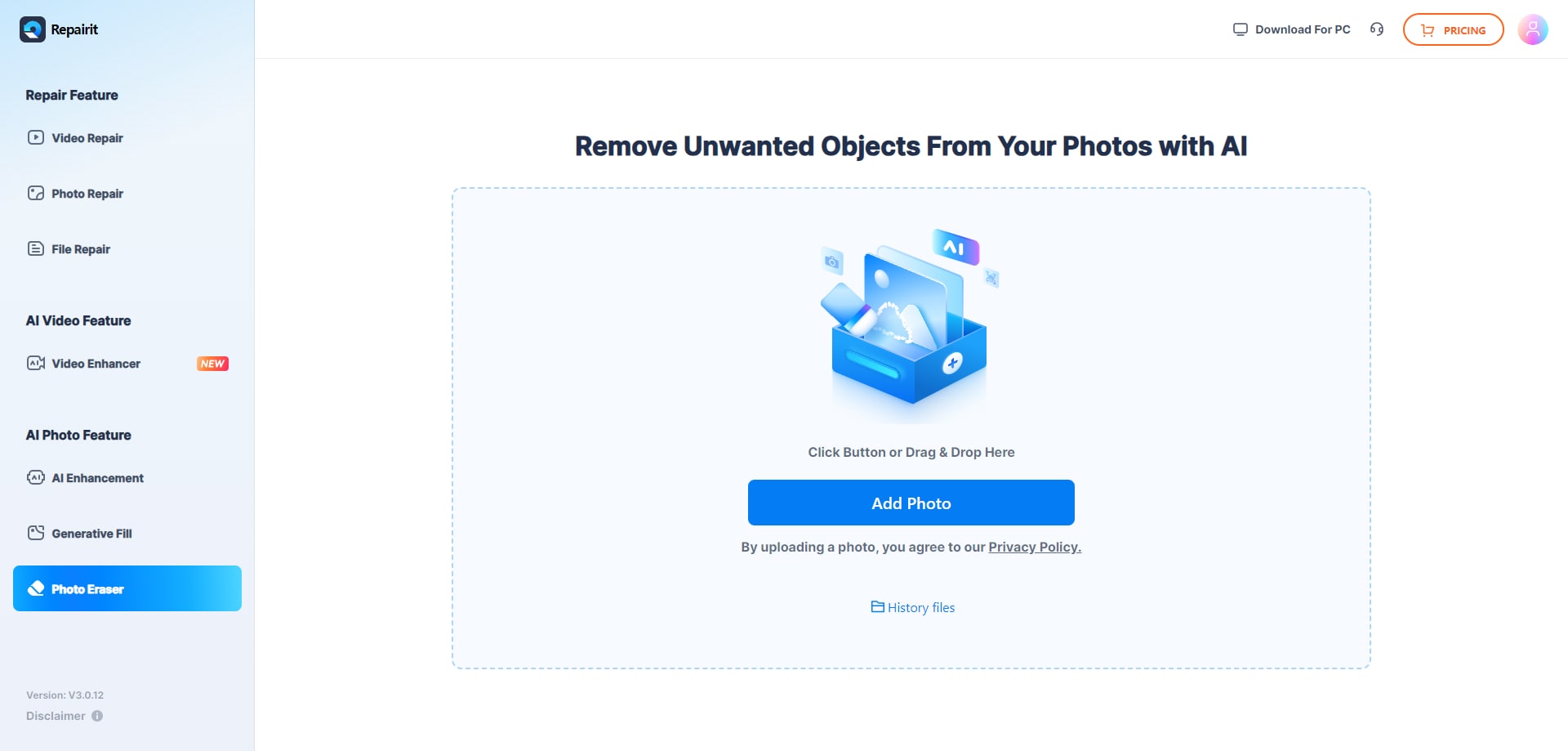
Step 1. Upload the photo you want to edit and start the object removal process.
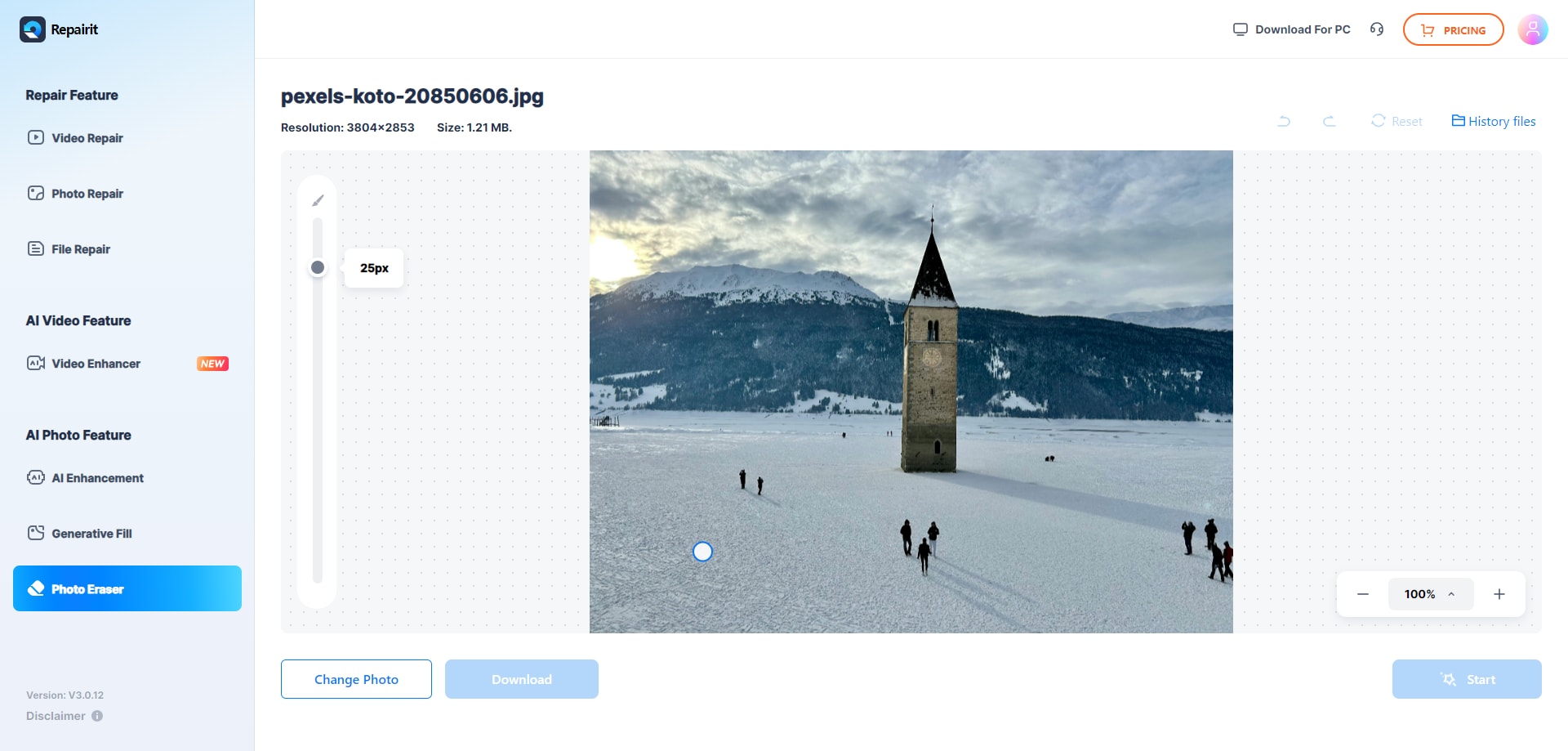
Step 2. Adjust the brush size and select the object or area you want to remove from the image.
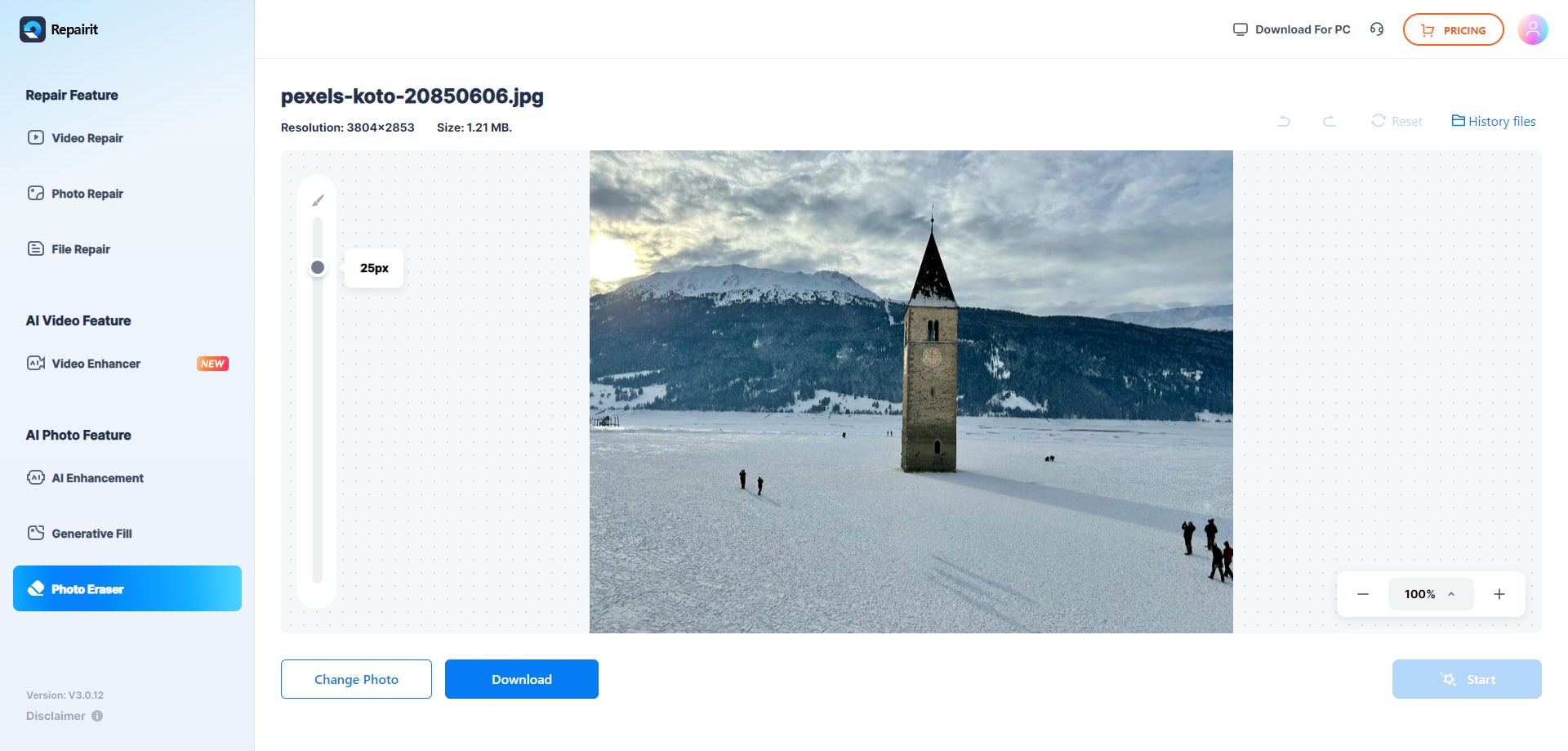
Step 3. Let the AI process the image and download the cleaned photo after the object is removed.
Final Verdict
Repairit Photo Eraser and SoftOrbits Photo Retoucher both aim to remove unwanted objects and clean up images, but they approach the task differently. Repairit leans on AI to erase objects from photos quickly with minimal input, making it appealing for users who value speed and an easy workflow. SoftOrbits provides structured tools for object removal and scratch repair, favoring users who prefer to control each adjustment.
In most cases, busy users or beginners will be better served by Repairit Photo Eraser for everyday cleanup across many images. SoftOrbits Photo Retoucher can still be a reasonable choice if you are comfortable with more manual tools and want extra control when removing specific objects, scratches, or marks one step at a time.
Next: Repairit Photo Eraser vs Akvis Retoucher
FAQ
-
1. Is Repairit Photo Eraser better than SoftOrbits Photo Retoucher for beginners?
For typical beginners, Repairit Photo Eraser is often easier because its AI focuses on automatic object removal with fewer settings to manage. SoftOrbits Photo Retoucher is still accessible but expects users to mark and refine areas more manually. -
2. Which is better at removing unwanted objects from complex backgrounds?
Results depend on the image. Repairit Photo Eraser can handle many complex scenes quickly with AI, but very intricate backgrounds may benefit from the manual control in SoftOrbits Photo Retoucher, where you can refine selections and repeat cleanup steps as needed. -
3. Can both tools delete watermarks and small logos?
Both tools can generally help delete watermarks, logos, and small text overlays by letting you mark the area and run object removal. Repairit focuses on doing this automatically, while SoftOrbits gives you more manual control over the process and cleanup passes. -
4. How should I choose between Repairit Photo Eraser and SoftOrbits Photo Retoucher?
If you want fast, AI-based removal of people, distractions, and simple watermarks with minimal effort, Repairit Photo Eraser may be a better match. If you prefer a slower, more manual approach with tools for object removal and scratch repair where you control each step, SoftOrbits Photo Retoucher may suit you more.




