
Choosing between Repairit Old Photo Restoration and GIMP can be confusing if you just want to repair damaged prints, fix fading, and bring old family photos back to life. This guide compares both tools on restoration quality, workflow, ease of use, and cost, so you can decide whether a guided AI-style process or a manual, pro-style editor is better for your old photo projects.
Restore Old Photos with Repairit
 Security Verified. Over 7,302,189 people have downloaded it.
In this article
- Repairit Old Photo Restoration vs GIMP: Quick Verdict
- Repairit Old Photo Restoration vs GIMP: Key Differences
- Repairit Old Photo Restoration vs GIMP: Comparison Table
- What Repairit Old Photo Restoration and GIMP Are Best For
- Repairit Old Photo Restoration vs GIMP: Repair Capabilities and Damage Handling
- Repairit Old Photo Restoration vs GIMP: Restoration Quality and Real Results
- Repairit Old Photo Restoration vs GIMP: Workflow and Ease of Use
- Repairit Old Photo Restoration vs GIMP: Pricing and Trial Options
- Who Should Choose Repairit Old Photo Restoration
- Who Should Choose GIMP
- Pros and Cons of Repairit Old Photo Restoration and GIMP
- How to Restore Old Photos After Choosing the Right Tool
Repairit Old Photo Restoration vs GIMP: Quick Verdict
The key choice between Repairit Old Photo Restoration and GIMP is convenience versus manual control. Repairit focuses on guided, AI-style repair of old photos, while GIMP is a full image editor where you build your own restoration workflow by hand.
Repairit Old Photo Restoration is a stronger choice for users who want to quickly fix scratches, cracks, and faded colors without learning complex tools. It is designed around common old photo issues and guides you through upload, automatic repair, and export in a few steps.
GIMP may be enough if you are comfortable with advanced editing, want a free solution, and are willing to repair damage using manual tools like healing and clone brushes.
In most cases, families digitizing albums or users restoring a batch of photos will finish faster with Repairit Old Photo Restoration, while experienced hobbyists and professionals may prefer GIMP for highly customized, pixel-level retouching.
Repairit Old Photo Restoration vs GIMP: Key Differences
At a high level, both tools can help you repair damaged photos, but they approach the job very differently.
Repairit Old Photo Restoration concentrates on common old photo problems such as scratches, cracks, stains, noise, and fading. It uses an automated, guided approach so that most of the heavy lifting happens in the background after you select the desired repair options.
GIMP is an open-source image editor that covers a wide range of tasks beyond restoration. For old photo repair, it relies on manual tools like healing, cloning, and color adjustment layers. This can produce very precise results, but it demands more practice, especially when dealing with torn edges, large stains, or subtle tonal changes.
The main differences that matter for old photo restoration include:
- Ease of use: Repairit offers a simplified, guided workflow; GIMP has a steeper learning curve and many panels.
- Automation vs. manual control: Repairit automates most repairs, while GIMP requires hands-on retouching for each area of damage.
- Speed: Repairit can handle typical restorations in a few guided steps; GIMP often takes longer because you manually heal and clone.
- Cost: Repairit is commercial with trial-style options; GIMP is completely free and open-source.
Repairit Old Photo Restoration vs GIMP: Comparison Table
| Dimension | Repairit Old Photo Restoration | GIMP |
|---|---|---|
| Best for | Everyday users wanting quick, guided repair of old or damaged photos with minimal manual editing. | Advanced users wanting free restoration tools in an open-source image editor. |
| Ease of use | Simple, guided workflow with automated repair for common old photo issues. | Steep learning curve with many manual steps and complex panels. |
| Restoration quality | Consistent, AI-style enhancement for scratches, cracks, fading, and facial details in most everyday photos. | Potentially very high, but depends heavily on user skill with healing and clone tools. |
| Workflow | Upload, choose restoration options, preview, and export in a few guided steps. | Open image, use healing and clone tools, adjust layers and colors, then export manually. |
| Strengths | Fast results, focused on old photo repair, no need for detailed editing knowledge. | Free, powerful tools, highly customizable brushes and layers for precise manual fixes. |
| Weaknesses | Less control over ultra-fine manual retouching than a full editor; often requires internet access for online use. | Complex interface, time-consuming manual workflow, easier to make mistakes without experience. |
What Repairit Old Photo Restoration and GIMP Are Best For
Repairit Old Photo Restoration aims squarely at users who want a focused tool to repair old photos without managing dozens of editing options. It is suited to:
- Cleaning up scanned family prints that have scratches, dust, and small tears.
- Improving soft or noisy portraits where faces are difficult to recognize.
- Restoring faded colors in everyday snapshots with minimal manual input.
GIMP is better framed as a full-featured editor that can be adapted for restoration tasks. It is a stronger match if you:
- Enjoy fine-tuning each area of damage with custom brushes and masks.
- Need very specific control over tones, contrast, and color balance for archival or creative projects.
- Prefer an open-source tool that you can customize with plugins and scripts.
In short, choose Repairit when you want speed and guidance, and consider GIMP when you want free, highly manual restoration with full control over every adjustment.
Repairit Old Photo Restoration vs GIMP: Repair Capabilities and Damage Handling
Both tools can help you tackle common types of damage found in old photos, but the way they handle that damage differs.
Repairit Old Photo Restoration concentrates on issues such as:
- Scratches, cracks, and minor stains: one-click repair options to reduce or remove surface defects on scanned prints.
- Fading and discoloration: automated adjustments to restore faded colors or refine black and white images.
- Noise and facial softness: targeted enhancement to make faces clearer in low-quality or aged portraits.
GIMP can address these same problems, but it requires you to choose and configure the tools:
- Healing and clone brushes to manually rebuild scratched or torn sections.
- Layer masks for carefully blending repaired areas with original textures.
- Curves, levels, and color balance to reduce yellowing or fading over time.
For light to moderate damage across many photos, Repairit tends to minimize repetitive manual work. For severe or unusual damage, such as large missing areas or complex stains, GIMP may give advanced users the flexibility to design a more customized repair.
Repairit Old Photo Restoration vs GIMP: Restoration Quality and Real Results
Restoration quality depends on both the tool and the person using it.
With Repairit Old Photo Restoration, you can usually expect consistent improvements on common problems like scratches and cracks, light stains, and overall fading. The tool is designed so that even users with little editing background can get a noticeably cleaner, clearer result from a scanned print.
With GIMP, results can range from basic fixes to highly refined restorations, depending on your familiarity with healing, cloning, and tonal adjustments. Users who know how to sample textures, align brush strokes, and work with multiple layers can often match or surpass automated tools on specific challenging areas, such as intricate backgrounds or clothing folds.
For many family archives, Repairit can be enough to bring images back to an enjoyable viewing quality with less trial and error. For projects where each pixel matters and you are willing to spend more time on careful retouching, GIMP remains a capable option.
Repairit Old Photo Restoration vs GIMP: Workflow and Ease of Use
Workflow is one of the clearest differences between these tools.
Repairit Old Photo Restoration prioritizes a streamlined process:
- Import a scanned old photo.
- Choose restoration options such as scratch removal, facial enhancement, or color restoration.
- Preview the repaired version.
- Export the final image.
This design makes it easier for beginners and busy users to move quickly from damaged print to shareable image.
GIMP follows a more manual path:
- Open the image as a new project.
- Create layers and masks for non-destructive edits.
- Use healing and clone tools to repair each damaged area.
- Apply curves, levels, and color correction to combat fading and color shifts.
- Flatten or export the image in your preferred format.
This manual approach gives skilled users deep control but can feel slow or intimidating if you just want to quickly fix a handful of old photos without learning a professional-style editor.
Repairit Old Photo Restoration vs GIMP: Pricing and Trial Options
Pricing is another practical factor when choosing between the two.
Repairit Old Photo Restoration is offered as a commercial tool. In many cases, you can try it in a limited or trial-style mode to test how well it handles your old photos before committing to paid use. This can be helpful if you want to see real results on your own images before deciding.
GIMP is completely free and open source. There are no license fees, which is attractive if you are working on a budget and are willing to invest time into learning the software.
When deciding, weigh GIMP s zero cost and flexibility against the time savings and guided automation offered by Repairit. For occasional large restoration projects or ongoing family archiving, the time saved by an automated workflow can matter as much as the purchase price.
Who Should Choose Repairit Old Photo Restoration
Repairit Old Photo Restoration is likely the better fit if your main goal is to restore memories rather than learn complex editing tools. It is especially suitable for:
- People who want to restore damaged old photos quickly without learning complex editing software.
- Families digitizing albums who need to fix scratches, cracks, and fading across many photos with minimal effort.
- Users who want help enhancing facial details and cleaning noise in old portraits using guided, AI-style tools.
- Anyone looking to colorize black and white photos with a simpler, focused restoration workflow.
If you are prioritizing a predictable, guided experience for multiple prints and do not want to manage layers, masks, and brush settings, Repairit aims to remove as much friction as possible from the process.
Who Should Choose GIMP
GIMP remains a strong choice for users who value control and cost savings more than convenience. It is a good match for:
- Experienced or advanced users wanting free restoration tools and complete manual control over every pixel.
- Hobbyists comfortable with GIMP s complex interface who enjoy fine-tuning scratch and crack repairs by hand.
- People who already use GIMP for general editing and occasionally need to repair old photos without switching tools.
- Users who prefer open-source software and are willing to follow a manual workflow of healing, cloning, adjusting, and exporting.
If you regularly retouch images and do not mind the time investment required for detailed manual edits, GIMP can serve as a flexible restoration environment without subscription or license fees.
Pros and Cons of Repairit Old Photo Restoration and GIMP
Understanding the pros and cons of each tool makes it easier to choose the right one for your restoration style and skill level.
Repairit Old Photo Restoration Pros and Cons
GIMP Pros and Cons
How to Restore Old Photos After Choosing the Right Tool
Once you have compared Repairit Old Photo Restoration and GIMP and decided which approach suits your skills, the next step is actually restoring your old photos. Even if you plan to learn detailed manual retouching later, many users prefer to start with a guided workflow to quickly rescue important images.
For a practical starting point, Repairit Old Photo Restoration offers a focused process that handles common damage such as scratches, cracks, and fading with minimal setup.
Key Features
Some core capabilities that matter for old photo restoration include:
- Automated repair of scratches, cracks, stains, and general surface damage on old photos.
- Enhancement of facial features and details to make portraits from old prints more recognizable.
- Options to restore faded colors or work with black and white photos in a guided, simplified way.
Together, these features help you repair torn or stained old photos, reduce noise, and make important people and details stand out more clearly.
Step-by-step guide
Step 1. Choose the AI restoration model based on your needs, such as repairing damaged photos or restoring old images.

Step 2. Import your old or damaged photos into Repairit to begin the restoration process.

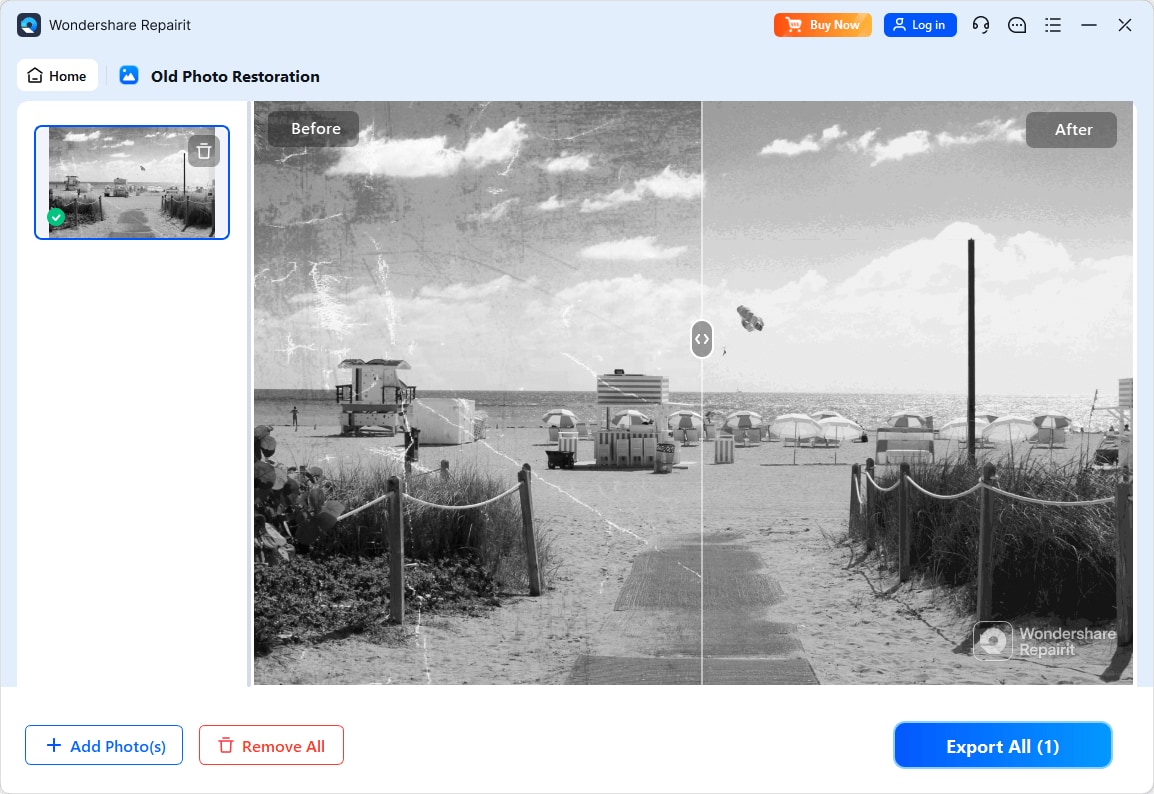
Step 3. Apply the old photo restoration model to fix scratches, restore colors, and improve image quality.
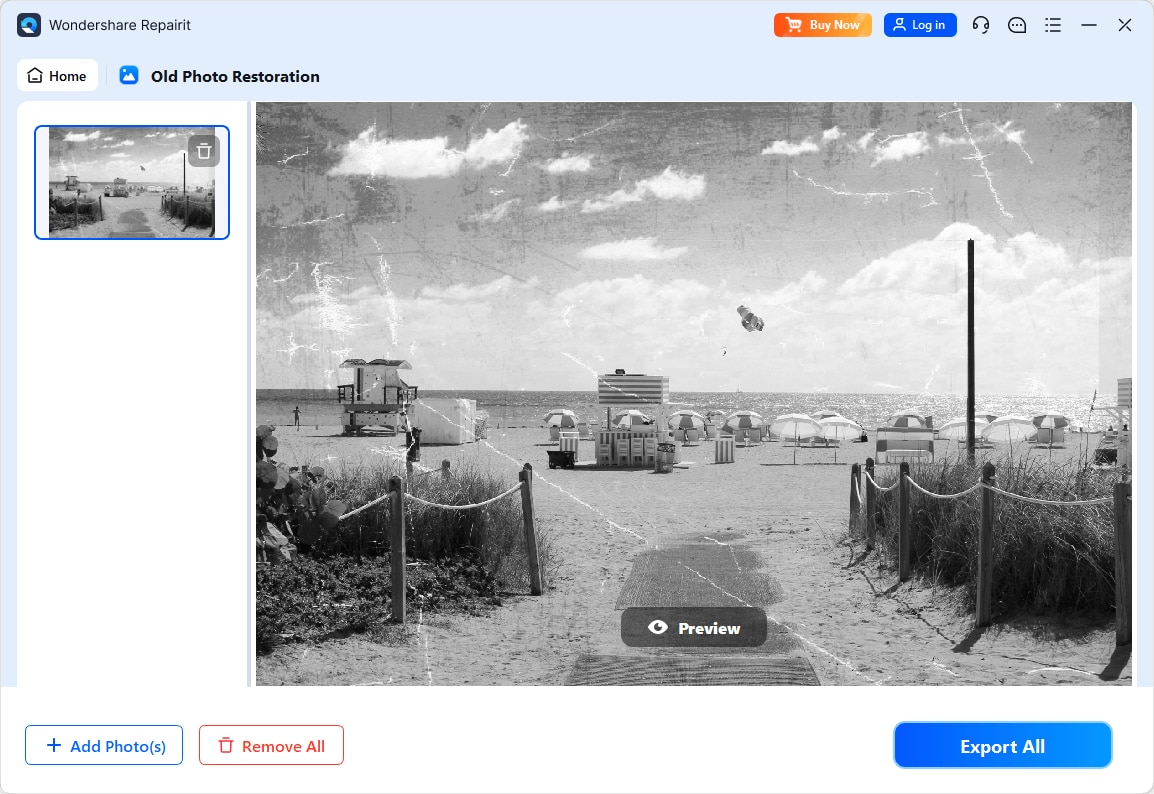
Step 4. Preview the restored result and save the repaired photo to your device.
Final Verdict
For most people who simply want to repair damaged photos, clean up scratches, and restore faded family memories, Repairit Old Photo Restoration offers a more accessible, guided path with less trial and error. Its focused tools reduce the need for deep editing knowledge and deliver reliable improvements on typical old prints.
GIMP can be a strong option if you are an advanced user who prefers free, open-source software and is comfortable investing time in manual healing, cloning, and color adjustments. It gives you fine control at the cost of a steeper learning curve and a slower, more hands-on workflow.
If you value speed, guidance, and consistent results across many photos, Repairit is usually the more practical fit. If you prioritize full manual control, enjoy detailed retouching, and do not mind a complex interface, GIMP may be all you need for old photo restoration.
Next: Repairit Old Photo Restoration vs Inpaint
FAQ
-
1. Is Repairit Old Photo Restoration better than GIMP for fixing scratches and cracks?
In most cases, Repairit Old Photo Restoration is easier for fixing scratches and cracks because it automates much of the repair. GIMP can match or exceed the result with healing and clone tools, but that usually requires more time and experience to avoid visible retouching artifacts. -
2. Which is easier for beginners, Repairit Old Photo Restoration or GIMP?
Repairit Old Photo Restoration is generally easier for beginners because it provides a guided workflow and automated repair features. GIMP has a steeper learning curve, with many tools and panels that can overwhelm users who only need simple old photo restoration. -
3. Can GIMP restore faded colors in old photos as well as Repairit Old Photo Restoration?
GIMP can restore faded colors through manual adjustments like curves, levels, and color balance, but the quality of the result depends on your skills and the time you spend fine-tuning. Repairit Old Photo Restoration streamlines color restoration, which is often more convenient if you prefer not to manage detailed color settings.




