
Repairit Old Photo Restoration vs Adobe Photoshop is a practical comparison for anyone trying to decide how to bring old, damaged prints back to life. Choosing between these tools depends on how you like to work and how severe the damage is in your images. Repairit Old Photo Restoration focuses on guided, AI-assisted restoration that can quickly fix scratches, fading, and minor damage with minimal manual work. Adobe Photoshop is professional image editing software with advanced restoration tools that reward patient, precise manual editing. This article breaks down repair quality, workflows, and who each tool suits so you can select the most practical option for your family archives or client projects.
Restore Old Photos with Repairit
 Security Verified. Over 7,302,189 people have downloaded it.
In this article
- Repairit Old Photo Restoration vs Adobe Photoshop: Quick Verdict
- Repairit Old Photo Restoration vs Adobe Photoshop: Key Differences
- Repairit Old Photo Restoration vs Adobe Photoshop: Comparison Table
- What Repairit Old Photo Restoration and Adobe Photoshop Are Best For
- Repairit Old Photo Restoration vs Adobe Photoshop: Repair Capabilities and Damage Handling
- Repairit Old Photo Restoration vs Adobe Photoshop: Restoration Quality and Real Results
- Repairit Old Photo Restoration vs Adobe Photoshop: Workflow and Ease of Use
- Repairit Old Photo Restoration vs Adobe Photoshop: Pricing and Trial Options
- Who Should Choose Repairit Old Photo Restoration
- Who Should Choose Adobe Photoshop
- Pros and Cons of Repairit Old Photo Restoration and Adobe Photoshop
- How to Restore Old Photos After Choosing the Right Tool
Repairit Old Photo Restoration vs Adobe Photoshop: Quick Verdict
The key difference between Repairit Old Photo Restoration and Adobe Photoshop is automation versus manual control. Repairit leans on AI to repair scratches, cracks, and faded colors in a guided way, while Photoshop expects you to make detailed, pixel-level decisions.
For most people digitizing family albums or handling moderate damage, Repairit can be a stronger choice because it produces consistent improvements with far less effort. Photoshop may be better suited if you already work with layers, masks, and retouching tools and you want to design a fully custom restoration.
In many real-world projects, a blended approach also works: using Repairit for quick baseline repairs, then refining tricky areas in Adobe Photoshop when you need advanced, manual touch-ups.
Repairit Old Photo Restoration vs Adobe Photoshop: Key Differences
The most important distinctions between these old photo restoration workflows revolve around control, learning curve, and time investment:
- Automation vs. manual editing: Repairit uses AI to detect and fix common defects in one pass, while Photoshop relies on tools like Healing Brush, Clone Stamp, and layers that you guide by hand.
- Speed of restoring old photos: Repairit typically repairs a scanned print in a few steps. Photoshop can take much longer because every crack, stain, or tear may need manual attention.
- Skill requirements: Repairit is oriented toward beginners and time-pressed users. Photoshop rewards experience with retouching and is often used by professional restorers.
- Level of customization: Repairit focuses on practical, natural-looking fixes. Photoshop provides more room for creative or stylized restorations, such as complex colorization or recomposing damaged areas.
- Best suited damage types: Repairit is strong for surface scratches, minor cracks, and faded colors. Photoshop is often chosen for severely torn or stained photos where you must rebuild missing sections carefully.
Which one fits you better depends on whether you value a fast, guided experience or in-depth manual control over every part of the restoration.
Repairit Old Photo Restoration vs Adobe Photoshop: Comparison Table
| Dimension | Repairit Old Photo Restoration |
|---|---|
| Best for | Everyday users and archivists who want fast, AI-assisted restoration of damaged old photos with minimal manual work. |
| Best for (Adobe Photoshop) | Professionals needing precise manual restoration and full creative control over every pixel. |
| Ease of use | Guided and streamlined, with automated tools that handle most scratch and fade repair for you. |
| Ease of use (Adobe Photoshop) | Steep learning curve with complex panels, tools, and layers that require practice to use effectively. |
| Restoration quality | Consistently strong results on common damage such as scratches, stains, and fading with little manual tuning. |
| Restoration quality (Adobe Photoshop) | Potentially very high quality when an experienced editor invests time in careful manual restoration work. |
| Workflow | Upload photo, choose restoration options, preview AI results, then export the repaired image. |
| Workflow (Adobe Photoshop) | Import photo, use healing or clone tools, adjust color, refine details with layers, then export. |
| Strengths | Fast results, AI-guided repair of facial details, simple tools for scratch and crack removal and color restoration. |
| Strengths (Adobe Photoshop) | Powerful retouching tools, layer control, and high flexibility to combine multiple restoration techniques. |
| Weaknesses | Less suited to highly customized, artistic edits and dependent on AI model limits for unusual damage. |
| Weaknesses (Adobe Photoshop) | Time-consuming and demanding to learn, especially if you only want to restore a few family photos. |
What Repairit Old Photo Restoration and Adobe Photoshop Are Best For
Repairit Old Photo Restoration and Adobe Photoshop both repair damaged photos, but they shine in different scenarios.
Repairit is usually the better fit if you are:
- Scanning family albums and want to quickly fix scratches and cracks in old photos without learning complex tools.
- Trying to restore faded colors in scanned photos or improve facial details in portraits from decades ago.
- Handling a batch of similar images where a consistent AI-driven approach saves time.
Photoshop is often preferred if you are:
- A professional retoucher or designer who needs precise, brush-based control over how every defect is patched.
- Tackling severely torn, stained, or partially missing photos where manual reconstruction with layers and masks is required.
- Planning custom colorization of black and white photos and want to fine-tune each color using advanced blending options.
For many users, the decision comes down to whether the goal is fast, reliable cleanup of typical damage or an in-depth creative restoration with complete control.
Repairit Old Photo Restoration vs Adobe Photoshop: Repair Capabilities and Damage Handling
Both tools can turn a damaged scan into a cleaner image, but they handle specific defects differently.
Repairit Old Photo Restoration repair capabilities focus on AI models trained to recognize typical aging issues in prints:
- Automatic scratch and crack repair across the whole image, which is useful when dust, hairline cracks, and surface marks are scattered everywhere.
- Reducing stains, small spots, and noise that often appear on older, low-resolution scans.
- Improving facial features to make eyes, mouths, and skin texture more recognizable without detailed brushwork.
- Enhancing color to address yellowing or overall fading from long-term storage.
Adobe Photoshop repair capabilities are built around manual tools and layer-based editing:
- Healing Brush, Clone Stamp, and Patch Tool for precisely repairing torn or stained old photos on a local level.
- Layer masks to isolate specific areas, such as restoring detail in a face while leaving the background as-is.
- Advanced tonal and color adjustments to remove color casts or match tones between patched areas and the original print.
- Brush-based reconstruction for missing pieces when you must carefully redraw parts of a face, outfit, or background.
In most cases, Repairit is more efficient for light to moderate damage across many photos, while Photoshop becomes valuable for the few images that require highly customized restoration.
Repairit Old Photo Restoration vs Adobe Photoshop: Restoration Quality and Real Results
Realistic expectations about restoration quality are important, especially when working with irreplaceable family photos.
With Repairit Old Photo Restoration, users typically see:
- Noticeable reduction of visible scratches and cracks without manual masking.
- Smoother backgrounds and clothing areas where dust and texture noise previously stood out.
- More legible faces, particularly in portraits where original details were slightly blurred or faded.
- Colors that look fresher and closer to how the original print might have appeared before aging.
The results often feel consistent across a set of images because the AI follows the same logic, which can be helpful when building a digital family archive.
With Adobe Photoshop, the final quality depends heavily on your skills and time:
- Experienced retouchers can manually remove extremely fine cracks and repair large tears while keeping texture believable.
- Color work can be very nuanced, especially when balancing skin tones or selectively brightening faded areas.
- For colorizing black and white photos, Photoshop allows you to control each color layer, shadows, and highlights to create a more stylized or historically accurate look.
In short, Repairit tends to produce good, dependable improvements quickly, while Photoshop offers a higher potential ceiling if you are willing to invest the effort.
Repairit Old Photo Restoration vs Adobe Photoshop: Workflow and Ease of Use
The workflow and ease of use often determine which tool feels right for your restoration project.
With Repairit Old Photo Restoration, the process is intentionally streamlined:
- Import your scanned old photo into a clear, guided interface.
- Choose restoration options such as scratch removal, face enhancement, or color restoration.
- Let the AI process the image and preview the repaired version.
- Download the result with minimal manual adjustment.
This suits users who do not want to manage layers, brushes, or complex panels.
With Adobe Photoshop, the workflow is more flexible but also more demanding:
- Open the scan, create duplicate layers, and plan your restoration steps.
- Use healing and cloning tools to remove spots, then patch deeper cracks and tears by hand.
- Apply adjustment layers for contrast, brightness, and color, masking them where necessary.
- Zoom in for meticulous touch-ups on facial features and fine textures.
While this approach offers fine control at each stage, it also means that complete beginners may need time and tutorials before achieving consistent results.
Repairit Old Photo Restoration vs Adobe Photoshop: Pricing and Trial Options
Cost and access can also influence the right choice, especially if you only restore old photos occasionally.
Repairit Old Photo Restoration pricing typically focuses on accessibility. Many users can try AI restoration on a limited number of photos or within certain feature limits before deciding whether to upgrade. This can make it appealing if your main need is to restore a batch of family photos once or twice a year rather than maintain ongoing software subscriptions.
Adobe Photoshop pricing generally comes through a subscription model. In many regions, this includes regular updates and access to a broader creative suite. Trial periods are often available so you can evaluate its restoration capabilities alongside other editing tasks. For professionals or frequent editors who already use Photoshop for design or photography, adding old photo restoration to their existing workflow may feel cost-effective.
For occasional restorations, Repairit may feel more straightforward and focused. For heavy, continuous editing work, Photoshop may integrate better into a broader toolkit.
Who Should Choose Repairit Old Photo Restoration
Repairit is designed for users who want dependable improvements without mastering complex image editing techniques. You might prefer Repairit Old Photo Restoration if you:
- Are digitizing family albums and want to quickly repair common defects like scratches, dust, and light cracks in old prints.
- Need to restore faded colors in scanned photos and make faces clearer in portraits where details have softened over time.
- Like the idea of one-click or guided AI workflows instead of building manual layer stacks.
- Have limited time but many images, and you want a tool that can handle batch restoration with consistent settings.
- Are a beginner or casual user who primarily cares about practical, natural-looking restoration rather than artistic experimentation.
In these situations, Repairit can deliver a good balance of speed, quality, and simplicity for old photo repair.
Who Should Choose Adobe Photoshop
Adobe Photoshop remains a solid option when you need deep control and are comfortable with advanced image editing concepts. It can be the right choice if you:
- Work as a professional restorer, designer, or photographer and want to manage every brushstroke and adjustment layer yourself.
- Already subscribe to Photoshop for other projects and now want to extend it to repair damaged photos from clients or archives.
- Are willing to spend time learning healing, cloning, masking, and color grading techniques for severe damage.
- Need highly custom colorization of black and white images, including stylized looks or historically researched palettes.
- Frequently combine multiple scans, replace backgrounds, or reconstruct missing elements as part of advanced restorations.
If your projects demand that level of control and you are ready to invest the time, Photoshop can support complex, detailed restoration work.
Pros and Cons of Repairit Old Photo Restoration and Adobe Photoshop
The trade-offs between these tools become clearer when you look at their advantages and limitations side by side.
Repairit Old Photo Restoration Pros and Cons
Adobe Photoshop Pros and Cons
How to Restore Old Photos After Choosing the Right Tool
After comparing Repairit Old Photo Restoration vs Adobe Photoshop, the next step is actually repairing those old, scratched, or faded photos. Even if you plan to use Photoshop for advanced projects later, starting with a guided, AI-assisted workflow can simplify the process and provide a strong baseline restoration.
Repairit Old Photo Restoration offers a practical path for users who want to fix common problems quickly before deciding whether deeper manual editing in Photoshop is necessary.
Key Features
- AI-assisted repair of scratches, cracks, and stains on scanned old photos.
- Automatic enhancement of facial details and reduction of noise in aged portraits.
- Simple tools for restoring faded colors and improving contrast in old prints.
- Support for common image formats such as JPG and PNG, ideal for most home scanners.
- Guided workflow that reduces the risk of over-editing while still improving clarity.
Step-by-step guide
Step 1. Choose the AI restoration model based on your needs, such as repairing damaged photos or restoring old images.

Step 2. Import your old or damaged photos into Repairit to begin the restoration process.

Step 3. Apply the old photo restoration model to fix scratches, restore colors, and improve image quality.
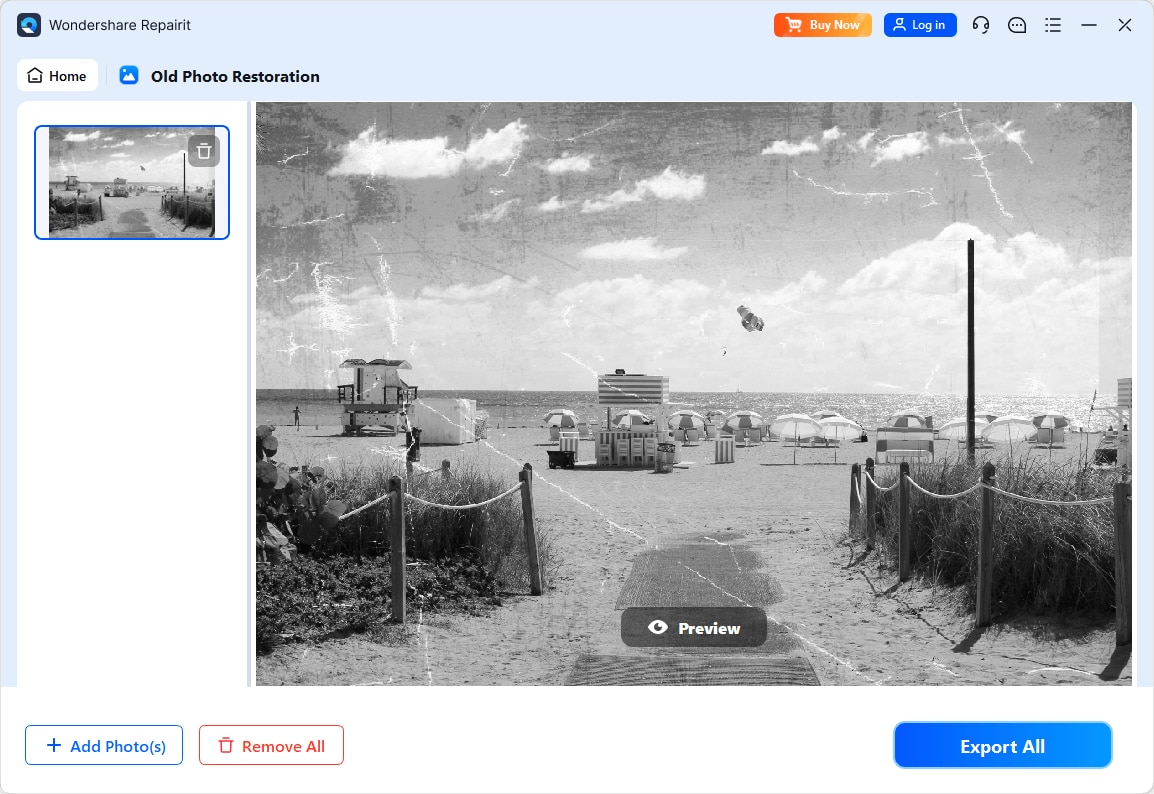
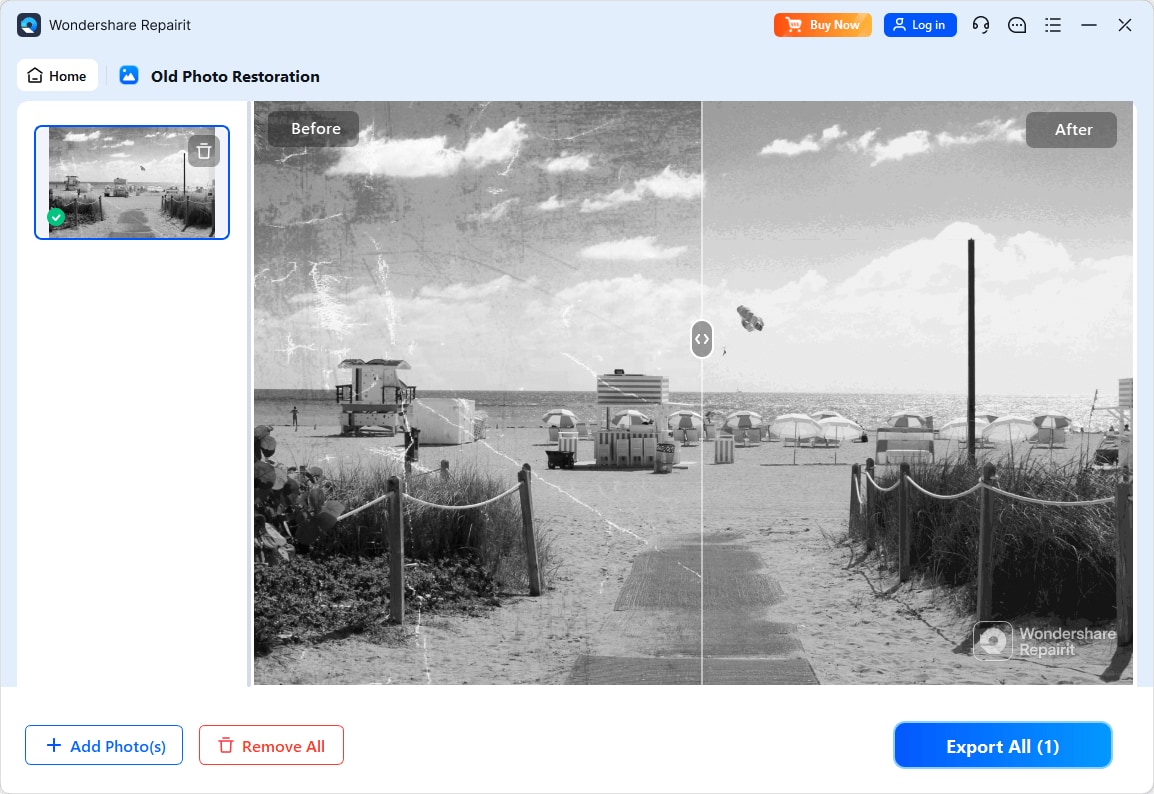
Step 4. Preview the restored result and save the repaired photo to your device.
Final Verdict
Both Repairit Old Photo Restoration and Adobe Photoshop can significantly improve old, damaged photos, but they serve different needs.
- Choose Repairit if you want an AI-guided, straightforward way to fix scratches and cracks, reduce stains, and restore faded colors in family photos without studying advanced retouching techniques.
- Choose Photoshop if you need detailed control over every step, regularly handle severe damage, or already rely on its tools for broader creative work.
In many cases, Repairit is enough to bring old memories back to a shareable, printable state in a fraction of the time. When you encounter particularly complex damage or want artistic colorization, adding selective Photoshop work on top of a Repairit base restoration can provide the best of both worlds.
Next: Repairit Old Photo Restoration vs Luminar Neo
FAQ
-
1. Is Repairit Old Photo Restoration better than Adobe Photoshop for beginners?
For most beginners, Repairit Old Photo Restoration is easier to start with because it guides you through AI-based scratch and color repair. Adobe Photoshop offers more control but has a steeper learning curve and many tools that can feel complex if you only want to restore a few old photos. -
2. Which tool restores scratches and cracks in old photos more accurately?
In typical cases, Repairit Old Photo Restoration can quickly handle common scratches and minor cracks across an entire image. Adobe Photoshop can achieve very precise repairs when a skilled user carefully applies healing and clone tools, especially for severe or unusual damage. -
3. Should I use Repairit or Adobe Photoshop to colorize black and white photos?
Repairit is suitable if you want quick, automated enhancements with minimal setup. Adobe Photoshop is more appropriate if you plan to manually paint and refine colors layer by layer for a highly customized or artistic look.




