
Trying to decide between Repairit Old Photo Restoration vs Luminar Neo for repairing damaged prints can be challenging, especially if you are working with scratches, cracks, stains, and fading. Both tools rely on AI, but they serve slightly different purposes. Repairit Old Photo Restoration concentrates on repairing old photos with a guided flow, while Luminar Neo blends restoration with wider photo editing controls. This comparison focuses on how each one handles damage, the typical restoration quality you can expect, and which tool is more suitable depending on your experience and restoration goals.
Restore Old Photos with Repairit
 Security Verified. Over 7,302,189 people have downloaded it.
In this article
- Repairit Old Photo Restoration vs Luminar Neo: Quick Verdict
- Repairit Old Photo Restoration vs Luminar Neo: Key Differences
- Repairit Old Photo Restoration vs Luminar Neo: Comparison Table
- What Repairit Old Photo Restoration and Luminar Neo Are Best For
- Repairit Old Photo Restoration vs Luminar Neo: Repair Capabilities and Damage Handling
- Repairit Old Photo Restoration vs Luminar Neo: Restoration Quality and Real Results
- Repairit Old Photo Restoration vs Luminar Neo: Workflow and Ease of Use
- Repairit Old Photo Restoration vs Luminar Neo: Pricing and Trial Options
- Who Should Choose Repairit Old Photo Restoration
- Who Should Choose Luminar Neo
- Pros and Cons of Repairit Old Photo Restoration and Luminar Neo
- How to Restore Old Photos After Choosing the Right Tool
Repairit Old Photo Restoration vs Luminar Neo: Quick Verdict
If your main goal is to repair damaged old photos with minimal learning curve, Repairit Old Photo Restoration is generally the more direct option. It guides you through uploading, applying AI repair for scratches and fading, and then downloading the restored result. Luminar Neo can be a strong choice if you also want broader editing tools and creative control alongside AI-assisted restoration, and you are comfortable exploring more panels and settings.
In most cases, families and beginners who just need to fix cracks, stains, and faded colors will appreciate Repairits focused workflow. Users who already edit photos or who want to shape the final style of their restored image may prefer Luminar Neos more expansive environment.
Repairit Old Photo Restoration vs Luminar Neo: Key Differences
The key difference between Repairit Old Photo Restoration vs Luminar Neo is focus. Repairit is built around a dedicated old photo repair flow, while Luminar Neo combines restoration with general photo editing and enhancement. This leads to several practical distinctions that matter when you are trying to rescue family albums or historical prints.
- Focus and intent: Repairit is centered on restoring damaged old photos; Luminar Neo functions as a full AI-enhanced editor that also offers restoration tools.
- Ease of use: Repairit aims for a short, guided path from import to export; Luminar Neo is user-friendly but includes more modules and options to understand.
- Damage handling: Repairit emphasizes handling scratches, cracks, stains, and fading; Luminar Neo leans more toward color, contrast, and overall enhancement with some repair capability.
- Creative control: Repairit keeps editing controls light; Luminar Neo allows more creative color grading and styling once basic restoration is done.
- Access model: Repairit Old Photo Restoration is streamlined and web-accessible, while Luminar Neo is desktop software installed on supported systems.
Repairit Old Photo Restoration vs Luminar Neo: Comparison Table
| Dimension | Repairit Old Photo Restoration | Luminar Neo |
|---|---|---|
| Best for | People focused mainly on restoring damaged old photos with a guided AI workflow | Users wanting an AI-powered photo editor with restoration and enhancement features in one place |
| Ease of use | Very straightforward, restoration-focused interface with minimal setup | User-friendly but closer to a full photo editor, with more panels and options to learn |
| Restoration quality | Consistent automatic repair of scratches, cracks, and faded details in typical old photos | Good AI-assisted restoration, especially for color and contrast, but may need extra tweaking |
| Workflow | Import old photo, choose AI repair, preview, then export restored image | Import photo, apply AI restore tools, adjust color, then export through a broader editing workspace |
| Strengths | Focused old photo repair, quick results, minimal manual work | AI tools for color restoration, easy interface, fast results with extra creative controls |
| Weaknesses | Less suited to creative editing beyond restoration | Less control than advanced manual tools and some restoration features can feel limited |
What Repairit Old Photo Restoration and Luminar Neo Are Best For
Both tools use AI to restore old photos, but they are best suited to different scenarios.
Repairit Old Photo Restoration tends to be a stronger choice if you need to:
- Repair visible scratches, cracks, and stains across many family photos.
- Rescue faded prints without investing time in learning complex editing software.
- Run a repeatable, guided restoration workflow for albums and archives.
Luminar Neo may be enough, or even preferable, if you:
- Frequently edit digital photos and want restoration tools integrated into the same editor.
- Care as much about creative styling, color grading, and atmosphere as you do about repairing damage.
- Are comfortable exploring different tools and sliders to refine the look of your restored images.
In short, Repairit aims to simplify old photo restoration, while Luminar Neo offers a broader canvas that mixes restoration with more advanced editing.
Repairit Old Photo Restoration vs Luminar Neo: Repair Capabilities and Damage Handling
Both tools address common old photo problems, but they prioritize damage in different ways. According to the provided feature summary, both can handle:
- Automatic repair of small scratches, dust spots, and mild stains.
- Faded color restoration to make washed-out prints look more natural.
- Basic tone, brightness, and contrast adjustments to support restoration.
Repairit Old Photo Restoration focuses its AI directly on photo damage. It is designed to reduce the visual impact of cracks, creases, stains, and surface wear, and it includes AI-assisted facial detail improvement for older portraits. This emphasis can be especially helpful when working with scanned studio portraits, family group photos, or prints that have been stored in less-than-ideal conditions.
Luminar Neo, by contrast, blends damage repair with a wider range of enhancement tools. Its AI is particularly helpful for adjusting color, contrast, and clarity, which can significantly improve the look of faded or flat old photos. For heavy cracks, severe tears, or very large stains, you may find that Luminar Neural tools still require some manual fine-tuning and masking, depending on the specific image.
For black and white photos, both options can improve clarity and contrast. Each also offers ways to work with colorized results, though the workflows and exact tools differ. Repairit aims to keep colorization realistic and straightforward, while Luminar Neo integrates black and white work into its broader editing toolset.
Repairit Old Photo Restoration vs Luminar Neo: Restoration Quality and Real Results
Because every old photo is unique, restoration quality depends heavily on the original damage and scanning quality. Still, there are general patterns in how each tool tends to perform.
With Repairit Old Photo Restoration you can typically expect:
- Consistent removal or softening of small to medium scratches and cracks.
- Noticeably cleaner faces and clothing details in portraits once AI facial enhancement is applied.
- Natural-looking color restoration that avoids heavy stylization and keeps the photo close to its original mood.
With Luminar Neo you can generally expect:
- Strong improvements in color depth, contrast, and overall clarity, especially on faded prints.
- Useful AI automation, followed by manual sliders and tools for those who want to refine the result.
- Good results on mild to moderate damage, while extreme cracks and stains may need more manual work.
In many real-world cases, Repairit will suit users who want a predictable, quick path to a clean, family-ready image, while Luminar Neo favors those willing to spend more time customizing the final look after the initial AI restoration pass.
Repairit Old Photo Restoration vs Luminar Neo: Workflow and Ease of Use
Workflow is often the deciding factor when choosing between Repairit Old Photo Restoration vs Luminar Neo, especially for beginners.
Repairit Old Photo Restoration uses a simple flow:
- Upload a scanned old photo in JPG, PNG, or TIFF.
- Choose the AI repair option for damage and fading.
- Preview and compare the before/after result.
- Download the restored image once you are satisfied.
Luminar Neo offers a broader editing workspace:
- Import your photo into the catalog or editing area.
- Apply AI-based restore or enhancement tools.
- Adjust color, tone, and detail with additional sliders and filters.
- Export the edited image once you are done refining the look.
Both are considered approachable, but Repairit is more tightly focused on old photo repair. Luminar Neos interface remains relatively friendly, yet its expanded control set means a slightly steeper learning curve, particularly if you have never used a dedicated photo editor before.
Repairit Old Photo Restoration vs Luminar Neo: Pricing and Trial Options
Pricing can change over time, so it is important to check each official site for current offers. Based on the available information:
- Repairit Old Photo Restoration emphasizes accessible, restoration-focused plans that align with occasional or frequent old photo repair work.
- Luminar Neo is typically licensed as desktop photo editing software, often with different licenses or bundles depending on your needs.
- Both may provide free trials or limited versions so you can test how well they handle your own scanned photos before committing.
Because old photo damage can vary widely, trying each tool with a couple of representative images is a practical way to see which one delivers results you are comfortable sharing or printing.
Who Should Choose Repairit Old Photo Restoration
Repairit Old Photo Restoration is especially helpful for users who prioritize simplicity and damage-focused AI. According to the provided guidance, it is well suited for:
- People who mainly need to repair damaged old photos with scratches, cracks, or stains.
- Families scanning albums who want an easy, guided AI workflow to restore fading.
- Users who prefer a focused restoration tool rather than a full creative photo editor.
- Beginners who want consistent automatic repairs without many settings to manage.
If your primary concern is bringing family archives, historical prints, or inherited albums back into shareable condition with minimal technical overhead, Repairit offers a straightforward path.
Who Should Choose Luminar Neo
Luminar Neo is better matched to users who want restoration inside a more complete editing environment. The tool makes the most sense if you:
- Want AI-assisted restoration with an easier workflow inside a broader photo editor.
- Often combine old photo restoration with creative color and style adjustments.
- Prefer a visual, panel-based interface and are willing to fine-tune results.
- Need integrated AI tools for color restoration and enhancement and can accept some feature limits on heavy damage repair.
In other words, Luminar Neo works well if old photo restoration is one part of a larger editing process, rather than your only task.
Pros and Cons of Repairit Old Photo Restoration and Luminar Neo
Repairit Old Photo Restoration Pros and Cons
Luminar Neo Pros and Cons
How to Restore Old Photos After Choosing the Right Tool
Once you have compared Repairit Old Photo Restoration vs Luminar Neo and decided which approach suits your needs, the next step is actually restoring your images. If you want a practical, guided workflow that minimizes setup and focuses squarely on old photo repair, Repairit Old Photo Restoration offers a clear path from upload to final download.
Repairit Old Photo Restoration Introduction
Repairit Old Photo Restoration, available at https://repairit.wondershare.com/online-old-photo-restoration.html, concentrates specifically on bringing damaged old photos back to life. It uses AI to help fix scratches, cracks, fading, and stains with a guided process that works well for families, hobbyists, and anyone who needs to restore prints without mastering a full professional editor.
Key Features
When you start restoring prints with Repairit, you can take advantage of features tailored to typical old photo issues, including:
- AI-driven repair of scratches, cracks, and surface damage in scanned photos.
- Automatic enhancement of faded colors and details in old portraits and prints.
- Simple, guided workflow designed for non-technical users restoring family photos.
Step-by-step guide
Step 1. Choose the AI restoration model based on your needs, such as repairing damaged photos or restoring old images.

Step 2. Import your old or damaged photos into Repairit to begin the restoration process.

Step 3. Apply the old photo restoration model to fix scratches, restore colors, and improve image quality.
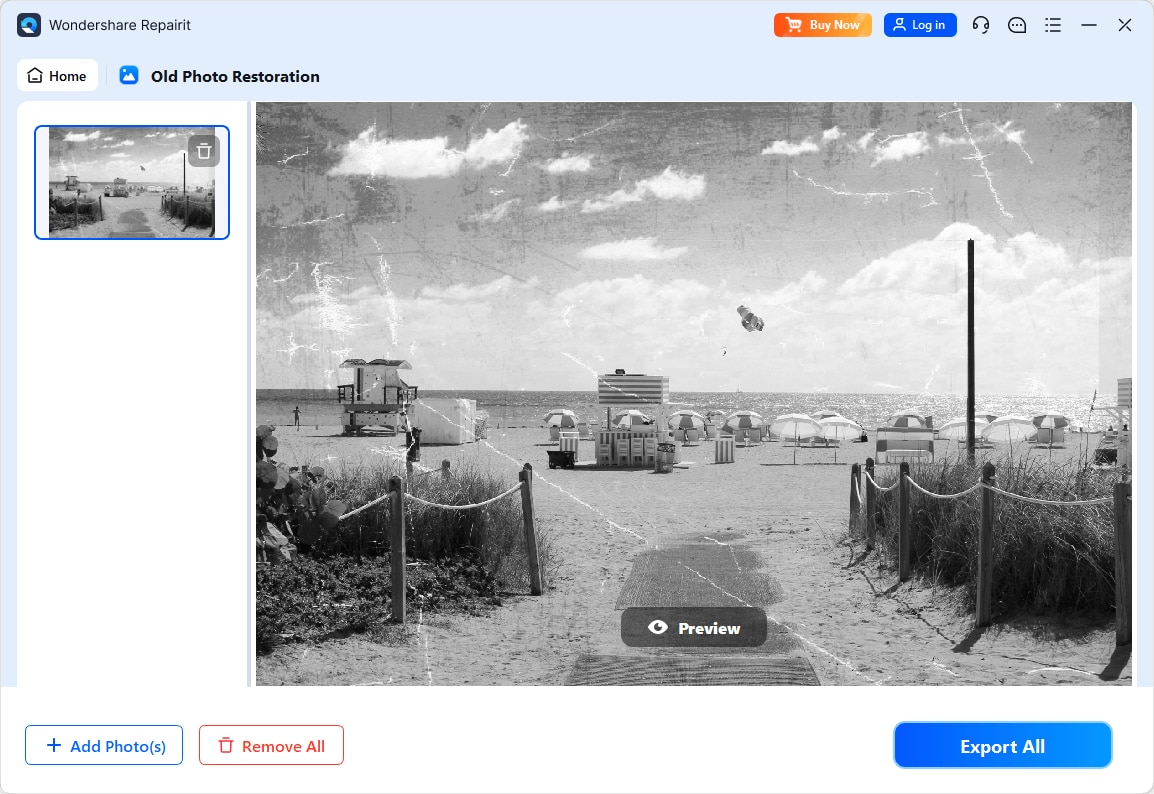
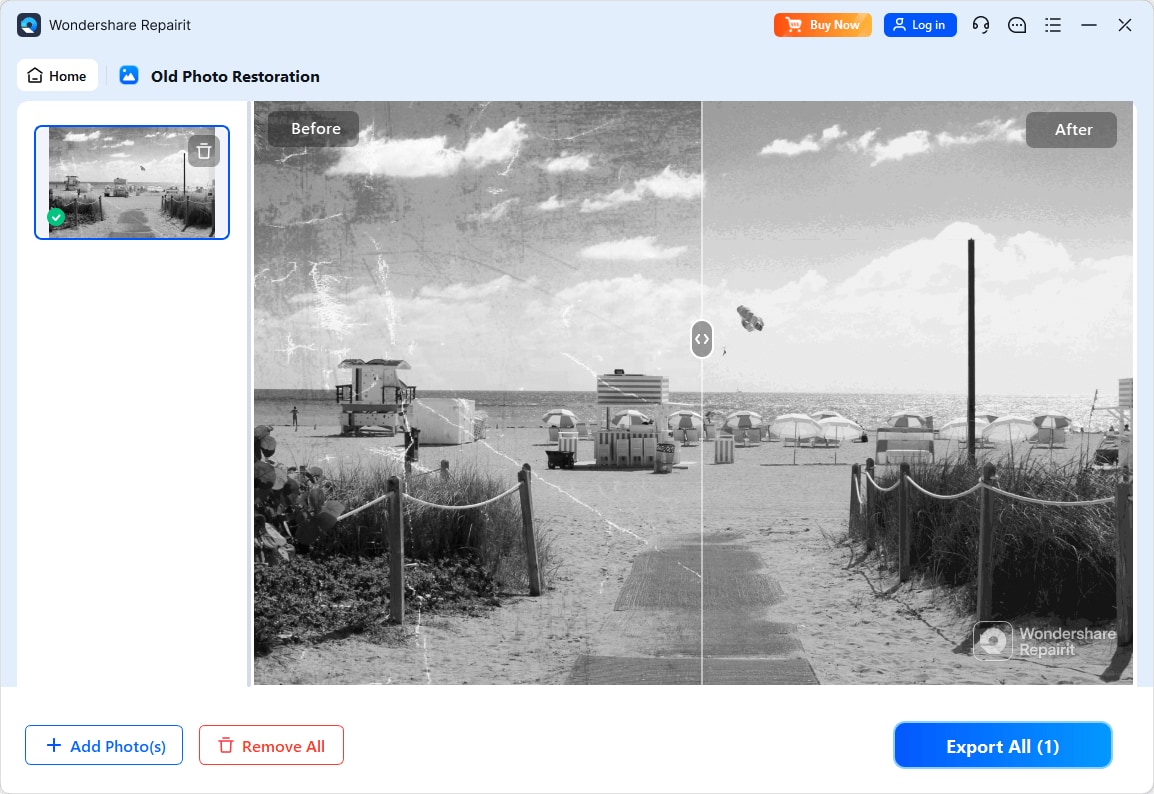
Step 4. Preview the restored result and save the repaired photo to your device.
Final Verdict
Choosing between Repairit Old Photo Restoration vs Luminar Neo comes down to whether you value a focused restoration workflow or a broader editing environment. For most users who primarily want to repair damaged old photos and avoid a steep learning curve, Repairit Old Photo Restoration is usually the more straightforward choice. Its guided AI flow is tailored to common problems such as scratches, cracks, stains, and fading, making it particularly practical for family archives and quick restoration sessions.
Luminar Neo remains a solid option if you also want an AI-powered editor that combines restoration, color work, and creative styling in a single place. It can handle typical restoration needs while giving you more room to experiment with color and mood, provided you are comfortable working inside a full-featured editor. In many workflows, a focused tool like Repairit may handle the bulk of damage repair, while Luminar Neo can be used later for optional creative finishing touches.
Next: Repairit Old Photo Restoration vs Photoglory
FAQ
-
1. Is Repairit Old Photo Restoration better than Luminar Neo for heavy scratches and cracks?
For photos with obvious scratches, cracks, and stains, Repairit Old Photo Restoration is often more convenient because it is built around automatic repair of visible damage. Luminar Neo can still handle these issues, but you may need more manual tweaking to reach similar results, especially on severely damaged prints. -
2. Which is easier for beginners, Repairit Old Photo Restoration or Luminar Neo?
Beginners who only need to restore old photos typically find Repairit easier thanks to its short, guided workflow. Luminar Neo remains approachable but is organized like a full editor, with extra panels and tools that may take longer to learn. -
3. How do color restoration results compare between Repairit Old Photo Restoration and Luminar Neo?
Both tools can restore faded colors. Repairit aims for natural, balanced color with minimal adjustment, while Luminar Neo usually offers more room to fine-tune style, saturation, and mood for users who want creative control over the final look.




