
Choosing between Repairit Old Photo Restoration vs PhotoGlory largely depends on how damaged your photos are and how much guidance you want while repairing them. Both tools focus on restoring old, scratched, or faded images, but they take different approaches to automation, manual control, and workflow. This comparison looks at real decision points such as repair quality, colorization, ease of use, and cost so you can match the right tool to your photo collection and experience level.
In most situations, Repairit Old Photo Restoration leans into guided, AI-style restoration, while PhotoGlory focuses on a more manual, desktop-based process with dedicated restoration and colorization tools. Both aim to help you fix scratches and cracks, restore faded tones, and bring black and white photos back to life.
Restore Old Photos with Repairit
 Security Verified. Over 7,302,189 people have downloaded it.
In this article
- Repairit Old Photo Restoration vs PhotoGlory: Quick Verdict
- Repairit Old Photo Restoration vs PhotoGlory: Key Differences
- Repairit Old Photo Restoration vs PhotoGlory: Comparison Table
- What Repairit Old Photo Restoration and PhotoGlory Are Best For
- Repairit Old Photo Restoration vs PhotoGlory: Repair Capabilities and Damage Handling
- Repairit Old Photo Restoration vs PhotoGlory: Restoration Quality and Real Results
- Repairit Old Photo Restoration vs PhotoGlory: Workflow and Ease of Use
- Repairit Old Photo Restoration vs PhotoGlory: Pricing and Trial Options
- Who Should Choose Repairit Old Photo Restoration
- Who Should Choose PhotoGlory
- Pros and Cons of Repairit Old Photo Restoration and PhotoGlory
- How to Restore Old Photos After Choosing the Right Tool
Repairit Old Photo Restoration vs PhotoGlory: Quick Verdict
The core difference in the Repairit Old Photo Restoration vs PhotoGlory comparison is how much automation you want versus how much manual tweaking you enjoy.
Repairit Old Photo Restoration is usually a stronger choice for beginners and family archivists who have heavily scratched, cracked, or faded photos and want guided, AI-style help. It focuses on automated tools that repair damage, enhance facial details, and colorize black and white photos with minimal setup.
PhotoGlory can be a good fit for users who prefer a straightforward desktop program with a panel of focused restoration and colorization tools. It suits moderate damage and people who like to stay in control without learning a full professional editor.
Repairit Old Photo Restoration vs PhotoGlory: Key Differences
At a high level, both are dedicated old photo restoration software, but they emphasize different workflows and levels of automation.
Repairit Old Photo Restoration centers on AI-style restoration. You import your scanned print, choose what type of repair you need, and let the tool automatically fix scratches, cracks, stains, and fading before you preview and export. This can be especially helpful when repairing batches of old family photos with similar damage.
PhotoGlory focuses more on a manual yet streamlined desktop workflow. Users follow a clear sequence of importing, repairing damage, colorizing, enhancing, and exporting. The tools are focused on restoring vintage photos, but the process generally expects more hands-on adjustments than Repairits guided flow.
In practice, the key differences matter in situations like:
- If your photos are heavily damaged with deep cracks, stains, or torn areas, Repairits AI-style repair can reduce manual retouching.
- If you tend to fine tune colorization and local fixes by hand, PhotoGlorys focused tools may feel more comfortable.
Repairit Old Photo Restoration vs PhotoGlory: Comparison Table
| Dimension | Repairit Old Photo Restoration | PhotoGlory |
|---|---|---|
| Best for | Everyday users who want guided tools to repair heavy damage, fading, and facial details in old photos. | Users specifically restoring vintage or damaged photos who want focused tools in a dedicated desktop app. |
| Ease of use | Very beginner friendly with an automated, step-by-step restoration flow. | Simple once learned, with a clear panel of focused restoration and colorization tools. |
| Restoration quality | Strong results on scratches, cracks, stains, and soft facial details in typical family photos. | Good quality for most vintage photos, though less advanced than pro editors in complex cases. |
| Workflow | Import, choose restoration options, preview AI fixes, then refine and export. | Import photo, repair damage, colorize, enhance, then export following a linear desktop workflow. |
| Strengths | Guided AI restoration, facial detail enhancement, fast processing for batches of family photos. | Focused restoration tools, colorization support, and an easy, restoration-centric workflow. |
| Weaknesses | Fewer manual pro-level editing controls than full image editors. | Less advanced than high-end editors for very complex or artistic retouching needs. |
What Repairit Old Photo Restoration and PhotoGlory Are Best For
Both tools are aimed at users repairing old, scanned photos rather than editing modern digital shots from scratch.
Repairit Old Photo Restoration is best for:
- People with family archives full of scratched, cracked, or stained prints that need consistent, automated repair.
- Beginners who want a guided workflow to fix old photos, enhance faces, and colorize without learning complex retouching.
- Users who often restore multiple old photos and need streamlined, repeatable steps.
PhotoGlory is best for:
- Users specifically focused on vintage photo restoration who prefer a dedicated desktop environment.
- People who like the linear import, repair, colorize, enhance, and export workflow.
- Users comfortable with manually adjusting restoration and colorization rather than relying heavily on AI automation.
In short, Repairit Old Photo Restoration vs PhotoGlory is less about which is universally better and more about whether you prefer guided automation or a modest amount of manual control in a desktop app.
Repairit Old Photo Restoration vs PhotoGlory: Repair Capabilities and Damage Handling
When comparing repair capabilities, you are mainly looking at how each tool handles common issues like scratches, cracks, fading, and stains.
According to the overview, both tools are designed for users restoring vintage or damaged photos. Repairit Old Photo Restoration leans into automated tools that fix scratches, cracks, stains, and faded details with minimal input. This can be useful if your prints have heavy surface damage or inconsistent fading across faces and backgrounds.
PhotoGlory offers a compact set of focused restoration and colorization tools in a manual-friendly interface. It is generally comfortable for light to moderate damage such as dust spots, light scratches, and mild fading, and can still help with more serious defects if you are willing to spend time fine tuning.
From the core feature sets:
- Both can repair damage like light scratches, dust spots, and minor cracks.
- Both help restore faded tones and improve contrast so old prints look clearer and easier to view.
- Both support colorizing black and white photos with controls suited to typical family and vintage images.
For heavier damage, the advanced features become more important:
- Repairit Old Photo Restoration uses AI-style repair to handle larger cracks, stains, and torn-looking areas with minimal manual involvement.
- PhotoGlory provides focused tools that you manually apply to different parts of the image, which can be effective but may take longer for heavily damaged prints.
- Both approaches allow you to combine repair, color restoration, and enhancement in one workflow, without needing multiple programs.
Repairit Old Photo Restoration vs PhotoGlory: Restoration Quality and Real Results
Restoration quality in Repairit Old Photo Restoration vs PhotoGlory often comes down to how realistic the repaired image looks and how well facial details are recovered.
Repairit Old Photo Restoration aims for strong results on common damage such as scratches, cracks, stains, and soft facial details. Its facial detail enhancement is particularly helpful when old portraits have blurred eyes, flat skin tones, or soft expressions. For many family photos, the automated corrections can deliver clearly improved, natural looking results without much manual tuning.
PhotoGlory offers generally good quality for most vintage photos, especially when the damage is moderate and you take time to adjust tools carefully. However, it may be less advanced than high end editors in complex cases that require very precise, artistic retouching. Users who like to refine colorization and local fixes by hand may appreciate the control, while others might find the process more time consuming.
For colorization of black and white photos:
- Repairit focuses on guided colorization that aims to produce balanced tones automatically, which can be helpful if you are not sure how to pick realistic colors.
- PhotoGlory provides focused colorization tools that may require more user adjustment to achieve the exact vintage look you want.
Neither tool guarantees perfect results on every image, but both can significantly improve readability and visual appeal of old photos when used on suitable material.
Repairit Old Photo Restoration vs PhotoGlory: Workflow and Ease of Use
Workflow and ease of use are major decision points, especially for beginners or families processing many old photos at once.
Repairit Old Photo Restoration offers a very streamlined, guided approach. You typically:
- Import your old photo through a web based flow or suitable desktop option.
- Choose restoration options like scratch removal, enhancement, or colorization.
- Let the tool apply AI-style fixes, then preview the results.
- Export the restored file for sharing or printing.
This step-by-step flow makes it approachable even if you have little or no editing background.
PhotoGlory follows a clear but slightly more hands-on desktop sequence:
- Import a scanned photo.
- Repair damage using its restoration tools.
- Colorize black and white photos if desired.
- Enhance sharpness or tones.
- Export the final image.
This feels natural to users familiar with classic desktop software. It is simple once you learn it, but you may spend more time choosing and applying specific tools compared to Repairits more automated process.
Repairit Old Photo Restoration vs PhotoGlory: Pricing and Trial Options
Pricing can change over time, so it is safer to look at how you plan to use each tool rather than focusing on exact numbers.
Both Repairit Old Photo Restoration and PhotoGlory typically offer free or limited trial options so you can test them on your own photos. This is important because different types of damage can respond differently to each tool.
When evaluating cost:
- Consider whether you prefer a one time license, a subscription, or a mix of online and desktop options.
- Think about how often you will restore old photos. Occasional use might favor simpler, one-off options, while ongoing restoration projects may justify a more flexible plan.
- Weigh how much you value guided automation (as in Repairit) versus manual control (as in PhotoGlory) because this can save you time on large archives.
Trying each tool on the same scanned photo during a trial is a practical way to see which gives you more satisfying results for your specific type of damage.
Who Should Choose Repairit Old Photo Restoration
Repairit Old Photo Restoration is a strong fit if you want guided, AI-style tools and a low learning curve.
- People with heavily scratched, cracked, or stained family photos who want automated help.
- Beginners who prefer a clear, step-by-step workflow that improves facial details quickly.
- Users who frequently colorize black and white photos and appreciate fast, balanced suggestions.
- Anyone who needs a straightforward way to process multiple old photos with consistent results.
If you feel overwhelmed by professional photo editors but need to bring a family archive back to life, Repairits workflow can reduce friction and still deliver meaningful restoration.
Who Should Choose PhotoGlory
PhotoGlory remains a reasonable choice when you prefer a focused desktop app and are comfortable with some manual adjustments.
- Users dedicated to restoring vintage or damaged photos in a classic desktop interface.
- People who like the import, repair damage, colorize, enhance, and export sequence.
- Users who want colorization support but do not need the full complexity of advanced professional editors.
- Those who mainly work on moderate damage and prefer direct control over each restoration step.
For users who enjoy spending a bit more time fine tuning each image, PhotoGlorys focused tools can offer a good balance between capability and simplicity.
Pros and Cons of Repairit Old Photo Restoration and PhotoGlory
Repairit Old Photo Restoration Pros and Cons
PhotoGlory Pros and Cons
How to Restore Old Photos After Choosing the Right Tool
After weighing Repairit Old Photo Restoration vs PhotoGlory, the next step is actually repairing your scanned prints. Regardless of which app you prefer, you will follow a similar pattern: import, repair, enhance, and export. For users who want a practical, guided option, Repairit Old Photo Restoration offers a clear path from damaged photo to restored image.
Key Features
- AI-style restoration that repairs scratches, cracks, stains, and fading with minimal manual input.
- Facial detail enhancement to make old portraits clearer and more lifelike.
- Built in colorization to turn black and white photos into realistic color images.
Step-by-step guide
Step 1. Choose the AI restoration model based on your needs, such as repairing damaged photos or restoring old images.

Step 2. Import your old or damaged photos into Repairit to begin the restoration process.

Step 3. Apply the old photo restoration model to fix scratches, restore colors, and improve image quality.
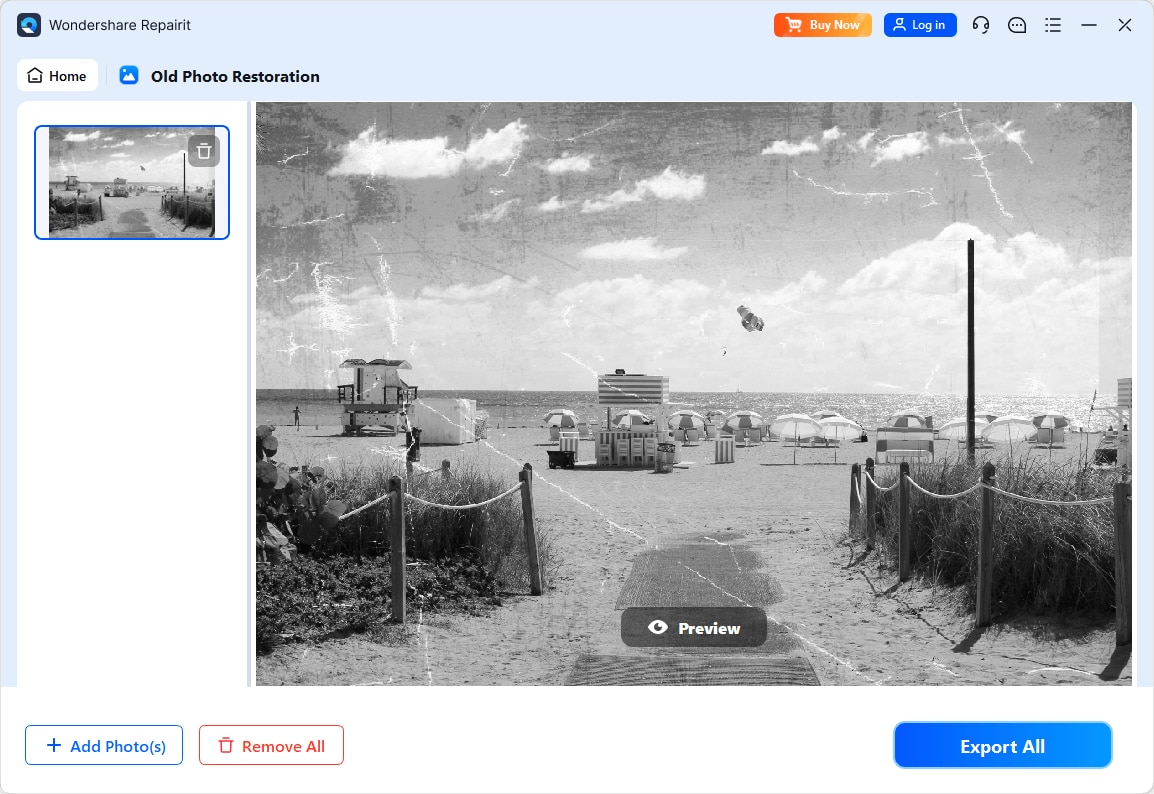
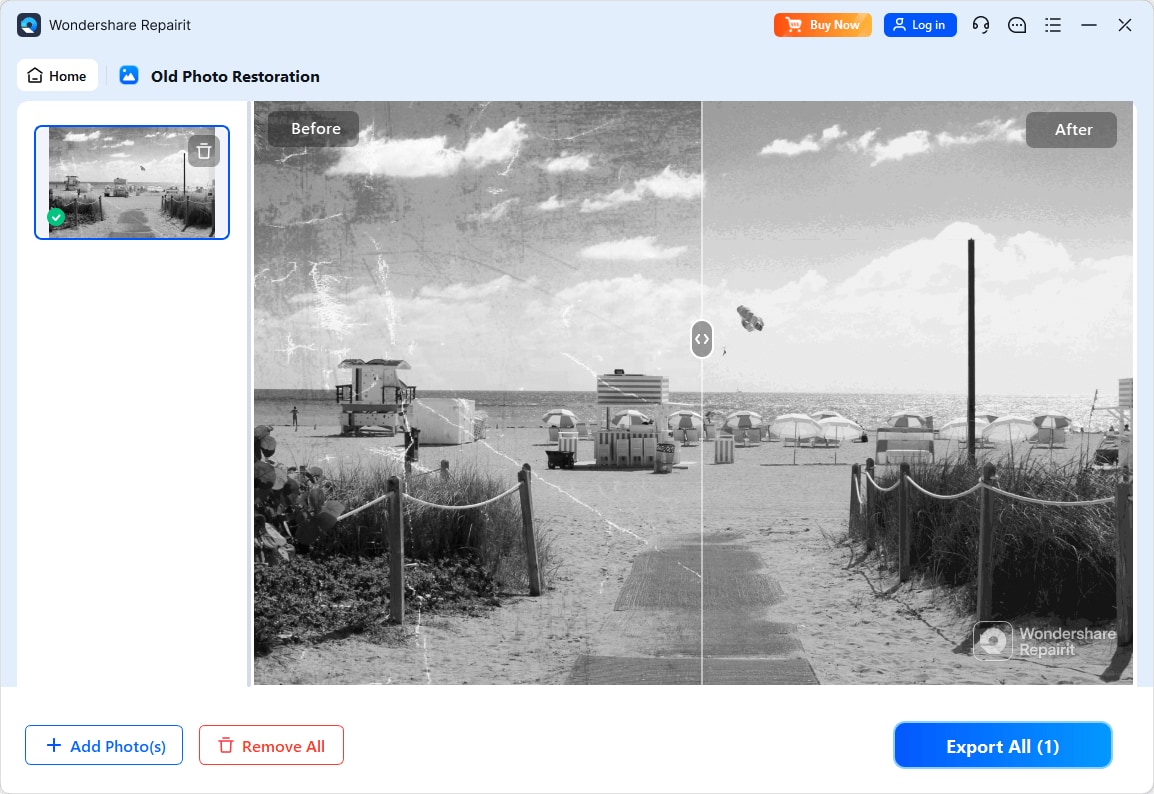
Step 4. Preview the restored result and save the repaired photo to your device.
Final Verdict
Both Repairit Old Photo Restoration and PhotoGlory are credible options for repairing old, scratched, or faded photos. The right choice depends on your damage level, workflow preferences, and comfort with manual editing.
For most everyday users dealing with heavily scratched, cracked, or faded photos, Repairit Old Photo Restoration is often the stronger choice. Its guided, AI-style workflow fixes common damage, enhances facial details, and supports colorization with minimal effort. This suits families and beginners who want consistent, repeatable results across many images.
PhotoGlory is often enough if you mainly work with moderately damaged vintage photos and prefer a focused desktop tool with restoration and colorization features, but without the complexity of full-scale professional editors. Users who like a linear, desktop-centric workflow and do not mind more manual tweaking may find it a comfortable fit.
In practice, it can be helpful to test both on a few representative photos. If you find yourself relying on automation and appreciating step-by-step guidance, Repairit will likely align better with your restoration workflow. If you enjoy adjusting tools by hand in a familiar desktop interface, PhotoGlory can serve your needs for moderate restoration tasks.
Next: Repairit Old Photo Restoration vs Akvis Retoucher
FAQ
-
1. Which is better for repairing heavily damaged old photos, Repairit Old Photo Restoration or PhotoGlory?
In most cases, Repairit Old Photo Restoration is more comfortable for heavily damaged photos because its guided, AI-style tools handle scratches, cracks, and stains with less manual work. PhotoGlory is generally better suited to moderate damage where you are willing to spend time fine tuning tools by hand. -
2. Is PhotoGlory easier to use than Repairit Old Photo Restoration for beginners?
PhotoGlory has a straightforward desktop layout, but absolute beginners may find Repairit Old Photo Restoration easier because of its step-by-step, automated process. Repairit reduces the need for manual fine-tuning, which can be reassuring if you have never restored photos before. -
3. Which tool gives more natural color when colorizing black and white photos?
Both tools can produce realistic colorization. Repairit Old Photo Restoration focuses on guided, automatic colorization that aims for balanced tones with minimal setup, while PhotoGlory provides focused colorization tools that may require more user adjustments to match your preferred vintage style.




