
Choosing between Repairit Old Photo Restoration vs AKVIS Retoucher comes down to how you prefer to restore old photos and how much manual control you want over the process. One tool focuses on guided, automated repair for common damage such as scratches, cracks, and fading, while the other behaves more like a specialized retouching workstation centered on precise scratch and object removal. This comparison walks through capabilities, workflow, pricing, and ideal users so you can decide which option better fits your old photo restoration projects.
In this guide, you will see how Repairit Old Photo Restoration and AKVIS Retoucher approach typical problems in damaged photos, including how they handle scratches and cracks, faded colors, stains, and damaged facial details in old photos.
Restore Old Photos with Repairit
 Security Verified. Over 7,302,189 people have downloaded it.
In this article
- Repairit Old Photo Restoration vs AKVIS Retoucher: Quick Verdict
- Repairit Old Photo Restoration vs AKVIS Retoucher: Key Differences
- Repairit Old Photo Restoration vs AKVIS Retoucher: Comparison Table
- What Repairit Old Photo Restoration and AKVIS Retoucher Are Best For
- Repairit Old Photo Restoration vs AKVIS Retoucher: Repair Capabilities and Damage Handling
- Repairit Old Photo Restoration vs AKVIS Retoucher: Restoration Quality and Real Results
- Repairit Old Photo Restoration vs AKVIS Retoucher: Workflow and Ease of Use
- Repairit Old Photo Restoration vs AKVIS Retoucher: Pricing and Trial Options
- Who Should Choose Repairit Old Photo Restoration
- Who Should Choose AKVIS Retoucher
- Pros and Cons of Repairit Old Photo Restoration and AKVIS Retoucher
- How to Restore Old Photos After Choosing the Right Tool
Repairit Old Photo Restoration vs AKVIS Retoucher: Quick Verdict
Both tools can repair damaged photos, but they serve slightly different needs. Repairit Old Photo Restoration focuses on fast, full-image repair with AI-assisted guidance, which suits users who want to improve many scanned prints with mixed issues such as fading, scratches, and low detail. AKVIS Retoucher leans toward more targeted work, where you manually indicate which scratches or objects to remove.
In most cases:
- Choose Repairit Old Photo Restoration if you want an accessible way to repair entire photos, enhance faces, and optionally colorize black and white photos with minimal manual work.
- Choose AKVIS Retoucher if you already work in a compatible photo editor and mainly need accurate scratch and object removal on specific areas, such as creases across a face or lines on a backdrop.
Neither tool fully replaces the other. Many users will favor Repairit for general batches of family photos and use AKVIS-style workflows when they require extra control on a few important images.
Repairit Old Photo Restoration vs AKVIS Retoucher: Key Differences
The key difference lies in automation and scope. Repairit Old Photo Restoration treats the whole image, using AI models to clean up scratches, cracks, stains, and faded colors across the photo and refine faces. AKVIS Retoucher expects you to manually mark defects so it can fill them using nearby image data, which is helpful when you want detailed control around sensitive areas.
From a workflow perspective, Repairit behaves more like a guided online or desktop tool where you upload, choose a restoration option, and let the algorithm run. AKVIS Retoucher integrates as a standalone app and plugin, aligning with users who already feel comfortable inside professional image editors and prefer brush-based selection.
In practice, this means:
- Repairit is usually faster for restoring multiple old photos with varied damage.
- AKVIS Retoucher may be better when you are focused on a few photos and want to refine specific scratches, creases, or small objects by hand.
Repairit Old Photo Restoration vs AKVIS Retoucher: Comparison Table
| Dimension | Repairit Old Photo Restoration | AKVIS Retoucher |
|---|---|---|
| Best for | Everyday users restoring multiple old photos with mixed damage like fading, scratches, and low detail | Users needing scratch and object removal in specific areas of a photo |
| Ease of use | Guided, mostly automatic workflow suitable for beginners | Requires more manual input and comfort with editing tools |
| Restoration quality | Consistent overall improvement on entire images, including faces and colors | Strong local cleanup of scratches and small objects when used carefully |
| Workflow | Upload, choose restoration option, preview, then export | Load image, remove defects, refine, export through its tool or plugin |
| Strengths | Broad old photo repair, color restoration, and optional colorization in a simple interface | Excellent scratch removal and plugin support for compatible editors |
| Weaknesses | Less granular brush-style control than some dedicated retouching plug-ins | Paid, niche interface that can feel complex for casual users |
What Repairit Old Photo Restoration and AKVIS Retoucher Are Best For
At a high level, AKVIS Retoucher is a specialized restoration tool and plugin mainly aimed at users needing accurate scratch and object removal, while Repairit Old Photo Restoration focuses on accessible, full-image repair. Together, they cover different levels of control and automation, from guided restoration for family archives to more targeted cleanup for users comfortable with manual selection.
Based on typical use cases:
- Repairit Old Photo Restoration is often the stronger fit for:
- Scanning and restoring entire family albums with a mix of scratches, stains, and fading.
- Improving overall clarity and facial details in portraits without detailed brush work.
- Modernizing archives by restoring faded colors or colorizing black and white images.
- AKVIS Retoucher is often the better match for:
- Carefully removing deep scratches, fold lines, and small objects one area at a time.
- Working inside existing editing ecosystems where you already adjust tones and colors separately.
- Users who want to decide exactly which parts of the photo are changed.
Repairit Old Photo Restoration vs AKVIS Retoucher: Repair Capabilities and Damage Handling
Both solutions can help fix scratches and cracks, but they do so differently.
Repairit Old Photo Restoration is designed as an accessible way to repair damaged old photos. It emphasizes full-image processing so you can handle several problem types at once. Typical capabilities include:
- Automated repair of scratches, cracks, and general damage across the entire photo.
- Cleanup of dust, spots, and minor defects that often appear in scanned prints.
- Assistance with faded color improvement and, in many workflows, colorizing black-and-white photos.
- AI-assisted enhancement of faces and textures so damaged portraits look clearer without complex manual work.
By contrast, AKVIS Retoucher concentrates on precise, local retouching:
- Users manually mark scratches, creases, or unwanted objects, then let the tool fill those areas using surrounding pixels.
- This gives detailed control near important edges, such as along faces or clothing lines.
- It is particularly useful when the main issue is a few strong defects rather than overall fading.
In many real projects, Repairit will be more efficient when an entire photo suffers from uneven fading, stains, and general wear, while AKVIS Retoucher can help when you are primarily focused on removing a limited number of distracting lines or marks.
Repairit Old Photo Restoration vs AKVIS Retoucher: Restoration Quality and Real Results
Restoration quality is not only about how clean a photo looks; it is also about whether the result still feels natural and recognizable.
With Repairit Old Photo Restoration, quality tends to come from consistent, global improvements:
- The AI model typically boosts overall clarity, especially in damaged facial areas, so eyes, skin, and expressions become clearer.
- It can help restore faded colors across the scene, which matters when prints have yellowed or lost saturation.
- The same pass often deals with scratches, stains, and light cracks, giving you a visibly refreshed image without heavy manual retouching.
AKVIS Retoucher, on the other hand, concentrates on the quality of local cleanups:
- When you carefully paint over scratches and small objects, it can blend them into the background with minimal artifacts.
- Because you choose the exact areas to fix, it may preserve nearby details better in tricky zones, such as hair or patterned fabrics.
- Color and tone typically depend on how you adjust the photo in your main editor, which can be an advantage for experienced users.
For most casual users restoring family memories, Repairit offers a more straightforward path to a good-looking result on the entire image. Advanced editors who already fine-tune exposure and color manually may appreciate the way AKVIS Retoucher lets them concentrate purely on structural flaws.
Repairit Old Photo Restoration vs AKVIS Retoucher: Workflow and Ease of Use
Workflow and learning curve are often as important as technical capabilities, especially if you have dozens of photos to handle.
Repairit Old Photo Restoration emphasizes a simple, repeatable flow:
- Accessed through a web browser or desktop app, so you do not need separate professional editing software.
- Typical steps are: upload your old photo, choose the restoration or enhancement mode, preview the automatic repair, then export.
- Beginners can usually get usable results after a short time because the tool does most of the decisions for them.
AKVIS Retoucher follows a more manual, editor-like sequence:
- Used as a standalone program or plugin inside compatible image editors.
- You load the image, mark scratches, tears, or unwanted objects with selection tools, run the repair, then refine or repeat.
- This workflow favors users who are already comfortable with layers, selections, and other image editing concepts.
Overall, beginners and occasional users usually adapt faster to Repairit, while advanced users who prefer painting over defects themselves might find AKVIS Retoucher more familiar.
Repairit Old Photo Restoration vs AKVIS Retoucher: Pricing and Trial Options
Pricing models differ, so it is useful to think about how often you plan to restore old photos.
Repairit Old Photo Restoration typically follows a flexible online or subscription-style model:
- In many cases you can test basic restoration before committing, which helps you judge whether the results match your expectations.
- Plans may vary depending on whether you want online access, desktop software, or broader feature bundles.
AKVIS Retoucher is usually sold as a paid, specialized product:
- Commonly licensed with a trial period, so you can evaluate its scratch and object removal on your own images.
- Often purchased as a one-time license or in bundles, depending on the vendor and ongoing promotions.
Since actual prices and offers change over time, it is best to check the latest information from each vendor and consider whether you need a short-term solution for a specific project or an ongoing tool for regular restoration work.
Who Should Choose Repairit Old Photo Restoration
Repairit Old Photo Restoration tends to suit users who care more about convenience and overall improvement than fine-grained, brush-level control.
It is a strong option for:
- People digitizing family albums who need fast, guided repair for many old photos.
- Users who want to fix scratches, cracks, and general fading without learning complex editing tools.
- Anyone looking to enhance colors or colorize black and white photos with minimal manual work.
- Beginners or casual users who prefer a straightforward, mostly automated restoration workflow.
If your main priority is to get a large number of prints looking cleaner, sharper, and more colorful with as little friction as possible, Repairit is likely to be more efficient for day-to-day use.
Who Should Choose AKVIS Retoucher
AKVIS Retoucher is better suited to users who value precision and who are comfortable spending more time on each image.
It may be the right choice if:
- You primarily need precise scratch and object removal on specific parts of a photo.
- You are a photographer, designer, or hobbyist who enjoys working with plugins inside existing editing software.
- You are willing to invest time in a more manual workflow for detailed control over defect cleanup.
- You are comfortable with a niche interface and mainly focus on retouching rather than broad automatic enhancements.
For someone who already fine-tunes color and contrast in their editor of choice, AKVIS Retoucher can act as a specialized step in a larger restoration pipeline rather than a one-click solution.
Pros and Cons of Repairit Old Photo Restoration and AKVIS Retoucher
Looking at pros and cons side by side can clarify which tool aligns better with your expectations.
Repairit Old Photo Restoration Pros and Cons
AKVIS Retoucher Pros and Cons
How to Restore Old Photos After Choosing the Right Tool
Once you understand how Repairit Old Photo Restoration vs AKVIS Retoucher compare, the next step is actually bringing your old images back to life. Regardless of which tool you favor for certain tasks, many users find that a guided solution like Repairit provides a practical starting point for cleaning up scans before doing any extra manual retouching.
Key Features
Repairit Old Photo Restoration includes several features aimed specifically at old photo restoration rather than general photo editing:
- Automatic repair of scratches, cracks, and stains on old photos.
- Color restoration and optional colorization of black-and-white images.
- Face-focused enhancement to improve clarity in portraits.
Together with its AI models, these options help you handle both structural damage and overall fading in a single workflow, making it easier to process many images from the same album.
Step-by-step guide
After you pick a tool, you still need a clear process. For users who choose Repairit, the following desktop-style flow shows how to restore old photos in a structured way.
Step 1. Choose the AI restoration model based on your needs, such as repairing damaged photos or restoring old images.

Step 2. Import your old or damaged photos into Repairit to begin the restoration process.

Step 3. Apply the old photo restoration model to fix scratches, restore colors, and improve image quality.
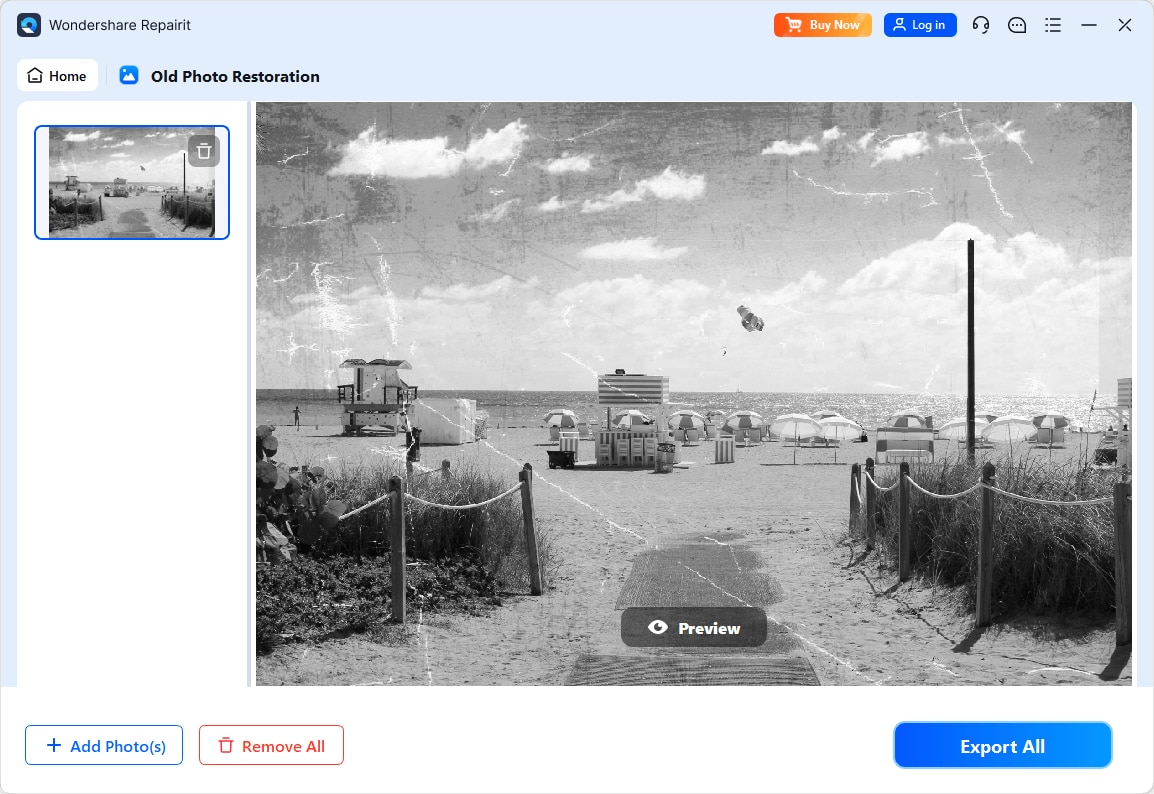
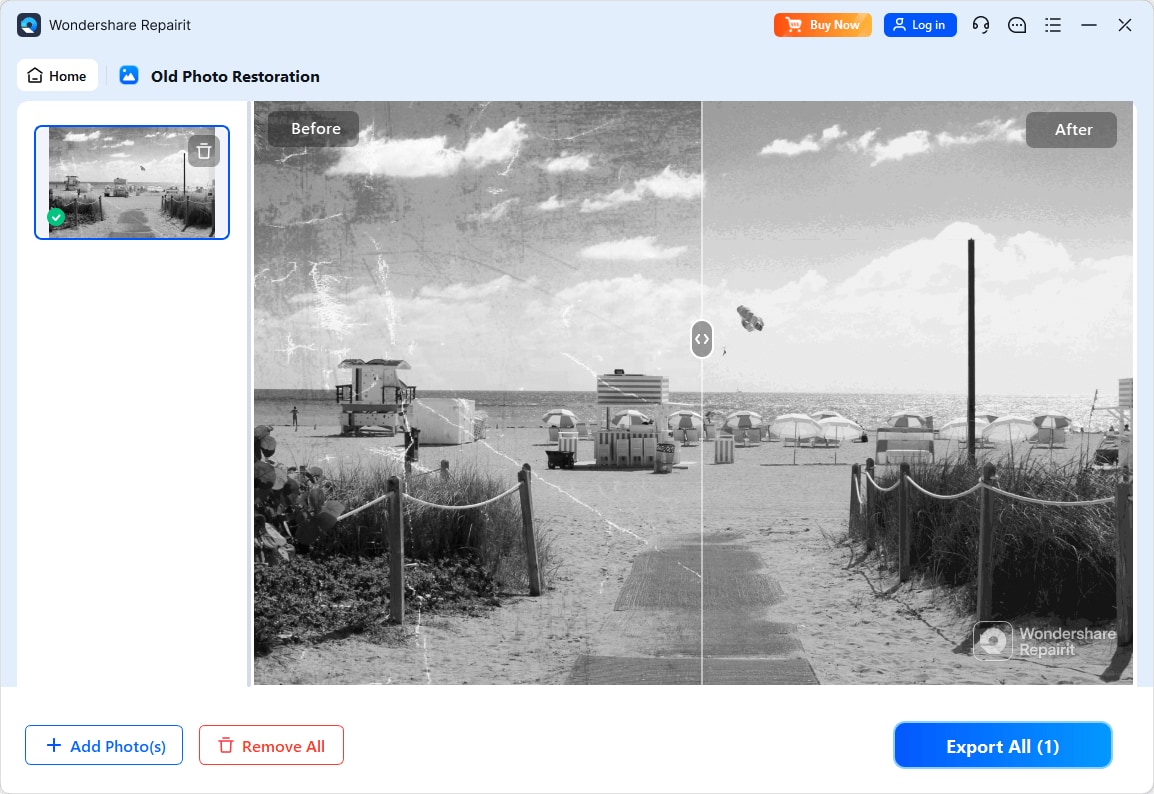
Step 4. Preview the restored result and save the repaired photo to your device.
Final Verdict
For most people restoring family archives, Repairit Old Photo Restoration is often the more convenient choice. Its guided, largely automated workflow can handle scratches, cracks, fading, and facial clarity in a few steps, making it suitable for batches of old photos and for users who do not want to learn detailed retouching.
AKVIS Retoucher remains a reasonable option if your main goal is precise scratch and object removal within a familiar editing environment. If you already use compatible photo editors and are comfortable with a more manual, selection-based process, AKVIS Retoucher can provide fine-grained control, while Repairit is better when you want broader, easier full-image restoration.
In many workflows, a hybrid approach works well: use Repairit to quickly improve overall quality and color, then rely on manual tools like AKVIS Retoucher for final fine-tuning on a few important images.
Next: Repairit Old Photo Restoration vs Retouch Pilot
FAQ
-
1. Is Repairit Old Photo Restoration easier to use than AKVIS Retoucher for beginners?
In most cases, yes. Repairit offers a guided, mostly automatic workflow for restoring old photos, while AKVIS Retoucher expects users to manually mark defects such as scratches or objects, which can be less intuitive if you are new to photo editing. -
2. Which is better for removing deep scratches in old photos, Repairit or AKVIS Retoucher?
AKVIS Retoucher is particularly strong at deep scratch removal when you carefully paint over damaged areas, because you control exactly what gets repaired. Repairit is usually better when you want quick, full-image repair where deep scratches are only one of several issues. -
3. Can both Repairit and AKVIS Retoucher help restore faded colors in old photos?
Repairit focuses more on overall color improvement and, in some workflows, colorization of black-and-white photos. AKVIS Retoucher mainly targets structural defect removal, so restoring faded colors usually depends on additional adjustments in your primary editor.




