
Repairit Old Photo Restoration vs Retouch Pilot is a practical comparison for anyone trying to decide how to fix scratches, cracks, stains, and fading in old photos. Choosing between these tools largely depends on how damaged your photos are and how much guidance you want while working. Repairit leans toward a guided, broader restoration experience, while Retouch Pilot focuses on more targeted defect removal.
Choosing between Repairit Old Photo Restoration and Retouch Pilot comes down to the type of damage in your old photos and how much guidance you want. This comparison looks at scratch and crack repair, faded color restoration, ease of use, and real-world workflows. By the end, you will know when a guided restoration tool like Repairit is more efficient and when a simpler defect-removal tool such as Retouch Pilot is enough for your projects.
Restore Old Photos with Repairit
 Security Verified. Over 7,302,189 people have downloaded it.
In this article
- Repairit Old Photo Restoration vs Retouch Pilot: Quick Verdict
- Repairit Old Photo Restoration vs Retouch Pilot: Key Differences
- Repairit Old Photo Restoration vs Retouch Pilot: Comparison Table
- What Repairit Old Photo Restoration and Retouch Pilot Are Best For
- Repairit Old Photo Restoration vs Retouch Pilot: Repair Capabilities and Damage Handling
- Repairit Old Photo Restoration vs Retouch Pilot: Restoration Quality and Real Results
- Repairit Old Photo Restoration vs Retouch Pilot: Workflow and Ease of Use
- Repairit Old Photo Restoration vs Retouch Pilot: Pricing and Trial Options
- Who Should Choose Repairit Old Photo Restoration
- Who Should Choose Retouch Pilot
- Pros and Cons of Repairit Old Photo Restoration and Retouch Pilot
- How to Restore Old Photos After Choosing the Right Tool
Repairit Old Photo Restoration vs Retouch Pilot: Quick Verdict
In most situations, Repairit Old Photo Restoration is a stronger choice for users dealing with multiple issues in the same image, such as deep cracks, stains, and faded colors, especially when portraits and facial details matter. Retouch Pilot is better suited to users who mainly want to clean up scratches and small defects on otherwise intact scans.
If your priority is an end-to-end, guided way to restore old photos without much manual retouching, Repairit tends to fit better. If you prefer a lightweight desktop tool for local fixes and do not need advanced automation, Retouch Pilot can be sufficient.
Repairit Old Photo Restoration vs Retouch Pilot: Key Differences
Both tools work on repairing old and damaged photos, but they approach the task differently. Repairit Old Photo Restoration vs Retouch Pilot mainly differs in breadth of restoration, automation, and the types of damage each handles most comfortably.
Repairit focuses on a wider scope: restoring faded colors, enhancing overall tones, and improving damaged facial details in old portraits, alongside scratch and crack repair. Retouch Pilot is more focused on fixing scratches and small damages with simple manual tools, which can be ideal for quick one-off cleanups.
This matters if you regularly deal with heavily aged photos or want guided support for tougher tasks such as colorizing black and white images and bringing back faces, instead of just removing visible defects.
Repairit Old Photo Restoration vs Retouch Pilot: Comparison Table
| Dimension | Repairit Old Photo Restoration |
|---|---|
| Best for | People restoring heavily damaged or very old photos, including faces, fading, and multiple defects at once. |
| Best for (Retouch Pilot) | Users fixing scratches and small damages on individual areas of an image. |
| Ease of use | Guided workflow with automated restoration options for non-technical users. |
| Ease of use (Retouch Pilot) | Simple UI with manual tools that are easy to grasp for basic retouching. |
| Restoration quality | Designed for deeper restoration, including improving facial details and faded tones in most common cases. |
| Restoration quality (Retouch Pilot) | Good for localized defect cleanup; more limited on complex, heavily damaged photos. |
| Workflow | Import photo, choose restoration options, preview, then export the repaired image. |
| Workflow (Retouch Pilot) | Open image, select defect, repair, export, focusing on local fixes. |
| Strengths | Handles multiple types of old photo damage in a more automated, guided way. |
| Strengths (Retouch Pilot) | Effective defect removal with a straightforward interface for spot repairs. |
| Weaknesses | May feel more feature-rich than needed for very minor touch-ups. |
| Weaknesses (Retouch Pilot) | Limited advanced features for complex restorations or batch handling of many photos. |
What Repairit Old Photo Restoration and Retouch Pilot Are Best For
At a high level, both tools focus on repairing damaged photos, but they shine in different scenarios. The overview below captures their primary roles so you can match them to your own collection of old images.
Retouch Pilot is photo repair software for removing defects and is best for users fixing scratches and small damages on old photos. Compared with Repairit Old Photo Restoration, it leans on a simple manual workflow, while Repairit focuses on broader restoration, including faded colors and facial details. Understanding these roles helps you choose the right tool for your restoration tasks.
Repairit Old Photo Restoration aims to cover a wider range of old photo issues, while Retouch Pilot keeps things focused on targeted defect removal with a simple interface and limited advanced options.
- Choose Repairit when you regularly work with badly faded, stained, or creased family photos that also need facial detail enhancement.
- Choose Retouch Pilot when most of your images are already in decent condition and mainly require cleaning small flaws.
Repairit Old Photo Restoration vs Retouch Pilot: Repair Capabilities and Damage Handling
In terms of repair capabilities, the two tools address similar problems but at different depths. Below is how their core and advanced features compare when handling real-world damage such as cracks, stains, and fading.
Core repair focus:
- Repairit Old Photo Restoration: restore faded colors and enhance overall tones in old photos, helping washed-out scans look closer to their original appearance.
- Retouch Pilot: remove scratches, dust, and small cracks using simple retouching tools, with an emphasis on local defect cleanup.
- Both: clean up visible defects such as minor stains or spots on scanned old photos, which is useful when you digitize prints from albums or shoeboxes.
Advanced and nuanced work:
- Repairit Old Photo Restoration: improve damaged facial details and clarity in aged portraits, which is important when faces are the focus of family memories.
- Repairit Old Photo Restoration: assist with colorizing black and white photos in a guided way so you can experiment with bringing older images to life.
- Retouch Pilot: allows more precise manual control on small areas, though without many advanced automation options, which suits users who enjoy manual touch-ups on specific spots.
For photos with torn corners, multiple deep cracks, and heavy discoloration, Repairit is generally better aligned with these complex scenarios. For relatively clean scans that just need a few scratches removed, Retouch Pilot can be more than enough.
Repairit Old Photo Restoration vs Retouch Pilot: Restoration Quality and Real Results
Real-world restoration quality depends on the starting image and how much time you want to invest. Repairit uses a more guided, automated approach to balance different kinds of damage in one pass, which can help when you have many photos or limited editing skills.
Repairit is designed for deeper restoration, including improved facial details and faded tones in common cases. It can be particularly helpful on portraits where eyes, skin, and hair have lost definition over time. By processing the whole image, it often produces a more cohesive look across faces, clothing, and backgrounds.
Retouch Pilot tends to produce its best results on localized cleanup: individual scratches, dust spots, or crease lines. Because it is more manual, the quality is closely tied to how carefully you use its tools. For heavily damaged prints or images with extensive fading, achieving a similar overall transformation usually takes more time and experience compared with a guided restoration workflow.
Repairit Old Photo Restoration vs Retouch Pilot: Workflow and Ease of Use
Workflow can influence which tool feels more comfortable day to day. Both are accessible for non-professionals, but they structure the process differently.
Repairit workflow and ease of use:
- Import photo, choose restoration options, preview, then export the repaired image.
- Offers more guided steps, which help beginners follow a clear sequence from upload to download.
- Well-suited when one photo contains cracks, stains, and severe fading that all need attention at once.
Retouch Pilot workflow and ease of use:
- Open image, select defect, repair, export, keeping the focus on local fixes.
- Uses a direct flow that many users find intuitive for small jobs.
- Better aligned with people who like to zoom into specific areas and control each repair manually.
Retouch Pilot uses a direct flow: open image, select defect, repair, export, making it approachable for quick spot fixes. Repairit Old Photo Restoration adds more guided steps, such as choosing restoration options and previewing results before exporting, which can be helpful when you need to repair multiple types of damage in one old photo.
Repairit Old Photo Restoration vs Retouch Pilot: Pricing and Trial Options
Pricing changes over time, but there are some general patterns in how these tools are offered. Repairit Old Photo Restoration and Retouch Pilot both typically provide paid options, and in many cases, a trial or demo is available so you can test basic restoration before committing.
Key considerations:
- Repairit is often better value if you have many heavily damaged photos to process because its broader automation can save time on each image.
- Retouch Pilot can be cost-effective if you only occasionally need to fix scratches or small defects on a handful of photos.
- Exact license types, duration, and promotions differ, so checking the current offers from each provider is important before deciding.
Repairit Old Photo Restoration and Retouch Pilot both typically offer paid plans, sometimes with trial or demo options so you can test basic restoration. Exact pricing may vary by edition, license type, and promotions. For cost-sensitive users who only need simple defect removal, Retouch Pilot can be adequate, while users with many heavily damaged photos may find more value in Repairit over time.
Who Should Choose Repairit Old Photo Restoration
Repairit is aimed at users who want a structured way to restore old photos rather than spend time on manual pixel-level edits. It becomes especially compelling when your photo library contains a mix of fading, surface damage, and portraits.
- People restoring heavily faded or stained family photos that need more than simple scratch removal.
- Users who want a guided, semi-automated workflow for enhancing facial details in old portraits.
- Anyone looking to colorize black and white photos while also cleaning cracks and creases.
- Beginners who prefer clear steps and previews instead of manual pixel-level retouching.
If you often scan entire albums or shoeboxes of prints and want a reliable way to clean them up with consistent results, Repairit Old Photo Restoration will usually feel more efficient than a purely manual defect-removal tool.
Who Should Choose Retouch Pilot
Retouch Pilot is more suitable when your main concern is cleaning up small defects and you are comfortable clicking or brushing over specific flaws. It keeps the toolset focused and avoids overwhelming you with options.
- Users who mainly need to fix scratches and small damages on otherwise intact photos.
- People who prefer a simple UI and manual control over specific defects without many extra features.
- Retouchers who want a lightweight desktop tool for quick spot cleanup on scanned prints.
- Those working with individual images who do not require advanced batch tools or complex adjustments.
If you already have relatively well-preserved prints and just want to remove a few distracting marks before printing or sharing, Retouch Pilot may be all you need.
Pros and Cons of Repairit Old Photo Restoration and Retouch Pilot
Looking at pros and cons side by side helps clarify how each tool fits different restoration scenarios.
Repairit Old Photo Restoration Pros and Cons
Retouch Pilot Pros and Cons
How to Restore Old Photos After Choosing the Right Tool
After comparing Repairit Old Photo Restoration vs Retouch Pilot, the next step is to actually restore your old photos. No matter which tool you lean toward, the goal is the same: fix scratches and cracks, bring back faded tones, and make faces recognizable again. For users who want a more guided path with less manual tweaking, Repairit Old Photo Restoration offers a practical workflow for getting from raw scan to restored image.
Both tools can open common file types and scanned images, making it easy to start from home-scanned prints or lab scans without special preparation. Both are designed to work with common image formats like JPG, PNG, or TIFF and scanned photo files. Repairit Old Photo Restoration focuses on a guided, often cloud-connected workflow, while Retouch Pilot is a traditional desktop program. In most cases, either option will open typical scans from home scanners or photo labs without special preparation.
Key Features
- Guided restoration of scratches, cracks, and stains on old photos.
- Enhancement of facial details and overall clarity in aged portraits.
- Options to restore faded colors and improve contrast in scanned prints.
Step-by-step guide
Step 1. Choose the AI restoration model based on your needs, such as repairing damaged photos or restoring old images.

Step 2. Import your old or damaged photos into Repairit to begin the restoration process.

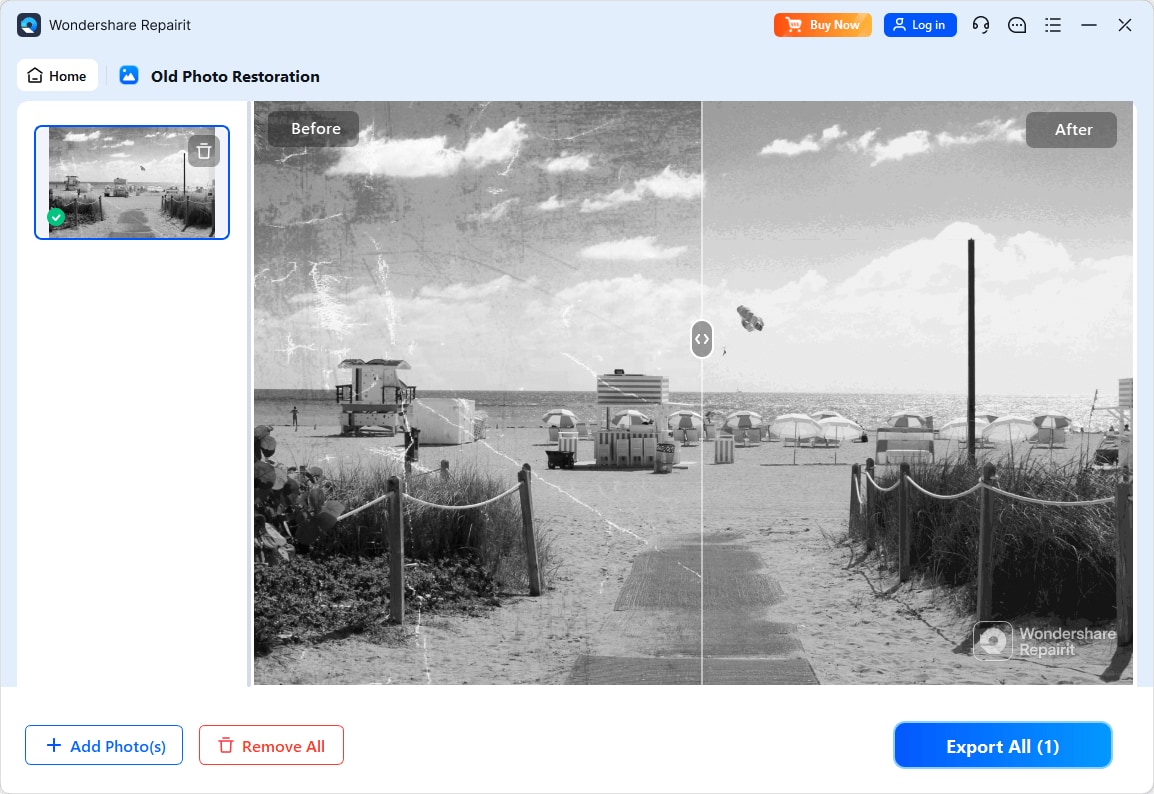
Step 3. Apply the old photo restoration model to fix scratches, restore colors, and improve image quality.
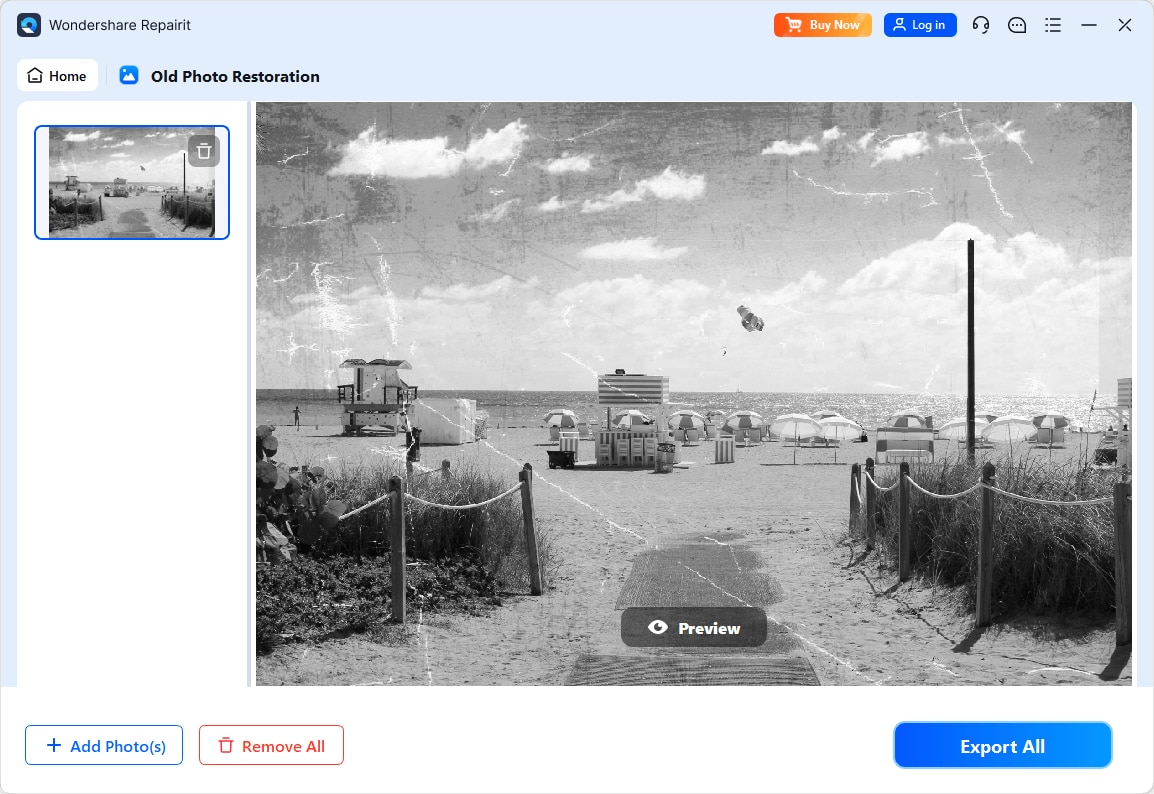
Step 4. Preview the restored result and save the repaired photo to your device.
Final Verdict
When comparing Repairit Old Photo Restoration vs Retouch Pilot, the main question is how complex your damage is and how much you want the software to guide you. For most users with multiple old family photos that show fading, stains, and worn facial details, Repairit Old Photo Restoration will usually be the more capable choice. Its guided workflow and broader restoration options help you repair complex damage without intensive manual work.
Retouch Pilot is still a practical solution if your needs are modest. When you mostly deal with isolated scratches, dust, or small defects on otherwise well-preserved photos, its simple interface and direct workflow can be sufficient and efficient. In many workflows, these tools can even complement each other: Repairit for overall restoration and color, and Retouch Pilot for additional manual fine-tuning on specific areas, if needed.
Next: Repairit Old Photo Restoration vs Softorbits Photo Retoucher
FAQ
-
1. Is Repairit Old Photo Restoration better than Retouch Pilot for heavily damaged photos?
In most cases, yes. Repairit Old Photo Restoration is better suited to heavily damaged photos with fading, stains, and facial detail issues, while Retouch Pilot is more focused on spot repairs like scratches and dust. -
2. Which is easier for beginners, Repairit Old Photo Restoration or Retouch Pilot?
Both are approachable, but in different ways. Repairit offers more guided steps and automated restoration, while Retouch Pilot has a very simple manual flow that may appeal to users who only need basic defect cleanup. -
3. Can Retouch Pilot restore faded colors as well as Repairit Old Photo Restoration?
Retouch Pilot is mainly designed for defect removal, so handling extensive fading often requires more manual work. Repairit Old Photo Restoration generally offers more support for restoring overall tones and contrast in faded photos.




