
Choosing between Repairit Photo Enhancer vs Upscayl comes down to how much control and automation you want over AI image enhancement. Upscayl is a popular open-source AI image upscaler that is free and works offline, while Repairit Photo Enhancer focuses on guided, AI-driven tools to improve image quality for everyday users. This comparison walks through realistic differences in output, workflow, and pricing so you can decide which option fits your projects and budget.
Instead of looking for a single winner, it is more useful to understand how each tool approaches enhancing photo quality, sharpening blurry photos, and upscaling image resolution so you can match the tool to your own images and workflow.
Enhance Photo Quality with Repairit Photo Enhancer
 Security Verified. Over 7,302,189 people have downloaded it.
In this article
- Repairit Photo Enhancer vs Upscayl: Quick Verdict
- Repairit Photo Enhancer vs Upscayl: Key Differences
- Repairit Photo Enhancer vs Upscayl: Comparison Table
- What Repairit Photo Enhancer and Upscayl Are Best For
- Repairit Photo Enhancer vs Upscayl: AI Enhancement Features and Capabilities
- Repairit Photo Enhancer vs Upscayl: Output Quality and Real-World Results
- Repairit Photo Enhancer vs Upscayl: Workflow and Ease of Use
- Repairit Photo Enhancer vs Upscayl: Pricing and Trial Options
- Who Should Choose Repairit Photo Enhancer
- Who Should Choose Upscayl
- Pros and Cons of Repairit Photo Enhancer and Upscayl
- How to Enhance Photos After Choosing the Right Tool
Repairit Photo Enhancer vs Upscayl: Quick Verdict
In everyday photo enhancement, the main difference between Repairit Photo Enhancer vs Upscayl is scope. Repairit Photo Enhancer is built as a broader AI photo enhancement toolkit, while Upscayl concentrates on AI upscaling.
For users who want to improve image clarity, sharpen portraits, reduce noise, and upscale resolution with guidance, Repairit Photo Enhancer tends to be the stronger choice. For users who mainly need a free, open-source way to enlarge images on desktop, Upscayl can be enough.
- Best overall for everyday users: Repairit Photo Enhancer, due to its guided interface and multiple enhancement modes.
- Best if you only care about free AI upscaling: Upscayl, because it is open source and focuses on resolution increases.
- Natural-looking portraits and low-quality photos: More often aligned with Repairit Photo Enhancer, thanks to portrait-focused modes and noise control.
- Offline, privacy-conscious upscaling: Upscayl, since it runs locally once installed.
Repairit Photo Enhancer vs Upscayl: Key Differences
When comparing Repairit Photo Enhancer vs Upscayl, several practical differences stand out that affect which tool will fit your workflow.
- Feature scope: Upscayl specializes in upscaling image resolution using AI models. Repairit Photo Enhancer goes beyond that, adding sharpening, denoising, clarity adjustments, and portrait-oriented enhancement options.
- Guidance and presets: Repairit Photo Enhancer provides AI-driven presets and modes aimed at everyday photos and portraits, which can be easier for beginners. Upscayl offers fewer dedicated presets and expects more experimentation with scale factors and models.
- Cost and licensing: Repairit Photo Enhancer is commercial software with paid plans and the possibility of trials. Upscayl is free and open source, which is attractive if you want zero license cost.
- Offline vs broader tools: Both can work locally, but Upscayl is explicitly designed for offline use and simple import to upscale to export. Repairit Photo Enhancer is oriented around a fuller enhancement workflow where you preview and fine-tune results.
- Target users: Repairit Photo Enhancer is aimed at photographers, content creators, and regular users who enhance images often. Upscayl suits technically comfortable users and anyone who mainly needs image enlargement without a full enhancement suite.
Repairit Photo Enhancer vs Upscayl: Comparison Table
| Aspect | Repairit Photo Enhancer |
|---|---|
| Primary focus | Guided AI photo enhancement, including upscaling, sharpening, denoising, clarity, and portrait modes. |
| Aspect | Upscayl |
| Primary focus | Open-source AI image upscaling for increasing resolution, mainly on desktop and offline. |
| Best for | Users who want an all-in-one enhancer to improve image clarity, sharpen blurry photos, and enhance portraits. |
| Best for | Users who mainly need a free AI image upscaler for enlarging photos, graphics, or digital art. |
| Ease of use | Non-technical users who like presets, previews, and a step-by-step enhancement flow. |
| Ease of use | Simple layout, but may feel more manual and experimental when choosing upscaling options. |
| Output style | Aims for balanced, natural-looking enhancements across a range of real-world photos. |
| Output style | Strong resolution gains, particularly for simple or stylized images; complex photos may need tuning. |
| Pricing | Commercial tool with paid plans and potential trial or limited free usage. |
| Pricing | Free and open source with no license fee for the core application. |
What Repairit Photo Enhancer and Upscayl Are Best For
Each tool is built around different priorities, so the right choice depends on how you handle your photos.
Repairit Photo Enhancer is best for users who want a guided, all-in-one enhancement experience. If you often work with soft smartphone shots, older images, or portraits that need better clarity and more natural detail, its AI modes can reduce the amount of manual adjustment you need to do.
Upscayl is best for users who want a free AI image upscaler that runs on desktop. If your main task is to enlarge digital art, game textures, or simpler photos for printing or higher-resolution displays, and you are comfortable experimenting with models and scale options, Upscayl can cover that specific need without adding extra cost.
- Choose Repairit Photo Enhancer if you want a broader toolkit for clarity, sharpness, noise reduction, and portraits.
- Choose Upscayl if you primarily care about open-source, offline, no-cost upscaling and do not need many extra enhancement tools.
Repairit Photo Enhancer vs Upscayl: AI Enhancement Features and Capabilities
The feature sets of Repairit Photo Enhancer vs Upscayl differ significantly, especially once you look beyond basic resolution changes.
Repairit Photo Enhancer focuses on multiple aspects of photo quality:
- AI upscaling designed to increase resolution while trying to keep details looking realistic.
- Sharpening tools that can help bring back edge definition in slightly blurry photos.
- Denoising options that aim to clean up grain or compression artifacts in low-light or heavily compressed images.
- Clarity and contrast enhancements to make soft or low-resolution photos appear more defined.
- Portrait-oriented modes aimed at facial details and skin for more natural portraits.
- Batch enhancement, so you can process multiple photos with similar settings.
Upscayl focuses mainly on resolution:
- AI-based upscaling by specific scale factors for enlarging photos and graphics.
- Offline processing using your local CPU or GPU, which can help with privacy.
- A straightforward import, choose model or preset, and export workflow.
- Open-source nature, allowing community-driven updates and transparency.
- Depending on build and configuration, some basic denoising or sharpening applied around the upscaling step.
Overall, Repairit Photo Enhancer targets users who need more than just bigger images, while Upscayl serves users whose priority is AI upscaling with a narrower set of enhancements.
Repairit Photo Enhancer vs Upscayl: Output Quality and Real-World Results
Output quality is often what matters most when you look at Repairit Photo Enhancer vs Upscayl. Neither tool is universally better; they simply emphasize different types of results.
With Repairit Photo Enhancer, the goal is to balance resolution, sharpness, and noise control, especially for real-world photos. For example, when you enhance a low-resolution portrait, the software aims to improve facial features and skin while limiting overly artificial textures. This can work well for social media posts, product photos, or everyday shots where you want natural-looking detail.
Upscayl tends to shine when the primary requirement is resolution gain. It can be particularly effective for digital art, graphics, or simpler scenes where clear edges are important and the noise level is already low. For complex, noisy, or very soft photos, you may need some trial and error with models and scale options, and results can sometimes show artifacts or an over-sharpened look, depending on the image.
In practice:
- Repairit Photo Enhancer is often a better match for mixed photo libraries that include portraits, soft smartphone images, and older low-quality photos.
- Upscayl is often a better match for users who already have relatively clean images and mainly want higher resolution for printing or zooming.
Repairit Photo Enhancer vs Upscayl: Workflow and Ease of Use
Both tools aim to stay approachable, but they guide you differently through enhancement.
Repairit Photo Enhancer emphasizes a more structured workflow:
- You install and launch the software, then import one or more photos in common formats.
- You choose what you want to do, such as upscaling, sharpening, or portrait enhancement.
- You can optionally select an AI model or preset based on the image type.
- A preview lets you compare before and after, and you can tweak the strength of sharpening or noise reduction.
- Finally, you export the enhanced images in the formats and resolution you prefer.
Upscayl follows a focused import to upscale to export pattern:
- You download and install Upscayl on a supported desktop system.
- You open an image, pick an upscale factor, and choose an AI model or preset if available.
- You run the upscaling process locally and wait for the result.
- You then export the enlarged image to your chosen folder and format.
For non-technical users who appreciate clear guidance and previews, Repairit Photo Enhancer can feel more approachable. For users comfortable experimenting with models and scales, Upscayl offers a minimal, focused interface.
Repairit Photo Enhancer vs Upscayl: Pricing and Trial Options
Cost is one of the clearest differences in the Repairit Photo Enhancer vs Upscayl comparison.
- Repairit Photo Enhancer pricing: It follows a commercial model with paid plans. In many cases, you can expect trial options or limited free usage so you can assess enhancement quality before committing. This suits users who enhance photos regularly and see value in an integrated toolkit.
- Upscayl pricing: Upscayl is free and open source, so there is no license fee for the core application. Your main costs are your own hardware, and the time spent managing installation and updates.
If cost is the deciding factor and you only need basic AI upscaling, Upscayl will often be the more attractive option. If you value a guided workflow, portrait tools, and broader enhancement capabilities, paying for Repairit Photo Enhancer may make sense, especially for ongoing work.
Who Should Choose Repairit Photo Enhancer
Repairit Photo Enhancer is a strong option for users who need more than simple resolution increases. It is especially relevant if:
- You frequently work with soft, low-resolution photos from older cameras or smartphones and want to improve image clarity.
- You often enhance portraits for social media, headshots, or product listings and want AI help with facial details and skin.
- You manage batches of images and want consistent, natural-looking results without adjusting every image manually.
- You prefer a structured interface with clear steps and previews that reduce guesswork when applying AI enhancement.
If your work or hobby regularly involves refining how photos look, rather than only enlarging them, investing in a tool like Repairit Photo Enhancer can provide more control and flexibility.
Who Should Choose Upscayl
Upscayl is better suited to users who primarily need a focused AI image upscaler and are comfortable working with an open-source desktop app. Consider Upscayl if:
- Your main goal is to upscale image resolution, for example, to prepare artwork, textures, or simple photos for higher-resolution displays or printing.
- You prefer free, open-source tools and are comfortable handling installation, updates, and occasional configuration yourself.
- You value offline processing and want your images processed locally on your own machine.
- You only occasionally enhance images and do not need a full suite of tools for portraits, noise reduction, and detailed clarity control.
For occasional or budget-conscious use where enlargement is the top priority, Upscayl can be a practical choice, even if it offers fewer specialized enhancement options than Repairit Photo Enhancer.
Pros and Cons of Repairit Photo Enhancer and Upscayl
Weighing the pros and cons of Repairit Photo Enhancer vs Upscayl helps clarify what you gain or give up with each option.
Repairit Photo Enhancer Pros and Cons
Upscayl Pros and Cons
How to Enhance Photos After Choosing the Right Tool
Once you understand how Repairit Photo Enhancer vs Upscayl compare, the next step is actually enhancing your photos. Even if you still use Upscayl for certain upscaling tasks, a guided enhancer can simplify everyday improvements like sharpening, noise reduction, and portrait tuning.
Below is how you can use Repairit Photo Enhancer in a practical, step-by-step way to improve image clarity and upscale resolution without needing deep technical knowledge.
Key Features
- AI upscaling to increase image resolution while aiming to preserve important details.
- Sharpening controls to bring definition back to slightly blurry photos.
- Denoising to reduce grain and compression artifacts in low-light or compressed images.
- Clarity and contrast adjustments to make soft images appear more defined.
- Portrait-focused enhancement modes tuned for faces and skin.
- Batch processing to apply a consistent enhancement style to many photos at once.
Step-by-step guide
Step 1. Choose an AI enhancement model based on your needs, such as general enhancement, portrait improvement, or image upscaling.

Step 2. Import your photo into Repairit Photo Enhancer to begin the enhancement process.

Step 3. Apply the enhancement settings and let the AI improve clarity, sharpness, and overall image quality.
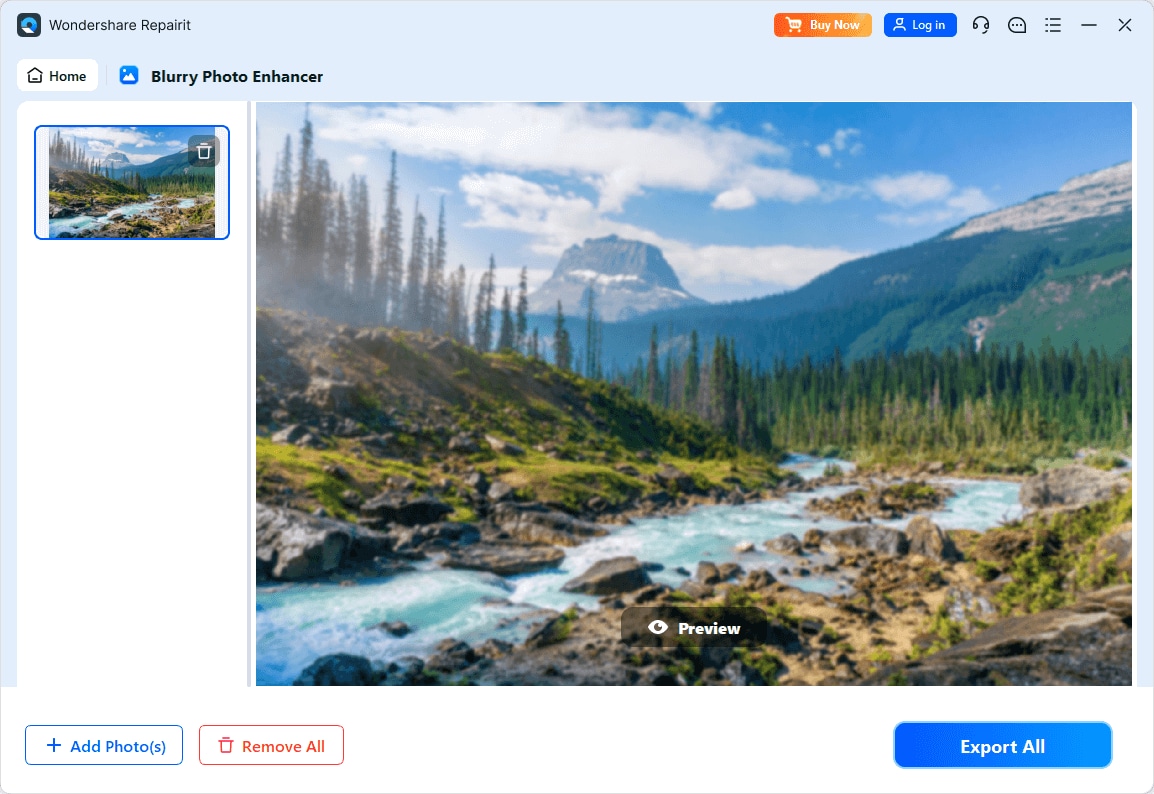
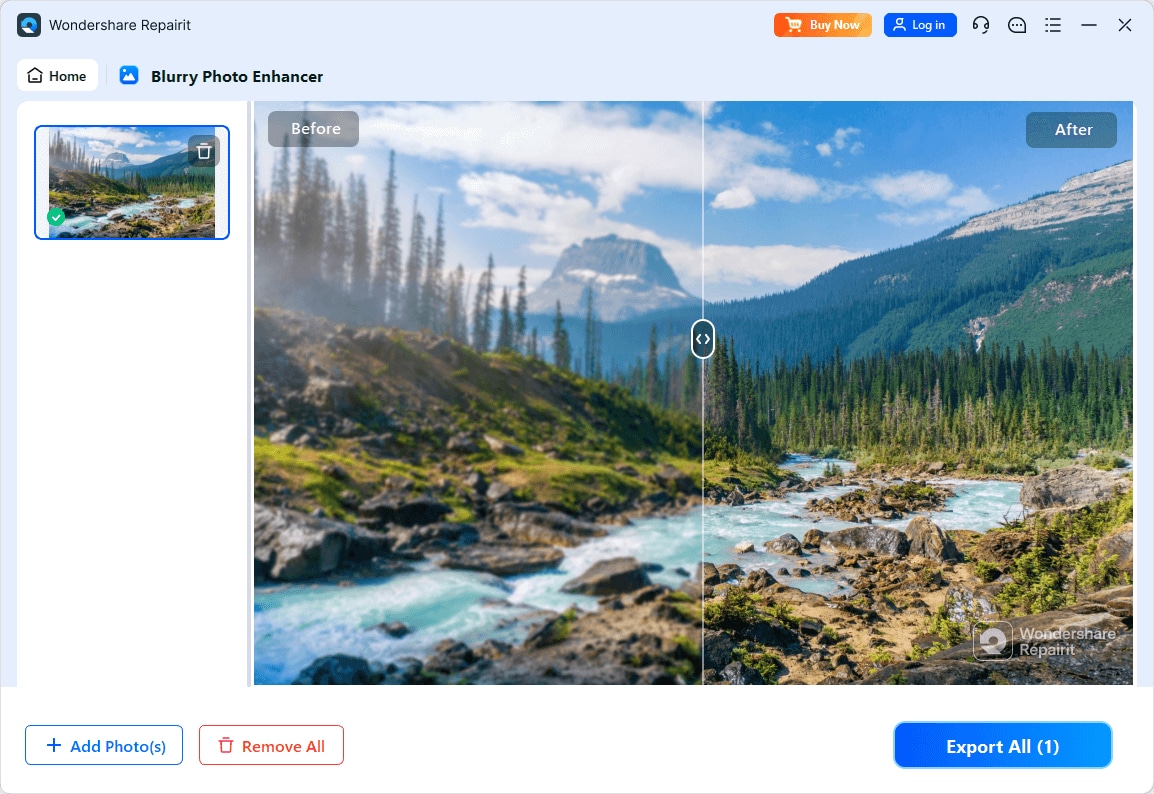
Step 4. Preview the enhanced result and save the improved photo to your device.
Final Verdict
For users comparing Repairit Photo Enhancer vs Upscayl, the right choice depends on whether you prioritize a broad enhancement toolkit or a free, focused upscaler.
Upscayl stands out as a free, open-source AI image upscaler that runs offline and concentrates on increasing resolution. It is a reasonable pick if you mainly enlarge digital art, textures, or simpler photos and do not need many extra tools for clarity and portraits.
Repairit Photo Enhancer is oriented toward users who care about both size and overall visual quality. Its AI enhancement modes aim to sharpen blurry photos, improve image clarity, and enhance portraits and low-quality images with more guidance and controls. In many everyday scenarios where you want natural-looking results across a range of photos, it can be the more capable and flexible choice.
A practical approach is to pick based on your most common tasks: use Upscayl when cost-free upscaling is enough, and rely on Repairit Photo Enhancer when you need a guided, all-in-one solution for enhancing how your images actually look.
Next: Repairit Photo Enhancer vs Real-Esrgan Gui
FAQ
-
1. Is Upscayl really free to use
Yes. Upscayl is an open-source AI image upscaler and is generally free to download and use. You do not pay a license fee for the core software, but you do need your own hardware to run the offline processing. -
2. Does Repairit Photo Enhancer only upscale images
No. While Repairit Photo Enhancer includes AI upscaling, it also focuses on improving image clarity, reducing noise, and enhancing portraits and low-quality images. It is designed as a broader photo enhancement tool rather than a single-purpose upscaler. -
3. Which tool gives better output quality, Repairit Photo Enhancer or Upscayl
It depends on your images and goals. Upscayl can deliver strong resolution increases, especially for simpler or stylized images. Repairit Photo Enhancer aims to balance resolution, sharpness, and noise control, which can produce more natural-looking results for varied real-world photos. -
4. Do I need an internet connection to use Upscayl or Repairit Photo Enhancer
Upscayl is designed to work offline once installed, as it processes images locally. Repairit Photo Enhancer may require internet access for installation, updates, or some features, but the core enhancement workflow focuses on your local images. You should check the latest requirements for each tool before planning fully offline use. -
5. Can I use both Upscayl and Repairit Photo Enhancer together
Yes. Some users may upscale an image in Upscayl first, then use Repairit Photo Enhancer to refine clarity, sharpness, or portraits, or do the reverse. Combining tools can make sense if you already rely on Upscayl for free upscaling but want more control over final appearance.




