
Choosing between Repairit Photo Enhancer vs Real-ESRGAN GUI usually comes down to how technical you want your image workflow to be. One emphasizes a guided, user-friendly interface, while the other exposes more of the ESRGAN-based power under the hood. This comparison looks at output quality, ease of use, and pricing so you can decide which tool makes more sense for everyday photo enhancement, from sharpening soft portraits to upscaling low-resolution images.
Enhance Photo Quality with Repairit Photo Enhancer
 Security Verified. Over 7,302,189 people have downloaded it.
In this article
- Repairit Photo Enhancer vs Real-ESRGAN GUI: Quick Verdict
- Repairit Photo Enhancer vs Real-ESRGAN GUI: Key Differences
- Repairit Photo Enhancer vs Real-ESRGAN GUI: Comparison Table
- What Repairit Photo Enhancer and Real-ESRGAN GUI Are Best For
- Repairit Photo Enhancer vs Real-ESRGAN GUI: AI Enhancement Features and Capabilities
- Repairit Photo Enhancer vs Real-ESRGAN GUI: Output Quality and Real-World Results
- Repairit Photo Enhancer vs Real-ESRGAN GUI: Workflow and Ease of Use
- Repairit Photo Enhancer vs Real-ESRGAN GUI: Pricing and Trial Options
- Who Should Choose Repairit Photo Enhancer
- Who Should Choose Real-ESRGAN GUI
- Pros and Cons of Repairit Photo Enhancer and Real-ESRGAN GUI
- How to Enhance Photos After Choosing the Right Tool
Repairit Photo Enhancer vs Real-ESRGAN GUI: Quick Verdict
Between Repairit Photo Enhancer and Real-ESRGAN GUI, the better option depends on whether you want a guided, non-technical interface or a more hands-on ESRGAN-based workflow.
Repairit Photo Enhancer is generally a stronger choice for users who want to enhance portraits, social media photos, and everyday images with minimal setup. It focuses on natural-looking improvements, quick previews, and clear enhancement modes.
Real-ESRGAN GUI suits users who are comfortable with local installations and model configuration. It can deliver impressive upscaling for graphics and photos when tuned well, but the learning curve and hardware demands may feel heavier for casual users.
In most cases, users who prioritize simplicity, predictable results, and guided AI enhancement will lean toward Repairit, while technically inclined users who want direct access to an ESRGAN-style engine may prefer Real-ESRGAN GUI.
Repairit Photo Enhancer vs Real-ESRGAN GUI: Key Differences
The key difference between Repairit Photo Enhancer vs Real-ESRGAN GUI is how much control they require from you.
- Ease of use: Repairit Photo Enhancer provides a streamlined interface with presets and modes like upscaling or portrait enhancement. Real-ESRGAN GUI typically exposes options such as model choice and scale factors, which can be powerful but more technical.
- Output focus: Repairit emphasizes natural-looking enhancement across portraits and everyday photos, balancing sharpness and noise reduction. Real-ESRGAN GUI is centered on ESRGAN-based resolution upscaling, which can be especially useful for low-resolution or stylized images when configured properly.
- Workflow: Repairit offers a few guided steps from import to export with previews built in. Real-ESRGAN GUI follows a load-select-model-upscale-save pattern that may involve more experimentation.
- Deployment: Repairit is built as a commercial, user-facing product with support and documentation. Real-ESRGAN GUI typically comes from open-source or community-driven distributions relying more on user initiative.
- Best suited users: Repairit targets photographers, content creators, and non-technical users who want clear improvements with little tuning. Real-ESRGAN GUI is better for users who enjoy tweaking AI tools locally and can manage dependencies and system resources.
Repairit Photo Enhancer vs Real-ESRGAN GUI: Comparison Table
| Aspect | Repairit Photo Enhancer | Real-ESRGAN GUI |
|---|---|---|
| Best for | Non-technical users and creative professionals who want guided AI enhancement for everyday photos | Users comfortable with desktop AI tools who want an ESRGAN-based upscaling workflow on their own machine |
| Ease of use | Streamlined interface with presets and guided steps | More technical; requires understanding of models and settings |
| Output focus | Natural-looking enhancement for portraits, low-resolution, and general photos | High-detail ESRGAN-style upscaling; results depend heavily on configuration |
| Workflow style | Import, choose enhancement type, preview, export | Install, load images, select model and scale, run upscaling, save |
| Strengths | Accessible UI, portrait-focused modes, quick previews, suitable for typical users | Powerful open-source engine, local processing, good for batch and technical workflows |
| Weaknesses | Less manual control over low-level AI parameters; commercial pricing | Technical setup, less guidance for beginners, interface can feel complex |
What Repairit Photo Enhancer and Real-ESRGAN GUI Are Best For
Both tools can significantly improve perceived image quality, but they excel in different scenarios.
- Repairit Photo Enhancer is best for users who regularly enhance portraits, family photos, product shots, or social media images. Its guided options help sharpen soft images, reduce noise, and boost clarity without requiring you to manage AI models manually.
- Real-ESRGAN GUI is better suited to users working with heavy upscaling tasks, such as anime art, game textures, or low-resolution assets. When the right ESRGAN-based model and settings are chosen, it can increase resolution substantially while adding detail-like textures.
If your main concern is getting clean, natural improvements on everyday photos in as few clicks as possible, Repairit is likely the more practical option. If you prefer to tune an upscaling pipeline on your own hardware and do not mind experimenting with models, Real-ESRGAN GUI can be a solid choice.
Repairit Photo Enhancer vs Real-ESRGAN GUI: AI Enhancement Features and Capabilities
From a feature perspective, the two tools overlap on AI upscaling but differ in how they package their capabilities.
Repairit Photo Enhancer capabilities include:
- AI-based upscaling to increase image resolution while aiming to maintain natural textures.
- Sharpening tools to improve image clarity and make soft details look crisper.
- Denoising to reduce visible noise in low-light or compressed photos.
- Portrait-focused enhancement modes that refine facial features and skin texture subtly.
- General clarity improvement for low-resolution, soft, or slightly blurry photos.
- Batch handling so you can enhance multiple images with similar settings.
- Simple presets that match common use cases such as social media posts or product shots.
Real-ESRGAN GUI capabilities generally include:
- ESRGAN-based AI upscaling to increase image resolution on the desktop.
- Local processing so photos stay on your machine rather than a cloud service.
- Configurable scale factors for enlarging images beyond their original size.
- Model selection options, depending on which Real-ESRGAN variants are available in the GUI.
- Basic controls for handling different input types, such as heavily compressed images.
- Support for batch upscaling through a single run, depending on the specific distribution.
In terms of capabilities, Repairit leans toward an integrated suite for clarity, sharpness, and noise handling, while Real-ESRGAN GUI focuses primarily on the upscaling engine itself. That distinction matters if you want an all-in-one enhancement workflow versus a specialized resolution booster.
Repairit Photo Enhancer vs Real-ESRGAN GUI: Output Quality and Real-World Results
Real-world results from Repairit Photo Enhancer vs Real-ESRGAN GUI depend heavily on source image quality and how each tool is used.
Repairit Photo Enhancer output tendencies:
- Aims for natural skin tones and face details, which is useful for portraits and people photos.
- Balances sharpening and noise reduction so images look clearer without becoming overly harsh.
- Offers presets that are tuned for typical photo scenarios, which helps non-experts get consistent results.
Real-ESRGAN GUI output tendencies:
- Can generate very detailed-looking upscaled images, especially for stylized content or graphics.
- Results depend on chosen scale factor, model, and hardware capability; users may need to experiment.
- On some photos, especially portraits, outputs may require careful tuning to avoid overly artificial textures.
If your priority is natural-looking enhancement with minimal trial and error, Repairit is usually easier to rely on. If you are comfortable adjusting parameters and testing different models to squeeze out every bit of detail from low-resolution files, Real-ESRGAN GUI can reward the extra effort.
Repairit Photo Enhancer vs Real-ESRGAN GUI: Workflow and Ease of Use
Workflow is one of the clearest dividing lines between these two tools.
Repairit Photo Enhancer workflow is built around guided steps:
- Open the app and import one or more photos from your computer.
- Choose an enhancement mode such as general upscaling or portrait enhancement.
- Optionally adjust intensity or related options in the interface.
- Preview the improvement in clarity, resolution, and noise.
- Confirm the enhancement and export in your preferred format.
Most users can complete this workflow in a few minutes, which suits busy photographers or content creators who need repeatable results.
Real-ESRGAN GUI workflow typically looks like this:
- Install the GUI and ensure Real-ESRGAN models and dependencies are in place.
- Launch the app and load an image or folder of images.
- Select the ESRGAN-based model, scale factor, and any other parameters.
- Run the upscaling process and wait for processing to finish.
- Review and save the upscaled outputs.
Once installed, this path is fairly linear, but initial setup and ongoing choices around models and parameters can feel challenging if you are not used to AI tools. Users who want a smooth, beginner-friendly experience will usually find Repairit easier to live with day to day.
Repairit Photo Enhancer vs Real-ESRGAN GUI: Pricing and Trial Options
Pricing also differs significantly between a commercial product and an open-source style tool.
Repairit Photo Enhancer pricing and trial:
- Offered as commercial software with paid plans for individuals and professionals.
- Typically provides a way to test core features before committing, so you can see how it enhances your own images.
- Pricing reflects ongoing development, support, and user-focused interface design.
Real-ESRGAN GUI pricing context:
- Built around an open-source ESRGAN-based project that is generally free to download and use under its license.
- No formal trial structure; you simply install and test, depending on the distribution you choose.
- Costs can show up indirectly in hardware requirements, time spent configuring, and potential troubleshooting.
If you value commercial support and a polished interface, paying for Repairit may be worthwhile. If minimizing software cost is your top priority and you can handle a more technical setup, Real-ESRGAN GUI can be attractive from a budget standpoint.
Who Should Choose Repairit Photo Enhancer
You should consider Repairit if you want an accessible AI photo enhancement tool that prioritizes clarity and ease of use over granular tweaking.
- You often work with portraits, family photos, or social media content and want them to look sharper and cleaner with minimal effort.
- You prefer clearly labeled modes for upscaling, sharpening, and portrait enhancement instead of raw model names and parameters.
- You value being able to enhance multiple photos quickly with consistent, natural-looking results.
- You want commercial support, documentation, and an interface that is maintained with non-expert users in mind.
For many photographers, marketers, and content creators, this balance of control and simplicity makes Repairit more practical than manually managing an ESRGAN-based environment.
Who Should Choose Real-ESRGAN GUI
Real-ESRGAN GUI is a better fit for users who are comfortable running AI tools locally and want deeper control over the upscaling pipeline.
- You frequently upscale low-resolution graphics, anime-style images, game textures, or assets that benefit from large resolution boosts.
- You want to keep processing strictly on your own machine and are fine with the hardware demands of ESRGAN-style models.
- You do not mind managing dependencies, downloading models, and experimenting with parameters to find what works best.
- You prefer open-source or community-driven tools and do not require a commercial support structure.
If you recognize yourself in this description and primarily care about high-detail upscaling, Real-ESRGAN GUI may be enough for your needs, especially when combined with other tools for fine-tuning.
Pros and Cons of Repairit Photo Enhancer and Real-ESRGAN GUI
Repairit Photo Enhancer Pros and Cons
Real-ESRGAN GUI Pros and Cons
How to Enhance Photos After Choosing the Right Tool
Once you have compared Repairit Photo Enhancer vs Real-ESRGAN GUI and decided which approach aligns with your workflow, the next step is actually enhancing your photos. For users who prefer a guided, structured process, Repairit Photo Enhancer offers a practical way to turn comparison insights into better-looking images without wrestling with low-level model settings.
Key Features
Some of the most relevant capabilities for everyday enhancement include:
- Improving image clarity and sharpness for soft or slightly blurry photos in just a few clicks.
- Upscaling image resolution while aiming to preserve natural detail and avoid overly artificial textures.
- Portrait-oriented options that refine faces and skin tones while keeping a realistic look.
- Consolidating upscaling, denoising, and clarity enhancement into a single, easy-to-navigate interface.
- Providing a structured workflow that reduces the learning curve compared with technical GUIs.
- Offering a consistent environment that complements or replaces more manual ESRGAN-based setups.
Step-by-step guide
Step 1. Choose an AI enhancement model based on your needs, such as general enhancement, portrait improvement, or image upscaling.

Step 2. Import your photo into Repairit Photo Enhancer to begin the enhancement process.

Step 3. Apply the enhancement settings and let the AI improve clarity, sharpness, and overall image quality.
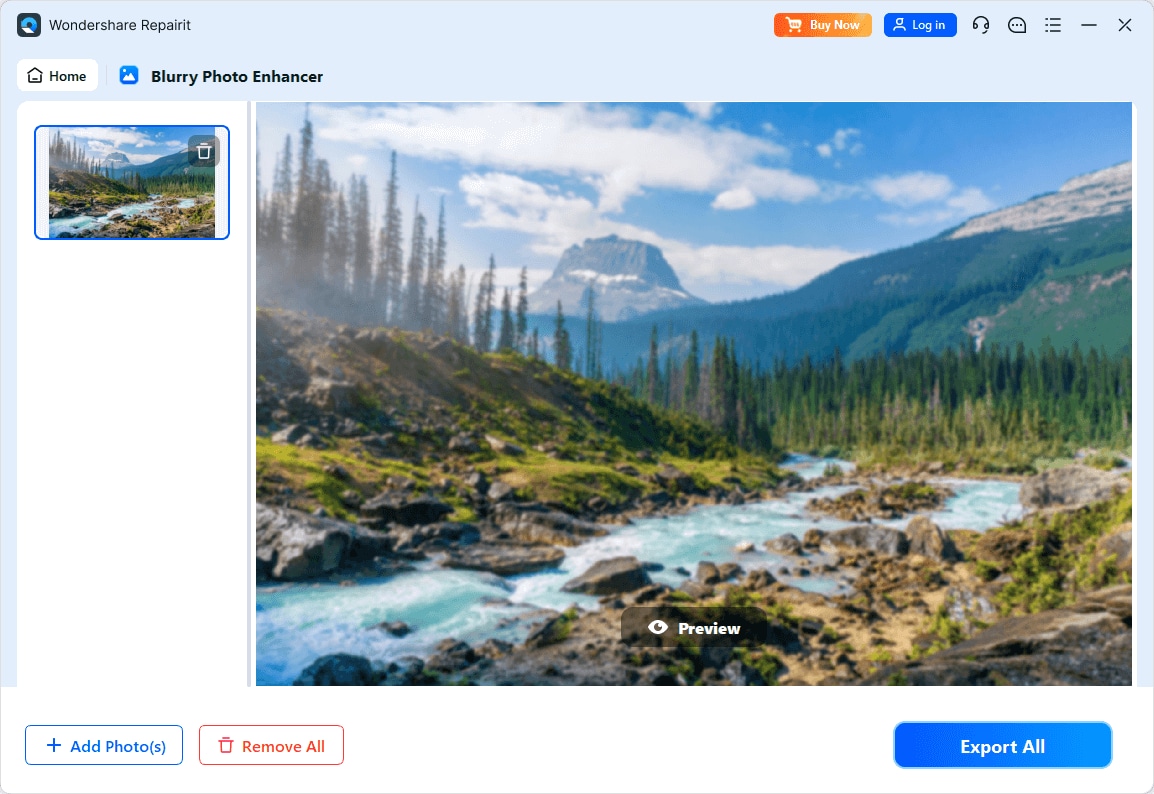
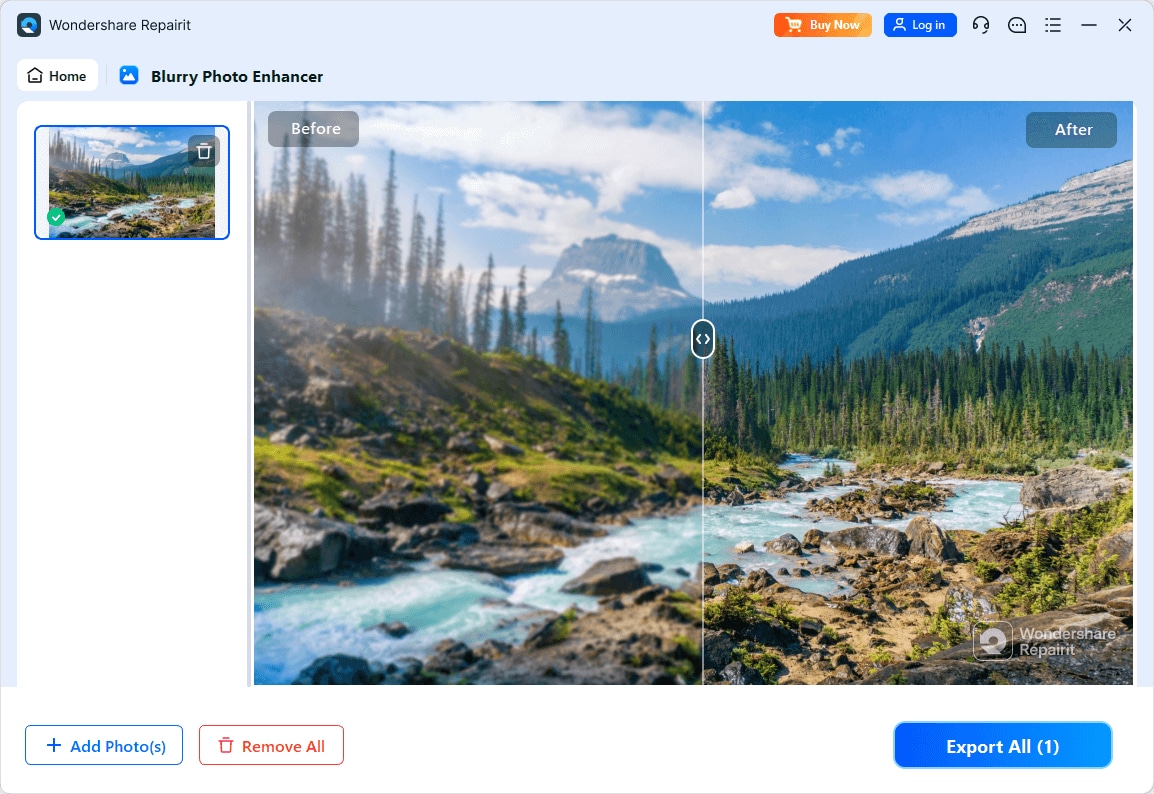
Step 4. Preview the enhanced result and save the improved photo to your device.
Final Verdict
Both tools can significantly improve image resolution and clarity, but they serve different types of users.
Repairit Photo Enhancer is better aligned with people who want a structured interface, clear enhancement modes, and natural-looking results for portraits and everyday photos. It wraps AI-based upscaling, sharpening, and denoising in a workflow that is easy to understand and quick to repeat.
Real-ESRGAN GUI makes more sense if you are technically inclined, want to run an ESRGAN-based upscaling engine locally, and are comfortable managing models and system resources. It can be especially effective for large resolution boosts on graphics or stylized images when you are willing to experiment with settings.
In practice, many users will find Repairit more approachable for day-to-day enhancement tasks, while Real-ESRGAN GUI remains a reasonable option for power users who enjoy tuning open-source tools and have the hardware to support intensive upscaling.
Next: Repairit Photo Enhancer vs Bigjpg Desktop
FAQ
-
1. Is Real-ESRGAN GUI better than Repairit Photo Enhancer for upscaling?
Real-ESRGAN GUI can deliver strong upscaling results thanks to its ESRGAN-based model, especially when used by someone who understands model and scale settings. Repairit Photo Enhancer focuses on offering comparable AI-driven improvements in a more guided, less technical interface. Which feels better depends on whether you prioritize fine-grained control and local setups or ease of use and structured enhancement modes. -
2. Which tool is easier for beginners to use?
Repairit Photo Enhancer is generally easier for beginners because it hides model complexity behind options like upscaling, sharpening, and portrait enhancement. Real-ESRGAN GUI often requires more technical setup and decisions about ESRGAN models, which can be challenging if you are new to AI image tools. -
3. Can both tools sharpen blurry photos and improve clarity?
Yes. Repairit Photo Enhancer provides targeted tools to sharpen soft details, reduce noise, and improve overall clarity for common photos. Real-ESRGAN GUI enhances apparent sharpness and detail primarily through its upscaling process, though the exact outcome depends on the chosen model, scale factor, and input quality. -
4. Do I need a powerful computer to run Real-ESRGAN GUI?
Real-ESRGAN GUI typically benefits from a reasonably powerful computer, especially a capable GPU, because ESRGAN-based upscaling is computationally intensive. It may still run on lower-spec systems, but processing times can be significantly longer than on high-end hardware. -
5. Can I combine Repairit Photo Enhancer and Real-ESRGAN GUI in one workflow?
Yes. Some users first upscale images with Real-ESRGAN GUI and then refine the results in Repairit Photo Enhancer to adjust clarity, smooth noise, or improve portraits. This layered approach can be useful when you want both strong resolution boosts and guided fine-tuning of faces or subtle textures.




