
Choosing between Repairit Old Photo Restoration vs Image Mender mainly depends on how damaged your photos are and how much automation you want during restoration. If you are dealing with cracks, stains, and fading across the whole image, automated tools can save a lot of time. If your photos only have a few visible scratches, a focused manual approach may be enough.
This comparison walks through both tools with an emphasis on how they handle scratch repair, stain removal, faded color restoration, and facial detail improvement. You will see where Repairit Old Photo Restoration can handle more complex, AI assisted restorations and where Image Mender still makes sense for quick fixes on scanned photos.
Restore Old Photos with Repairit
 Security Verified. Over 7,302,189 people have downloaded it.
In this article
- Repairit Old Photo Restoration vs Image Mender: Quick Verdict
- Repairit Old Photo Restoration vs Image Mender: Key Differences
- Repairit Old Photo Restoration vs Image Mender: Comparison Table
- What Repairit Old Photo Restoration and Image Mender Are Best For
- Repairit Old Photo Restoration vs Image Mender: Repair Capabilities and Damage Handling
- Repairit Old Photo Restoration vs Image Mender: Restoration Quality and Real Results
- Repairit Old Photo Restoration vs Image Mender: Workflow and Ease of Use
- Repairit Old Photo Restoration vs Image Mender: Pricing and Trial Options
- Who Should Choose Repairit Old Photo Restoration
- Who Should Choose Image Mender
- Pros and Cons of Repairit Old Photo Restoration and Image Mender
- How to Restore Old Photos After Choosing the Right Tool
Repairit Old Photo Restoration vs Image Mender: Quick Verdict
At a glance, Repairit Old Photo Restoration leans toward guided, AI assisted restoration for heavily damaged, faded, or low quality photos, while Image Mender focuses on hands on scratch and stain repair on otherwise intact images.
In most cases, Repairit is a stronger choice if you want to fix several issues at once, including cracks, fading, and facial softness, with minimal manual work. Image Mender may be enough when your scanned photo mainly has clear scratches, small tears, or stains and you prefer to control exactly which areas are repaired.
- Choose Repairit Old Photo Restoration if your photos are very aged, faded, or full of scattered damage and you want a structured workflow.
- Choose Image Mender if you have a relatively clean scan with a few problem spots you are happy to mark manually.
Repairit Old Photo Restoration vs Image Mender: Key Differences
The key differences between Repairit Old Photo Restoration vs Image Mender come down to automation level, breadth of restoration, and how you interact with damaged areas.
- Automation vs manual control: Repairit uses AI assisted restoration to detect and repair multiple issues in one pass, while Image Mender expects you to brush over scratches, stains, or tears yourself.
- Scope of damage handled: Repairit is designed to combine damage repair with clarity and, in some workflows, color improvement across the entire image. Image Mender is more focused on surface defects such as scratches and small missing pieces.
- Learning curve: Beginners often find Repairit more approachable because of its guided steps and previews. Image Mender stays simple but may require trial and error to mark damaged regions accurately.
- Use case focus: Repairit targets broader old photo restoration, including noise reduction and facial detail enhancement. Image Mender prioritizes precise, localized cleanup on already decent scans.
Repairit Old Photo Restoration vs Image Mender: Comparison Table
| Dimension | Repairit Old Photo Restoration | Image Mender |
|---|---|---|
| Best for | Users who want guided, often AI assisted restoration for heavily damaged, faded, or low quality old photos. | Users repairing damaged or scanned photos with clear scratches, small tears, or stains. |
| Ease of use | Beginner friendly with a structured workflow and automated restoration options. | Straightforward once you learn to mark damaged areas, but more manual control is needed. |
| Restoration quality | Typically stronger for complex damage, facial detail improvement, and overall image cleanup. | Solid for localized fixes like scratches and stains on reasonably intact photos. |
| Workflow | Import photo, choose restoration options, preview AI results, then refine and export. | Load image, mark damaged areas, run repair, then export the fixed photo. |
| Strengths | Handles various damage types in one pass, including fading, noise, and facial softening. | Good for scratches and stains with a simple, focused marking and repair workflow. |
| Weaknesses | More features can feel overkill for quick, light touch ups. | Limited AI capabilities and less suited for very complex or severely deteriorated photos. |
What Repairit Old Photo Restoration and Image Mender Are Best For
Both tools are centered on old photo restoration, but their strengths differ.
Repairit Old Photo Restoration is best for users who need an AI assisted way to repair a mix of cracks, stains, and fading across entire images. It can be a good fit when you want to improve overall clarity and facial details at the same time as removing visible damage.
Image Mender is best suited to users repairing damaged or scanned photos with obvious, localized defects such as scratches, dust marks, or small tears. Once you mark the problem zones, the software attempts to rebuild those areas while leaving the rest of the image untouched.
In practice, many people use a tool like Repairit to handle global restoration first and would consider a focused tool like Image Mender for additional, precise cleanup if needed.
Repairit Old Photo Restoration vs Image Mender: Repair Capabilities and Damage Handling
From a capabilities perspective, both tools aim to repair damaged photos, but they approach damage detection and handling in different ways.
According to the comparison data, Repairit Old Photo Restoration leans on automated and AI assisted corrections to tackle multiple issues at once, which can help when you have:
- Noticeable scratches, spots, and minor cracks.
- Widespread fading or softness across the image.
- Old portraits where facial features need gentle reconstruction.
Image Mender focuses on a more manual, brush based process. You load a scan, mark scratches, cracks, or stains, and let the tool rebuild those areas. This can be useful when you want to keep full control over exactly what is altered and your photo is otherwise in reasonable condition.
For very complex damage, such as multiple cracks, stains, and noise combined, Repairit is generally better positioned because its AI models can take the entire photo context into account. Image Mender may handle these scenarios less efficiently, especially if a large percentage of the image must be repainted manually.
Repairit Old Photo Restoration vs Image Mender: Restoration Quality and Real Results
Actual results will vary depending on scan quality and the level of deterioration, but the tools are optimized for different restoration styles.
Repairit Old Photo Restoration typically provides stronger results when you need to:
- Restore faded colors and improve tonal contrast across the whole photo.
- Reduce noise and smooth grain in very old or low resolution images.
- Improve facial details that have become blurred or washed out.
Because its workflow merges global enhancement with scratch and stain repair, you often see coordinated improvements across the full image, not only where cracks were visible.
Image Mender tends to shine when your main concern is localized issues. For example, if a nearly clean black and white portrait has a single crease or a few dust lines, manually selecting these flaws can preserve the rest of the photo exactly as scanned. This can be valuable for archivists or users who are cautious about automated changes.
Neither tool guarantees perfect restoration, and for highly valuable historical material you may still want a professional retoucher. But for day to day family photo projects, Repairit can be more efficient for comprehensive rebuilds, while Image Mender is more targeted.
Repairit Old Photo Restoration vs Image Mender: Workflow and Ease of Use
The right workflow depends on how comfortable you are with editing tools and how many old photos you plan to restore.
Repairit Old Photo Restoration emphasizes a guided process:
- Import your scanned or digital file.
- Choose automated restoration options, such as damage repair or facial enhancement.
- Preview AI restored results and adjust or rerun if necessary.
- Export the repaired image once you are satisfied.
For many beginners, this hands off approach is easier than painting over every scratch. The tool does more detection work for you, which can be critical when cracks and stains are subtle.
Image Mender offers a more straightforward but manual workflow: load the image, mark damaged areas, repair, then export. Once you understand which brush sizes and selection styles work best, it feels predictable. However, if the photo is heavily damaged, the amount of manual marking can become time consuming.
Overall, users who want a faster, more automated path from scan to restored file often lean toward Repairit, while those who enjoy direct, pixel level control may find Image Mender more satisfying.
Repairit Old Photo Restoration vs Image Mender: Pricing and Trial Options
Pricing structures change over time, so it is important to check each vendor site for current offers. In general:
- Repairit Old Photo Restoration is usually available with free trial options or limited free usage so you can test restoration quality before paying. Paid plans often make sense for users with ongoing or higher volume restoration work.
- Image Mender may offer a trial or demo version from its official website, with a one time license or upgrade option depending on the edition.
If you only have a handful of photos to fix, starting with whichever trial is easiest to access can help you see which workflow suits you better. If you expect to restore batches of family albums over time, a more feature rich tool such as Repairit can provide better long term value.
Who Should Choose Repairit Old Photo Restoration
You are likely to benefit from Repairit Old Photo Restoration if your situation matches one or more of these scenarios:
- People restoring heavily damaged family photos with cracks, fading, or noise.
- Users who want AI guided tools to repair old portraits and improve facial details.
- Anyone needing to fix both structural damage and overall clarity in a single workflow.
- Beginners who prefer a more automated, step by step restoration process.
Because Repairit can address different types of damage at once, it is well suited for users who want to restore entire collections of old photos without learning complex editing techniques.
Who Should Choose Image Mender
Image Mender is a reasonable choice if your needs are more focused and you prefer manual control over where changes are applied.
- Users repairing damaged or scanned photos with clear scratches or stains.
- People who like manually marking problem areas so only specific defects are fixed.
- Those restoring relatively intact photos that only need localized cleanup.
- Users who prefer a simple, focused scratch and stain repair tool with a predictable workflow.
This approach is particularly helpful if you are working with high quality scans where you want to preserve the original texture and grain while quietly removing visible flaws.
Pros and Cons of Repairit Old Photo Restoration and Image Mender
Repairit Old Photo Restoration Pros and Cons
Image Mender Pros and Cons
How to Restore Old Photos After Choosing the Right Tool
After comparing Repairit Old Photo Restoration vs Image Mender, the next step is to actually restore your old photos. Regardless of which tool you prefer for specific tasks, many users want a practical, guided way to bring cracked, faded, or stained images back to life without advanced editing skills.
For that reason, it can be useful to walk through a typical AI assisted workflow using Repairit Old Photo Restoration. You can apply similar planning even if you later refine details with a manual tool like Image Mender.
Key Features
Key capabilities that matter for repairing damaged photos include:
- AI assisted repair for cracks, scratches, and surface damage on old photos.
- Options to restore clarity, reduce noise, and improve facial details in vintage portraits.
- Straightforward workflow for importing, restoring, previewing, and exporting photos.
Combined, these features allow you to tackle both structural damage and general image quality in a single session.
Step-by-step guide
Use this concise workflow to restore old photos in a desktop environment.
Step 1. Choose the AI restoration model based on your needs, such as repairing damaged photos or restoring old images.

Step 2. Import your old or damaged photos into Repairit to begin the restoration process.

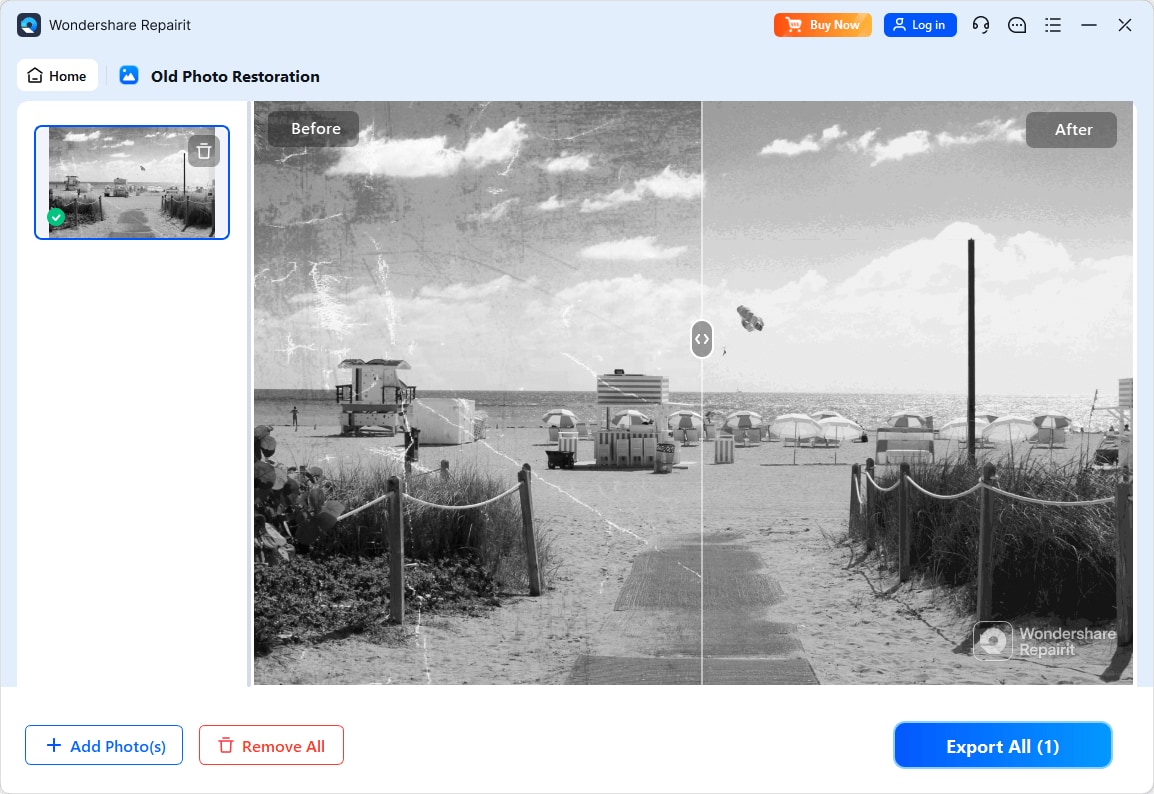
Step 3. Apply the old photo restoration model to fix scratches, restore colors, and improve image quality.
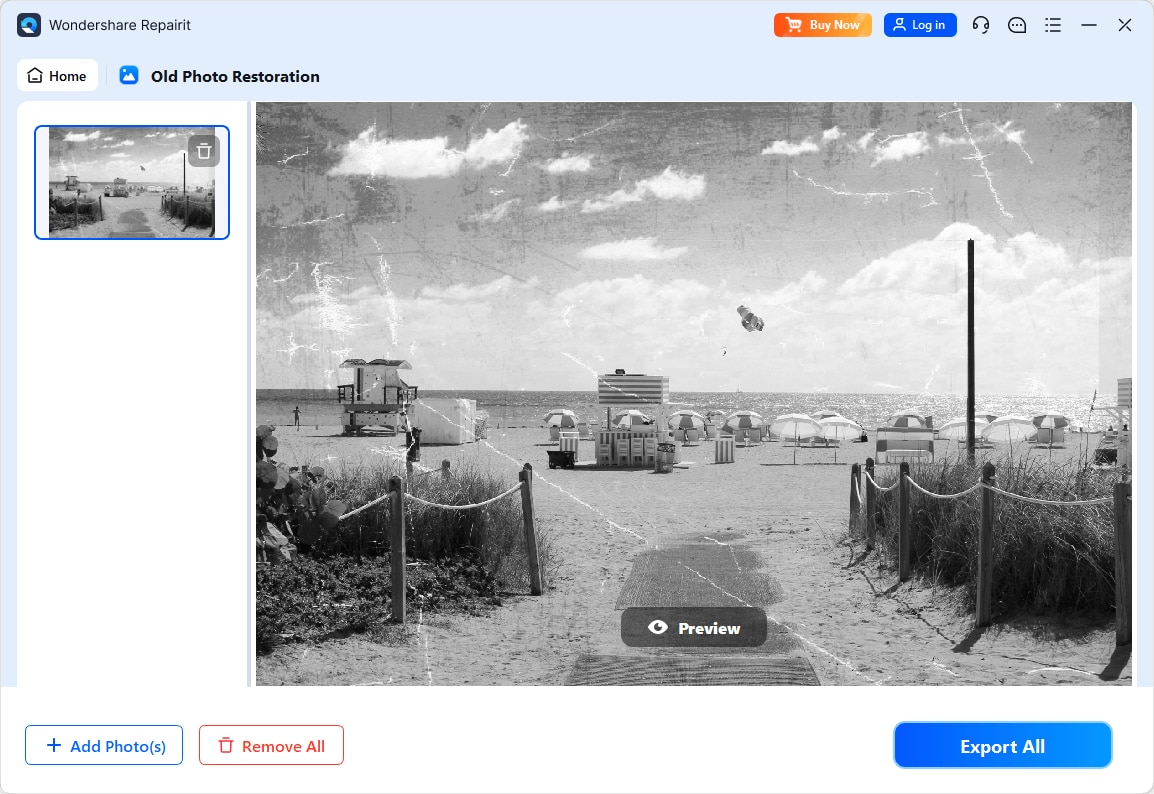
Step 4. Preview the restored result and save the repaired photo to your device.
Final Verdict
When you compare Repairit Old Photo Restoration vs Image Mender, the better choice depends on your photo damage and your preferred working style.
Repairit Old Photo Restoration is generally the stronger option for heavily damaged, faded, or low quality old photos. Its AI assisted workflow can handle multiple issues at once, including scratches, stains, noise, and facial softness, and it guides beginners from import to export with previews along the way.
Image Mender remains a sensible pick when your photos are mostly intact and you just need to remove obvious scratches, tears, or stains manually. Its focus on marked areas and a straightforward interface can be appealing for users who prefer direct control and do not require broader color or clarity improvements.
In many real world projects, starting with an automated tool like Repairit to address global problems, then optionally doing targeted manual work, offers a balanced approach. Choose the tool that best matches how much time you want to invest and how severely your old photos are damaged.
Next: Repairit Old Photo Restoration vs Photoworks
FAQ
-
1. Is Repairit Old Photo Restoration better than Image Mender for fixing deep scratches and cracks?
For deep scratches, multiple cracks, and complex damage, Repairit Old Photo Restoration is usually more capable because it can address several problems in one guided workflow. Image Mender is effective for localized scratches and cracks but is better suited to photos that are not severely deteriorated. -
2. Which is easier for beginners, Repairit Old Photo Restoration or Image Mender?
Beginners often find Repairit easier because it provides a clearer, step by step process with more automation. Image Mender has a straightforward interface but relies more on you accurately marking damaged areas, which can require some trial and error. -
3. Which tool gives better results for restoring faded colors in old photos?
Repairit Old Photo Restoration is typically better for addressing overall fading and washed out colors, since it can combine damage repair with broader image adjustments. Image Mender focuses more on scratches and stains and is less about global color restoration.




