
Choosing between an AI eraser like Repairit Photo Eraser and a traditional tool such as Jihosoft Photo Eraser comes down to how you prefer to work. If you want fast, automatic cleanup, Repairit leans on AI to erase objects in a few clicks. If you prefer hands-on control and manual selection tools, Jihosoft may feel more familiar. This comparison looks at object removal quality, workflow, pricing, and who each tool is best for so you can pick the right option for your images.
Remove Unwanted Objects with Repairit Photo Eraser
 Security Verified. Over 7,302,189 people have downloaded it.
In this article
- Repairit Photo Eraser vs Jihosoft Photo Eraser: Quick Verdict
- Repairit Photo Eraser vs Jihosoft Photo Eraser: Key Differences
- Repairit Photo Eraser vs Jihosoft Photo Eraser: Comparison Table
- What Repairit Photo Eraser and Jihosoft Photo Eraser Are Best For
- Repairit Photo Eraser vs Jihosoft Photo Eraser: Object Removal Capabilities
- Repairit Photo Eraser vs Jihosoft Photo Eraser: Background Fill and Realism
- Repairit Photo Eraser vs Jihosoft Photo Eraser: Workflow and Ease of Use
- Repairit Photo Eraser vs Jihosoft Photo Eraser: Pricing and Trial Options
- Who Should Choose Repairit Photo Eraser
- Who Should Choose Jihosoft Photo Eraser
- Pros and Cons of Repairit Photo Eraser and Jihosoft Photo Eraser
- How to Remove Unwanted Objects After Choosing the Right Tool
Introduction
Both Repairit Photo Eraser and Jihosoft Photo Eraser focus on the same goal: helping you remove unwanted objects, distractions, text, and simple watermarks while keeping the background looking as natural as possible. The main difference is how much work you want to do yourself. Repairit leans on AI to guess what the background should look like and fills it in for you, while Jihosoft uses a more traditional, manual workflow where you carefully outline what to erase. Understanding how these approaches affect speed, control, and realism will help you decide which tool fits your day to day editing tasks.
Repairit Photo Eraser vs Jihosoft Photo Eraser: Quick Verdict
If you want to erase objects from photos quickly with minimal manual effort, Repairit Photo Eraser is likely to feel more efficient. Its AI based workflow is well suited to removing passersby, background distractions, small objects, and simple watermarks from everyday scenes.
Jihosoft Photo Eraser may be a better fit when you prefer hands on control and are comfortable taking more time to outline objects precisely. It can work well for users who already understand classic selection tools and do not mind a slower, manual process to clean up specific areas.
Repairit Photo Eraser vs Jihosoft Photo Eraser: Key Differences
At a high level, the tools differ in how they approach object removal and how much you need to intervene.
Workflow style: Repairit Photo Eraser follows a streamlined, AI centric flow: upload an image, roughly mark what you want gone, and let the system compute the fill. Jihosoft uses a more step by step desktop pattern of open, select, erase, and export, with the user driving most decisions.
Removal logic: Repairit relies on AI to infer surrounding textures and patterns, which can speed up cleanup on mixed or busy backgrounds. Jihosoft relies more heavily on traditional algorithms guided by your selections, so results depend strongly on how accurately you outline the unwanted object.
Manual control: Repairit offers basic selection tools but focuses on automation over pixel level control. Jihosoft emphasizes brush and selection precision, making it more suitable when you want to carefully protect edges around subjects or text.
Natural looking results: In many everyday photos, AI based fill in Repairit can quickly produce realistic backgrounds without much tweaking. With Jihosoft, users can refine selections and run multiple passes, which may help when you are willing to spend more time to manually manage difficult edges or overlapping objects.
Repairit Photo Eraser vs Jihosoft Photo Eraser: Comparison Table
| Criteria | Repairit Photo Eraser | Jihosoft Photo Eraser |
|---|---|---|
| Best for | Users who want fast, AI assisted removal of unwanted objects with minimal manual work. | Users removing unwanted objects manually with precise control over selections. |
| Ease of use | Very simple; upload, roughly mark objects, and let AI clean up the image. | Simple interface but more hands on; users must select and refine objects manually. |
| Object removal | Strong for everyday distractions, random people, and small objects with automatic background fill. | Reliable for clearly defined objects and watermarks when users carefully outline the area. |
| Workflow | Streamlined AI flow: upload photo, select area, auto erase, download. | Traditional workflow: open image, select object, erase, export following a manual process. |
| Strengths | Speed, automation, and consistent background fill for most typical photos. | Multiple selection tools, simple UI, and detailed manual control for each removal. |
| Weaknesses | Less granular brush based control for pixel perfect manual retouching. | Manual workflow, less automation, and slower for batches or many small distractions. |
What Repairit Photo Eraser and Jihosoft Photo Eraser Are Best For
Both tools aim to remove unwanted elements and clean up images, but they shine in slightly different scenarios.
Repairit Photo Eraser is generally better for:
- Quickly removing random people, wires, signs, or small objects from casual photos.
- Cleaning up product shots or social media images where you want fast, natural looking results.
- Situations where you prefer to rely on AI instead of drawing precise selection paths.
Jihosoft Photo Eraser is generally better for:
- Users who are willing to zoom in and refine object boundaries manually.
- Images where objects have clear, sharp edges and you want tight control over what stays or goes.
- Cases where you are comfortable with a desktop style, manual cleanup workflow.
Repairit Photo Eraser vs Jihosoft Photo Eraser: Object Removal Capabilities
From an object removal standpoint, both tools cover a similar range of tasks, but the experience differs.
Range of removable objects: You can use either tool to remove people, small items, logos, and simple text from photos. Repairit prioritizes speed and automation, which is helpful when you need to clean up various distractions within the same frame. Jihosoft focuses on manual precision, which can benefit tasks where each object must be carefully separated from nearby details.
Watermark and logo cleanup: For basic watermarks, such as small logos or short text, both tools can work. Repairit uses AI to infer the underlying pattern, which may be effective when the watermark sits on textured surfaces. With Jihosoft, you typically select the watermark more accurately and run the erase action, which can suit users who want more deliberate control over edges.
People and moving objects: When removing people or moving objects in casual scenes, Repairit generally favors speed: you highlight the person, process, and the AI fills in the background. In Jihosoft, you often spend more effort tracing around the person, which may be more work but lets you decide exactly how close to the subject boundary you erase.
Text removal: Both tools can remove text overlays, labels, or dates, especially if the background is not extremely complex. Repairit is suited to erasing short text from skies, walls, or flat surfaces. Jihosoft gives you manual selection control, which can help when text overlaps detailed background elements and you want to fine tune what is removed.
Scene complexity: Depending on the image, complex scenes with repeating patterns or intersecting lines can challenge any object remover. Repairit will attempt to handle this automatically, which can save time but might require occasional reprocessing or small adjustments. With Jihosoft, you may spend more time on selections, but the manual approach can help you handle particularly tricky overlaps in a stepwise way.
Repairit Photo Eraser vs Jihosoft Photo Eraser: Background Fill and Realism
When you erase something from a photo, what really matters is how believable the filled in background looks.
Repairit Photo Eraser background fill: Repairit uses context aware, AI driven fill designed to blend erased areas with nearby colors and textures. In many typical photos, such as portraits with blurred backgrounds or outdoor shots with foliage and sky, the filled area can look natural with minimal effort. You usually do not need to trace boundaries perfectly for the result to be acceptable for sharing or quick publishing.
Jihosoft Photo Eraser background fill: Jihosoft combines its selection tools with more traditional fill logic. The realism you get often depends on how carefully you select the object and how uniform the surrounding background is. Flat surfaces and simple textures tend to work better, while more complex patterns might need multiple attempts and fine tuning.
Artifacts and cleanup needs: With both tools, challenging backgrounds may leave minor artifacts, such as repeated patterns or slight blur where the object used to be. Repairit aims to minimize these automatically, which is helpful when you need quick results. Jihosoft allows you to rework specific regions manually, so users who are patient can refine problematic spots with extra passes.
When manual cleanup still helps: Even with AI assistance, some images benefit from a hybrid approach. For example, you might use Repairit for rapid initial object removal, then, if needed, touch up small areas with another manual tool. Similarly, Jihosoft users may run several smaller, targeted selections instead of one large removal to keep the background consistent.
Repairit Photo Eraser vs Jihosoft Photo Eraser: Workflow and Ease of Use
Simplicity of the interface: Repairit presents a minimal, browser based interface. You upload a file, pick a selection tool, and start erasing. This suits users who want to avoid complex tool palettes. Jihosoft, as a classic desktop program, offers more traditional toolbars and options that may feel familiar to people used to standard photo editors.
Selection and brush tools: Both tools provide ways to mark the unwanted area. Repairit focuses on simple, forgiving selections that its AI can interpret, so you often do not need a perfect outline. Jihosoft emphasizes more precise selection tools and may encourage zooming in and adjusting brush sizes more frequently for best results.
Editing effort per image: With Repairit, most of the effort is in the initial mark up; after that, AI handles the fill. This tends to reduce the number of manual steps when you are batch cleaning many images. In Jihosoft, each object removal is usually more hands on, which can be slower but potentially gives more confidence to users who prefer explicit control.
Learning curve: For beginners or non designers, Repairit generally feels easier to pick up because it reduces the need to learn detailed selection behavior. Jihosoft may require a bit more practice to understand how large selections, overlapping edges, and multiple passes affect the final result.
Repairit Photo Eraser vs Jihosoft Photo Eraser: Pricing and Trial Options
Both tools aim to let you test object removal before fully committing, but they do it in different ways.
Repairit Photo Eraser is typically offered through an online interface, with free or limited access options so you can try its AI based object removal on your own photos. This can be useful if you want to quickly check how it handles your typical scenes without installing additional software.
Jihosoft Photo Eraser is generally sold as downloadable desktop software, with a trial or restricted version available from its official page. Users can usually install it, try removing objects and watermarks on a limited basis, and then decide whether its manual workflow suits their needs. Since exact pricing, licenses, and feature limits may change, it is sensible to confirm details on each vendor site before deciding.
Who Should Choose Repairit Photo Eraser
Repairit Photo Eraser may be a better fit for users who want speed, convenience, and AI assistance.
- People who want AI to remove unwanted objects with as few steps as possible.
- Beginners who are not comfortable with detailed manual selection tools.
- Users who need to clean up images and delete watermarks quickly for social media or work.
- Anyone who prefers a browser based, lightweight workflow over installing desktop software.
Who Should Choose Jihosoft Photo Eraser
Jihosoft Photo Eraser tends to suit users who like hands on editing and a traditional software experience.
- Users who like manual control and do not mind selecting objects themselves.
- People who already work with desktop photo software and prefer traditional tools.
- Those who often erase objects with clear edges and want to refine selections closely.
- Users comfortable with the open image - select object - erase - export workflow.
Pros and Cons of Repairit Photo Eraser and Jihosoft Photo Eraser
Repairit Photo Eraser Pros and Cons
Jihosoft Photo Eraser Pros and Cons
How to Remove Unwanted Objects After Choosing the Right Tool
Once you have decided whether an AI driven or manual tool fits your workflow, the next step is actually removing objects from your own photos in a consistent, repeatable way. Using a simple, guided process helps you focus on the image rather than on technical settings.
Key Features
Repairit Photo Eraser focuses on core object removal and background cleanup tasks.
- AI assisted removal of unwanted objects, people, and simple watermarks from photos.
- Automatic background fill that attempts to blend erased areas with surrounding content.
- Streamlined browser based workflow for quick uploads, edits, and downloads without heavy software.
Step-by-step guide
After choosing an object removal tool, following clear steps makes it easier to get natural looking results. Here is a straightforward workflow using Repairit Photo Eraser.
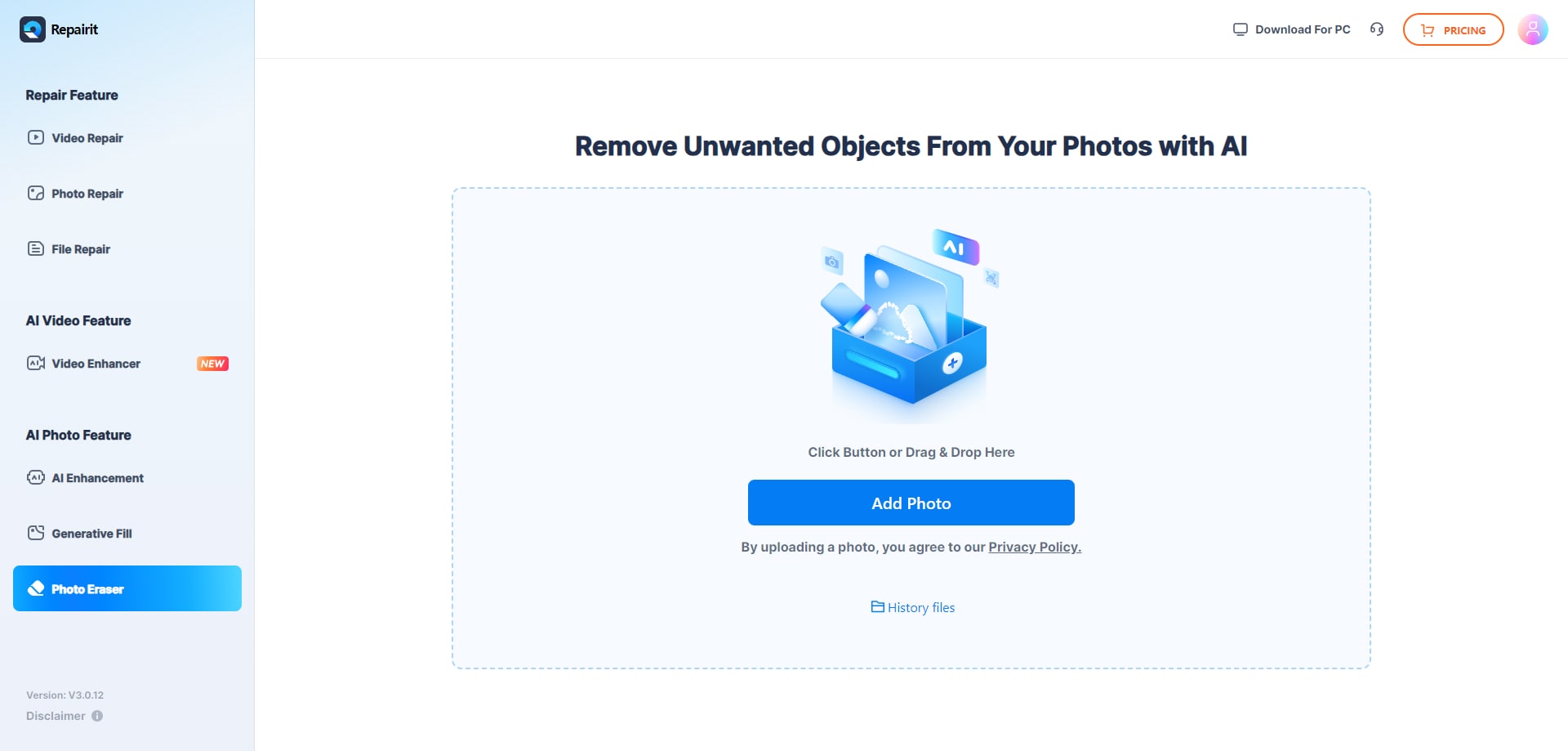
Step 1. Upload the photo you want to edit and start the object removal process.
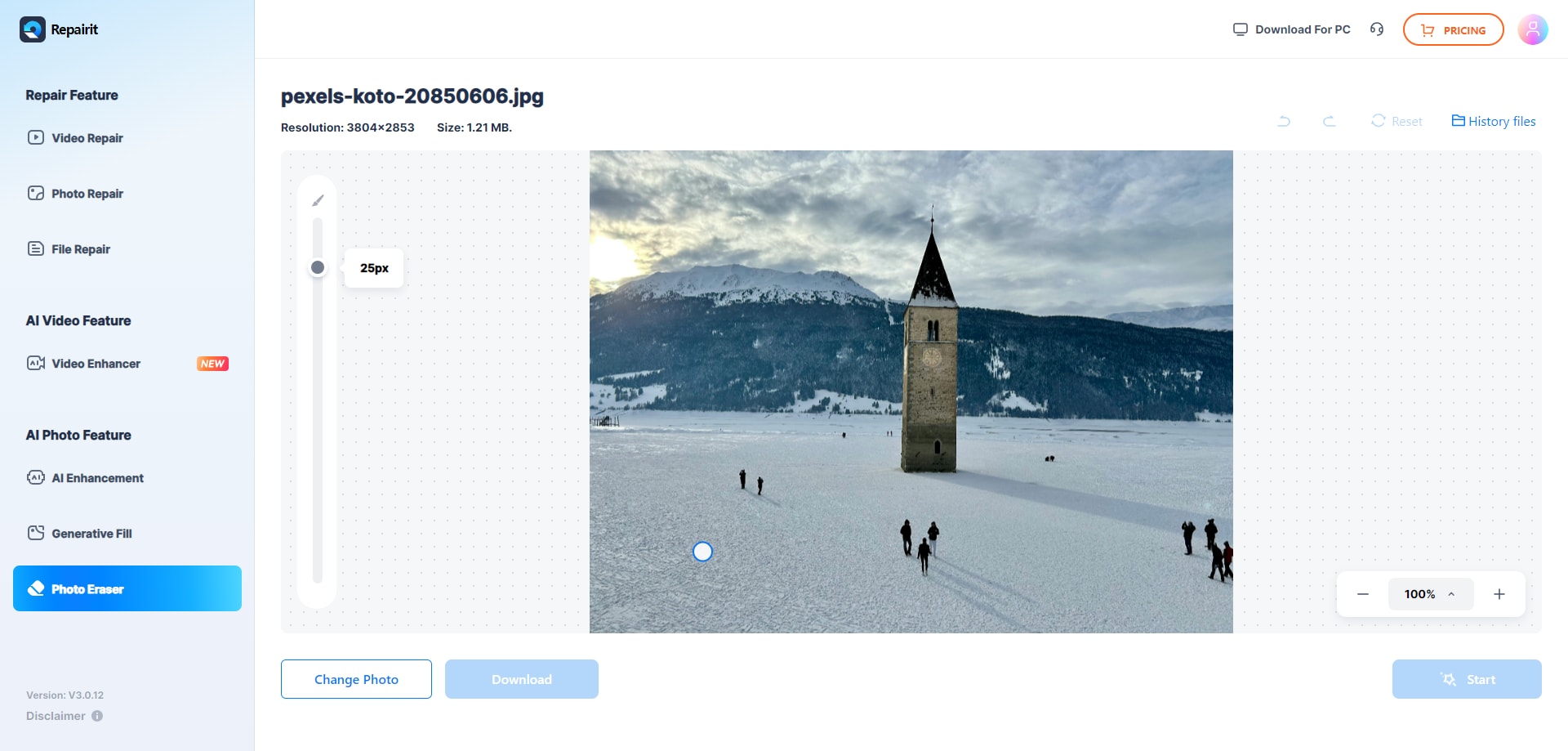
Step 2. Adjust the brush size and select the object or area you want to remove from the image.
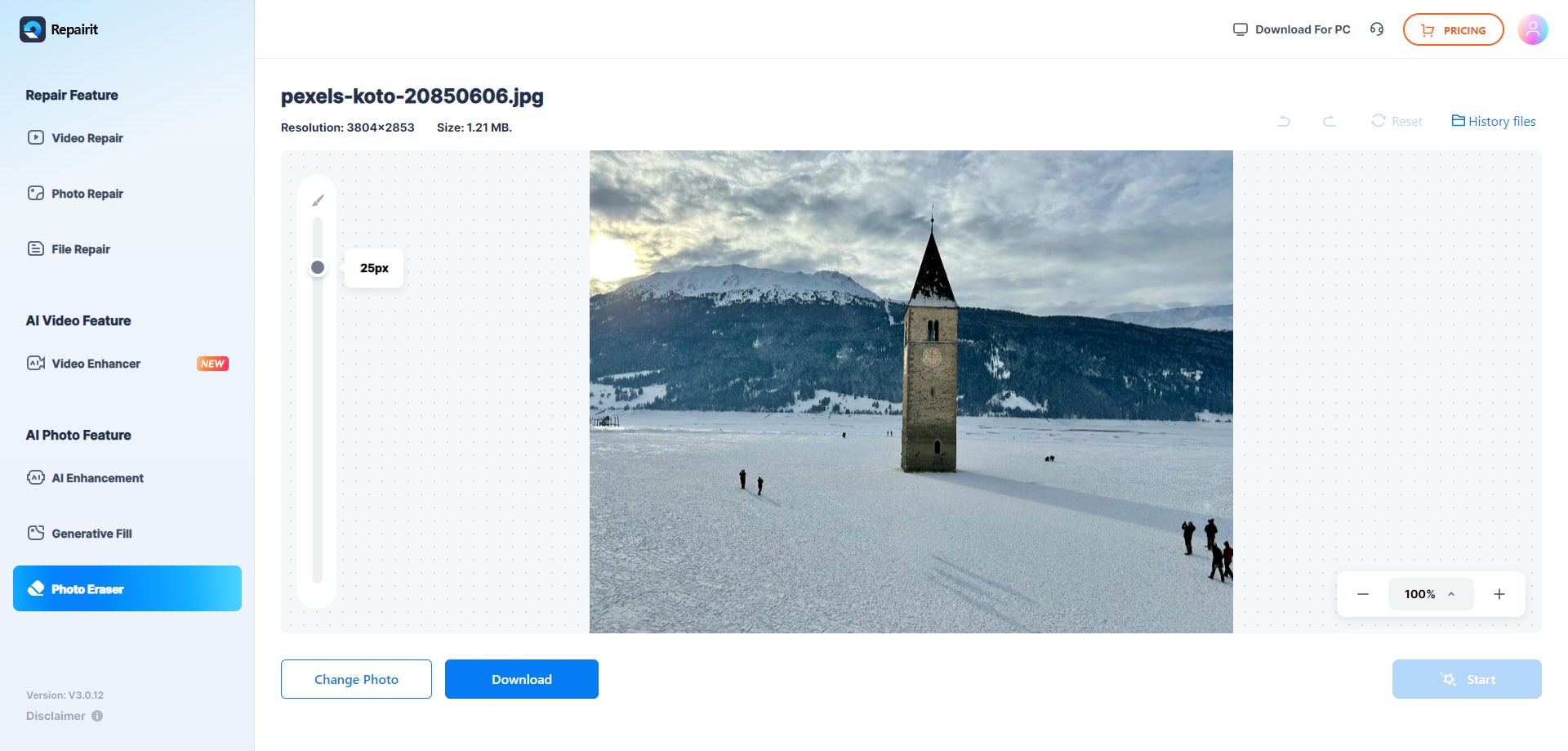
Step 3. Let the AI process the image and download the cleaned photo after the object is removed.
Final Verdict
For most casual users and busy creators, Repairit Photo Eraser offers a faster way to remove unwanted objects, random passersby, or simple watermarks. Its AI driven workflow reduces the need for detailed selections and usually produces realistic background fills with only a few clicks.
Jihosoft Photo Eraser remains a solid choice if you prefer a more traditional, manual process with clear selection tools and predictable desktop behavior. In practice, many users may rely on Repairit for everyday cleanups and turn to a manual tool like Jihosoft when they need maximum control over a specific, detailed removal task.
Next: Repairit Photo Eraser vs Akvis Retoucher
FAQ
-
1. Is Repairit Photo Eraser better than Jihosoft Photo Eraser for beginners?
In most cases, yes. Repairit Photo Eraser leans on AI to erase objects from photos with fewer steps, so beginners who are not comfortable with precise selections usually get results faster than with a manual workflow like Jihosoft Photo Eraser. -
2. When does Jihosoft Photo Eraser make more sense than Repairit Photo Eraser?
Jihosoft Photo Eraser can be a better fit if you prefer manual control, work primarily on a desktop, and do not mind spending extra time carefully selecting objects. It suits users comfortable with the open image, select object, erase, and export sequence. -
3. Can both tools remove background distractions and random people from photos?
Yes, both Repairit Photo Eraser and Jihosoft Photo Eraser can remove background distractions and people. Repairit focuses on AI automation to handle most of the fill work, while Jihosoft relies on you to manually select and refine the areas to be erased. -
4. Which tool is faster for cleaning up many photos at once?
For typical users, Repairit Photo Eraser is usually faster because its AI can remove repeated types of distractions with less manual effort. Jihosoft Photo Eraser can also handle multiple photos, but its manual workflow often requires more time per image, especially for detailed cleanups.




