
Choosing between Repairit Photo Enhancer vs Evoto AI largely depends on whether you mainly enhance portraits or need a more flexible photo enhancer for many image types. This comparison looks at AI tools, output quality, workflows, and pricing so you can decide which fits better for improving everyday images, sharpening blurry photos, or building a portrait-focused editing process.
Repairit Photo Enhancer is built as an accessible AI enhancer that improves image clarity, sharpness, noise, and resolution across portraits and non-portrait shots. Evoto AI is positioned more as an AI portrait enhancer and editor, tuned primarily for people images and facial refinement. Understanding these priorities will help you choose the tool that aligns with how you shoot and edit.
Enhance Photo Quality with Repairit Photo Enhancer
 Security Verified. Over 7,302,189 people have downloaded it.
In this article
- Repairit Photo Enhancer vs Evoto AI: Quick Verdict
- Repairit Photo Enhancer vs Evoto AI: Key Differences
- Repairit Photo Enhancer vs Evoto AI: Comparison Table
- What Repairit Photo Enhancer and Evoto AI Are Best For
- Repairit Photo Enhancer vs Evoto AI: AI Enhancement Features and Capabilities
- Repairit Photo Enhancer vs Evoto AI: Output Quality and Real-World Results
- Repairit Photo Enhancer vs Evoto AI: Workflow and Ease of Use
- Repairit Photo Enhancer vs Evoto AI: Pricing and Trial Options
- Who Should Choose Repairit Photo Enhancer
- Who Should Choose Evoto AI
- Pros and Cons of Repairit Photo Enhancer and Evoto AI
- How to Enhance Photos After Choosing the Right Tool
Repairit Photo Enhancer vs Evoto AI: Quick Verdict
Both tools can enhance photo quality with AI, but they target different priorities. Repairit Photo Enhancer is more flexible across portraits, group shots, travel photos, and low-quality images, with a simple workflow that suits beginners and casual creators. Evoto AI is more narrowly designed for portraits and people-focused editing, where facial features and skin tones are the main concern.
If you mostly enhance a mix of selfies, group photos, everyday images, and occasional portraits, Repairit Photo Enhancer is usually the more practical choice. If your work is heavily portrait-based, Evoto AI can fit better into a studio or client portrait workflow.
Repairit Photo Enhancer vs Evoto AI: Key Differences
The key difference is scope. Repairit Photo Enhancer is a general-purpose AI enhancer with strong support for portraits, but also works well with landscapes, products, and low-quality images. Evoto AI centers on portraits and human subjects, focusing its adjustments on faces and skin rather than general scenes.
Repairit Photo Enhancer emphasizes quick, automatic results with options like upscaling, sharpening, and denoising. Evoto AI expects that you are working with portraits and that you may want to fine-tune portrait-specific settings. This matters if you want a single tool for all photos versus a specialized portrait enhancer that complements other editing software.
Repairit Photo Enhancer vs Evoto AI: Comparison Table
| Aspect | Repairit Photo Enhancer | Evoto AI |
|---|---|---|
| Best for | Users who want an AI enhancer for portraits and non-portrait images, including everyday and low-quality photos. | Photographers and creators focused on portraits and people images. |
| AI focus | General enhancement: clarity, sharpness, noise reduction, and upscaling across many image types. | Portrait enhancement and editing tuned around faces and skin. |
| Ease of use | Simple, guided workflow with minimal configuration; beginner friendly. | Approachable but more specialized for users familiar with portrait editing. |
| Output emphasis | Consistent improvement for a variety of scenes, from selfies to travel photos. | Strong results on well-lit portrait shots and people-focused images. |
| Workflow style | Import, choose enhancement type (upscale, sharpen, denoise, portrait), preview, export. | Import portraits, apply portrait AI tools, adjust portrait settings, export. |
| Strengths | Versatile, accessible AI enhancement for mixed photo libraries. | Focused portrait tools for speeding up people-image workflows. |
| Limitations | Less deep than a dedicated portrait retouching suite. | Less suited as a general-purpose enhancer for non-portrait scenes. |
What Repairit Photo Enhancer and Evoto AI Are Best For
Repairit Photo Enhancer is best for users who want one AI tool that can handle portraits, group photos, travel shots, product images, and other everyday scenes. It is especially helpful if you often need to sharpen blurry photos, improve image clarity, or upscale image resolution from smartphones, older cameras, or social media downloads.
Evoto AI is better suited to workflows where portraits are the main output. If your typical session involves headshots, studio portraits, or social-media-focused images of people, its portrait-centered features can help you refine faces and skin tones more efficiently than manual tools alone.
Repairit Photo Enhancer vs Evoto AI: AI Enhancement Features and Capabilities
Repairit Photo Enhancer focuses on general-purpose AI enhancement with strong support for portraits and low-quality images. Its capabilities typically include:
- Upscaling image resolution so small or low-resolution photos look clearer.
- Sharpening soft or slightly blurry photos to make fine details more visible.
- Reducing noise and grain, especially in low-light or high-ISO shots.
- Improving overall clarity and contrast while aiming for natural-looking results.
- Enhancing faces automatically in portraits and selfies without manual retouching.
The AI approach emphasizes one-click style enhancement with optional adjustments, so users can upgrade image quality quickly without deep technical knowledge.
Evoto AI, by contrast, is tuned mainly for human subjects. Its typical capabilities include:
- AI-based portrait enhancement to refine faces, skin, and overall portrait presence.
- Adjustments that prioritize how people look in the frame, such as smoothing or refining details on faces.
- Tools that make sense in a portrait workflow, where the main subject is a person and the goal is to improve their appearance.
For users who primarily shoot portraits, Evoto AI can feel more specialized. For mixed photo libraries, Repairit Photo Enhancer generally offers broader coverage.
Repairit Photo Enhancer vs Evoto AI: Output Quality and Real-World Results
Output quality depends on the source image and how each tool is used, but their priorities are clear. Repairit Photo Enhancer aims for consistent improvements in clarity, sharpness, and noise levels across many scenes. In most cases, it helps make portraits, group photos, and everyday images look crisper and more detailed without heavy manual work.
In portrait-heavy scenarios, Evoto AI can deliver strong results on well-lit people images because its tools are oriented around faces and skin. It may feel especially useful when clients expect polished portraits but you want to limit the time spent on manual retouching.
If your main concern is rescuing soft smartphone images, low-resolution downloads, or mixed everyday shots, Repairit Photo Enhancer offers more general-purpose enhancement tools. If you already have reasonably sharp photos and mainly want to refine how people look, Evoto AI may be enough for those specific portraits.
Repairit Photo Enhancer vs Evoto AI: Workflow and Ease of Use
Both tools follow an import, enhance, and export structure, but the complexity and focus differ.
With Repairit Photo Enhancer, a typical workflow looks like this:
- Import single images or a batch from your computer or device.
- Select the enhancement type, such as general upscaling, sharpening, noise reduction, or portrait enhancement.
- Optionally adjust intensity or choose AI presets.
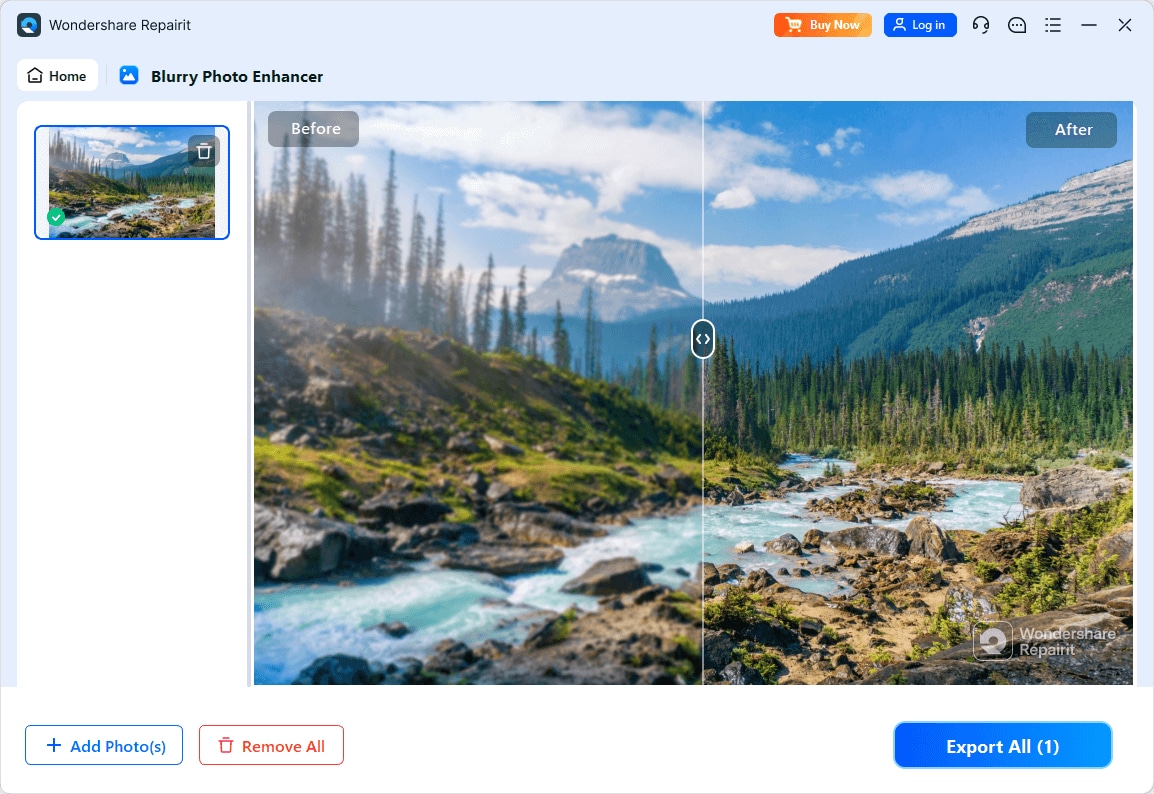
- Preview before-and-after results to confirm that the enhancement looks natural.
- Export in a common photo format for sharing, printing, or further editing.
It is designed to be straightforward, with a light learning curve and minimal jargon, making it accessible to beginners and non-technical users.
Evoto AI follows a similar flow but with a portrait emphasis:
- Import portrait photos, often from dedicated portrait or studio sessions.
- Apply AI portrait tools that focus on faces and overall subject appearance.
- Tweak portrait-specific options to match your preferred style.
- Inspect results, especially skin and facial details, then export for client delivery or social media.
This can feel more specialized. Users experienced with portrait editing will likely find it intuitive, while complete beginners may encounter a slightly steeper learning curve than with a more general enhancer.
Repairit Photo Enhancer vs Evoto AI: Pricing and Trial Options
Repairit Photo Enhancer typically offers consumer-friendly licensing aimed at individuals and small teams. It often includes a way to test core AI features, such as a trial or limited access, so users can check enhancement quality before committing. This makes it suitable if you need a cost-effective tool that improves a variety of photos, not just portraits.
Evoto AI is structured more around photographers and creative users who work regularly with portraits. Details such as tiers, credit systems, or subscription structures may change, so it is important to confirm the latest information on its official site.
When comparing pricing, consider:
- How many photos per month you expect to enhance.
- Whether most images are portraits or a mix of scenes.
- Whether you need one general-purpose enhancer or a portrait-specific add-on alongside other software.
Checking each products current pricing and trial information is recommended before deciding.
Who Should Choose Repairit Photo Enhancer
Repairit Photo Enhancer is a strong fit if:
- You want an AI tool that enhances portraits, group photos, and non-portrait images in one place.
- You frequently sharpen blurry photos, enhance low-quality images, or upscale image resolution from phones and older cameras.
- Your work mixes portraits with travel, events, or product images, and you prefer a single, consistent workflow.
- You value a short learning curve and want clear, guided steps more than fine-grained manual retouching controls.
In these cases, a general-purpose enhancer tends to provide better everyday value than a portrait-only solution.
Who Should Choose Evoto AI
Evoto AI makes sense if:
- Portraits are at the center of your workflow, such as studio sessions, headshots, or influencer content.
- You already use a general editor or enhancer and want an additional tool focused specifically on faces and skin.
- Your business regularly delivers people images and you want AI support to speed up portrait refinement.
If most of your work involves landscapes, products, or architecture, a portrait-focused tool will feel less relevant. Evoto AI is more compelling when the vast majority of your deliverables are people photos and you can make full use of its portrait-driven features.
Pros and Cons of Repairit Photo Enhancer and Evoto AI
Repairit Photo Enhancer Pros and Cons
Evoto AI Pros and Cons
How to Enhance Photos After Choosing the Right Tool
Once you have compared Repairit Photo Enhancer vs Evoto AI and identified which one fits your workflow, the next step is actually enhancing your photos. For many users, a guided, general-purpose enhancer makes it easier to turn soft or low-quality images into clearer, sharper results without a complex setup.
Below is how you can use Repairit Photo Enhancer in practice if you choose it as your main AI enhancer.
Repairit Photo Enhancer Introduction
Repairit Photo Enhancer is an AI-driven tool designed to help users enhance photo quality in everyday situations. Rather than targeting portraits alone, it can improve a variety of images from smartphones, cameras, and social platforms by sharpening details, reducing noise, and upscaling resolution while aiming to keep results natural.
Key Features
- Sharpens soft and slightly blurry images so important details stand out more clearly.
- Upscales image resolution to make small or low-resolution photos more usable.
- Reduces noise and grain in low-light or high-ISO shots for a cleaner look.
- Improves overall clarity and contrast while attempting to preserve a natural style.
- Enhances faces and portraits automatically, which is useful for selfies, group photos, and profile images.
- Supports a wide range of everyday scenarios, from social media posts to images prepared for printing or portfolios.
Compared with a portrait-focused option, this makes it easier to run mixed folders of portraits, group shots, landscapes, and products through a single, consistent enhancement process.
Step-by-step guide
Step 1. Choose an AI enhancement model based on your needs, such as general enhancement, portrait improvement, or image upscaling.

Step 2. Import your photo into Repairit Photo Enhancer to begin the enhancement process.

Step 3. Apply the enhancement settings and let the AI improve clarity, sharpness, and overall image quality.
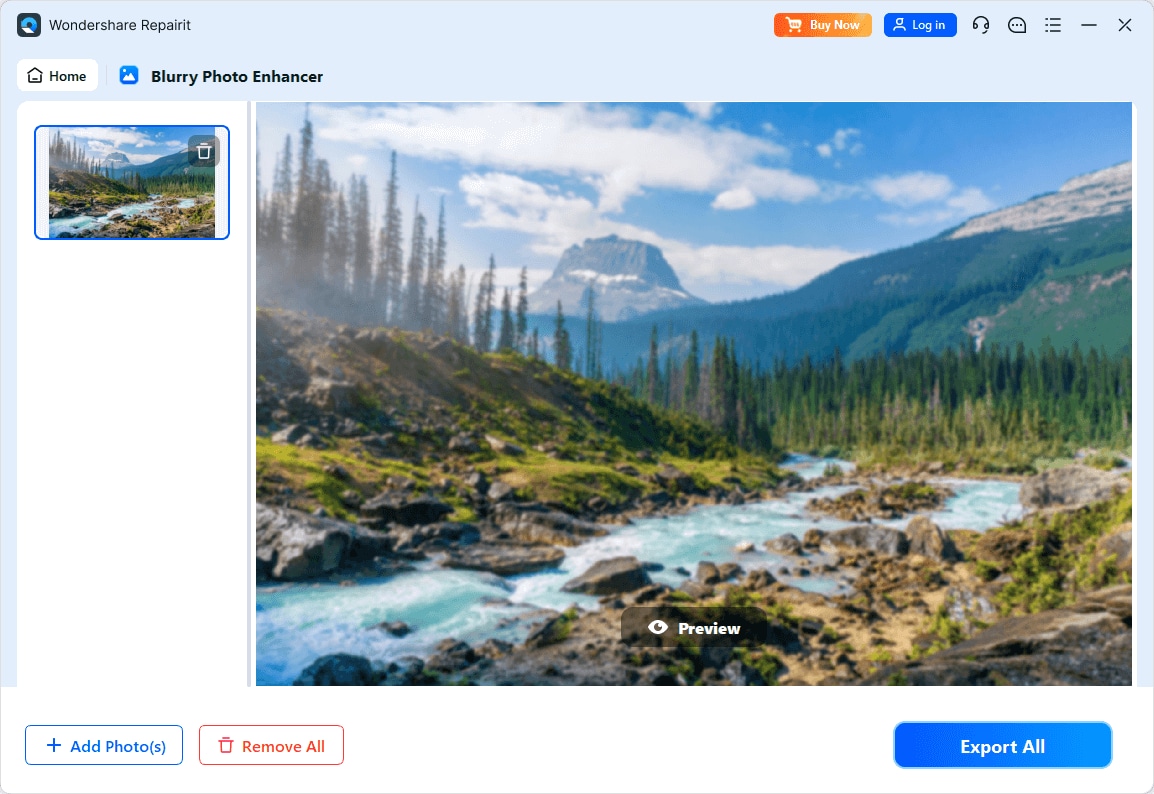
Step 4. Preview the enhanced result and save the improved photo to your device.
Final Verdict
Both tools can significantly enhance photo quality with AI, but they do so with different priorities. Repairit Photo Enhancer focuses on accessible enhancement across many image types, helping you sharpen blurry photos, enhance portraits and low-quality images, and upscale image resolution with a straightforward workflow. It is well suited for users who handle a mix of people images and general scenes and who prefer a light learning curve.
Evoto AI narrows its attention to portraits and people-focused images, offering tools that align more closely with facial refinement and skin adjustments. For photographers whose work is almost entirely portrait-based, it can be a reasonable specialist companion to other software.
In most everyday scenarios where you need to improve a diverse set of photos quickly and consistently, Repairit Photo Enhancer will usually be the more versatile option. If your workload is heavily portrait-centric and you already rely on additional editors for non-portrait content, a portrait-focused tool like Evoto AI may still have a place in your toolkit.
Next: Repairit Photo Enhancer vs Retouch4me
FAQ
-
1. Is Repairit Photo Enhancer better than Evoto AI for all types of photos?
For a mixed library that includes portraits, travel shots, and everyday scenes, Repairit Photo Enhancer is usually more versatile because it is not limited to people images. Evoto AI is more narrowly focused on portraits, so it is less suited as a single general-purpose enhancer for every photo type. -
2. When does Evoto AI make more sense than Repairit Photo Enhancer?
Evoto AI makes more sense when most of your editing revolves around portraits and people photos and you want AI tools dedicated to faces and skin. In that case, a portrait-focused enhancer can complement other software you already use for landscapes or products. -
3. Can both tools sharpen blurry photos and improve image clarity?
Both tools aim to enhance image quality, but Repairit Photo Enhancer is positioned more clearly around tasks like sharpening, clarity improvement, denoising, and upscaling across many image types. Evoto AI applies similar ideas mainly within portrait workflows. -
4. Do I need advanced editing skills to use these tools?
No. Both use AI to simplify enhancement. Repairit Photo Enhancer is generally more beginner friendly thanks to its guided, step-by-step workflow, while Evoto AI may feel more specialized and familiar to users who already understand portrait editing expectations. -
5. Can I use Repairit Photo Enhancer and Evoto AI together in one workflow?
Yes. Some users may rely on Repairit Photo Enhancer for general enhancement and upscaling across their entire library, then bring selected portraits into Evoto AI for additional portrait-specific refinement, depending on their needs and workflow.




