
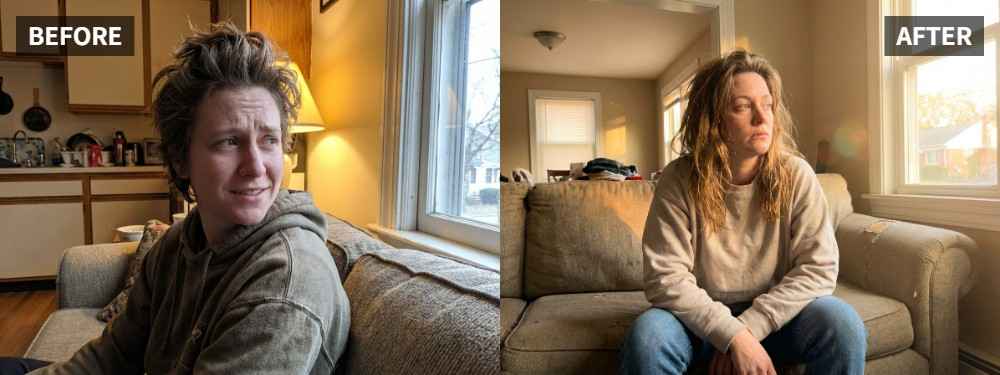
 TL;DR:
Use the Scene Retake > Golden Hour tool in the Relumi App Photo Lighting Enhancer to add flattering, warm light to social app portraits while preserving realistic skin texture and environmental lighting.
● The feature performs optimally on single-person photos that already have good composition and expressions but suffer from flat, plain, or overly cool lighting.
● The system analyzes face brightness, shadow direction, and scene atmosphere to correct patchy or harsh light without flattening the depth of the portrait.
● Verify your edited photo before saving to ensure the added warmth does not look heavily orange and the face retains realistic skin details instead of an over-smoothed filter effect.
Ask AI for a summary
 ChatGPT
 Perplexity
 Gemini
 Claude
 Grok
Grok
Key Takeaway: If you want a portrait for a social app to feel warmer, softer, and more flattering, you do not need to push heavy filters. In the Relumi App, Photo Lighting Enhancer with Scene Retake > Golden Hour can help give the photo a natural golden-hour glow while keeping skin texture and environmental light believable.
Photos chosen for social apps usually need to do one thing well: make the person look good immediately. The problem is that many portraits look too plain, too cool, or too flat before posting, even when the expression is good. The broader Relumi App page describes AI Retake as a way to fix portraits that “would’ve been great with just a bit more light,” while blending the correction with original skin texture and environmental lighting.
In this article
Part 1: Why Social App Portraits Often Miss the Golden Hour Feel
Golden hour is attractive because it gives portraits a mix of warm light and soft shadow that feels flattering instead of harsh. As photographers note in discussions about what makes golden hour portraiture special, the appeal is not just orange color. It is the balance between warmth, depth, and a more relaxed look on the face.
Common Signs
- The portrait looks too cool or plain before posting
- The face feels flatter than the background
- Skin tone looks a little gray or tired
- Heavy filters make the photo feel fake
- The image looks edited, but not naturally flattering
What People Usually Want
- A softer and warmer portrait
- Skin that looks healthier, not over-smoothed
- A golden-hour feel without obvious filter damage
- A result that feels polished but still believable
- A photo that looks strong enough to post right away
In short, people usually do not want a dramatic makeover. They want a better-lit version of themselves that still looks real.
Part 2: How to Use Relumi Golden Hour
Relumi Photo Lighting Enhancer is built around reading face brightness, shadow direction, background contrast, and scene atmosphere, then making the portrait feel as if it had been retaken under more flattering light. That is exactly the kind of correction that works well for social app portraits.


Relumi Lighting Enhancer
Retake photo lighting naturally with AI-powered scene relighting.

 Balance harsh facial shadows without flattening the portrait
-
Improve hard light, patchy light, and low-visibility street portraits naturally
-
Keep urban mood while making the subject easier to see
-
No editing skills required — upload, relight, preview, and save
Step 1: Add Your Portrait
Open the Relumi App, go to Photo Lighting Enhancer, and upload the portrait you want to post.

Step 2: Select Golden Hour
Choose Scene Retake > Golden Hour. This is the key step when you want softer warmth instead of obvious filter styling.

Step 3: Preview and Save
Compare before and after. Save the result if the face looks warmer, smoother in light, and still believable.

Part 3: When Golden Hour Works Best
Golden Hour works best on portraits that are already good enough to post, but still feel too ordinary. It is especially useful when the expression is strong, the composition works, and the only missing piece is softer, more flattering light.
Ideal Scenarios
- Portraits selected for a profile update
- Single-person photos for social posting
- Casual portraits that look too cool or flat
- Photos where the background feels better than the face
- Portraits that need warmth without heavy editing
What a Good Result Should Look Like
- Warmer, but not orange
- Softer, but not blurry
- Cleaner, but not artificial
- Better lit, but still natural
Quick Checklist Before Saving
| Check | What to ask |
|---|---|
| Warmth | Does the portrait feel more flattering without looking overdone? |
| Skin | Does the face still look like real skin instead of a filter effect? |
| Post-Ready | Would you feel comfortable posting this version as-is? |
If the answer is yes to all three, the photo is probably ready to post.
Conclusion
A social app portrait does not need to look heavily edited to look better. If you want warmth, softness, and a more flattering golden-hour feel, Relumi Lighting Enhancer with Scene Retake > Golden Hour is a practical way to improve the light while keeping the person believable.
FAQ
-
Will Golden Hour make my portrait look too filtered?
It should not if the source photo is still usable. The goal is a natural relit look, not a heavy beauty filter. -
Is this only for selfies?
No. It works for many single-person portraits, especially photos you want to post on social apps. -
Can it help if my photo just feels too plain?
Yes. That is one of the best use cases: the portrait is already decent, but it needs better warmth and face light.



