
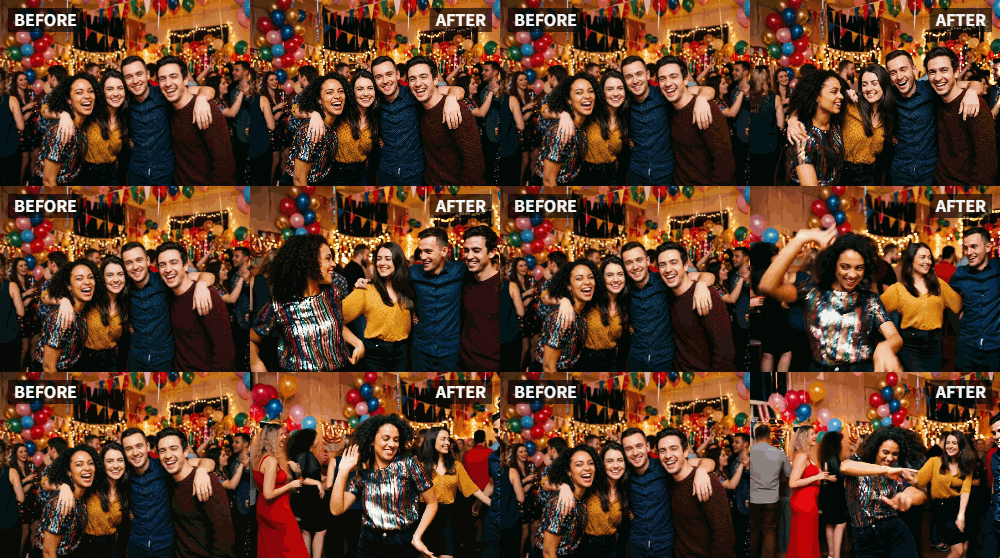
 TL;DR:
Use the Relumi app's "Dance" preset to animate static wedding portraits into moving videos of you and your partner dancing.
● For the AI to generate accurate movement, you must select a photo where the faces and upper bodies of the subjects are clearly visible.
● While the app creates the dancing animation, adding music tracks or text overlays requires exporting the generated video to a separate video editing tool.
● The effect works on formal poses, candid shots, and solo images, making it applicable for anniversary montages, digital photo frames, and vow renewal ceremonies.
Ask AI for a summary
 ChatGPT
 Perplexity
 Gemini
 Claude
 Grok
Grok
Your wedding photos are some of the most cherished images you own. They capture the joy, the love, the formality of your special day. But years later, when you look at them, they're beautiful but static. For a milestone anniversary, you want to do something special, something that reminds you both of the joy and playfulness of your relationship, not just the ceremony.
Relumi's "Dance" feature is the perfect tool for a fun, heartwarming anniversary surprise. Take a favorite photo from your wedding—perhaps a formal portrait or a candid shot—and animate it so the two of you start dancing. It's a beautiful metaphor for a marriage: a partnership that moves, grooves, and celebrates together through the years.
In this article
Part 1: Celebrating a Marriage, Not Just a Wedding
On anniversary forums and in discussions about relationship milestones, couples often look for ways to celebrate their journey, not just the single day they got married. They want gifts and gestures that reflect the life they've built together, the partnership, the fun .
A formal wedding portrait is a symbol of the promise you made. An animated version of that photo, where you both start dancing, is a symbol of the promise kept. It represents the joy, the movement, the "dance" of your life together. It's a deeply personal and creative way to say, "I'd marry you all over again, and I love dancing through life with you."
Part 2: How to Create a Dancing Anniversary Surprise


Relumi AI Photo Animation
Bring old photos to life with AI-powered animation.

 Preset motion styles — Wave, Dance, Clap, Cheers & more
-
Works on old, faded, and black-and-white photos
-
No editing skills required — generate in seconds
-
One tap turns any still image into a moving memory.
Creating this heartfelt surprise is simple and can be done in minutes.
Step 1: Choose the Perfect Wedding Photo
Select a clear photo from your wedding where both of you are visible. A formal portrait of the two of you is great, but a candid shot where you're already laughing or moving can be even more effective. Ensure your faces and upper bodies are clear.

Step 2: Upload to Relumi and Apply the "Dance" Preset
Open the Relumi app, go to Photo Animation, and select the "Dance" preset. The AI will work its magic, generating a short video of the two of you dancing together. It's a magical moment to see your wedding photo come to life with joyful movement.

Step 3: Present Your Animated Surprise
Now, how to share it?
- Private Surprise: On your anniversary morning, simply show your spouse the video on your phone. It's an immediate, heartfelt moment.
- Anniversary Video Montage: Include the dancing wedding photo in a longer video montage you create, featuring photos from throughout your marriage.
- Social Media Shout-Out: Post it on your social media with a caption like "10 years ago we said 'I do.' Today, we're still dancing. Happy anniversary, my love."
- Digital Photo Frame: Load the animated clip onto a digital photo frame as a constant, rotating reminder of your love and joy.

Part 3: Other Anniversary and Romantic Uses for the Dance Feature
This idea can be adapted for many romantic milestones.
- Engagement Announcements: Instead of a standard "we're engaged!" photo, post an animated one where the happy couple dances for joy.
- Valentine's Day Greetings: Create a fun, animated dancing video of a favorite couples photo to post on Valentine's Day.
- "Just Because" Surprises: You don't need an anniversary. Surprise your partner with a dancing animation of an old, cherished photo just to make them smile.
- Renewal of Vows Ceremony: Include an animated dancing photo of the two of you from your original wedding day in the video montage at your vow renewal ceremony.
Conclusion
Your wedding marked the beginning of your dance together. On your anniversary, celebrate the music that's played since. By using Relumi's "Dance" feature to animate a favorite wedding photo, you create a living, moving symbol of your joyful, enduring partnership. It's a gift from the heart that says, "I'm so glad I get to dance through life with you."
Frequently Asked Questions
-
Will the dance look natural on a formal, posed wedding photo?
Yes, and the contrast between the formal pose and the joyful dance often makes the effect even more charming and heartwarming. -
Can I make a photo of just one of us dance as a surprise for the other?
Absolutely! Animate a solo photo of yourself from your wedding day, dancing as if you're waiting for your spouse. It's a cute and personal gesture. -
What kind of music should I pair with the video?
"Your song" is the obvious and perfect choice. If you don't have one, choose a romantic, upbeat song that reflects your relationship. -
Can I add text to the video, like the number of years?
Yes. After exporting the clip, use a simple video editor to add text overlays like "Happy 5th Anniversary" or "Still Dancing After All These Years."



