
 TL;DR:
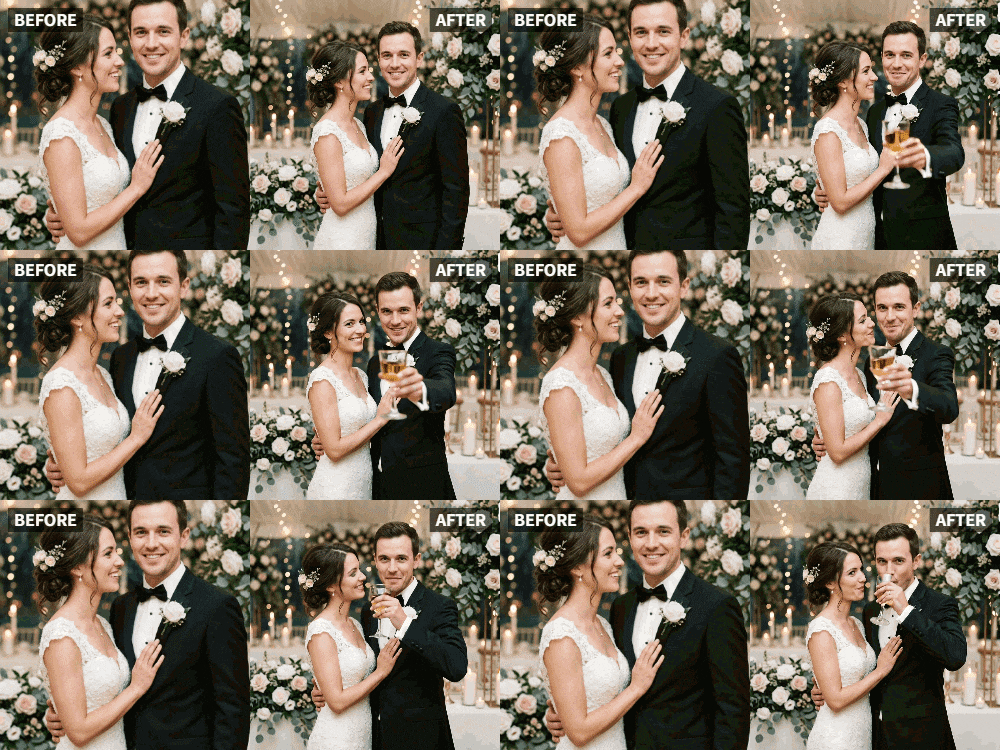
You can instantly transform static wedding photos into moving videos for anniversary celebrations by uploading a picture of you and your spouse raising glasses and applying the "Cheers" preset in the Relumi AI Photo Animation app.
● The "Cheers" feature is optimized specifically for human subjects holding glasses, requiring users to select alternative presets like "Wave" or "Dance" for formal portraits without drinks or object-only shots.
● The AI animation engine natively processes varying image conditions, allowing you to apply the synchronized moving effect directly to old, faded, and black-and-white photos without prior editing.
● Enhancing the generated animation with your wedding song or custom anniversary text overlays is not supported within the app and requires exporting the file to a separate video editor.
Ask AI for a summary
 ChatGPT
 Perplexity
 Gemini
 Claude
 Grok
Grok
Your wedding photos are some of your most treasured possessions. They capture the joy, the love, the beginning of your life together. Years later, on your anniversary, you want to celebrate that day again. You look at the photos, and they're beautiful, but they're still. They don't capture the sound of glasses clinking, the roar of the crowd toasting to your future.
Relumi's "Cheers" feature can change that. By animating a favorite wedding photo—perhaps the first toast or a shot of you two with your glasses raised—you can bring that moment back to life. It's a powerful, romantic way to celebrate your anniversary and relive the joy of your wedding day.
In this article
Part 1: Reliving the Celebration, Not Just the Image
On anniversary forums, couples often discuss ways to make their milestone feel special. A simple dinner is nice, a gift is appreciated, but what they really want is to feel the connection to their wedding day again.
A static photo is a reminder. An animated photo where the two of you raise your glasses in a toast is a recreation. It's as if you're clinking glasses all over again, right there in the present. It brings the energy and emotion of that moment forward through time, making your anniversary feel like a continuation of the celebration, not just a memory of it.
Part 2: How to Create an Animated Anniversary Toast


Relumi AI Photo Animation
Bring old photos to life with AI-powered animation.

 Preset motion styles — Wave, Dance, Clap, Cheers & more
-
Works on old, faded, and black-and-white photos
-
No editing skills required — generate in seconds
-
One tap turns any still image into a moving memory.
Creating this romantic surprise is simple and takes less than a minute.
Step 1: Choose Your Favorite Wedding Toast Photo
Select a clear photo from your wedding where you and your spouse are raising your glasses. A shot from the reception, during the first toast, is perfect. A photo of the two of you alone, or one with your wedding party, both work beautifully.

Step 2: Upload to Relumi and Apply the "Cheers" Preset
Open the Relumi app, go to Photo Animation, and select the "Cheers" preset. The AI will bring the photo to life, animating the raising of glasses in a smooth, synchronized toast. It's like watching a video clip from your wedding day, created from a single still image.

Step 3: Share Your Animated Anniversary Greeting
Now, share this living memory.
- Private Surprise: On the morning of your anniversary, simply show your spouse the video on your phone. It's an immediate, heartfelt moment.
- Anniversary Video Montage: Include the animated toast in a longer video you create, featuring photos from throughout your marriage.
- Social Media Shout-Out: Post it with a caption like "Reliving our first toast as Mr. & Mrs. Happy anniversary to us!" .

Part 3: Other Romantic Uses for the Cheers Feature
This idea extends beyond just your main anniversary.
- Engagement Anniversary: Celebrate the day you got engaged by animating a photo from that night where you're toasting with champagne.
- Valentine's Day Greetings: Create a romantic video for Valentine's Day by animating a favorite couples photo with a "cheers" to love.
- Renewal of Vows Invitations: If you're renewing your vows, use an animated wedding toast photo in your digital invitation to set a celebratory tone.
- "Just Because" Surprises: You don't need a special date. Surprise your partner with an animated "cheers" from an old photo just to say, "I'd still marry you all over again."
Conclusion
Your wedding day was the start of your greatest adventure. On your anniversary, let the celebration continue. With Relumi's "Cheers" feature, you can bring the joy, the love, and the toast of that day back to life, creating a moving reminder of the promise you made and the life you've built together.
Frequently Asked Questions
-
Will the animation work on a formal wedding portrait where we aren't holding glasses?
The "Cheers" preset is designed for photos with glasses. For a formal portrait, the "Wave" or "Dance" presets might be more appropriate. Choose the style that fits the mood of the photo. -
Can I animate a photo of just the champagne glasses on the table?
The "Cheers" feature is optimized for people. For an object-focused shot, you might try other apps, but the magic of "Cheers" is in the human connection. -
How can I make the video even more special?
Pair the animated clip with your wedding song. Use a video editor to overlay the audio, creating a mini music video of your special moment. -
Can I add text like "Happy Anniversary" to the video?
Absolutely. After exporting, use a simple editor to add text overlays with your names, the date, and the number of years you're celebrating.



