
 TL;DR:
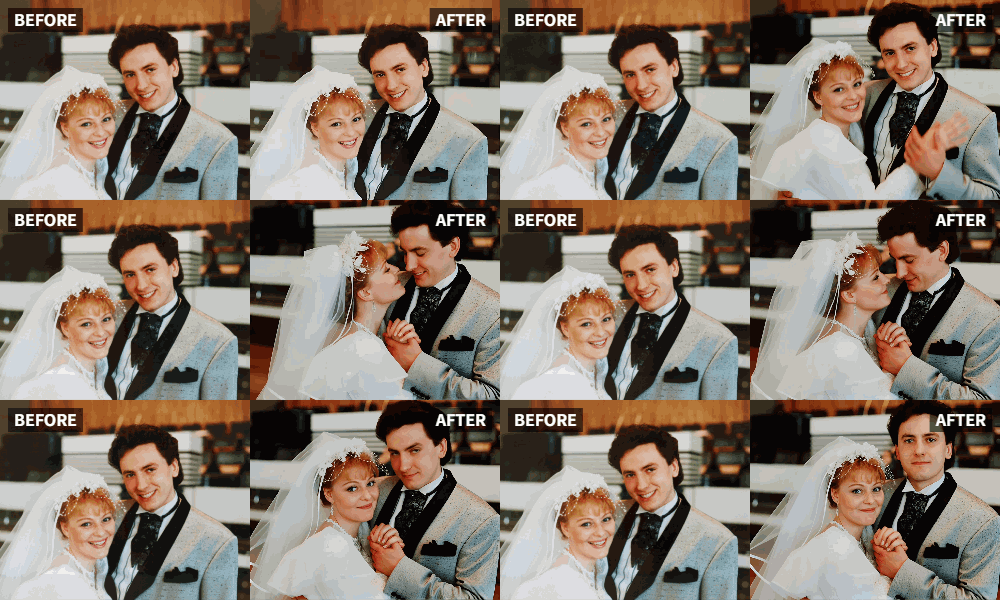
You can generate animated applause videos for remote or hybrid weddings by uploading still photos of the couple or guests into Relumi and applying the "Clap" preset.
● Integrate the animated clips into virtual guest book compilations, reception livestreams, or digital thank-you cards to visually acknowledge remote attendees.
● Overlay the generated animations with real applause sound effects using a separate video editor to create an immersive audio-visual result.
● The preset adds motion to both casual and stiff formal portraits, though it is best applied to highlight reels rather than traditional ceremony footage.
Ask AI for a summary
 ChatGPT
 Perplexity
 Gemini
 Claude
 Grok
Grok
In an age where loved ones are spread across the globe, virtual attendance at weddings is more common than ever. You might have a photo of your happy couple, or a group shot of the wedding party. But when you're putting together a video montage of well-wishes from friends who couldn't make it, how do you visually represent the collective joy and applause that would have happened in person?
Relumi's "Clap" feature offers a beautiful solution. By animating a photo of the happy couple or a group of well-wishers, you can create a virtual "round of applause" that feels personal, connected, and full of the love the day deserves .
In this article
Part 1: Recreating the Feeling of In-Person Applause
On wedding planning forums, couples and planners discuss the challenge of making virtual guests feel included. A video call is one thing, but it's hard to replicate the feeling of a room full of people clapping when the couple shares their first kiss or is announced at the reception.
The desire is to create a sense of unity and celebration, even across distances. While you can't beam distant guests into the room, you can create visual representations of their joy. Animating photos of the couple or their loved ones to clap is a powerful way to inject that missing energy into your virtual or hybrid celebration .
Part 2: How to Create an Animated Wedding Toast or Tribute


Relumi AI Photo Animation
Bring old photos to life with AI-powered animation.

 Preset motion styles — Wave, Dance, Clap, Cheers & more
-
Works on old, faded, and black-and-white photos
-
No editing skills required — generate in seconds
-
One tap turns any still image into a moving memory.
Here's how to use Relumi to add a digital applause to your wedding content.
Step 1: Gather Your Photos
Collect a few key images:
- A beautiful portrait of the happy couple.
- Group photos of the wedding party or family.
- (If possible) Photos of the far-away guests who are celebrating virtually.

Step 2: Animate with the "Clap" Preset
Upload each of these photos to Relumi and apply the "Clap" preset. You'll now have a collection of short videos where the key people in your wedding story are applauding.

Step 3: Integrate the Applause into Your Wedding Content
These animated clips can be used in several powerful ways.
- In a Virtual Guest Book Video: At the end of a video compilation of well-wishes from far-away friends, cut to an animated photo of the couple clapping, as if to say "thank you" to everyone who sent a message.
- During the Reception: If you're live-streaming or have screens at the reception, you can play a short animated clip of a group of guests clapping immediately after the couple shares their first dance or a special moment.
- In a Thank You Card: Create a digital thank-you card for your guests that ends with a photo of the two of you clapping in appreciation for their presence and gifts.

Part 3: Creative Applications for Wedding-Related Content
This idea extends to the entire wedding journey.
- Engagement Announcements: Instead of a standard photo, post an animated version where the happy couple is clapping for themselves and their exciting news.
- Bridal Shower or Bachelor Party Highlights: Animate a group photo from the pre-wedding event to show the group's collective excitement and celebration for the big day.
- Anniversary Videos: On your first anniversary, create a "look back" video and end it with an animated photo of the two of you from your wedding day, clapping for the amazing first year you've shared.
Conclusion
Love is worth celebrating, no matter the distance. By using Relumi's "Clap" feature, you can create powerful, visual symbols of joy and appreciation that connect far-away loved ones to your wedding day. It's a modern tool for an age-old emotion, ensuring that every clap, cheer, and well-wish is seen and felt.
Frequently Asked Questions
-
Can I animate a formal wedding portrait where the couple is posing stiffly?
Yes. The "Clap" feature adds a layer of joyful motion that can actually make a formal portrait feel more lively and celebratory, which is perfect for a wedding context. -
Is it okay to use this for a religious or very traditional ceremony video?
It depends on the tone you're going for. For a highlight reel or reception video, it's fantastic. For the ceremony itself, you might want to keep things more traditional. Use your best judgment based on the couple's style. -
Can I animate a photo of just the bride or just the groom clapping?
Absolutely. An animated photo of the bride clapping for her new husband, or vice versa, can be an incredibly sweet and personal moment in a tribute video. -
How can I make the virtual applause feel more real?
Pair your animated clapping photos with the sound of real applause. You can find free sound effects online to overlay in your video editor, creating an immersive audio-visual experience of celebration.



