
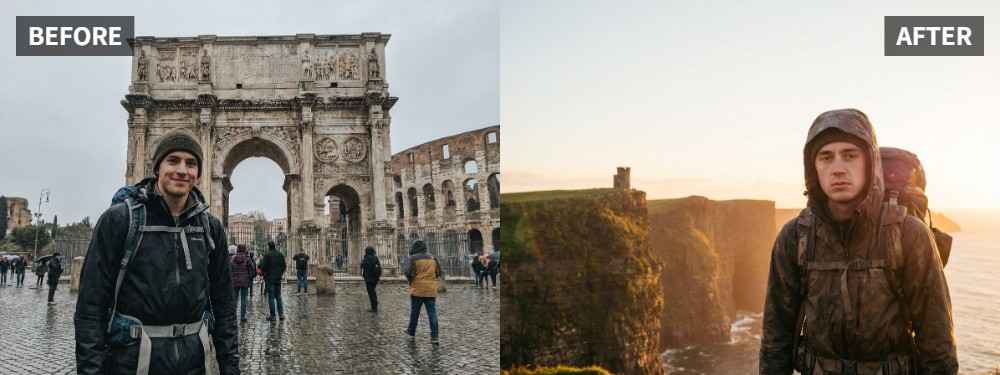
 TL;DR:
To rescue travel portraits where the scenery is well-lit but the subject is underexposed, use the Scene Retake tool in Relumi Lighting Enhancer to brighten the face without washing out the background.
● This method is most effective for backlit landmark photos, flat cloudy-day shots, or midday conditions with strong facial shadows, provided the composition and facial expressions are already worth keeping.
● Avoid increasing the overall brightness of the image to fix a dark subject, as this weakens the surrounding landscape; the tool instead specifically isolates and rebalances the subject's lighting and skin tone to match the environment.
● The workflow requires no manual editing skills and relies on a final visual checklist to ensure the person stands out naturally while the original location's atmosphere remains completely intact.
Ask AI for a summary
 ChatGPT
 Perplexity
 Gemini
 Claude
 Grok
Grok
Key Takeaway: A travel portrait often fails for a simple reason: the place looks unforgettable, but the person does not. Relumi Lighting Enhancer helps correct that imbalance by improving face light while keeping the location, mood, and memory intact.
Travel portraits are usually taken quickly, often in bright outdoor conditions where the background matters as much as the person. That is exactly why they go wrong so easily. The official Relumi page describes travel and outdoor portraits as one of the main situations where the scenery is perfect but the light on the face is not, especially in backlit, cloudy, or high-contrast conditions. Relumi Lighting Enhancer
In this article
Part 1: Why Travel Portraits So Often Look Worse Than the Real Moment
Travel portraits often fail because the camera tries to handle both the person and the scenery at once. If the sky, sea, or landmark is bright, the face can easily turn darker than expected. That is why so many destination photos end up with a good location but a weak portrait. Discussions around scenic-background portraits often point out that what looked great in person can fall apart once the camera has to balance the person and the place. Reddit discussion on scenic-background portraits
Common Signs
- The background looks better than the person
- The face is too dark compared with the sky, street, or sea
- Skin tone looks gray, tired, or lifeless
- The portrait feels flat even though the location was amazing
- Brightening the full image weakens the place instead of helping the person
What People Usually Want
- A portrait where both the person and the place work together
- Better face light without losing the scenery
- Healthier skin tone and clearer expression
- A more flattering travel memory
- A final image that feels closer to the real moment
The real goal is not to make the travel photo brighter. It is to make the person look like they truly belong in the scene.
Part 2: How to Use Relumi Lighting Enhancer
Travel portraits usually do not need dramatic retouching. What they need is better light on the subject. The official Relumi page says the feature can brighten faces in travel portraits without washing out the sky, sea, street, or landscape behind them, which makes it a strong fit for this kind of people-first correction. Relumi Lighting Enhancer


Relumi Lighting Enhancer
Retake photo lighting naturally with AI-powered scene relighting.

 Balance harsh facial shadows without flattening the portrait
-
Improve hard light, patchy light, and low-visibility street portraits naturally
-
Keep urban mood while making the subject easier to see
-
No editing skills required — upload, relight, preview, and save
Step 1: Add the Travel Portrait
Upload the image where the place looks great, but the person looks too dark, too flat, or less flattering than the real moment.

Step 2: Use Scene Retake
Open Scene Retake in Relumi Lighting Enhancer. This helps rebalance the subject and environment so the portrait feels more like it was captured at a better moment of light.

Step 3: Preview and Save
Check whether the face now belongs in the scene instead of fighting against it. If the person looks clearer and the place still matters, save the result.

Part 3: When This Works Best
This works best when the destination, composition, and expression are already worth keeping, but the lighting on the person is not. The official Relumi page describes this as helping the face and the place both look worth keeping, which is exactly the goal of a strong travel portrait. Relumi Lighting Enhancer
Ideal Scenarios
- Portraits taken in front of landmarks
- Travel photos with a bright sky or backlight
- Cloudy-day portraits that feel flat
- Midday travel shots with strong facial shadow
- Vacation photos where the scenery wins and the subject disappears
What a Good Result Should Look Like
- The person looks more connected to the location
- The face is clearer without ruining the view
- Skin tone looks healthier and more natural
- The image keeps its travel atmosphere
- The portrait feels worth saving, not just documenting
Quick Checklist Before Saving
| Check | What to look for |
|---|---|
| Person | Does the subject stand out more naturally now? |
| Place | Does the location still matter in the picture? |
| Memory | Does the image feel more like the real trip and less like a lighting mistake? |
If the answer is yes to all three, the travel portrait is likely ready to keep or share.
Conclusion
A bad-light travel portrait is still worth rescuing if the place, timing, and expression are right. In many cases, the image does not need a full remake. It just needs the person to be lit in a way that matches the scene. Relumi Lighting Enhancer helps bring the subject back into the photo instead of leaving all the attention to the background.
FAQ
-
Can this help if my background already looks amazing?
Yes. That is exactly why this kind of fix matters. The goal is to make the person look as good as the location. -
Will it ruin the scenery if I brighten the face?
No. This use case is built around improving face light while keeping the surrounding scene believable and worth keeping. -
Is this only for sunset travel portraits?
No. It also fits cloudy outdoor portraits, bright midday travel shots, and other scenic people photos where the subject lighting fell short.



