
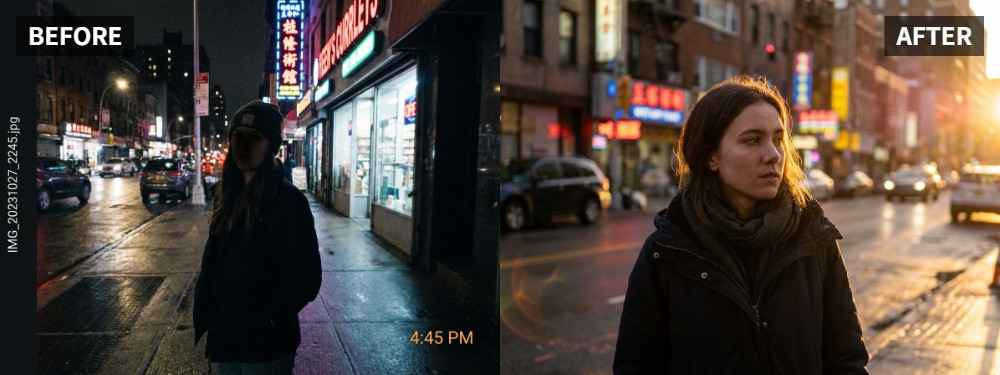
 TL;DR:
Resolve harsh facial shadows in street portraits by applying the Scene Retake feature in Relumi Lighting Enhancer to rebalance subject visibility while preserving the original urban atmosphere.
● Ideal for midday sun, strong side light, or uneven evening street lamps where the composition is strong but the face is too dark or unevenly shadowed.
● The tool analyzes face brightness and shadow direction to rebuild the lighting naturally, avoiding the flat, over-softened look of standard corrections.
● The enhancement deliberately retains essential shadow depth to maintain the street attitude and cinematic feel rather than completely erasing all shadows.
Ask AI for a summary
 ChatGPT
 Perplexity
 Gemini
 Claude
 Grok
Grok
Key Takeaway: A street portrait can have great attitude and city energy, but harsh shadows often make the face look too hard, too dark, or less flattering than it should. Relumi Lighting Enhancer can soften the lighting balance without stripping away the street mood that gives the portrait its character.
Street portraits often happen fast, and that is part of what makes them interesting. But there is a difference between dramatic light and bad light. When shadows cut too hard across the face, the portrait can start feeling distracting instead of stylish. The official Relumi page explicitly includes cinematic street portraits among the people-focused scenes it can improve, especially when better face light can make the result feel more polished. Relumi Lighting Enhancer
In this article
Part 1: Why Harsh Shadows Hurt Good Street Portraits
Street portraits often look worse than they should when strong light creates sharp facial shadows. That can happen in direct midday sun, under hard side light, or beneath a strong street lamp at night. In photography discussions, people regularly point out that hard light becomes unflattering when it leaves the face with dark, uneven shadows. Reddit discussion on hard light and dark shadows
Common Signs
- One side of the face is much darker than the other
- Shadows hide the eyes or key facial details
- The light feels sharp in a bad way, not a stylish way
- Contrast pulls attention away from the subject
- The portrait feels more harsh than intentional
What People Usually Want
- A face that is easier to read
- Better shadow control without losing edge
- Skin that still looks natural under city light
- A street portrait that feels cinematic, not messy
- Strong mood with cleaner subject lighting
The goal is not to erase every shadow. It is to keep the portrait's attitude while making the person more visible and more flattering.
Part 2: How to Use Relumi Lighting Enhancer
Street portraits work because they feel real, so the fix should not make them look soft, generic, or studio-made. Relumi Lighting Enhancer is useful here because it is described as a tool that reads face brightness, shadow direction, and scene atmosphere, then rebuilds the image so it feels closer to a better-lit retake instead of a flat correction. Relumi Lighting Enhancer


Relumi Lighting Enhancer
Retake photo lighting naturally with AI-powered scene relighting.

 Balance harsh facial shadows without flattening the portrait
-
Improve hard light, patchy light, and low-visibility street portraits naturally
-
Keep urban mood while making the subject easier to see
-
No editing skills required — upload, relight, preview, and save
Step 1: Add the Street Portrait
Upload the image where the person looks too shadowed, too harshly lit, or less flattering than the location deserves.

Step 2: Use Scene Retake
Open Scene Retake in Relumi Lighting Enhancer. This helps rebalance the face and surrounding light so the portrait keeps its urban mood while becoming easier to read.

Step 3: Preview and Save
Check whether the face is clearer, the shadow still adds depth, and the portrait still feels like part of the street scene. If yes, save the result.

Part 3: When This Works Best
This works best when the composition, pose, and environment already feel strong, but the lighting on the face is stopping the portrait from reaching its full potential. The official Relumi page describes this as cinematic street photo enhancement, which is exactly the kind of portrait that needs better light without losing style. Relumi Lighting Enhancer
Ideal Scenarios
- Midday street portraits with heavy facial shadow
- Urban portraits under strong side light
- Street shots where the background looks great but the face is too dark
- Portraits taken under harsh lamps or patchy city light
- Fashion-style street images that feel more severe than flattering
What a Good Result Should Look Like
- The face is clearer, but not flat
- The shadow still adds depth instead of hiding the subject
- Skin tone looks more natural
- The portrait keeps its street attitude
- The image feels intentional and polished
Quick Checklist Before Saving
| Check | What to look for |
|---|---|
| Face | Are the eyes and expression easier to read? |
| Shadow | Does the shadow still support the mood instead of swallowing the face? |
| Style | Does the portrait still feel urban and real, not over-softened? |
If the answer is yes to all three, the street portrait is likely ready to keep or publish.
Conclusion
Harsh shadows are not always bad in street portraits, but they become a problem when they make the subject harder to connect with. If the portrait already has style, timing, and location, you may only need better light balance on the face. Relumi Lighting Enhancer helps make the image feel cleaner and more deliberate while preserving the visual identity of the street scene.
FAQ
-
Can this help if I still want to keep some shadow for mood?
Yes. The goal is not to remove every shadow. It is to make the portrait more readable and flattering while keeping the mood. -
Will it make a street portrait look too soft?
It should not if the original image already has good structure. A good result keeps the personality of the street while improving the face. -
Is this only for daytime street photos?
No. It can also help with uneven evening light, strong lamps, and other urban portrait situations where the subject looks too hard or too dark.



