
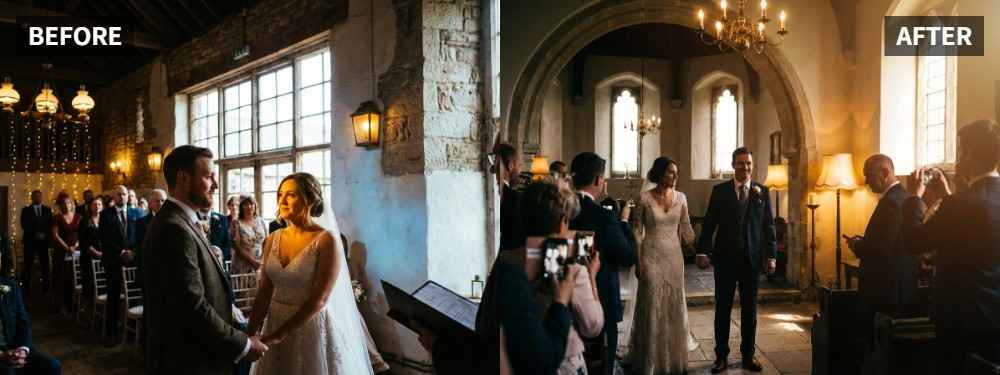
 TL;DR:
To fix underexposed faces in backlit wedding photos without ruining the romantic atmosphere, use the Scene Retake feature in Relumi Lighting Enhancer to naturally relight the couple.
● The tool is most effective on outdoor, sunset, or reception images that already have strong composition and emotion but suffer from uneven light or shadows falling specifically on the subjects.
● Instead of uniformly brightening the entire file, the software analyzes face brightness and shadow direction to recover natural skin tones without flattening the background contrast.
● Ensure a successful edit before saving by verifying that both subjects' expressions are clearly readable, skin tones avoid looking gray or orange, and the final image does not appear heavily filtered.
Ask AI for a summary
 ChatGPT
 Perplexity
 Gemini
 Claude
 Grok
Grok
Key Takeaway: A wedding portrait can still feel elegant and emotional even if the couple looks too dark in the original shot. Relumi Lighting Enhancer helps improve face brightness, soften harsh contrast, and keep the romantic mood instead of flattening the whole image.
Wedding photos often fail in a very specific way: the setting looks beautiful, the moment is real, but the couple's faces are darker than they should be. When that happens, the portrait loses some of its softness and polish. The official Relumi page explicitly lists wedding lighting fixes as one of the people-focused scenes the feature is designed to improve, especially when better face light and shadow balance can make the portrait feel closer to a well-planned shoot. Relumi Lighting Enhancer
In this article
Part 1: Why Wedding Portraits Often Look Too Dark
Wedding portraits often turn out darker than expected because the background is brighter than the couple. Backlight, sunset, bright skies, or uneven reception light can make the camera protect the highlights while letting the people fall into shadow. That is why photographers so often ask why faces turn dark even when the overall scene still looks bright. Reddit discussion on dark faces in bright outdoor light
Common Signs
- The couple's faces look darker than the dress, sky, or background
- One person looks clearer than the other
- Skin tone looks dull instead of soft and flattering
- Brightening the whole image ruins the wedding mood
- The portrait feels less elegant than the real moment
What Couples Usually Want
- Clearer faces without losing atmosphere
- Softer and more flattering skin tones
- A romantic look that still feels natural
- Better balance between the couple and the background
- A result that looks refined, not over-edited
In short, people do not want a brighter file. They want a wedding portrait where the couple finally looks as good as the moment felt.
Part 2: How to Use Relumi Lighting Enhancer
Wedding portraits usually do not need heavy retouching. In many cases, they just need the people to be lit more beautifully. Relumi Lighting Enhancer is designed for that kind of correction. On the official page, it is described as a tool that reads face brightness, shadow direction, background contrast, and scene atmosphere, then adjusts the portrait so it feels more naturally relit. Relumi Lighting Enhancer


Relumi Lighting Enhancer
Retake photo lighting naturally with AI-powered scene relighting.

 Balance harsh facial shadows without flattening the portrait
-
Improve hard light, patchy light, and low-visibility street portraits naturally
-
Keep urban mood while making the subject easier to see
-
No editing skills required — upload, relight, preview, and save
Step 1: Add the Wedding Portrait
Upload the photo where the couple looks too dark, unevenly lit, or less flattering than the moment felt in real life.

Step 2: Use Scene Retake
Open Scene Retake in Relumi Lighting Enhancer. This helps rebuild better light on the couple instead of simply brightening the whole photo.

Step 3: Preview and Save
Compare the updated version with the original. If the couple is easier to see, the skin looks healthier, and the image still feels romantic, save it.

Part 3: When This Works Best
This works best on wedding portraits that already have strong emotion and composition, but weak subject lighting. The official Relumi page includes wedding portraits among the important people photos that benefit from cleaner, softer, and more flattering light. Relumi Lighting Enhancer
Ideal Scenarios
- Outdoor wedding portraits with backlight
- Sunset wedding shots where faces fall into shadow
- Ceremony or reception photos with uneven light
- Couple portraits where one person looks darker than the other
- Romantic wedding images that feel too dull straight out of camera
What a Good Result Should Look Like
- The couple stands out more clearly
- Skin tone looks natural, not gray or orange
- The image still feels soft and romantic
- The background still supports the mood
- The final portrait looks polished, not fake
Quick Checklist Before Saving
| Check | What to look for |
|---|---|
| Faces | Can you read both expressions more easily? |
| Skin Tone | Does the skin still look believable and flattering? |
| Mood | Does the image still feel like a wedding, not a heavy filter? |
If the answer is yes to all three, the portrait is likely ready to keep or share.
Conclusion
A dark wedding portrait is not automatically a failed one. If the moment, pose, and setting are already right, better light on the couple can change the whole image. Relumi Lighting Enhancer is useful here because it improves how the people look while protecting the atmosphere that makes wedding photos worth keeping.
FAQ
-
Can this help if the wedding background already looks good, but the couple does not?
Yes. That is one of the most practical use cases: the environment is beautiful, but the people need better balance and visibility. -
Will the result look too artificial for a wedding photo?
It should not if the original image is still usable. The goal is to make the portrait feel better lit, not obviously edited. -
Is this only for formal wedding portraits?
No. It can also help on casual couple shots, reception photos, and other people-centered wedding images where the light was not flattering enough.



