
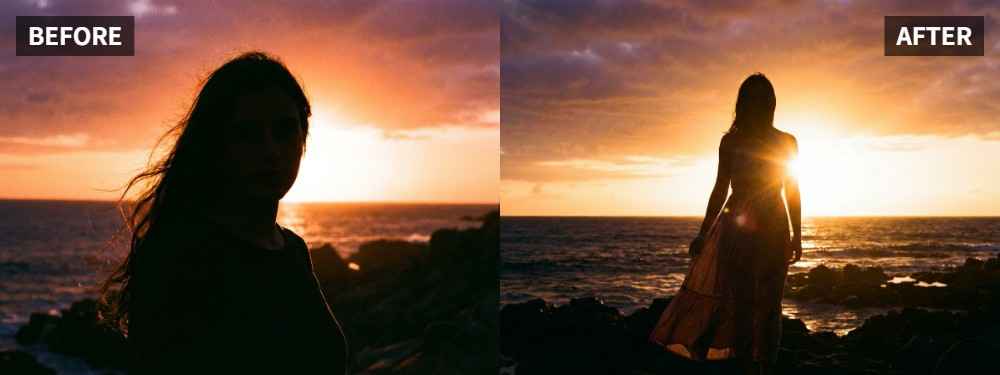
 TL;DR:
You can restore natural warmth and face brightness to flat sunset portraits by applying the Golden Hour setting in Relumi Lighting Enhancer.
● This tool is designed specifically for person-centered photos where the background composition is successful but the subject appears dim, gray, or lacks contrast against the sky.
● The enhancement balances face shadows and background lighting without pushing skin tones into the unnatural orange hues often caused by heavy manual filters.
● To process the image, upload your file, select Golden Hour, and verify that the subject's face is easier to read while maintaining a believable sunset mood before saving.
Ask AI for a summary
 ChatGPT
 Perplexity
 Gemini
 Claude
 Grok
Grok
Key Takeaway: If a sunset portrait looks dull instead of warm, you do not always need to reshoot it. Relumi Lighting Enhancer can help restore warmer light, healthier-looking skin tones, and a more natural golden-hour feel without making the person look fake.
A lot of sunset portraits feel disappointing for one reason: the background still suggests sunset, but the person does not. The face may look dim, gray, or lifeless, so the final image feels flatter than the real moment. That gap between memory and result is a common frustration in sunset critique discussions such as this one on Reddit.
In this article
Part 1: Why Sunset Portraits Look Flat
A flat sunset portrait usually does not mean the composition failed. More often, the light on the person does not carry enough warmth, depth, or separation from the background. Photographers often describe flat light as light that lacks shape and dimension, as explained in this Quora discussion about what flat light is and how to counter it.
Common Reasons
- The face looks darker than the sky or background
- The warm sunset tone does not show clearly on the skin
- The portrait loses contrast and feels visually weak
- Manual edits make the skin too orange instead of naturally warm
- The photo shows the scene, but not the softness of the real moment
What People Usually Want
- A brighter and more flattering face
- Warmer skin tone without an orange cast
- A softer golden-hour mood
- A portrait that feels closer to the memory
- A result that looks natural, not heavily filtered
In short, people do not just want more color. They want the person to feel alive in the sunset again.
Part 2: How to Use Relumi Lighting Enhancer
Relumi Lighting Enhancer is designed for person-centered photos where the scene is good, but the lighting on the subject does not feel right. On the official Relumi Lighting Enhancer page, the feature is positioned around improving face brightness, shadow balance, and overall scene mood while keeping the result natural.


Relumi Lighting Enhancer
Retake photo lighting naturally with AI-powered scene relighting.

 Brighten darker faces while keeping the sunset background believable
-
Improve backlit, dull, and low-warmth portraits with a natural look
-
Restore warmth and skin tone without relying on heavy manual filters
-
No editing skills required — upload, relight, preview, and save
Step 1: Add Your Portrait
Open Relumi and upload the sunset portrait that feels too dull, too gray, or not warm enough on the face.

Step 2: Select Golden Hour
Choose Golden Hour inside Relumi Lighting Enhancer. This helps rebuild a softer sunset mood while making the portrait feel warmer and more flattering.

Step 3: Preview and Save
Compare the new version with the original. If the face looks more alive, the skin looks warmer, and the sunset feeling still looks believable, save it.

Part 3: When This Works Best
Relumi Lighting Enhancer works best when the portrait already has a good expression and composition, but the subject does not carry the warmth of the sunset strongly enough.
Ideal Scenarios
- Travel portraits taken near sunset
- Beach portraits where the sky looks better than the face
- Outdoor evening portraits that feel a little gray
- Casual sunset shots where the skin tone looks dull
- Portraits that are technically usable but emotionally weaker than the real scene
What a Good Result Should Look Like
- Warmer, but not orange
- Softer, but not blurry
- More flattering, but still realistic
- Better balanced between face and background
Quick Checklist Before Saving
| Check | What to ask |
|---|---|
| Face | Does the person look more alive and easier to read? |
| Skin Tone | Does the warmth look natural instead of orange? |
| Sunset Mood | Does the image still feel like golden hour, not a heavy filter? |
If the answer is yes to all three, the portrait is likely ready to keep or share.
Conclusion
A flat sunset portrait is usually not a failed portrait. In many cases, the moment and expression are already good — the light on the person just needs help. If you want to bring back warmth while keeping the portrait natural, Relumi Lighting Enhancer is a simple way to make the image feel closer to golden hour again.
FAQ
-
Can this help if my sunset portrait looks gray or dull?
Yes. It works well when the person is visible but the portrait feels cooler, flatter, or less warm than the real moment. -
Will it make skin look too orange?
It should not if the original portrait is still usable. The goal is to add warmth and softness without pushing skin into an unnatural orange tone. -
Is this mainly for portraits instead of scenery?
Yes. This article and this use case are focused on person-centered sunset photos, where the subject needs better lighting balance and a more natural golden-hour feel.



