
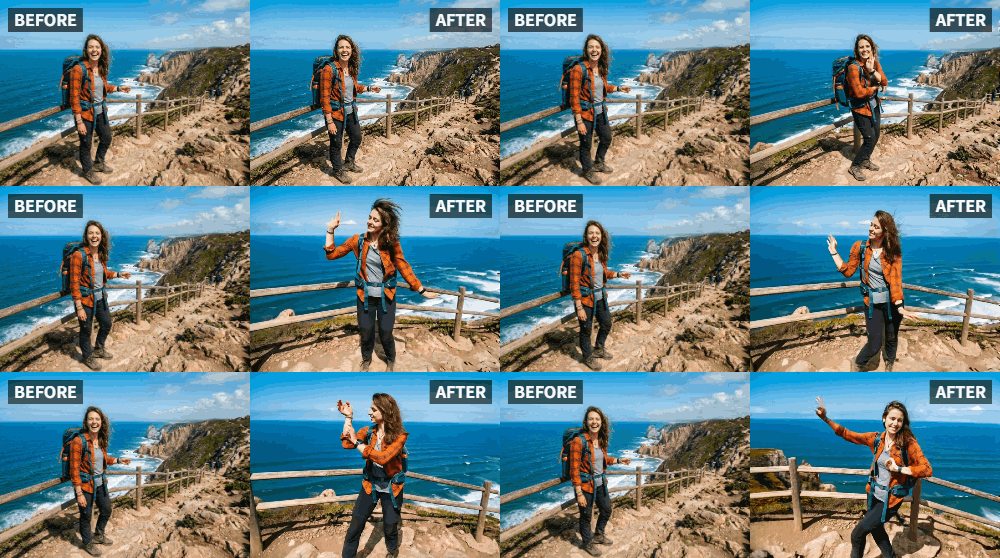
 TL;DR:
Relumi's AI Photo Animation app transforms static travel portraits into dynamic videos by applying the "Dance" preset to create engaging content without requiring actual video footage.
● Optimal results require a high-quality, well-lit, front-facing or three-quarters photo where the person is the clear main subject, as distant figures lack sufficient detail for smooth AI generation.
● The "Dance" feature is specifically designed for people and pets, while the "Wave" preset should be selected to apply natural swaying movements to empty landscapes.
● The application processes generation in seconds without requiring editing skills, functions on old, faded, or black-and-white photos, and outputs clips that can be exported to external editors for text or music overlays.
Ask AI for a summary
 ChatGPT
 Perplexity
 Gemini
 Claude
 Grok
Grok
You're back from an amazing trip. You have hundreds of photos—stunning landscapes, iconic landmarks, and you, posing in front of them all. You post them on Instagram, and they look... fine. But they don't capture the feeling of being there—the energy, the excitement, the sheer joy of exploration. They're beautiful, but they're still.
Relumi's "Dance" feature can change that. By animating a photo of yourself in front of a famous landmark or a beautiful vista, you inject that missing energy. You transform a standard vacation snap into a dynamic, joyful memory that truly reflects the thrill of your travels.
In this article
Part 1: The Limits of the Classic Vacation Snap
On travel forums and subreddits like r/travel, people share their most stunning photos. The classic shot is "me in front of [famous landmark]." It's a record of being there, but it often lacks a sense of life. You were probably buzzing with excitement when that photo was taken, but the photo itself is frozen.
There's a growing desire among travelers to create more engaging, personal content from their trips . Video is the obvious answer, but not everyone wants to film themselves talking to a camera. An animated photo is the perfect middle ground. It keeps the simplicity of a photo but adds a layer of dynamic energy that video provides.
Part 2: How to Create a Dynamic Travel Memory with Relumi


Relumi AI Photo Animation
Bring old photos to life with AI-powered animation.

 Preset motion styles — Wave, Dance, Clap, Cheers & more
-
Works on old, faded, and black-and-white photos
-
No editing skills required — generate in seconds
-
One tap turns any still image into a moving memory.
Here's how to turn your travel photos into living memories.
Step 1: Take a Great Travel Portrait
This is easy! On your next trip, take a clear photo of yourself (or have a friend take one) in front of a landmark, landscape, or cityscape you love. A front-facing or three-quarters shot where you are the clear subject works best.

Step 2: Upload to Relumi and Apply the "Dance" Preset
Open the Relumi app, go to Photo Animation, and select the "Dance" preset. The AI will generate a short video of you dancing joyfully in your travel location. The contrast between the static, majestic background and your dynamic, happy movement is visually stunning and emotionally resonant.

Step 3: Share Your Living Travel Memory
Export the clip and share it on your social media.
- Instagram Reel: Post it as a Reel with a trending song or a piece of music from the region you visited.
- TikTok: The dynamic nature of the dancing video is perfect for TikTok's energetic format.
- Travel Blog or Vlog: If you have a travel blog, these animated clips are a fantastic way to add visual interest and personality to your posts.
- Personal Keepsake: Keep it for yourself. It's a much more engaging way to remember your trip than a standard static photo.

Part 3: Creative Travel Applications for the Dance Feature
This idea can be used in many creative ways to document your journeys.
- Landmark "Dance-Offs": Create a series of videos where you "dance" in front of multiple landmarks, creating a fun, personal travel montage.
- Celebrating a Travel Milestone: Reached the summit of a hike? Made it to your dream destination? Animate a photo of yourself dancing to celebrate the achievement.
- Solo Traveler Content: For solo travelers, this is a fantastic way to create engaging content without needing someone to film you. You just need a photo.
- Group Travel Memories: Animate a group photo of your travel buddies dancing in front of a famous site. It's a perfect, shareable memory of your adventure together.
- "Before and After" Travel Videos: Show a static photo of a location, then cut to an animated photo of you dancing in front of it. It's a fun way to say "I was here!"
Conclusion
Your travel memories deserve to feel as alive as the adventures they represent. With Relumi's "Dance" feature, you can transform your standard vacation snaps into dynamic, joyful videos that capture the true spirit of exploration. Stop just showing where you went; start showing how you felt.
Frequently Asked Questions
-
Will the dance animation work if I'm far away from the camera in the photo?
For the best results, you should be the main subject of the photo. If you're too small, the AI may not have enough detail to generate a smooth animation. -
Can I animate a photo of a landscape without a person?
The "Dance" preset is designed for people (and pets). For landscapes, the "Wave" preset is a much better choice, as it creates a gentle, natural sway in the scene. -
How can I make sure the video is stable and looks professional?
Since the animation is generated by AI, the movement is naturally smooth. The key is to start with a high-quality, well-lit photo. -
Can I add text to the video, like the location name?
Absolutely. After exporting the clip, use any simple video editor or even Instagram's own editing tools to add text overlays with the location, date, or a fun caption.



