
Choosing between Repairit Photo Enhancer vs Retouch4me usually comes down to how you like to edit and how specialized your portrait work is. Repairit Photo Enhancer focuses on making it easy to enhance photo quality, improve image clarity, and sharpen blurry photos in a standalone interface. Retouch4me, by contrast, works as an AI retouching plugin suite that fits into professional editors and emphasizes portrait-focused corrections.
This comparison walks through output quality, workflow, pricing, and ideal use cases, so you can decide whether a streamlined AI enhancer or a plugin-based portrait toolkit fits your current and future projects better.
Enhance Photo Quality with Repairit Photo Enhancer
 Security Verified. Over 7,302,189 people have downloaded it.
In this article
- Repairit Photo Enhancer vs Retouch4me: Quick Verdict
- Repairit Photo Enhancer vs Retouch4me: Key Differences
- Repairit Photo Enhancer vs Retouch4me: Comparison Table
- What Repairit Photo Enhancer and Retouch4me Are Best For
- Repairit Photo Enhancer vs Retouch4me: AI Enhancement Features and Capabilities
- Repairit Photo Enhancer vs Retouch4me: Output Quality and Real-World Results
- Repairit Photo Enhancer vs Retouch4me: Workflow and Ease of Use
- Repairit Photo Enhancer vs Retouch4me: Pricing and Trial Options
- Who Should Choose Repairit Photo Enhancer
- Who Should Choose Retouch4me
- Pros and Cons of Repairit Photo Enhancer and Retouch4me
- How to Enhance Photos After Choosing the Right Tool
Repairit Photo Enhancer vs Retouch4me: Quick Verdict
For users who want a straightforward way to enhance photo quality, upscale image resolution, and clean up portraits without extra plugins, Repairit Photo Enhancer is generally the more convenient option. It runs as a standalone app, so you can import a photo, apply AI models for sharpening, denoising, or portrait enhancement, preview the result, and export.
Retouch4me suits photographers and retouchers who already work in advanced editors and want AI modules that focus mainly on skin and local portrait details. It fits naturally into a layer-based workflow but depends on compatible host software, which adds complexity if you are not used to that environment.
In practice, many non-specialists will find Repairit Photo Enhancer faster for day-to-day improvements across portraits and general scenes, while Retouch4me can add value in portrait-heavy workflows where you already rely on masks, layers, and manual finishing.
Repairit Photo Enhancer vs Retouch4me: Key Differences
The key distinction between Repairit Photo Enhancer vs Retouch4me is where they sit in your workflow:
- Workflow placement: Repairit Photo Enhancer works as a self-contained AI enhancer. Retouch4me is a plugin suite that runs inside host editors.
- Focus area: Repairit Photo Enhancer covers general enhancement such as improving image clarity, sharpening blurry photos, denoising, and upscaling for many photo types. Retouch4me concentrates on portrait retouching tasks like skin and facial details.
- Ease of use: Repairit Photo Enhancer emphasizes a guided, beginner-friendly experience. Retouch4me assumes you are comfortable with professional editing tools and plugin management.
- Budget planning: Repairit Photo Enhancer usually comes as a single AI enhancement product. Retouch4me is often purchased per module or bundle, so cost scales with how many portrait tools you adopt.
This matters if you mainly want consistent global improvements to a variety of photos, versus deep control over portraits inside an existing pro stack.
Repairit Photo Enhancer vs Retouch4me: Comparison Table
| Aspect | Repairit Photo Enhancer |
|---|---|
| Main focus | Standalone AI tool to enhance photo quality, handle sharpening, denoising, and upscale image resolution for portraits and general photos. |
| Aspect | Retouch4me |
| Main focus | Plugin-based AI retouching suite centered on portraits, skin, and local adjustments inside compatible editors. |
| Best for | Users wanting quick, natural-looking improvements without relying on pro hosts. |
| Best for (Retouch4me) | Photographers and retouchers who already work extensively in host software and want AI help mainly for portraits. |
| Ease of use | Simple, guided workflow with minimal setup and learning curve. |
| Ease of use (Retouch4me) | Feels natural in a professional editing environment but more complex for casual users. |
| Workflow style | Import photos, choose enhancement, preview, export. |
| Workflow style (Retouch4me) | Open editor, launch plugin module, retouch on layers or selections, then export from host. |
| Strengths | Broad enhancement focus, no host software required, AI models suitable for many everyday photos. |
| Strengths (Retouch4me) | Specialized portrait modules, tight integration with layers, masks, and manual adjustments. |
| Limitations | Less deep integration with pro stacks; fewer micro-level sliders than some high-end plugins. |
| Limitations (Retouch4me) | Requires compatible host software; mainly aimed at portrait retouching rather than general enhancement alone. |
What Repairit Photo Enhancer and Retouch4me Are Best For
Both tools use AI, but they solve slightly different problems around photo enhancement and portrait work.
- Repairit Photo Enhancer is best for users who want an all-in-one enhancer to improve image clarity, reduce noise, sharpen blurry photos, and enhance portraits and low-quality images without opening a full editor. It suits travel photos, product shots, social content, and general portrait improvements.
- Retouch4me is best for photographers and retouchers who already live inside professional tools and want AI modules that speed up tasks like skin smoothing or detail refinement. It makes more sense when portraits and close-up people shots dominate your workload.
If you rarely open a pro editor, a standalone enhancer like Repairit Photo Enhancer tends to feel more approachable. If layers, masks, and advanced adjustment tools are already part of your process, Retouch4me can plug into that pattern.
Repairit Photo Enhancer vs Retouch4me: AI Enhancement Features and Capabilities
In terms of capabilities, Repairit Photo Enhancer aims to cover the full journey from soft or low-resolution input to a cleaner, clearer image, while Retouch4me is built around more specialized portrait modules.
Repairit Photo Enhancer core capabilities include:
- AI upscaling to increase resolution so small or low-resolution photos become more usable for print or large displays.
- Sharpening that helps recover detail in soft or slightly blurry images, with a focus on maintaining natural edges and skin.
- Denoising to reduce visible grain in high-ISO or low-light shots while preserving important details.
- Clarity and detail enhancement for a wide range of subjects, from products to landscapes and portraits.
- Portrait options that refine skin appearance, facial clarity, and subject emphasis without requiring manual masking.
- Support for handling multiple images in a similar style, which is useful when you have sets of photos from the same shoot.
Retouch4me capabilities generally include:
- AI portrait modules that target skin, eyes, and localized facial features.
- Operation as plugins inside supported editors, so results can be combined with manual color grading, retouching, and compositing tools.
- Presets and controls tuned toward professional retouching expectations.
- A modular approach where you pick specific plugins for specific retouching steps.
In most cases, Repairit Photo Enhancer is stronger when you want one environment to handle upscaling, denoising, sharpening, and general enhancement. Retouch4me can be a better fit when you are comfortable letting the host editor handle global adjustments while its AI takes on portrait-specific tasks.
Repairit Photo Enhancer vs Retouch4me: Output Quality and Real-World Results
Output quality depends on the source photo and how aggressively you push the AI, but there are some broad tendencies that are useful for decision-making.
- Repairit Photo Enhancer output: In typical use, it aims for natural-looking improvements across a variety of scenes. Upscaling and sharpening can help bring out detail in soft or compressed files, while denoising reduces grain without turning images overly plastic when settings are kept moderate. For portraits, it usually provides balanced improvements rather than heavy stylization.
- Retouch4me output: Inside a pro editor, it can deliver refined portrait retouching, especially when combined with your existing layer and mask techniques. Skin and facial details can look polished while you keep creative control over color and overall mood through the host software.
If you mainly need to make a broad range of images look cleaner and more detailed for sharing, printing, or client previews, Repairit Photo Enhancer offers a direct path. If your priority is subtle portrait refinement within a more complex edit, Retouch4me may fit better, provided you are prepared to work in a compatible editor.
Repairit Photo Enhancer vs Retouch4me: Workflow and Ease of Use
Workflow differences are often the deciding factor between Repairit Photo Enhancer vs Retouch4me.
Repairit Photo Enhancer workflow typically follows these steps:
- Open the application and import one or more images from your computer.
- Choose AI options such as upscaling, noise reduction, sharpening, or portrait enhancement.
- Preview the AI output and, where available, adjust intensity so results remain natural.
- Export the enhanced photos in common formats for sharing or further use.
This import to preview to export pattern is designed to stay approachable for beginners while remaining efficient for quick batches.
Retouch4me workflow depends heavily on the host editor:
- Open your preferred photo editor and load the image or layered file.
- Launch the relevant Retouch4me plugin from within the host.
- Select the module that matches your goal, for example skin or portrait enhancement.
- Run the plugin so it applies changes, often to a new layer or selection.
- Refine using masks, blending modes, and other tools in the host before exporting the final file.
Repairit Photo Enhancer prioritizes a simple, standalone experience. Retouch4me gives flexibility inside a pro stack but expects you to be comfortable navigating more complex software and plugin setups.
Repairit Photo Enhancer vs Retouch4me: Pricing and Trial Options
Exact pricing and trial structures change over time, so it is important to confirm current details on each vendor site, but the general positioning is different.
- Repairit Photo Enhancer pricing is typically organized as a single AI enhancement product aimed at individuals and small teams. In many cases, you can explore core features or trial versions to see how well it handles your own images before committing.
- Retouch4me pricing often follows a modular or bundle-based model, where you purchase specific portrait retouching plugins or collections of them. This lets you pay only for what you need, but total cost can grow as you add more modules.
For most users who want predictable costs and one primary enhancement tool, Repairit Photo Enhancer is easier to budget. For portrait specialists who only need certain modules and already own powerful host software, Retouch4me may fit into an existing investment.
Who Should Choose Repairit Photo Enhancer
Repairit Photo Enhancer is a strong option if you prioritize simplicity and broad photo enhancement over complex plugin chains. It works well for:
- Content creators, small businesses, and social media managers who want to enhance photo quality quickly for posts, ads, or listings.
- Users who frequently deal with soft, grainy, or low-resolution images and need to upscale image resolution, clean noise, and make details clearer in a few guided steps.
- Aspiring photographers who want better-looking images without mastering a full professional editor immediately.
- People who do not rely on or do not want to manage additional host software and plugin installations.
If you like the idea of loading a photo into a dedicated AI tool, selecting the type of enhancement you want, and exporting a clearer result without extra technical overhead, Repairit Photo Enhancer aligns well with that workflow.
Who Should Choose Retouch4me
Retouch4me is more suitable for users who already work inside advanced editing environments and want AI modules that accelerate portrait retouching rather than replace their editor.
- Professional portrait and wedding photographers who manage large sets of face-focused images and already depend on tools like layers, masks, and selective adjustments.
- Studio retouchers and serious enthusiasts who want AI to handle repetitive portrait steps while they keep creative control over finishing touches.
- Users who are comfortable installing and maintaining plugins, checking compatibility, and updating both host and plugin software as needed.
If your editing routine already revolves around a pro editor and you mainly want to speed up portrait-specific work while keeping everything else in your usual environment, Retouch4me can fit that niche.
Pros and Cons of Repairit Photo Enhancer and Retouch4me
Repairit Photo Enhancer Pros and Cons
Retouch4me Pros and Cons
How to Enhance Photos After Choosing the Right Tool
Once you have compared Repairit Photo Enhancer vs Retouch4me and decided which fits your workflow, the next step is actually enhancing your photos. If you want a guided, standalone process that does not depend on extra plugins, using Repairit Photo Enhancer as your main enhancement stage can be a practical approach before any optional fine-tuning elsewhere.
Key Features
- Upscale image resolution to make small or low-resolution files more suitable for print or high-resolution displays.
- Sharpen blurry photos while aiming to preserve a natural look in edges, faces, and fine textures.
- Reduce digital noise in high-ISO or low-light images so they appear smoother yet still detailed.
- Enhance portraits and low-quality images by improving skin appearance, facial clarity, and overall subject emphasis.
- Improve details in soft or low-resolution photos before sharing with clients, posting online, or adding creative edits elsewhere.
Step-by-step guide
Step 1. Choose an AI enhancement model based on your needs, such as general enhancement, portrait improvement, or image upscaling.

Step 2. Import your photo into Repairit Photo Enhancer to begin the enhancement process.

Step 3. Apply the enhancement settings and let the AI improve clarity, sharpness, and overall image quality.
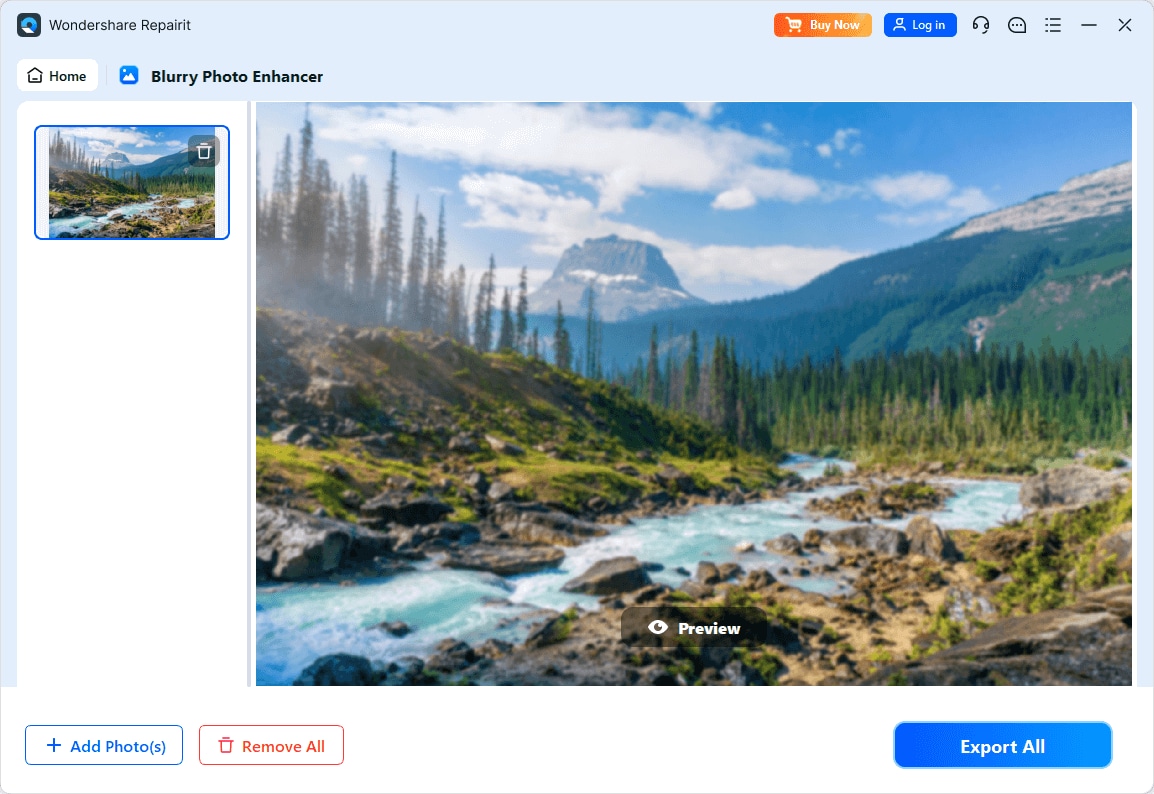
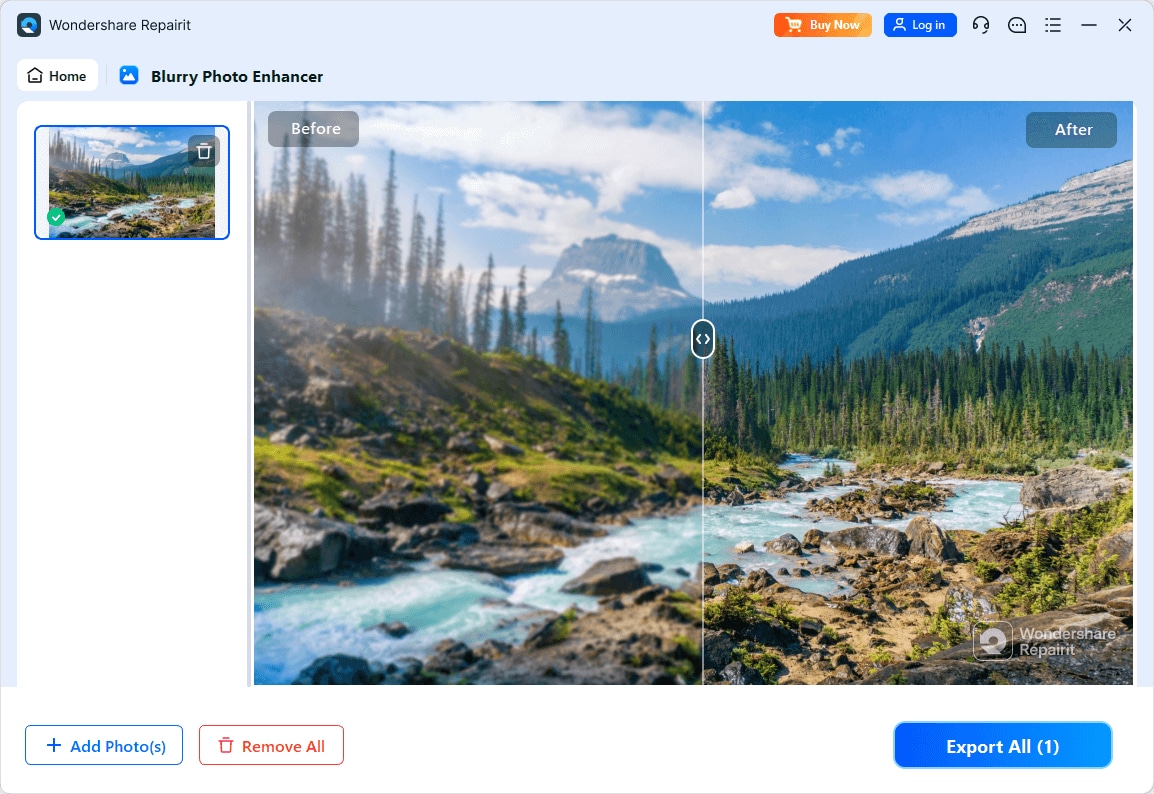
Step 4. Preview the enhanced result and save the improved photo to your device.
Final Verdict
Both tools can meaningfully improve your photos, but they do so in different ways. Repairit Photo Enhancer focuses on a standalone experience that combines upscaling, denoising, sharpening, and general clarity enhancements in one interface, making it easier for many users to enhance photo quality without learning complex software.
Retouch4me is built as a plugin suite aimed at portrait retouching inside host editors. For photographers and retouchers who already rely on those editors and want AI modules for skin and facial details, it can streamline part of an existing workflow.
If you want a direct, guided path to cleaner, sharper photos across many subjects, Repairit Photo Enhancer is usually the more straightforward choice. If your primary need is refined portrait retouching inside a pro editing stack, Retouch4me may still be worth considering. Some users may even combine both approaches: using Repairit Photo Enhancer for broad enhancements, then applying targeted portrait modules in a host editor when deeper retouching is required.
Next: Repairit Photo Enhancer vs Imagenai
FAQ
-
1. Is Repairit Photo Enhancer easier to use than Retouch4me for beginners?
In most cases, yes. Repairit Photo Enhancer runs as a standalone app with a guided workflow, while Retouch4me depends on compatible host software and plugin management, which can feel more complex if you are new to editing. -
2. Which is better for portrait retouching, Repairit Photo Enhancer or Retouch4me?
Retouch4me is more focused on portrait retouching inside professional editors, which can benefit users who already work with layers and masks. Repairit Photo Enhancer also improves portraits but emphasizes an all-in-one, simpler interface for general photo enhancement. -
3. Do I need Photoshop or similar software to use Repairit Photo Enhancer?
No, you do not need additional host software. Repairit Photo Enhancer is designed to work on its own so you can import, enhance, and export photos directly.




