
Choosing between Repairit Photo Enhancer vs ImagenAI comes down to how you edit, how many images you process, and how much control you want over AI enhancement. Repairit Photo Enhancer focuses on accessible AI tools that help you enhance photo quality, improve image clarity, and sharpen blurry photos one image or small batch at a time. ImagenAI is built more around professional, batch oriented workflows where you send large sets of similar photos through a consistent editing pipeline.
This guide compares both tools on output quality, batch processing, pricing, and ease of use so you can quickly decide which fits your workflow, whether you handle a few key shots or thousands of client photos each month.
Enhance Photo Quality with Repairit Photo Enhancer
 Security Verified. Over 7,302,189 people have downloaded it.
In this article
- Repairit Photo Enhancer vs ImagenAI: Quick Verdict
- Repairit Photo Enhancer vs ImagenAI: Key Differences
- Repairit Photo Enhancer vs ImagenAI: Comparison Table
- What Repairit Photo Enhancer and ImagenAI Are Best For
- Repairit Photo Enhancer vs ImagenAI: AI Enhancement Features and Capabilities
- Repairit Photo Enhancer vs ImagenAI: Output Quality and Real-World Results
- Repairit Photo Enhancer vs ImagenAI: Workflow and Ease of Use
- Repairit Photo Enhancer vs ImagenAI: Pricing and Trial Options
- Who Should Choose Repairit Photo Enhancer
- Who Should Choose ImagenAI
- Pros and Cons of Repairit Photo Enhancer and ImagenAI
- How to Enhance Photos After Choosing the Right Tool
Repairit Photo Enhancer vs ImagenAI: Quick Verdict
Repairit Photo Enhancer is generally a stronger choice for individual creators, small teams, and users who want a clear, visual way to enhance photo quality without building a complex catalog workflow. It emphasizes AI tools for upscaling image resolution, sharpening slightly blurry photos, denoising, and enhancing portraits and low quality images on a per image basis.
ImagenAI is better suited to photographers who already manage structured shoots and need AI to apply a consistent style to hundreds or thousands of similar images. Its value comes from batch processing and consistency rather than hands on control of each frame.
If you mainly enhance a mix of everyday photos, product shots, portraits, or social media images as needed, Repairit Photo Enhancer will usually feel more intuitive. If you are a high volume wedding, event, or portrait photographer with repeatable looks and regular client galleries, ImagenAI may fit better into your workflow.
Repairit Photo Enhancer vs ImagenAI: Key Differences
The key distinction between Repairit Photo Enhancer vs ImagenAI is how they approach AI enhancement in relation to your editing habits.
- Workflow focus: Repairit Photo Enhancer focuses on a simple, visual workflow where you import an image, pick an enhancement type (upscaling, sharpening, denoising, portrait enhancement), and preview changes before exporting. ImagenAI focuses on upload, process, and export for large sets of images.
- Volume vs control: Repairit Photo Enhancer favors careful review of each photo or small group, which suits mixed content and occasional usage. ImagenAI emphasizes throughput and consistent style across many similar images, which suits event and wedding workflows.
- Pricing mindset: Repairit Photo Enhancer typically offers more straightforward licensing that can feel comfortable for occasional use. ImagenAI relies on a subscription model that tends to make more sense for photographers who process large volumes regularly.
- Use case orientation: Repairit Photo Enhancer targets general users, content creators, and photographers who want visible improvements to clarity, sharpness, and resolution. ImagenAI is aligned with professional catalog and client gallery workflows.
This difference matters if you are deciding between a tool that fits into varied daily tasks versus one that is optimized for repeatable, large scale editing sessions.
Repairit Photo Enhancer vs ImagenAI: Comparison Table
| Criteria | Repairit Photo Enhancer | ImagenAI |
|---|---|---|
| Best for | General users, content creators, and photographers handling individual images or small sets | High volume photographers processing large batches of similar images |
| Ease of use | Very beginner friendly with guided, visual options and previews | Geared toward photography workflows; may feel more technical for casual users |
| Output focus | Clarity, sharpness, resolution, and natural looking portrait enhancement | Consistent exposure, color, and style across many images |
| Workflow style | Import, choose enhancement, preview, and export | Upload or sync, batch process using a profile, then export or sync back |
| Strengths | Accessible AI upscaling, sharpening, denoising, and portrait tools with per image control | Fast batch processing and consistent style for large photo sets |
| Limitations | Less focused on managing very large catalogs or thousands of images at once | Subscription cost and setup may not suit occasional or highly varied editing |
What Repairit Photo Enhancer and ImagenAI Are Best For
Both tools aim to use AI to enhance photo quality, but they are best suited to different types of users and projects.
Repairit Photo Enhancer is best for people who want straightforward AI enhancement for common scenarios:
- Improving details in soft or low resolution photos for web, print, or presentations
- Sharpening slightly blurry images and improving clarity for personal or business use
- Enhancing portraits and low quality images where skin, facial features, and lighting need refinement
- Handling mixed content like social posts, product photos, travel shots, and screenshots
ImagenAI is best for photographers who work in structured, high volume environments:
- Weddings, events, and portrait sessions with hundreds of similar images per job
- Catalog style work where a consistent look across many files is more important than tweaking each one
- Studios that can invest time in building AI profiles or styles and then reuse them across shoots
- Workflows where export, client delivery, and archiving are tied to a catalog or folder structure
If your day to day work is varied and you value simple, visual control, Repairit Photo Enhancer will likely be more comfortable. If your priority is moving large, consistent shoots through an AI powered pipeline, ImagenAI may be enough to cover that need.
Repairit Photo Enhancer vs ImagenAI: AI Enhancement Features and Capabilities
Both tools rely on AI, but they emphasize different types of adjustments and controls.
Repairit Photo Enhancer core capabilities include:
- AI upscaling to increase image resolution while aiming to preserve as many details as possible, useful when you need larger exports from smaller originals.
- Sharpening and clarity tools to sharpen blurry photos and improve image clarity in soft or slightly out of focus shots.
- Denoising features that reduce digital noise in low light or high ISO images while trying to keep textures looking natural.
- Portrait enhancement tools that refine facial details, adjust skin appearance, and subtly improve lighting for more flattering portraits.
- Color and contrast optimization to make photos appear more vivid and readable without extreme, unnatural changes.
ImagenAI capabilities are oriented around consistent, style based editing:
- AI driven adjustments tuned for photographers, generally focusing on exposure, color, tone, and overall balance.
- Batch processing that applies similar enhancements across large sets of images in a single run, reducing repetitive manual work.
- Profile or style based editing where the tool can reflect a photographers preferred look when properly configured.
- Tools for lighting and tone refinement that can help keep event or wedding shoots consistent when many photos share similar conditions.
In most cases, Repairit Photo Enhancer is the more focused option if you care about per image clarity, sharpness, and resolution improvements. ImagenAI tends to fit better when your main concern is maintaining a recognizable style and exposure balance across many similar photos.
Repairit Photo Enhancer vs ImagenAI: Output Quality and Real-World Results
Output quality for both tools depends on the source files, chosen settings, and how closely their AI models match your expectations.
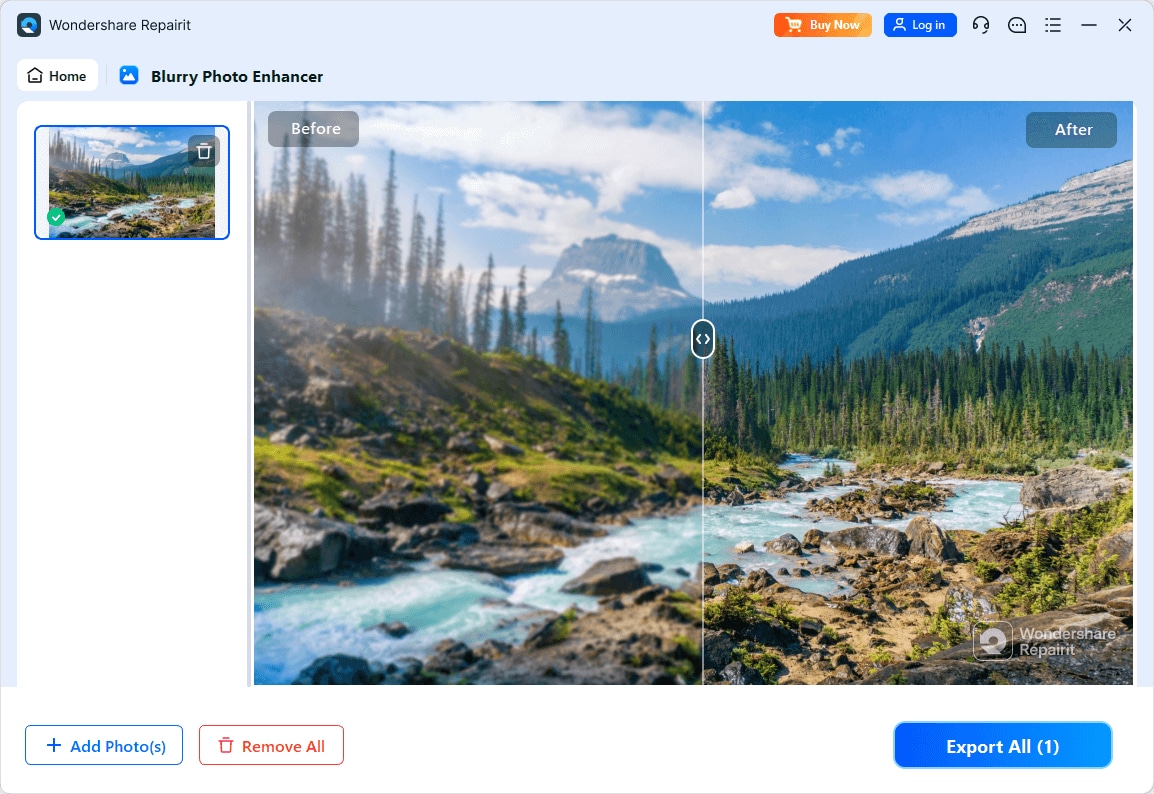
With Repairit Photo Enhancer, the experience is centered on visible before and after results. You typically see how AI upscaling, sharpening, denoising, or portrait enhancement changes your photo before you export it. This is helpful if you want natural looking improvements and prefer to avoid overprocessed results. It is especially practical when you need to:
- Upscale image resolution for printing or higher resolution displays
- Clean up noise and softness from phone photos or older digital cameras
- Polish portraits for profiles, marketing materials, or client previews without starting from scratch in a full editor
With ImagenAI, results are more about consistency across a batch. The tool is designed to apply similar adjustments to many images, which can be valuable for wedding or event galleries where a uniform look matters more than micro adjustments to each frame. However, the output typically assumes you maintain a relatively stable shooting and editing style so the AI can learn and replicate it effectively.
For readers deciding between them, this means:
- If you want to judge every enhancement and fine tune which photos to keep, Repairit Photo Enhancer offers more granular control.
- If you want many images to reach a consistent baseline quickly, ImagenAI can help streamline that process, with the option to refine favorites later in another editor.
Repairit Photo Enhancer vs ImagenAI: Workflow and Ease of Use
Workflow is often the deciding factor when comparing Repairit Photo Enhancer vs ImagenAI.
Repairit Photo Enhancer workflow and ease of use:
- The tool focuses on a simple, visual flow. You launch the software, import or drag in the image, and then choose an AI enhancement type such as upscaling, sharpening, denoising, or portrait enhancement.
- A preview or side by side comparison typically shows how much the image is changing. You can adjust strength or detail sliders where available before exporting.
- This approach suits users who prefer to review each image and confirm that the enhancement looks natural and aligned with their intent.
ImagenAI workflow and ease of use:
- The workflow is oriented around large sets of images. Photographers upload or sync a folder or catalog segment, select the profile or style, and let the AI process the batch.
- The general flow is upload, process, and export or sync back to the library. The focus is on reducing time spent on repetitive edits.
- For casual users, this may feel more complex or overbuilt, especially if they only need to enhance a few photos and do not maintain a structured catalog or stable style.
In practice, beginners and non specialists tend to find Repairit Photo Enhancer easier to understand quickly. Photographers already comfortable with professional workflows may appreciate how ImagenAI integrates into a more advanced pipeline.
Repairit Photo Enhancer vs ImagenAI: Pricing and Trial Options
Pricing influences whether a tool makes sense for occasional enhancement or ongoing professional work.
Repairit Photo Enhancer pricing and trial mindset:
- The tool typically offers straightforward licensing that is easier for occasional users to understand.
- There is usually a way to try the software on a limited basis before committing, which helps you evaluate enhancement quality on your own photos.
- This structure tends to suit people who enhance photos when needed rather than on a daily schedule.
ImagenAI pricing and trial mindset:
- ImagenAI generally follows a subscription model, which aligns with photographers who use it frequently and can justify ongoing costs based on time saved.
- For low volume or seasonal photographers, the subscription may feel less attractive if they only process a small number of images each month.
- As with any subscription service, it is important to check current plans and trial options to confirm whether the pricing matches your workload.
Because pricing details can change, you should verify the latest licensing, discounts, and included features for each tool on their respective official sites before making a decision.
Who Should Choose Repairit Photo Enhancer
Repairit Photo Enhancer is a practical choice if your priority is enhancing individual photos or small batches with clear, visual control. It is especially suitable when you:
- Upscale image resolution for social posts, websites, or prints without complex manual editing
- Sharpen slightly blurry photos and improve image clarity on everyday shots from phones or consumer cameras
- Enhance portraits and low quality images for personal branding, product listings, or marketing campaigns
- Work with mixed content types such as travel photos, product imagery, and screenshots rather than strictly organized shoots
Because Repairit Photo Enhancer does not require a heavy catalog or profile setup, you can simply open the image, select the appropriate AI enhancement, preview, and export. This makes it comfortable for solo creators, small businesses, and hobbyist photographers who want reliable improvements without investing time in building complex presets or AI profiles.
It can also complement existing editing tools. You might use Repairit Photo Enhancer for upscaling or clarity improvements first, then perform final creative edits in another application if needed.
Who Should Choose ImagenAI
ImagenAI is better suited to photographers who prioritize speed and consistency when handling large volumes of images.
- Wedding and event photographers who return from each job with hundreds or thousands of similar photos
- Portrait studios that rely on a recognizable, repeatable style across many client galleries
- Professionals who already maintain a structured workflow with organized folders or catalogs and consistent shooting conditions
- Teams that can benefit from centralized profiles or looks that multiple shooters can share
In these scenarios, ImagenAI can reduce the effort required to bring an entire shoot to a consistent baseline before final culling or retouching. The subscription model tends to make sense when the time saved on each job offsets the ongoing cost.
If you rarely shoot in bulk, drastically change your style from project to project, or prefer hands on control over every image, ImagenAI may feel heavier than you need. But for high volume workflows, an AI powered batch editor like ImagenAI can still be a reasonable and efficient option.
Pros and Cons of Repairit Photo Enhancer and ImagenAI
Understanding pros and cons side by side can help clarify which tool aligns more closely with your expectations.
Below are concise overviews derived from the scenarios described above.
Repairit Photo Enhancer Pros and Cons
ImagenAI Pros and Cons
How to Enhance Photos After Choosing the Right Tool
Once you understand how Repairit Photo Enhancer vs ImagenAI differ, the next step is actually enhancing your photos in a way that fits your workflow. For many users, a guided, visual approach is the most practical way to start improving clarity, sharpness, and resolution without overhauling their entire editing setup.
Repairit Photo Enhancer offers this kind of focused, step by step experience: you choose an enhancement goal, import your photo, and preview changes before saving. The following overview explains how it works in more detail.
Key Features
Key capabilities in Repairit Photo Enhancer focus on improving visual quality in typical photo scenarios:
- AI upscaling that increases resolution while aiming to keep edges and textures looking detailed.
- Sharpening tools that help clarify slightly soft or blurry areas, improving overall crispness.
- Denoising that reduces grain and digital noise in low light or high ISO shots while trying to preserve natural details.
- Portrait enhancement that refines facial features, skin tones, and lighting to make portraits look more polished.
- Color and contrast optimization to make photos appear clearer and more vibrant without extreme, unrealistic edits.
Step-by-step guide
Step 1. Choose an AI enhancement model based on your needs, such as general enhancement, portrait improvement, or image upscaling.

Step 2. Import your photo into Repairit Photo Enhancer to begin the enhancement process.

Step 3. Apply the enhancement settings and let the AI improve clarity, sharpness, and overall image quality.
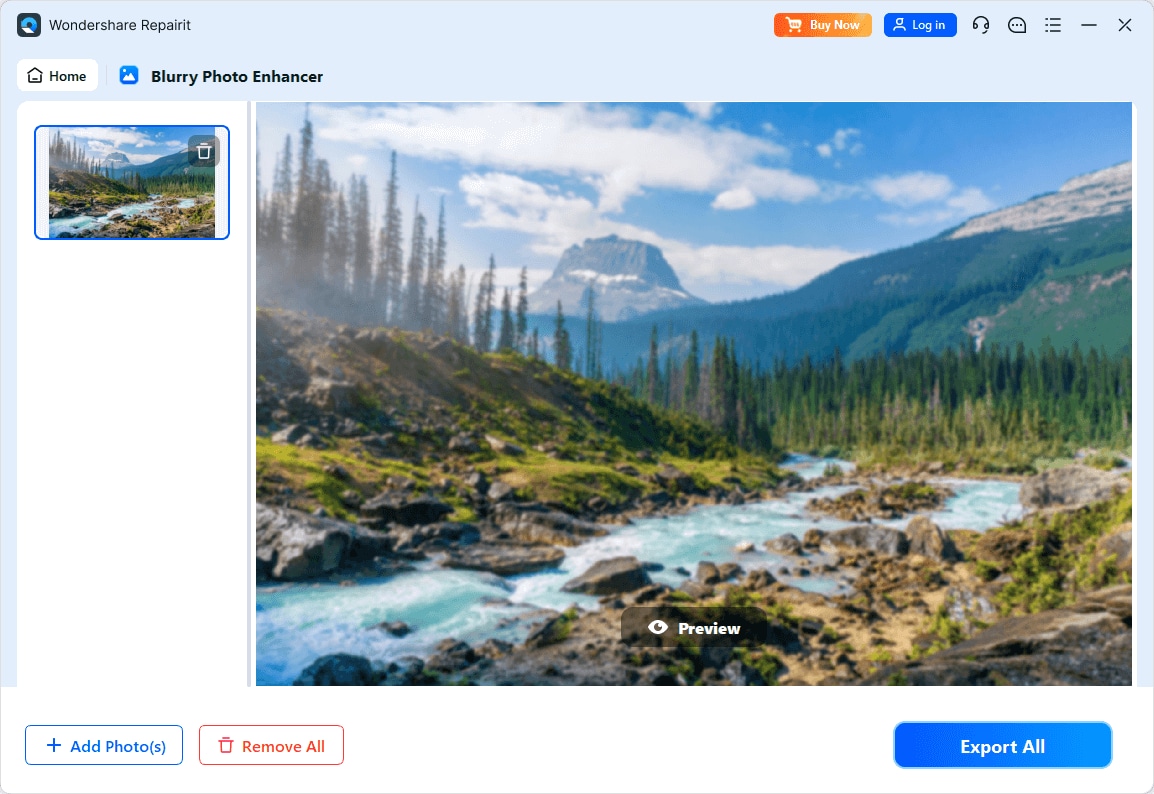
Step 4. Preview the enhanced result and save the improved photo to your device.
Final Verdict
Both Repairit Photo Enhancer and ImagenAI use AI to enhance photo quality, but they support different editing habits.
Repairit Photo Enhancer focuses on accessible, per image tools that help you upscale image resolution, sharpen blurry photos, denoise, and enhance portraits with clear visual feedback. It is a strong option if you work with varied photo types, prefer to inspect results closely, and do not want to commit to a heavy batch workflow or ongoing subscription just to improve occasional images.
ImagenAI leans toward AI driven batch processing for high volume photographers. When you regularly manage weddings, events, or studio sessions with many similar photos, its ability to apply consistent exposure, color, and style across an entire shoot can save meaningful time, assuming you maintain a relatively stable editing approach and are comfortable with subscription based pricing.
In most cases, casual users, small businesses, and mixed content creators will find Repairit Photo Enhancer more straightforward and cost efficient. Photographers who deliver large client galleries and value throughput and consistency may still find ImagenAI a reasonable fit within a professional pipeline.
Next: Repairit Photo Enhancer vs Topaz Photo Ai
FAQ
-
1. Is Repairit Photo Enhancer better than ImagenAI for everyday users?
For typical everyday users and small teams, Repairit Photo Enhancer is usually more comfortable to use because it offers straightforward AI tools to enhance individual photos without requiring a complex batch workflow or ongoing subscription. ImagenAI can still work for non professionals, but its strengths are more noticeable in high volume, structured environments. -
2. When does ImagenAI make more sense than Repairit Photo Enhancer?
ImagenAI tends to make more sense for professional photographers who process large batches of similar images from weddings, events, or studio sessions and who value consistent, automated enhancements across full shoots. If you routinely handle hundreds or thousands of images and already maintain a stable editing style, its batch oriented design can be a better fit. -
3. Can both tools sharpen blurry photos and improve image clarity?
Both tools are designed to improve photo quality, but they apply their adjustments differently. Repairit Photo Enhancer focuses on visible, per image tools for sharpening, denoising, and clarity, so you can decide how far to push each enhancement. ImagenAI incorporates sharpening and tonal changes into a broader batch process aimed at producing a consistent look across many files. -
4. Which tool should I choose if I only enhance photos a few times per month?
If you enhance photos occasionally, Repairit Photo Enhancer is generally the more practical choice. Its licensing approach is more comfortable for ad hoc use, and the workflow is optimized for quickly improving individual photos without maintaining a large catalog or subscription based pipeline. -
5. Do I need professional photography experience to use Repairit Photo Enhancer or ImagenAI?
Repairit Photo Enhancer is designed to be approachable even for beginners who want to enhance portraits and low quality images without deep editing skills. ImagenAI is more aligned with photographers who already manage structured shoots and a consistent editing style, though motivated users can learn it over time if they decide a batch oriented workflow suits their needs.




