
Choosing between Repairit Photo Enhancer vs Topaz Photo AI largely depends on how you prefer to enhance photos and what hardware you use. Both solutions use AI to denoise, sharpen, and upscale images, but they differ in complexity, pricing, and how streamlined the workflow feels. This comparison focuses on practical concerns such as output quality, natural-looking enhancement, portrait results, upscaling, ease of use, and total cost so you can decide which tool better fits your everyday editing needs.
Enhance Photo Quality with Repairit Photo Enhancer
 Security Verified. Over 7,302,189 people have downloaded it.
In this article
- Repairit Photo Enhancer vs Topaz Photo AI: Quick Verdict
- Repairit Photo Enhancer vs Topaz Photo AI: Key Differences
- Repairit Photo Enhancer vs Topaz Photo AI: Comparison Table
- What Repairit Photo Enhancer and Topaz Photo AI Are Best For
- Repairit Photo Enhancer vs Topaz Photo AI: AI Enhancement Features and Capabilities
- Repairit Photo Enhancer vs Topaz Photo AI: Output Quality and Real-World Results
- Repairit Photo Enhancer vs Topaz Photo AI: Workflow and Ease of Use
- Repairit Photo Enhancer vs Topaz Photo AI: Pricing and Trial Options
- Who Should Choose Repairit Photo Enhancer
- Who Should Choose Topaz Photo AI
- Pros and Cons of Repairit Photo Enhancer and Topaz Photo AI
- How to Enhance Photos After Choosing the Right Tool
Repairit Photo Enhancer vs Topaz Photo AI: Quick Verdict
Repairit Photo Enhancer is built around a guided, beginner-friendly AI workflow. It focuses on making everyday images clearer, sharper, and more detailed in just a few steps, which is helpful if you want better results without learning advanced photo editing.
Topaz Photo AI leans toward more advanced users and dedicated desktop workflows. It combines denoise, sharpen, and upscale into one environment, which can deliver strong results if you are comfortable with heavier software and a paid license.
For most casual photographers, social media users, and people working on general-purpose computers, Repairit Photo Enhancer often feels more approachable. Topaz Photo AI can be a better fit for users with powerful machines who want an all-in-one AI suite and do not mind adjusting more technical settings.
Repairit Photo Enhancer vs Topaz Photo AI: Key Differences
At a high level, the key differences between Repairit Photo Enhancer vs Topaz Photo AI come down to workflow style, system demands, and how much control you want over AI adjustments.
- Best for: Repairit prioritizes a streamlined, guided experience for improving clarity, sharpness, and resolution in common photos. Topaz Photo AI targets users who want a denoise, sharpen, and upscale hub in one place.
- Ease of use: Repairit uses clear modes and simple options that suit beginners and casual editors. Topaz Photo AI is relatively intuitive but can feel more technical, with more fine-grained control.
- Output style: Repairit aims for natural-looking improvements that keep everyday photos and portraits looking realistic. Topaz Photo AI is known for strong enhancement on noisy or soft images when tuned correctly.
- Workflow: Repairit keeps the flow simple: upload, select enhancement type, preview, and export. Topaz Photo AI generally analyzes the image, suggests AI corrections, then lets you adjust and export.
- Hardware and cost: Repairit tends to be lighter on system resources and more accessible for occasional use. Topaz Photo AI is paid, desktop-focused software and can benefit from higher-end hardware.
If you primarily need to enhance portraits, phone photos, and standard-resolution images quickly, Repairit is usually the easier starting point. If you already work in a desktop-based photo workflow and are comfortable investing in a dedicated app, Topaz Photo AI may align better with that environment.
Repairit Photo Enhancer vs Topaz Photo AI: Comparison Table
| Aspect | Repairit Photo Enhancer | Topaz Photo AI |
|---|---|---|
| Best for | Users who want a straightforward AI photo enhancer to improve overall image quality in a few guided steps. | Users who prefer a more advanced, all-in-one AI workflow with denoise, sharpen, and upscale in a single tool. |
| Ease of use | Emphasizes a guided, step-by-step flow suitable for beginners and casual editors. | Relatively intuitive but can feel more technical, with more fine-grained control and heavier system demands. |
| Output quality focus | Aims for clear, natural-looking improvements for everyday photos and portraits. | Known for strong output quality, especially when denoising and upscaling soft or low-resolution images. |
| Typical workflow | Upload, choose enhancement type, preview, fine-tune if needed, export. | Import image, let the app auto analyze, apply AI corrections, then export the enhanced result. |
| Main strengths | Accessible interface, focused enhancement modes, good for quick clarity and detail improvement without a steep learning curve. | All-in-one AI system that combines denoise, sharpening, and upscaling in a single environment with strong enhancement results. |
| Main weaknesses | Fewer advanced tuning options than some professional-focused tools. | Resource heavy, works best on stronger hardware, and available only as paid software. |
What Repairit Photo Enhancer and Topaz Photo AI Are Best For
Both tools focus on AI-powered photo enhancement, but they target slightly different user groups and scenarios.
Repairit Photo Enhancer is best for users who:
- Want to enhance photo quality from phones and consumer cameras without learning complex editing.
- Care about making portraits, selfies, and everyday images look clearer and more detailed.
- Prefer simple choices like clarity improvement, noise reduction, sharpening, or upscaling, guided by the tool.
- Work on general-purpose laptops or desktops that might not be tuned for heavy creative workloads.
Topaz Photo AI is best for users who:
- Already manage photos in a desktop-based workflow with higher-performance hardware.
- Want denoise, sharpen, and upscale available together, especially for high ISO or low-light images.
- Are comfortable paying for a dedicated enhancement application.
- Do not mind adjusting more parameters to fine-tune the look of AI results.
If you often enhance photos for social media, presentations, or quick prints, a guided tool like Repairit can be enough. If you frequently work with challenging files such as noisy raw exports or very soft images, the combined workflow in Topaz Photo AI may add value.
Repairit Photo Enhancer vs Topaz Photo AI: AI Enhancement Features and Capabilities
From a feature standpoint, both tools use AI to improve clarity and detail but take different approaches.
Repairit Photo Enhancer key capabilities include:
- AI-based clarity improvement to make soft photos look cleaner and more defined.
- Noise reduction to smooth grainy images while trying to preserve important details.
- Sharpening tools to help sharpen blurry photos, especially low-quality phone shots or older digital images.
- Image upscaling to increase resolution and improve details in soft or low-resolution photos.
- Portrait-focused enhancement modes to refine faces, skin, and overall appearance.
- Simple presets that let you pick an enhancement style without manual tweaking.
Topaz Photo AI capabilities typically include:
- All-in-one AI enhancement that combines denoise, sharpen, and upscale tools.
- Automatic analysis that suggests denoise and sharpening strength based on image content.
- Resolution enhancement to upscale images while aiming to keep textures and edges natural.
- Detail recovery on soft or slightly out-of-focus shots to improve perceived sharpness.
- Noise reduction tuned for high ISO and low-light photos to improve clarity.
- Options to adjust the intensity of individual AI effects for more manual control.
In most cases, the main distinction is that Repairit focuses on focused modes and simplicity, while Topaz Photo AI integrates multiple enhancements into one panel. This matters if you prefer a quick, guided choice versus a single environment where you can tweak several AI modules together.
Repairit Photo Enhancer vs Topaz Photo AI: Output Quality and Real-World Results
Output quality is influenced by the source photo, your settings, and your hardware, so results will vary with both tools. Still, their tendencies are different enough to affect your decision.
Repairit Photo Enhancer output characteristics:
- Aims for balanced, natural-looking results, especially on portraits and everyday shots.
- Helps improve image clarity, reduce visible noise, and sharpen soft details without needing many manual adjustments.
- Upcaling tools can make low-resolution or small images more usable for sharing or light printing.
Topaz Photo AI output characteristics:
- Known for strong denoise and upscaling when working with soft, noisy, or low-resolution images.
- Can produce crisp results if you carefully balance noise reduction, sharpening, and upscaling intensity.
- Might require a bit more trial and error to avoid overly processed or artificially sharp looks, depending on your preferences.
If your priority is quick improvements that keep family photos, travel shots, and portraits looking natural, Repairit can be a comfortable fit. If you are willing to spend more time inspecting fine detail at 100 percent zoom and experimenting with settings, Topaz Photo AI can reward that extra effort on challenging images.
Repairit Photo Enhancer vs Topaz Photo AI: Workflow and Ease of Use
Workflow is often the deciding factor, especially for beginners or busy professionals who want to minimize friction.
Repairit Photo Enhancer workflow:
- Open the tool and choose a mode such as clarity improvement, denoising, sharpening, or upscaling.
- Import your photo from local storage or another accessible location.
- Let the AI analyze and preview the enhancement, then adjust simple sliders or options if provided.
- Compare before and after views to confirm that details look natural.
- Export and save the enhanced image in your preferred format.
This guided flow is well suited for users who want to enhance photos without learning advanced concepts such as radius, masking, or complex noise profiles.
Topaz Photo AI workflow:
- Launch the desktop app and import one or more photos.
- Allow the software to automatically detect and apply denoise, sharpen, and upscale settings.
- Review the preview and tweak sharpening, noise reduction, and upscaling strength as needed.
- Inspect important areas like faces, edges, and textures at higher zoom levels.
- Export the final result in the chosen size and format.
Topaz Photo AI still automates many decisions, but the extra controls and heavier processing can feel more advanced. In general, Repairit is more forgiving if you want a light, guided experience, while Topaz Photo AI fits users who are comfortable spending more time fine-tuning.
Repairit Photo Enhancer vs Topaz Photo AI: Pricing and Trial Options
Budget and licensing model also influence which AI photo enhancer makes sense for you.
- Repairit Photo Enhancer pricing: Positioned to be approachable for everyday users. Plans and promotions may vary by region, so it is wise to check the latest details on the official Repairit website.
- Topaz Photo AI pricing: Offered as paid software, often through a one-time purchase with version-specific updates or similar licensing. Exact terms can change, so reviewing the publisher site is recommended.
- Trial options: Both products may offer a trial or limited-use experience so you can test enhancement quality and workflow before committing. Always verify current trial conditions directly with each provider.
- Cost considerations: If you only enhance photos occasionally or are unsure what you need, starting with trial versions can clarify your decision. Users who regularly process large batches of images may find more value in whichever tool best integrates with their long-term workflow.
Who Should Choose Repairit Photo Enhancer
Repairit Photo Enhancer is typically the stronger choice for users who value simplicity and a guided, low-friction workflow.
Ideal users for Repairit Photo Enhancer:
- Casual photographers who want to improve photo quality from phones or basic cameras with minimal learning curve.
- Content creators and social media users who need clear, sharp visuals for posts, thumbnails, and stories.
- People who prefer straightforward AI controls instead of complex editing panels.
- Users working on general-purpose computers or laptops that might not handle very heavy creative apps smoothly.
Common use cases:
- Improving details in soft or low-resolution photos before sharing or printing.
- Sharpening slightly blurry images from events, travel, or family gatherings.
- Enhancing portraits and low-quality images for profiles, resumes, and online portfolios.
- Preparing clear visuals for presentations, e-commerce listings, or marketing materials.
Choose Repairit Photo Enhancer if you want to focus on using your images rather than managing technical settings. Its design centers on making photos look cleaner, sharper, and more detailed in just a few decisions.
Who Should Choose Topaz Photo AI
Topaz Photo AI tends to suit users who are already comfortable with desktop-based photo workflows and want more integrated control.
Ideal users for Topaz Photo AI:
- Photographers and visual creators who want denoise, sharpen, and upscale in a single desktop application.
- Users who are fine with installing dedicated creative software and maintaining stronger hardware.
- People who are willing to invest in paid tools for higher-quality output.
Common use cases:
- Preparing photos for prints, portfolios, or client projects where detail quality is important.
- Improving noisy, high-ISO shots taken in low light, such as indoor events or night scenes.
- Upscaling images for larger prints or high-resolution displays while trying to keep edges and textures realistic.
If you are comfortable working with sliders, checking results at high zoom levels, and running heavier software on your machine, Topaz Photo AI can be a solid part of an advanced enhancement toolkit. It makes more sense when you edit frequently and need an all-in-one AI environment.
Pros and Cons of Repairit Photo Enhancer and Topaz Photo AI
Weighing pros and cons can clarify which AI photo enhancer aligns better with your expectations and hardware.
Repairit Photo Enhancer Pros and Cons
Topaz Photo AI Pros and Cons
How to Enhance Photos After Choosing the Right Tool
Once you have compared Repairit Photo Enhancer vs Topaz Photo AI and decided which style of workflow suits you, the next step is actually enhancing your photos. If you want a practical, guided option that focuses on clear, natural-looking results, Repairit Photo Enhancer offers a straightforward way to move from comparison to action without adding complexity.
Key Features
Some helpful capabilities in Repairit Photo Enhancer include:
- Takes typical low-quality or soft photos and improves clarity and detail in a few steps.
- Helps sharpen slightly blurry photos while aiming to keep them natural looking.
- Offers AI upscaling when you need larger, clearer versions of existing images.
- Provides portrait-friendly enhancement that can gently refine faces and features.
- Minimizes manual tweaking so you can finish enhancements quickly, even with limited editing experience.
Repairit can be especially effective when you want a more guided approach than an advanced desktop suite, when you are performing quick everyday enhancements, or when your computer is not optimized for running resource-intensive applications.
Step-by-step guide
Step 1. Choose an AI enhancement model based on your needs, such as general enhancement, portrait improvement, or image upscaling.

Step 2. Import your photo into Repairit Photo Enhancer to begin the enhancement process.

Step 3. Apply the enhancement settings and let the AI improve clarity, sharpness, and overall image quality.
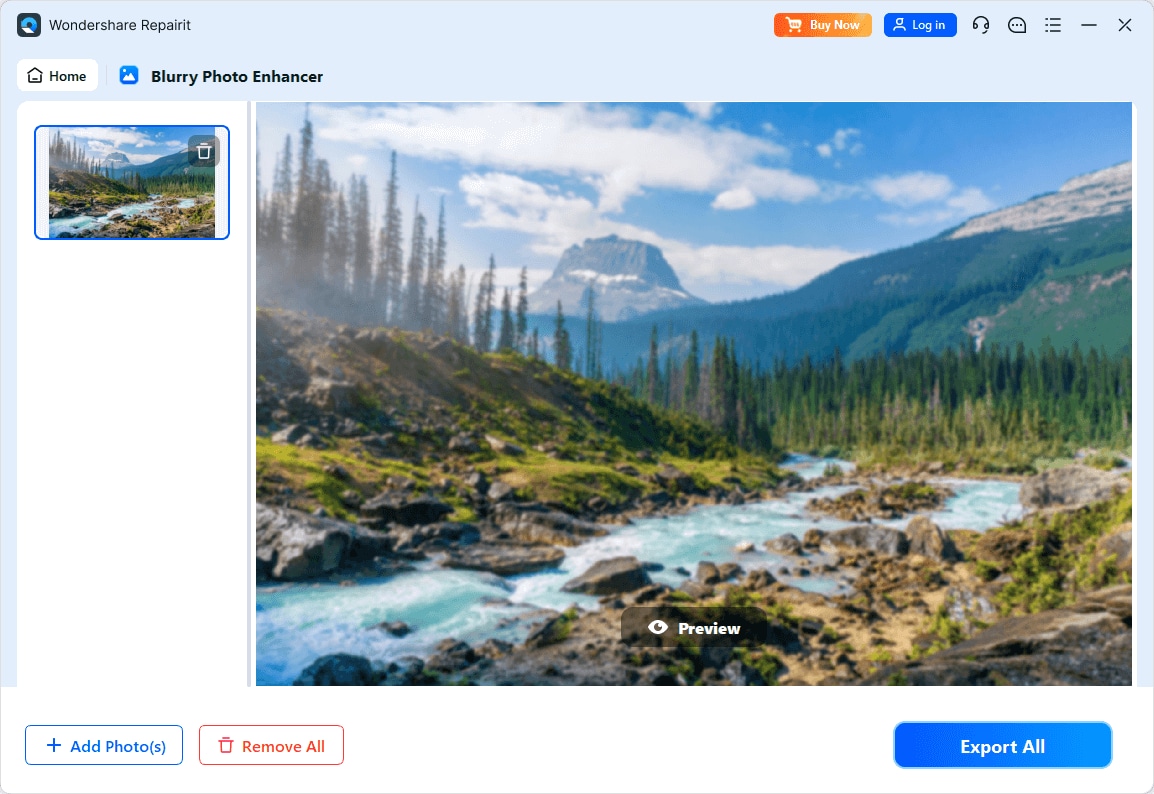
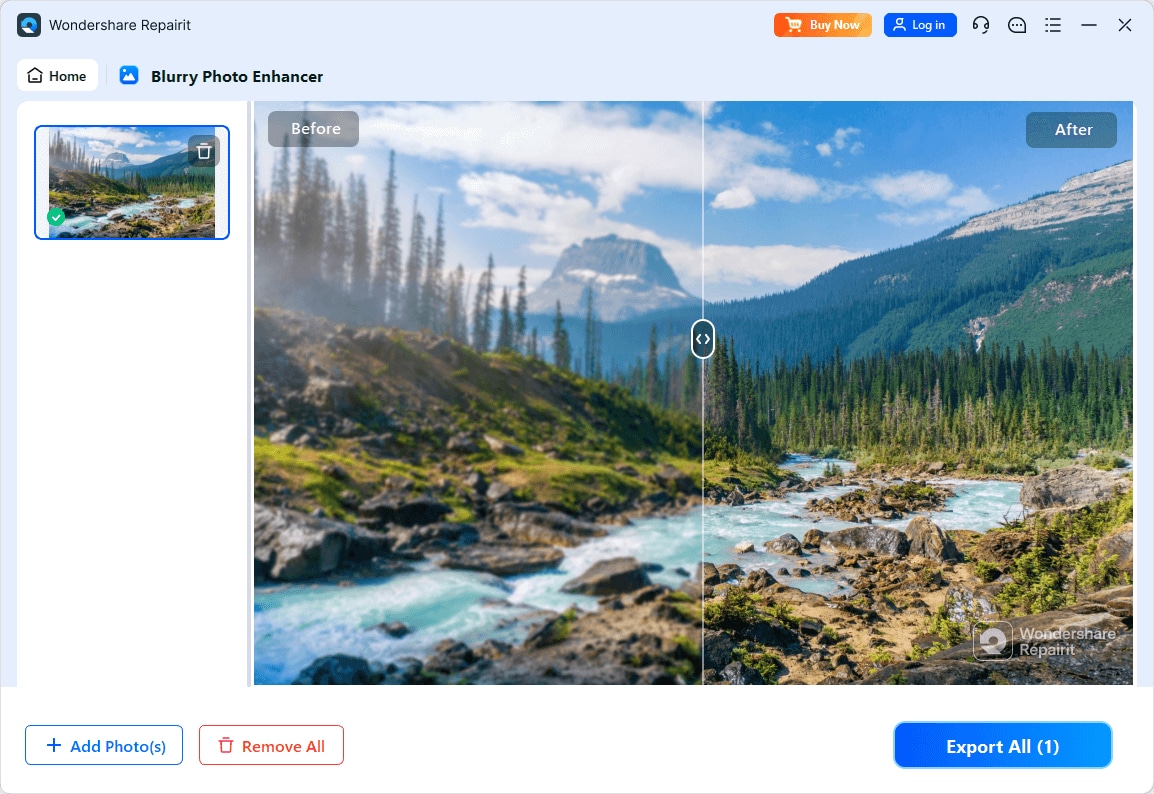
Step 4. Preview the enhanced result and save the improved photo to your device.
Final Verdict
Both Repairit Photo Enhancer and Topaz Photo AI aim to improve image clarity, reduce noise, sharpen details, and upscale resolution with AI. The primary difference lies in how you interact with each tool and what kind of workflow you prefer.
If you want a simple, guided experience for enhancing portraits and everyday photos on a wide range of hardware, Repairit Photo Enhancer is likely to feel more comfortable. It keeps the steps clear and lets you focus on whether the photo looks better, rather than on technical settings.
If you already work on a capable desktop, need an all-in-one denoise, sharpen, and upscale environment, and are willing to invest in paid, resource-heavy software, Topaz Photo AI can be a solid fit. It makes more sense when you frequently tackle noisy or soft images and do not mind fine-tuning AI intensity.
In many real-world scenarios, starting with a more accessible tool like Repairit Photo Enhancer and then deciding whether you truly need the extra complexity of an advanced suite is a practical approach. Consider your hardware, budget, and how often you enhance photos, then choose the option that best matches how you actually work.
Next: Repairit Photo Enhancer vs Topaz Gigapixel Ai
FAQ
-
1. Is Topaz Photo AI better than Repairit Photo Enhancer for every user?
Not for every user. Topaz Photo AI can deliver strong denoise, sharpen, and upscale results in a single desktop app, but it is paid and more resource intensive. Repairit Photo Enhancer is more focused on accessibility and guided workflows, which many everyday users find easier to work with. -
2. Which tool is easier for beginners to use?
Repairit Photo Enhancer is generally easier for beginners because it offers clear enhancement modes and a simple step-by-step flow. Topaz Photo AI is still approachable but includes more controls that may take longer to understand if you are new to photo enhancement. -
3. Can both tools sharpen blurry photos and reduce noise?
Yes. Both Repairit Photo Enhancer and Topaz Photo AI use AI to sharpen slightly blurry photos and reduce noise. The visual style of the results differs, so trying a few sample images in each tool is the best way to see which output you prefer. -
4. Do I need a powerful computer for Topaz Photo AI?
Topaz Photo AI can be resource heavy, especially with large or high-resolution images, so it tends to run more smoothly on newer, more powerful hardware. Repairit Photo Enhancer is typically more forgiving on general-purpose systems. -
5. How should I choose between Repairit Photo Enhancer and Topaz Photo AI?
Consider how often you enhance photos, how powerful your computer is, and how much control you want. If you value simplicity and quick, guided improvements, Repairit Photo Enhancer is a strong candidate. If you want more advanced, all-in-one AI controls and are comfortable with paid desktop software, Topaz Photo AI may suit you better.




