
Choosing between Repairit Photo Enhancer and Topaz Gigapixel AI comes down to how you enhance photo quality in everyday work. This comparison looks at AI upscaling, image clarity, ease of use, and pricing, so you can decide which tool fits your typical projects, from enlarging low resolution images to polishing portraits and social media visuals.
Both tools rely on AI, but they emphasize different outcomes. Repairit Photo Enhancer focuses on all around enhancement for soft, noisy, or low resolution photos, while Topaz Gigapixel AI is centered on high quality upscaling when you need larger files with more perceived detail.
Enhance Photo Quality with Repairit Photo Enhancer
 Security Verified. Over 7,302,189 people have downloaded it.
In this article
- Repairit Photo Enhancer vs Topaz Gigapixel AI: Quick Verdict
- Repairit Photo Enhancer vs Topaz Gigapixel AI: Key Differences
- Repairit Photo Enhancer vs Topaz Gigapixel AI: Comparison Table
- What Repairit Photo Enhancer and Topaz Gigapixel AI Are Best For
- Repairit Photo Enhancer vs Topaz Gigapixel AI: AI Enhancement Features and Capabilities
- Repairit Photo Enhancer vs Topaz Gigapixel AI: Output Quality and Real-World Results
- Repairit Photo Enhancer vs Topaz Gigapixel AI: Workflow and Ease of Use
- Repairit Photo Enhancer vs Topaz Gigapixel AI: Pricing and Trial Options
- Who Should Choose Repairit Photo Enhancer
- Who Should Choose Topaz Gigapixel AI
- Pros and Cons of Repairit Photo Enhancer and Topaz Gigapixel AI
- How to Enhance Photos After Choosing the Right Tool
Repairit Photo Enhancer vs Topaz Gigapixel AI: Quick Verdict
In most everyday situations, Repairit Photo Enhancer is a stronger choice if you want one tool that can sharpen blurry photos, reduce noise, enhance clarity, and upscale image resolution in a single workflow. It is built for creators, marketers, and casual photographers who mainly want natural looking improvements without complex tuning.
Topaz Gigapixel AI remains a compelling option if your primary goal is enlarging images as much as possible while preserving perceived detail. It tends to suit photographers and designers who already edit color and exposure elsewhere and simply need a dedicated upscaling step for large prints or detailed crops.
Both apps can enhance photo quality, but their priorities differ. Repairit focuses on overall image improvement for mixed quality photos, while Topaz keeps most of its power centered on scaling and resolution.
Repairit Photo Enhancer vs Topaz Gigapixel AI: Key Differences
The key differences between Repairit Photo Enhancer and Topaz Gigapixel AI revolve around scope, workflow, and depth of control.
- Main focus: Repairit combines upscaling with sharpening, denoising, and clarity improvement, while Topaz concentrates on resolution and detailed enlargements.
- Workflow: Repairit is oriented toward quick enhancement sessions and batch processing of mixed quality photos for web, social, and presentations. Topaz follows a focused import, choose scale, upscale, export flow.
- Control level: Repairit favors guided options and presets so non experts can enhance photos quickly. Topaz provides more emphasis on scale factors and some tuning that may appeal to users comfortable adjusting resolution settings.
- Use cases: Repairit fits smartphone shots, downloaded images, low resolution graphics, and portraits. Topaz tends to be used where final file dimensions and print readiness are especially important.
- Scope of enhancement: With Repairit, you address clarity, noise, and sharpness alongside upscaling; with Topaz, you may still rely on another editor for broader adjustments.
Repairit Photo Enhancer vs Topaz Gigapixel AI: Comparison Table
| Aspect | Repairit Photo Enhancer | Topaz Gigapixel AI |
|---|---|---|
| Best for | All around AI enhancement to improve image clarity, sharpen blurry photos, reduce noise, and upscale resolution in one place. | Enlarging images without losing quality for prints, crops, and high resolution exports. |
| Ease of use | Straightforward interface with guided options and presets for common enhancement tasks. | Clear import upscale export flow with strong focus on scaling choices and tuning. |
| Output focus | Balanced improvement across sharpness, noise, and overall clarity, targeting natural looking results. | High quality AI upscaling and detailed enlargements when resolution is the main concern. |
| Workflow style | Designed for quick sessions and batch processing of mixed quality images for web and social media. | Optimized as a resolution focused stage inside a broader editing pipeline. |
| Core strengths | Combines resolution upscaling, sharpening, denoising, and clarity enhancement in one app. | Strong performance in AI upscaling with consistent resolution gains. |
| Limitations | Upscaling scale choices and fine tuning are simpler than some power users might expect. | Primarily focused on resolution, so you may still need another tool for broader image adjustments. |
What Repairit Photo Enhancer and Topaz Gigapixel AI Are Best For
Both tools can enhance photo quality, but they stand out in different scenarios.
- Repairit Photo Enhancer is best for users who want an all around AI enhancer to improve image clarity, sharpen blurry photos, reduce noise, and upscale resolution in one place. It suits content creators, marketers, and casual photographers working with portraits, product images, and social media visuals.
- Topaz Gigapixel AI is best for users focused mainly on enlarging images without losing quality, such as prints, tight crops, and high resolution exports for large displays.
If you often handle soft, low resolution photos from phones, screenshots, or older cameras, Repairit can be a practical everyday tool. If you already have a full editing setup and simply need a strong upscaling stage, Topaz may fit that more specialized need.
Repairit Photo Enhancer vs Topaz Gigapixel AI: AI Enhancement Features and Capabilities
The AI feature sets overlap but are tuned differently.
Repairit Photo Enhancer focuses on everyday enhancement features:
- AI upscaling to increase image resolution while aiming to preserve natural edges and textures for typical photos.
- Sharpening that brings out detail in faces, objects, and backgrounds, helping to rescue slightly blurry shots.
- Denoising to smooth grain in high ISO or low light images while trying to retain important detail.
- Clarity improvement so hazy or flat images look cleaner and more defined.
- Portrait enhancement tuned for faces, helping improve skin appearance and facial details while keeping a realistic look.
Topaz Gigapixel AI concentrates on scaling and detail refinement:
- AI upscaling designed specifically for enlarging images by multiple times while preserving as much perceived detail as possible.
- Detail refinement that emphasizes fine textures, which can help when enlarging crops or close ups.
- Edge handling aimed at keeping edges and text relatively sharp as resolution increases.
- Noise and artifact control to balance sharpness and noise during upscaling.
- Resolution focused workflow with tools and presets centered on scale factors and output size.
If you want one tool that can handle clarity, noise, and sharpness alongside upscaling, Repairit generally offers broader coverage. If your main metric is final pixel dimensions and enlargement quality, Topaz capabilities align closely with that requirement.
Repairit Photo Enhancer vs Topaz Gigapixel AI: Output Quality and Real-World Results
Output quality depends on your source files and priorities, but some patterns are common.
- Repairit Photo Enhancer output tends to prioritize natural looking results across a range of typical images. Its AI aims to balance sharpening and denoising so portraits, lifestyle photos, and phone shots look clearer without appearing overly processed in most cases.
- Topaz Gigapixel AI output is widely recognized for strong upscaling results. When you need to enlarge an image significantly, it can often retain or even emphasize fine detail, which is valuable for prints, crops, and large format displays.
In real world use, this means Repairit often fits workflows where you want to quickly improve a batch of soft or noisy images for digital use. Topaz tends to shine when you already have a good looking source file and need to increase its size for demanding outputs without sacrificing as much clarity as a standard resize method might.
Repairit Photo Enhancer vs Topaz Gigapixel AI: Workflow and Ease of Use
Workflow can be as important as raw AI capability, especially if you handle many photos.
Repairit Photo Enhancer workflow is designed to be approachable:
- Open the app and choose an enhancement mode that matches your goal, such as upscaling or portrait enhancement.
- Import one or multiple photos from your computer.
- Select or adjust AI settings for upscaling, sharpening, denoising, and clarity based on how soft or noisy your images are.
- Preview before and after, then fine tune intensity to keep results natural.
- Export in your preferred format and size for web, social media, or printing.
It favors guided options and presets, which can be reassuring if you are not familiar with technical editing controls.
Topaz Gigapixel AI workflow is more narrowly focused:
- Launch the desktop app and import the image or batch you want to enlarge.
- Choose the upscale factor or target resolution that matches your output needs.
- Optionally adjust available AI settings related to sharpness or noise control.
- Preview the upscaled result, then export the enlarged files.
Once you understand how scale and resolution settings affect quality and processing time, the flow is straightforward, but it assumes some comfort with deciding final dimensions.
Overall, Repairit offers a more rounded workflow for complete enhancement in one place, while Topaz fits well as a resolution step inside a larger editing pipeline.
Repairit Photo Enhancer vs Topaz Gigapixel AI: Pricing and Trial Options
Pricing details change over time, but their general models are different.
- Repairit Photo Enhancer is generally offered with flexible plans that aim to be accessible to individuals and small teams. Prospective users can usually explore the tool through a trial or limited experience to see how it improves clarity, sharpness, and resolution before committing.
- Topaz Gigapixel AI is typically sold as dedicated software with a one time purchase model or periodic update options, depending on current Topaz Labs policies. Potential buyers can often test it through a trial version from the official website to evaluate its upscaling quality and workflow.
Because pricing and trial conditions can change, it is worth checking the latest information on each official site before deciding. For many users, Repairit s flexible approach may feel more approachable when testing an all purpose enhancer, whereas Topaz can make sense if you prefer a focused upscaling license.
Who Should Choose Repairit Photo Enhancer
Repairit Photo Enhancer is a strong choice if you handle many everyday images and want a simple way to improve overall quality, not just resolution.
- Creators and marketers who need to enhance portraits, product photos, and social media visuals quickly.
- Users with soft, low resolution, or noisy images from older devices who want more clarity and sharper details without manual retouching.
- People who prefer an all in one enhancer that can upscale, sharpen, reduce noise, and improve clarity within a single workflow.
- Beginners who want AI assistance and intuitive controls instead of complex editing tools.
If your main goal is to make photos look cleaner, sharper, and more detailed across multiple quality issues, Repairit generally offers a more rounded feature set than tools that concentrate mainly on resolution.
Who Should Choose Topaz Gigapixel AI
Topaz Gigapixel AI is better suited to users who primarily care about enlarging images while preserving as much perceived detail as possible.
- Photographers and designers who frequently upscale images for prints, large displays, or detailed crops.
- Users who already manage color, exposure, and other adjustments in another editor and only need a specialized upscale step.
- People comfortable testing different scale settings and AI options to maximize upscaling quality.
- Projects where final pixel dimensions and resolution are more important than broader enhancement tasks.
If your main problem is increasing resolution for large outputs and you are satisfied handling other edits elsewhere, Topaz can be a practical, resolution focused solution.
Pros and Cons of Repairit Photo Enhancer and Topaz Gigapixel AI
Understanding pros and cons helps you pick the tool that better matches your workflow instead of treating one as an across the board replacement for the other.
Below are concise pros and cons for each option.
Repairit Photo Enhancer Pros and Cons
Topaz Gigapixel AI Pros and Cons
How to Enhance Photos After Choosing the Right Tool
After comparing Repairit Photo Enhancer and Topaz Gigapixel AI, the next step is actually enhancing your images. Regardless of which app you prefer for specific jobs, many users start by cleaning up everyday photos with a guided tool and then upscale only when larger output is required. In that context, Repairit works well as a practical, step by step option for improving clarity, sharpness, and overall image quality.
It can help you quickly enhance portraits, travel images, product shots, and social content without requiring deep editing knowledge. You choose a suitable AI enhancement model, let the algorithm process your image, and then review the result before saving.
Key Features
Key capabilities that matter in day to day use include:
- Enhance photo quality across clarity, sharpness, and resolution in a single interface.
- Sharpen blurry photos from motion, soft focus, or older devices with AI assistance.
- Reduce noise in low light or high ISO images while trying to preserve important details.
- Upscale image resolution for better quality on websites, social media, and moderate prints.
- Improve portraits with AI tuned enhancements that keep faces natural instead of over processed.
These features are especially useful for:
- Upgrading old vacation photos and family portraits to look cleaner and sharper.
- Preparing product and lifestyle images for online stores, marketing campaigns, and presentations.
- Improving screenshots, downloaded images, and low resolution assets for modern displays.
- Quickly enhancing batches of photos for content creation workflows without deep editing knowledge.
Compared with a specialist like Topaz Gigapixel AI, Repairit provides a broader set of enhancement tools in one place, which can streamline your everyday editing routine.
Step-by-step guide
Step 1. Choose an AI enhancement model based on your needs, such as general enhancement, portrait improvement, or image upscaling.

Step 2. Import your photo into Repairit Photo Enhancer to begin the enhancement process.

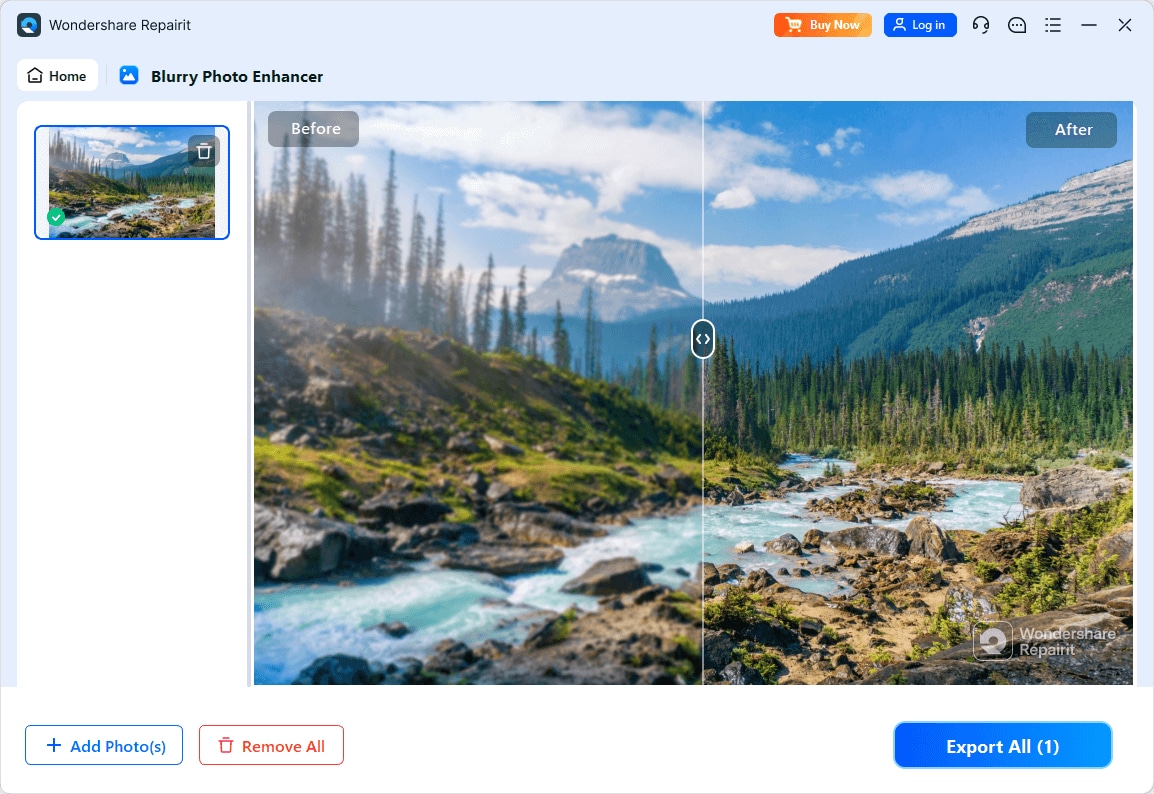
Step 3. Apply the enhancement settings and let the AI improve clarity, sharpness, and overall image quality.
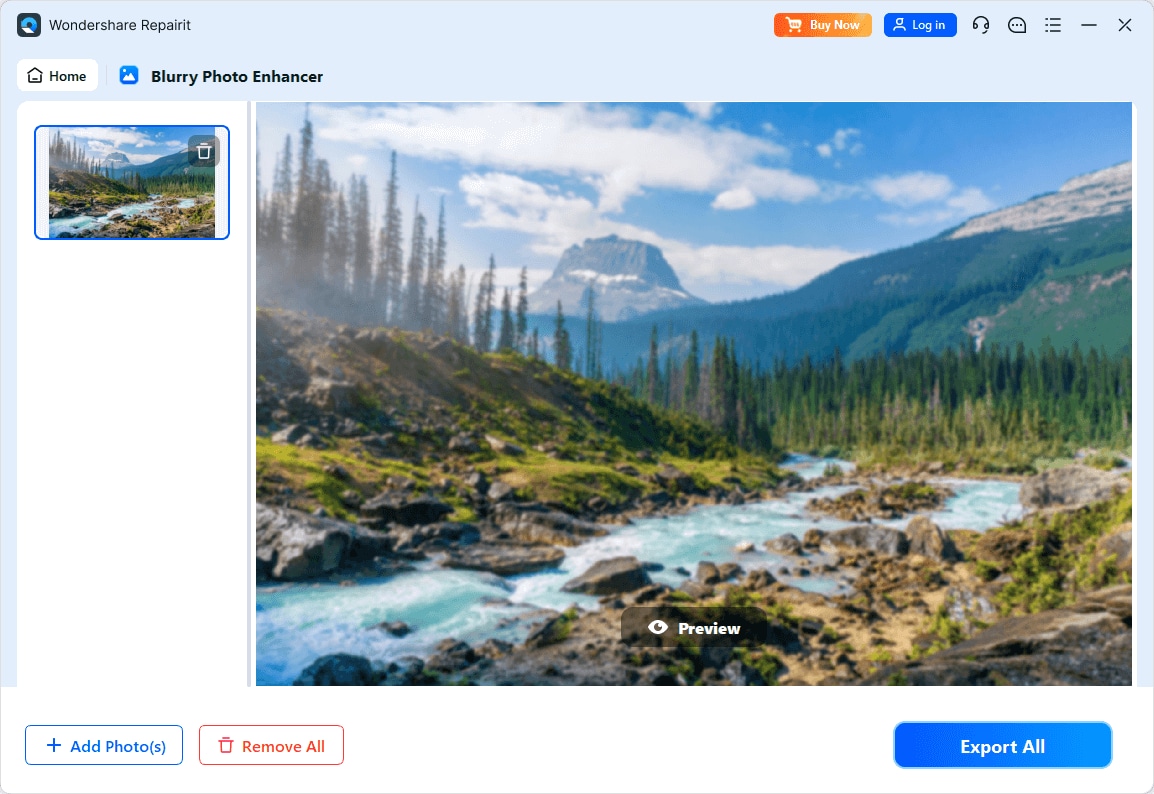
Step 4. Preview the enhanced result and save the improved photo to your device.
Final Verdict
Both Repairit Photo Enhancer and Topaz Gigapixel AI use AI to turn low quality or small images into more usable assets, but they prioritize different goals.
- Topaz Gigapixel AI puts most of its strength into upscaling and detail when you need higher resolution output, especially for prints, large displays, and demanding crops.
- Repairit Photo Enhancer takes a more rounded approach, helping you sharpen blurry photos, reduce noise, and enhance clarity while also upscaling.
If your main challenge is improving the overall look of everyday photos with minimal effort, Repairit will usually fit those workflows better. If you frequently prepare very large files and already adjust color and exposure in other software, Topaz can serve as a capable, resolution focused companion.
In many cases, users start by enhancing images with Repairit for clarity and noise reduction, then rely on a specialized upscaler only when specific projects demand extreme enlargement. Choosing between them ultimately depends on whether you care more about all around enhancement or advanced control over final resolution.
Next: Repairit Photo Enhancer vs Avclabs Photo Enhancer Ai
FAQ
-
1. Is Repairit Photo Enhancer an alternative to Topaz Gigapixel AI?
Yes. Repairit Photo Enhancer can act as an alternative, especially for users who want AI powered resolution upscaling combined with sharpening, denoising, and clarity improvement in one tool. Topaz Gigapixel AI remains a strong choice for users primarily concerned with high quality enlargements. -
2. Which is better for enlarging images without losing quality?
If your top priority is maximizing resolution and detail when enlarging, Topaz Gigapixel AI is designed around that use case. Repairit Photo Enhancer also upscales images while improving clarity and noise, making it more suitable for users who want broader enhancement, even if upscaling is not the only goal. -
3. Do I need both Repairit Photo Enhancer and Topaz Gigapixel AI?
Many users will be comfortable with just one tool. Repairit Photo Enhancer is usually enough for everyday enhancement and moderate upscaling. Professionals with demanding print work or very large output requirements may benefit from using Repairit for general enhancement and a dedicated tool like Topaz Gigapixel AI for final large scale enlargements. -
4. Which tool is easier for beginners to use?
Repairit Photo Enhancer focuses on clear options and guided enhancements, which can feel more approachable for beginners who want to enhance photo quality with minimal setup. Topaz Gigapixel AI is still accessible but assumes you mainly understand scale factors and resolution targets. -
5. Can I enhance portraits with both tools?
Both tools can improve portrait resolution and clarity. Repairit Photo Enhancer includes broader portrait oriented enhancements, such as sharpening facial details and reducing noise while aiming for a natural look. Topaz Gigapixel AI is particularly helpful when you need to enlarge portrait images significantly for prints or tight crops.




