
Choosing between Repairit Photo Enhancer and AVCLabs Photo Enhancer AI usually comes down to how much control you want and how fast you need results. Both tools use AI to enhance photo quality, improve image clarity, and upscale image resolution, but they feel different in real-world use. This guide breaks down their workflows, output quality, pricing, and best use cases so you can decide which AI photo enhancer better matches your projects and budget.
Enhance Photo Quality with Repairit Photo Enhancer
 Security Verified. Over 7,302,189 people have downloaded it.
In this article
- Repairit Photo Enhancer vs AVCLabs Photo Enhancer AI: Quick Verdict
- Repairit Photo Enhancer vs AVCLabs Photo Enhancer AI: Key Differences
- Repairit Photo Enhancer vs AVCLabs Photo Enhancer AI: Comparison Table
- What Repairit Photo Enhancer and AVCLabs Photo Enhancer AI Are Best For
- Repairit Photo Enhancer vs AVCLabs Photo Enhancer AI: AI Enhancement Features and Capabilities
- Repairit Photo Enhancer vs AVCLabs Photo Enhancer AI: Output Quality and Real-World Results
- Repairit Photo Enhancer vs AVCLabs Photo Enhancer AI: Workflow and Ease of Use
- Repairit Photo Enhancer vs AVCLabs Photo Enhancer AI: Pricing and Trial Options
- Who Should Choose Repairit Photo Enhancer
- Who Should Choose AVCLabs Photo Enhancer AI
- Pros and Cons of Repairit Photo Enhancer and AVCLabs Photo Enhancer AI
- How to Enhance Photos After Choosing the Right Tool
Repairit Photo Enhancer vs AVCLabs Photo Enhancer AI: Quick Verdict
At a glance, Repairit Photo Enhancer leans toward guided, natural-looking enhancement for everyday images, while AVCLabs Photo Enhancer AI focuses on a streamlined desktop flow for quickly improving clarity and resolution.
In most cases, Repairit Photo Enhancer is a stronger choice if you want balanced AI enhancement with an interface that explains what each option does. AVCLabs Photo Enhancer AI may be enough if you prefer a focused upload, enhance, save experience and do not need many manual controls.
- Best overall for everyday users: Repairit Photo Enhancer, thanks to its guided options and emphasis on natural-looking results.
- Best for single-purpose desktop upscaling: AVCLabs Photo Enhancer AI, especially when you just need to boost clarity and resolution.
- Best for mixed content and batches: Repairit Photo Enhancer, which is designed to fit recurring content workflows.
Repairit Photo Enhancer vs AVCLabs Photo Enhancer AI: Key Differences
Both tools enhance photo quality with AI, but they take different approaches that matter once you start using them regularly.
- Interface and guidance: Repairit Photo Enhancer offers clearly named enhancement types and a guided flow, which can help beginners understand which option to pick for portraits, everyday photos, or low-quality images. AVCLabs Photo Enhancer AI keeps things simple with fewer steps and fewer controls.
- Control vs speed: Repairit balances sensible defaults with basic adjustments for sharpening, denoising, and upscaling. AVCLabs Photo Enhancer AI prioritizes speed, applying its models with minimal configuration.
- Use-case focus: Repairit is built for social media images, product shots, slide decks, and personal archives where natural rendering matters. AVCLabs Photo Enhancer AI focuses more narrowly on clarity and resolution improvement for desktop users.
- Workflow fit: Repairit is well suited to users who occasionally process batches of images and want consistent, natural results. AVCLabs Photo Enhancer AI is better when you frequently run individual images through an AI enhancer before editing them further elsewhere.
Repairit Photo Enhancer vs AVCLabs Photo Enhancer AI: Comparison Table
| Aspect | Repairit Photo Enhancer | AVCLabs Photo Enhancer AI |
|---|---|---|
| Best for | General users, content creators, and small teams who want quick AI enhancement for everyday images with minimal setup. | Users focused on improving clarity and resolution on desktop with a single-purpose AI enhancer. |
| Ease of use | Very beginner-friendly with guided options and straightforward presets for different scenes and subjects. | Simple upload, enhance, save workflow with fewer steps and fewer adjustable options. |
| Output style | Aims for natural-looking clarity, sharpness, and noise reduction suitable for social media, presentations, and personal archives. | Strong clarity and resolution improvement, ideal for quick upscaling and sharpening. |
| Workflow | Choose enhancement type, import images, preview, then export in common formats; designed for regular content workflows. | Focused three-step flow optimized for single-task enhancement on desktop. |
| Key strengths | Balanced enhancement across sharpness, denoising, and detail recovery; clear interface; good for batches of everyday photos. | Focused desktop tool; noticeable clarity and resolution gains with minimal configuration. |
| Main limitations | Fewer deep manual controls than advanced editing suites; not for complex, layered editing workflows. | Limited manual control; narrower feature set focused mainly on AI enhancement. |
What Repairit Photo Enhancer and AVCLabs Photo Enhancer AI Are Best For
Repairit Photo Enhancer is generally best for users who want dependable, natural-looking AI enhancement across many image types. It fits well when you:
- Need to improve image clarity for social media, online stores, slide decks, or documentation.
- Regularly sharpen blurry photos, reduce noise, and upscale image resolution without complex setup.
- Work with a mix of portraits, landscapes, product photos, and screenshots.
- Prefer guided choices over technical sliders.
AVCLabs Photo Enhancer AI is better suited for users who mainly care about a straightforward desktop enhancer for clarity and resolution. It can make sense when you:
- Mostly handle low-resolution or slightly blurry images that need more detail.
- Value a focused AI enhancer with a simple upload, enhance, save flow.
- Plan to fine-tune color and style later in another editor.
- Do not require cloud access or multi-device workflows and prefer working on a computer.
Repairit Photo Enhancer vs AVCLabs Photo Enhancer AI: AI Enhancement Features and Capabilities
From a feature standpoint, both tools use AI to reinterpret pixels, rebuild missing detail, and improve overall clarity. The emphasis, however, differs slightly.
Repairit Photo Enhancer features include:
- AI upscaling to increase image resolution while preserving as much visible detail as possible.
- Sharpening to improve edge definition and make soft subjects appear clearer.
- Denoising tools to reduce grain and low-light noise while keeping important details.
- Clarity improvement to boost local contrast and visibility in flat or hazy images.
- Portrait-focused enhancement that can gently improve facial details and skin clarity without heavy retouching.
- Support for common photo formats for social, web, and everyday projects.
AVCLabs Photo Enhancer AI features generally focus on:
- AI-based upscaling that increases resolution and perceived detail for low-resolution images.
- Sharpening functions to improve clarity in slightly blurry or soft photos.
- General denoising and smoothing to clean up grainy or noisy shots.
- Clarity and detail enhancement aimed at restoring more texture in soft-focus images.
- A simple AI-driven enhancement approach with limited complexity, supporting faster decisions.
- A desktop-focused design for users who primarily enhance photos on a computer.
If you frequently adjust multiple aspects of an image (sharpness, noise, and clarity together), Repairit Photo Enhancer may feel more rounded. If your priority is mostly upscaling and sharpening a specific set of photos, AVCLabs Photo Enhancer AI can be sufficient.
Repairit Photo Enhancer vs AVCLabs Photo Enhancer AI: Output Quality and Real-World Results
Output quality is often the deciding factor with AI photo enhancers. While exact results depend on the original file, some patterns are common.
- Natural look vs intensity: Repairit Photo Enhancer is tuned for natural-looking clarity, which helps portraits and everyday shots avoid an overly processed feel. AVCLabs Photo Enhancer AI can deliver noticeable sharpness and resolution gains that may appear more pronounced, which some users prefer for certain subjects.
- Portraits and people: For faces, subtle enhancement is usually safer. Repairit Photo Enhancer puts emphasis on gentle improvements to facial details and skin clarity, easing the risk of harsh lines. AVCLabs Photo Enhancer AI can still improve soft portraits but may sometimes require additional retouching in another editor if you need precise control.
- Upscaling small or soft images: Both tools aim to rebuild detail when you upscale. Repairit focuses on keeping the overall look balanced, while AVCLabs Photo Enhancer AI concentrates on boosting resolution and structure in a fast, desktop-friendly way.
- Consistency for batches: If you process sets of images for a store or content channel, consistent, natural output can matter more than aggressive enhancement. In that context, Repairit Photo Enhancer often aligns with everyday publishing standards.
Repairit Photo Enhancer vs AVCLabs Photo Enhancer AI: Workflow and Ease of Use
The way each tool fits into your workflow can be as important as the raw features.
Repairit Photo Enhancer workflow is structured around a straightforward, task-focused process:
- Open the program and pick an AI enhancement option suited to your image type, such as general improvement or portrait enhancement.
- Import one or more photos and let the AI apply upscaling, sharpening, denoising, and clarity adjustments.
- Preview the effect before exporting and tweak basic parameters when needed.
- Export in common formats and resolutions for sharing or further editing.
This design lets non-experts rely on sensible defaults while still having enough control to adapt to different images.
AVCLabs Photo Enhancer AI workflow emphasizes a minimal, desktop-centric flow:
- Launch the application and load your image.
- Select an AI enhancement mode if multiple are available.
- Run the enhancement and wait for processing to finish.
- Review and save the result to your device.
The limited number of steps makes AVCLabs Photo Enhancer AI approachable, though users who want to direct the enhancement more precisely may find the options relatively constrained compared with broader tools.
Repairit Photo Enhancer vs AVCLabs Photo Enhancer AI: Pricing and Trial Options
Pricing models change over time, but the general approaches are different enough to influence your choice.
Repairit Photo Enhancer pricing and trial typically includes:
- Flexible licensing, with options such as free trials, short-term plans, and longer subscriptions depending on region and campaigns.
- Pricing oriented toward individuals, content creators, and small teams who regularly enhance photos without investing in complex high-end suites.
- The ability to test AI enhancement on a limited set of images before committing.
For the most accurate and current details, it is best to check the official Repairit Photo Enhancer page.
AVCLabs Photo Enhancer AI pricing and trial often involves:
- A desktop license or subscription structure, with tiers that may vary by duration and update policy.
- Some form of trial or evaluation mode so you can test AI enhancement in your own workflow.
- Differences in available features and trial limits depending on the exact version.
Because these specifics can change, checking the current AVCLabs Photo Enhancer AI information on the official site before purchasing is advisable.
Who Should Choose Repairit Photo Enhancer
Repairit Photo Enhancer will generally suit people who want reliable, AI-based improvement of everyday photos without learning advanced editing techniques.
Choose it if you:
- Regularly need to enhance image clarity for social media, online stores, presentations, or documentation.
- Prefer a tool that balances sharpening, denoising, and detail recovery while keeping results natural.
- Want an interface that guides you through selecting enhancement types instead of exposing many technical sliders.
- Work with varied content such as portraits, landscapes, product photos, and screenshots.
- Occasionally process multiples at once and do not want to repeat complex manual steps for each file.
If dependable, easy AI enhancement matters more to you than deep manual control, Repairit Photo Enhancer is likely to fit your workflow.
Who Should Choose AVCLabs Photo Enhancer AI
AVCLabs Photo Enhancer AI is better suited to users who primarily care about straightforward, AI-driven desktop enhancement with a simple flow.
It may be a good match if you:
- Mainly want to restore details and improve clarity in low-resolution or slightly blurry photos.
- Prefer a focused tool centered on AI upscaling and enhancement rather than a broad imaging toolkit.
- Are comfortable with an upload, enhance, save approach and do not need many manual adjustments.
- Work mostly on a desktop and do not require cloud-based access or multi-platform workflows.
- Plan to use a secondary editor afterwards for color grading, retouching, or other refinements when necessary.
For users who like a compact, purpose-built AI enhancer that emphasizes clarity and resolution gains over extensive configuration, AVCLabs Photo Enhancer AI can be a reasonable option.
Pros and Cons of Repairit Photo Enhancer and AVCLabs Photo Enhancer AI
This section outlines the main strengths and trade-offs so you can quickly see where each tool aligns with your needs.
Below are concise pros and cons based on typical use cases, not strict benchmarks.
Repairit Photo Enhancer Pros and Cons
AVCLabs Photo Enhancer AI Pros and Cons
How to Enhance Photos After Choosing the Right Tool
Once you have compared Repairit Photo Enhancer and AVCLabs Photo Enhancer AI and have a sense of which fits your workflow, the next step is actually enhancing your photos. For users who prefer a guided, straightforward process with AI handling most of the heavy lifting, Repairit Photo Enhancer offers a practical path from raw image to clearer, sharper results.
Key Features
- AI-driven enhancement that improves clarity, sharpness, and overall image quality.
- Upscaling capabilities for increasing image resolution while preserving as much visible detail as possible.
- Denoising and deblurring functions to help clean up low-light or soft photos.
- Options tuned for portraits and everyday images to keep results natural.
- A workflow designed for quick previews and exports suitable for online use.
Step-by-step guide
Step 1. Choose an AI enhancement model based on your needs, such as general enhancement, portrait improvement, or image upscaling.

Step 2. Import your photo into Repairit Photo Enhancer to begin the enhancement process.

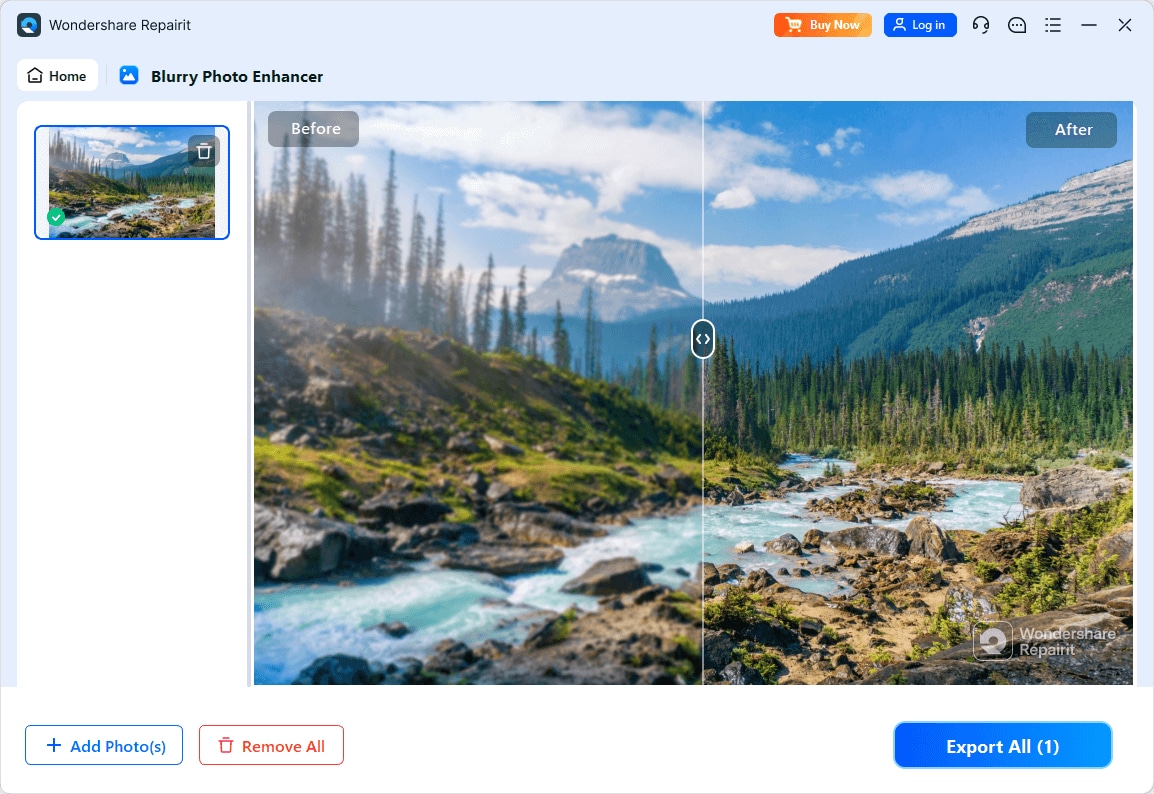
Step 3. Apply the enhancement settings and let the AI improve clarity, sharpness, and overall image quality.
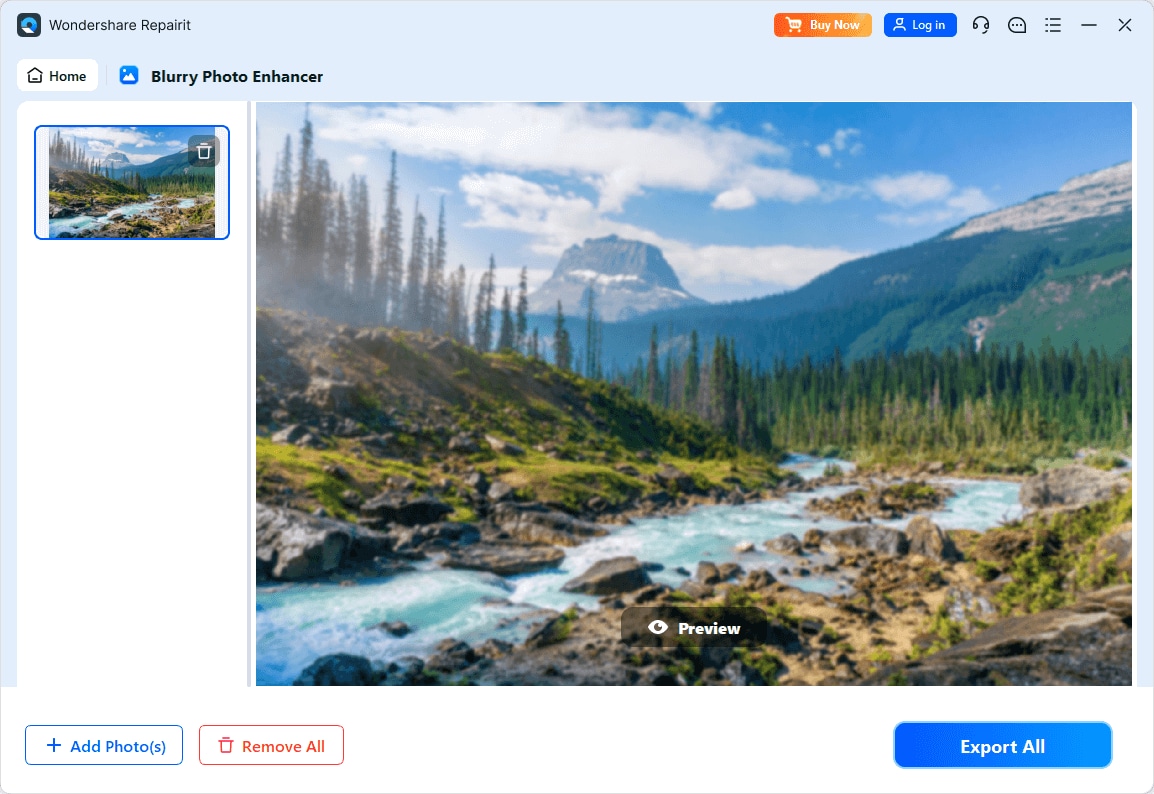
Step 4. Preview the enhanced result and save the improved photo to your device.
Final Verdict
Repairit Photo Enhancer and AVCLabs Photo Enhancer AI share a common goal: using AI to improve image clarity and resolution. The practical differences lie mainly in how guided the experience is and how you prefer to work.
If you want a balanced, accessible tool that focuses on natural-looking enhancements across a wide range of everyday images, Repairit Photo Enhancer is likely the more comfortable choice. Its guided options and emphasis on clarity, sharpness, and noise reduction suit social media, business, and personal projects where realism matters.
If you mainly need a focused desktop enhancer with a minimalistic upload, enhance, save approach and are comfortable with less manual control, AVCLabs Photo Enhancer AI can be a suitable alternative. It fits users who prioritize quick clarity and resolution improvements, especially when paired with a separate editor for detailed adjustments.
In many real-world workflows, testing both tools on a small set of images and comparing the look, speed, and ease of use is the most reliable way to see which aligns better with your expectations.
Next: Repairit Photo Enhancer vs Hitpaw Photo Enhancer
FAQ
-
1. Is Repairit Photo Enhancer better than AVCLabs Photo Enhancer AI for beginners?
For most beginners, Repairit Photo Enhancer feels more guided because its options clearly describe what they do. AVCLabs Photo Enhancer AI is also simple, but its minimal controls can give some users less context about how the enhancement is being applied. -
2. Which is better for upscaling low-resolution photos?
Both tools focus on AI upscaling and detail improvement. Repairit emphasizes balanced, natural-looking results suitable for everyday use, while AVCLabs Photo Enhancer AI leans into a straightforward desktop flow. Testing the same image in both is a practical way to see which output style you prefer. -
3. Can I use Repairit Photo Enhancer and AVCLabs Photo Enhancer AI together?
Yes. Some users run images through one tool for initial AI enhancement and then refine the results with the other or with a dedicated editor. As long as you keep enough resolution and image quality at each stage, combining tools can be effective. -
4. Do I still need a full photo editor if I use these AI enhancers?
For tasks like sharpening, denoising, and upscaling, you may rely mainly on an AI enhancer. However, for complex color work, compositing, or detailed retouching, a full-featured photo editor remains useful alongside either Repairit Photo Enhancer or AVCLabs Photo Enhancer AI. -
5. How should I decide between Repairit Photo Enhancer and AVCLabs Photo Enhancer AI?
Consider your priorities: if you want a guided interface and balanced enhancement for varied everyday images, lean toward Repairit Photo Enhancer. If you prefer a focused desktop tool with a very simple upload, enhance, save process and do not mind limited manual controls, AVCLabs Photo Enhancer AI may be enough.




