
Choosing between Repairit Photo Eraser and Luminar Neo comes down to how much you care about quick object removal versus broader AI photo editing. Repairit focuses on fast, automatic erasing of unwanted objects and distractions. Luminar Neo is a wider AI photo editor with an object removal tool built in. This comparison breaks down their object removal quality, workflows, and pricing so you can decide which one fits your cleanup needs.
Remove Unwanted Objects with Repairit Photo Eraser
 Security Verified. Over 7,302,189 people have downloaded it.
In this article
- Repairit Photo Eraser vs Luminar Neo: Quick Verdict
- Repairit Photo Eraser vs Luminar Neo: Key Differences
- Repairit Photo Eraser vs Luminar Neo: Comparison Table
- What Repairit Photo Eraser and Luminar Neo Are Best For
- Repairit Photo Eraser vs Luminar Neo: Object Removal Capabilities
- Repairit Photo Eraser vs Luminar Neo: Background Fill and Realism
- Repairit Photo Eraser vs Luminar Neo: Workflow and Ease of Use
- Repairit Photo Eraser vs Luminar Neo: Pricing and Trial Options
- Who Should Choose Repairit Photo Eraser
- Who Should Choose Luminar Neo
- Pros and Cons of Repairit Photo Eraser and Luminar Neo
- How to Remove Unwanted Objects After Choosing the Right Tool
Introduction
Both Repairit Photo Eraser and Luminar Neo can erase distracting objects, people, text, or simple watermarks from photos. The key difference is focus: Repairit is built around a streamlined object removal pipeline, while Luminar Neo embeds its remove tool inside a larger photo editing environment. Understanding how each handles object selection, background fill, and day-to-day workflow makes it easier to choose the right tool for your cleanup tasks.
Repairit Photo Eraser vs Luminar Neo: Quick Verdict
If your main task is removing unwanted objects, cleaning up backgrounds, or discreetly erasing text and simple watermarks, Repairit Photo Eraser is usually faster to learn and more direct. Its interface and processing logic are tuned for object removal, not for full creative editing.
For users who want object removal alongside a broader set of editing controls, Luminar Neo can be a reasonable option. You get a capable remove tool plus many other adjustments in one place, at the cost of a slightly heavier workflow and a more complex interface.
Repairit Photo Eraser vs Luminar Neo: Key Differences
The core difference is specialization. Repairit Photo Eraser is centered on a dedicated AI erase workflow: upload, mark, remove, and export. Nearly every control supports this sequence, which helps users get natural-looking results quickly, even with limited editing experience.
Luminar Neo treats object removal as one tool among many. You typically move from the object removal brush to other panels for color, contrast, or creative looks. This can be powerful for photographers who do full edits in one session, but it also means object removal is not the sole design priority.
In practice, this shows up in three areas:
- Workflow focus: Repairit keeps you within a single, guided flow dedicated to erasing distractions. Luminar Neo asks you to navigate multiple modules, which can feel slower when you only want to remove a pole, logo, or passerby.
- Manual control vs simplicity: Luminar Neo tends to give more room for additional editing steps around the removed region, while Repairit minimizes the need for manual retouching by relying more on AI-based background fill.
- Learning curve: Repairit is easier to understand for new or occasional editors. Luminar Neo rewards users who are comfortable exploring a fuller interface and combining tools.
Repairit Photo Eraser vs Luminar Neo: Comparison Table
| Criteria | Repairit Photo Eraser | Luminar Neo |
|---|---|---|
| Best for | Users who mainly need to remove unwanted objects, distractions, or watermarks quickly | Users wanting AI-assisted editing and object removal inside a broader photo editor |
| Ease of use | Very straightforward, focused on an AI erase workflow only | Modern UI with more options and panels to learn |
| Object removal | Specialized AI eraser tuned for clean removal and automatic background fill | Capable remove tool suitable for general cleanup but not eraser-focused |
| Workflow | Upload, mark objects, erase, and export in a few guided steps | Import photo, use remove tool, refine with other edits, then export |
| Strengths | Simple AI erasing, fast cleanup, minimal learning curve | Remove tool plus broader edits, generative-style cleanup, modern interface |
| Weaknesses | Less suited for complex multi-layer editing or heavy styling | Subscription-style pricing and not primarily focused on object erasing |
What Repairit Photo Eraser and Luminar Neo Are Best For
Both tools help you erase objects from photos and clean up images, but they target slightly different priorities.
Repairit Photo Eraser is generally best for:
- Removing tourists, passersby, or background clutter from everyday shots
- Cleaning simple logos or watermarks when usage rights allow
- Quickly hiding signboards, trash bins, or distracting elements around a subject
- Users who want a dedicated eraser without dealing with complex photo editing panels
Luminar Neo is generally best for:
- Photographers who already edit color, tone, and style in the same app
- Users who want to combine object removal with broader AI-driven enhancements
- Creators who prefer having multiple adjustment tools open around one image
- Situations where object removal is one step in a more elaborate edit
Repairit Photo Eraser vs Luminar Neo: Object Removal Capabilities
Both tools can handle a wide range of object removal tasks, but with different emphasis.
Unwanted people and distractions
For clearing people or small distractions from a scene, Repairit Photo Eraser leans on an AI-driven erase engine that tries to understand surrounding textures and rebuild them automatically. In many everyday images, you simply paint over people, power lines, or random objects, then let the AI do the rest with minimal manual adjustment.
Luminar Neo also lets you brush over unwanted subjects and remove them, usually in combination with other tools if the background is complex. Users who already edit inside Luminar may appreciate being able to switch between removal and other corrections in one place.
Watermark and logo cleanup
Both tools can help delete simple logos or watermarks, especially on flat or uniform backgrounds. Results will depend heavily on the image: large or intricate watermarks across detailed textures are harder for any tool. In such cases, you might need multiple passes or some manual refinement. Regardless of the software, it is important to respect copyright and only remove watermarks when you have the right to do so.
Text removal
Repairit Photo Eraser can be effective for removing dates, captions, or small text overlays, particularly when the text sits on a relatively simple background. The AI fill aims to recreate the underlying area with minimal visible seams.
Luminar Neo can handle similar text removal tasks, but you may rely more on combining its remove and correction tools to polish the result, especially if the underlying textures are detailed.
Scene complexity
On simple scenes, both tools tend to perform well. On more complex images, such as overlapping objects, patterned fabrics, or dense foliage, Repairit Photo Eraser aims to keep things straightforward, while Luminar Neo users might spend more time blending remove operations with other adjustments. In most cases, the best approach is to zoom in and tackle complex areas in smaller selections, whichever tool you use.
Repairit Photo Eraser vs Luminar Neo: Background Fill and Realism
Natural-looking background fill is critical for convincing object removal. Repairit Photo Eraser is designed so that, once you mark an object, the AI models attempt to infer surrounding colors and textures to reconstruct the hidden area. On typical photos with skies, walls, roads, or grass, this often yields smooth, believable results with few visible edges.
In more detailed scenes, such as repeating patterns or complex architecture, you may still notice small artifacts or subtle smudges after automatic fill. In those cases, refining the selection or applying multiple lighter passes can help. Because Repairit keeps the focus on object removal, the interface encourages quick review and re-tries until the replaced area looks natural.
Luminar Neo also performs background fill when you use its remove tools. However, since it is part of a larger editing suite, you are more likely to complement the automatic fill with additional local adjustments or other tools to hide minor artifacts. For users who are comfortable with that extra editing step, this can offer more flexibility, although it tends to be slower than a single-purpose eraser workflow.
In both tools, the realism of the final image largely depends on:
- The size of the removed object relative to the frame
- The complexity and repetition of nearby textures
- How carefully you define selection edges before erasing
Repairit Photo Eraser leans toward getting acceptable, natural results quickly. Luminar Neo leans toward giving you tools to refine realism as part of a more detailed edit when needed.
Repairit Photo Eraser vs Luminar Neo: Workflow and Ease of Use
The day-to-day workflow is where these tools feel very different.
Repairit Photo Eraser workflow and usability
Repairit keeps object removal to a narrow set of actions: upload, select, erase, and export. Brush size, selection controls, and preview are all oriented around this flow. New users generally understand the steps in minutes, and the limited number of panels means there is less chance of getting lost in settings that are not related to object removal.
Luminar Neo workflow and usability
Luminar Neo organizes tools into modules and panels, with object removal living alongside color, light, and creative filters. This layout is appealing to photographers who already do full edits in Luminar, but it introduces more interface elements for users who only want to remove objects.
In practice:
- Repairit is usually quicker from opening the tool to exporting a cleaned photo if object removal is your only goal.
- Luminar Neo offers more control around the removed area when you pair its remove tool with other editing modules, at the cost of a slightly longer path from import to final export.
Repairit Photo Eraser vs Luminar Neo: Pricing and Trial Options
When you choose an object removal tool, it helps to consider how often you will use the broader editing features.
Repairit Photo Eraser typically offers straightforward access focused on its eraser capabilities. Because the tool concentrates on object removal, it can be easier to evaluate whether the cost aligns with your specific needs, without paying primarily for extra editing modules you may not use.
Luminar Neo follows a more traditional AI photo editor approach with licensing or subscription-style options. The exact offers and bundles can change over time, and they usually reflect the fact that you are getting a full editing program, not just an eraser. For users who will use many of its modules regularly, this can be reasonable; for those who only need to remove objects occasionally, it may feel like more than they require.
Both tools may provide trials or limited-use versions. Checking their current websites for updated plans and trial conditions is recommended before making a decision.
Who Should Choose Repairit Photo Eraser
Repairit Photo Eraser is likely a better fit when:
- You mainly need to remove unwanted objects without learning a full editor.
- You are a beginner who prefers a guided, simple experience centered on object erasing.
- You often delete watermarks or background distractions in batches, within your rights.
- You value speed and a focused cleanup workflow more than having many extra photo editing tools.
Who Should Choose Luminar Neo
Luminar Neo may make more sense when:
- You are a photographer or creator who wants object removal plus color grading and other AI edits in one program.
- You are comfortable with a subscription-style or license-based AI photo editor model.
- You appreciate a modern interface with many adjustment sliders and creative tools.
- You prefer to refine images further after cleaning distractions, all inside a single app.
Pros and Cons of Repairit Photo Eraser and Luminar Neo
Repairit Photo Eraser Pros and Cons
Luminar Neo Pros and Cons
How to Remove Unwanted Objects After Choosing the Right Tool
Once you decide which workflow suits you, the next step is putting it into practice. If your priority is quick, repeatable cleanup with minimal setup, using a dedicated eraser like Repairit can streamline the process from upload to final download.
Key Features
- AI-powered erasing that automatically fills in backgrounds to help maintain visual consistency.
- Simple tools to mark and remove unwanted objects, people, and text overlays.
- Lightweight workflow that is well-suited to fast image cleanup sessions and batch-style tasks.
Step-by-step guide
Step 1. Upload the photo you want to edit and start the object removal process.

Step 2. Adjust the brush size and select the object or area you want to remove from the image.
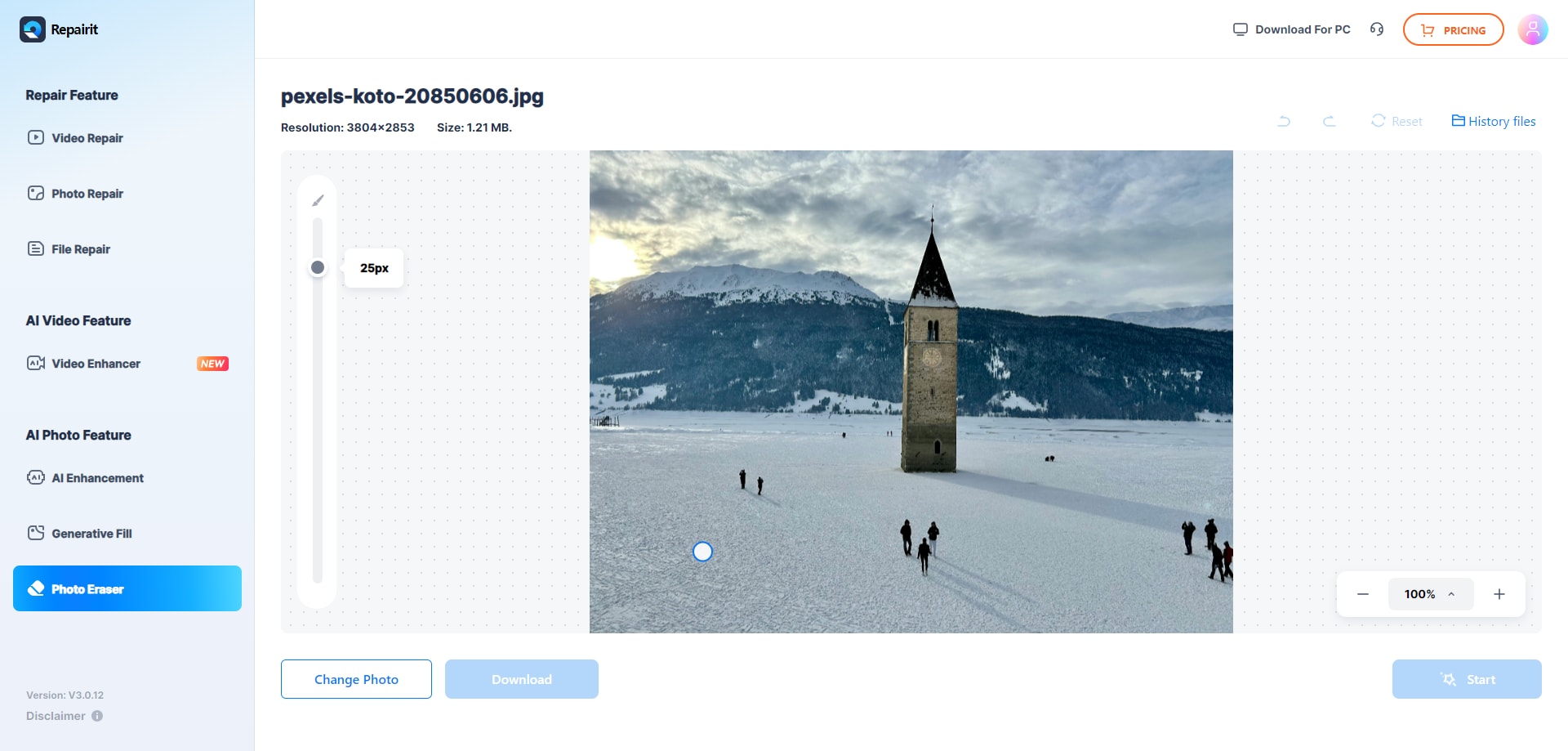
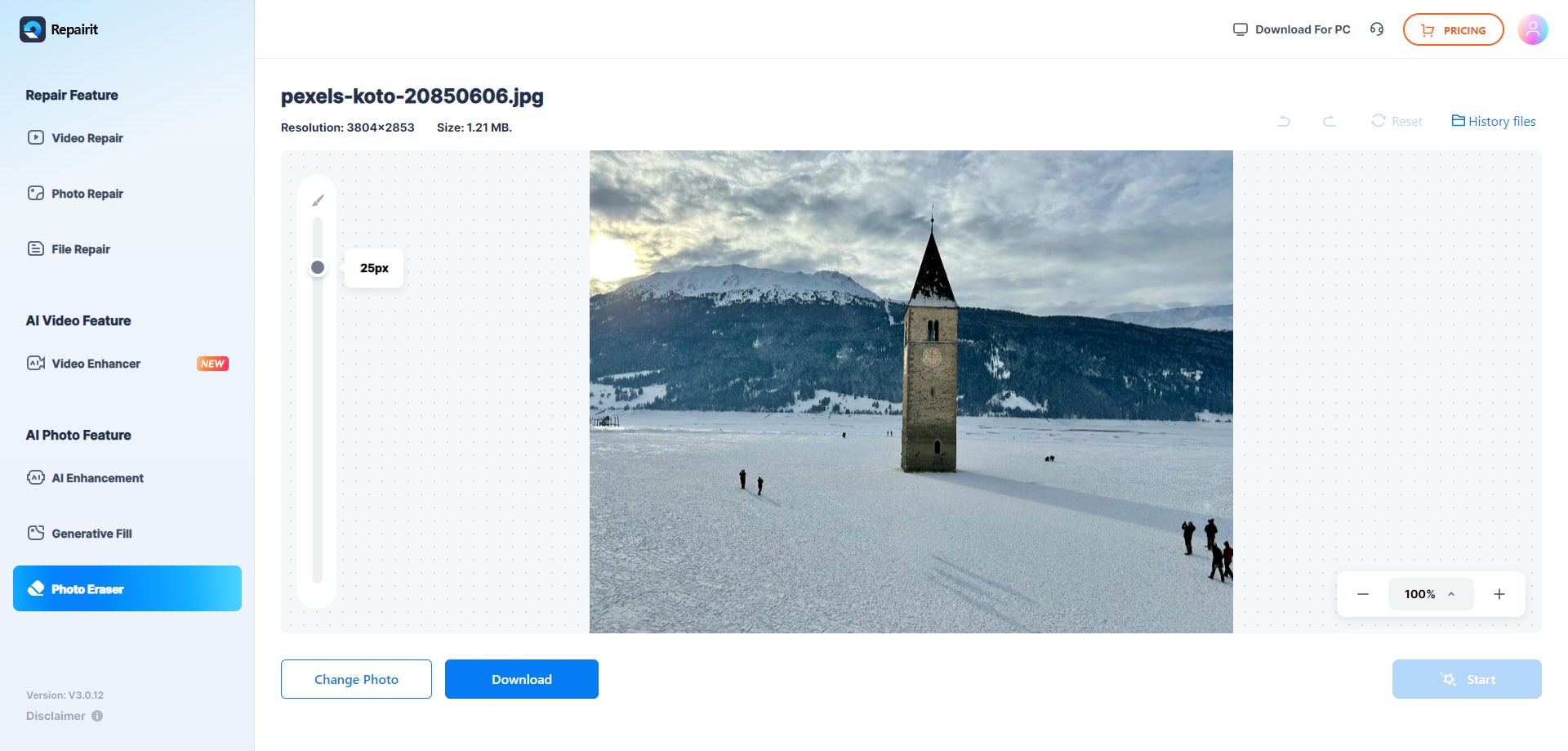
Step 3. Let the AI process the image and download the cleaned photo after the object is removed.
Final Verdict
Repairit Photo Eraser and Luminar Neo both help you remove unwanted objects, but they serve slightly different needs. Repairit leans into a focused AI eraser experience, ideal when you want fast, repeatable cleanup without navigating extra editing modules. Its workflow, selection tools, and background fill are all tuned around object removal tasks.
Luminar Neo places object removal inside a broader AI photo editor. For users who already rely on it for color, tone, and creative looks, keeping object removal in the same interface is convenient, even if it takes more steps than a dedicated eraser.
For typical users who mostly want to clean up images and delete distractions or simple watermarks with minimal friction, Repairit will usually feel more direct. If you also want to adjust many other aspects of your photos in the same app and do not mind a fuller interface or subscription-style pricing, Luminar Neo can be a practical all-in-one choice.
Next: Repairit Photo Eraser vs Adobe Photoshop
FAQ
-
1. Is Repairit Photo Eraser better than Luminar Neo for removing unwanted objects?
For users who mainly want to erase objects from photos quickly, Repairit Photo Eraser is often more convenient because it is built around a dedicated AI erase workflow. Luminar Neo is competitive but spreads its focus across many editing features, so it may feel heavier if object removal is your only task. -
2. When does Luminar Neo make more sense than a dedicated eraser?
Luminar Neo makes more sense if you want object removal plus other editing tasks in one program, such as color adjustments or creative looks, and you are comfortable with a more complex interface and subscription-style pricing. -
3. Can both tools delete watermarks and logos from photos?
Both tools can technically help delete watermarks or logos, particularly on simple backgrounds, but results depend on the image and watermark complexity. Regardless of which tool you use, you should only remove watermarks or branded elements when you have the legal right to edit that content. -
4. Which tool is easier for beginners to start cleaning up images?
Most beginners find Repairit Photo Eraser easier because the interface is centered on uploading, marking objects, and erasing them. Luminar Neo is still approachable but introduces more panels and options that may take longer to learn, especially if you only need object removal.




