
Choosing between Repairit Photo Eraser and AVCLabs PhotoPro AI comes down to how much time you want to spend removing unwanted objects from photos. Repairit focuses on fast, AI-driven erasing with a simple workflow. AVCLabs PhotoPro AI is a broader AI-powered photo editing suite that includes object removal but also offers heavier, more advanced editing tools. This guide compares both so you can decide which tool better fits your typical cleanup tasks.
Remove Unwanted Objects with Repairit Photo Eraser
 Security Verified. Over 7,302,189 people have downloaded it.
In this article
- Repairit Photo Eraser vs AVCLabs PhotoPro AI: Quick Verdict
- Repairit Photo Eraser vs AVCLabs PhotoPro AI: Key Differences
- Repairit Photo Eraser vs AVCLabs PhotoPro AI: Comparison Table
- What Repairit Photo Eraser and AVCLabs PhotoPro AI Are Best For
- Repairit Photo Eraser vs AVCLabs PhotoPro AI: Object Removal Capabilities
- Repairit Photo Eraser vs AVCLabs PhotoPro AI: Background Fill and Realism
- Repairit Photo Eraser vs AVCLabs PhotoPro AI: Workflow and Ease of Use
- Repairit Photo Eraser vs AVCLabs PhotoPro AI: Pricing and Trial Options
- Who Should Choose Repairit Photo Eraser
- Who Should Choose AVCLabs PhotoPro AI
- Pros and Cons of Repairit Photo Eraser and AVCLabs PhotoPro AI
- How to Remove Unwanted Objects After Choosing the Right Tool
Both Repairit Photo Eraser and AVCLabs PhotoPro AI help you remove unwanted objects, distractions, and simple watermarks from photos. The main difference is focus: Repairit is built around fast AI object removal and natural background fill, while AVCLabs integrates object cleanup into a larger editing environment with more adjustment options. Understanding how each handles object removal, text cleanup, and workflow will help you decide which fits your day-to-day editing better.
Repairit Photo Eraser vs AVCLabs PhotoPro AI: Quick Verdict
If your primary goal is to erase people, clutter, or text from photos as quickly as possible, Repairit Photo Eraser is usually the more efficient option thanks to its focused, AI-driven workflow and lightweight interface.
If you often combine object removal with broader edits, such as retouching faces or adjusting the overall look of an image, AVCLabs PhotoPro AI may be a better fit because object cleanup is one part of a more complete editing toolkit.
Repairit Photo Eraser vs AVCLabs PhotoPro AI: Key Differences
The main differences between Repairit Photo Eraser and AVCLabs PhotoPro AI center on how much of your workflow they try to handle and how streamlined the object removal process is.
- Workflow focus: Repairit is dedicated to AI object erasing and background cleanup. AVCLabs wraps object removal inside a multi-tool editing suite.
- Learning curve: Repairit keeps controls minimal so beginners can start erasing quickly. AVCLabs offers more panels and options, which is helpful for experienced editors but can be slower to learn.
- Manual control: Both allow you to brush or select areas to remove. Repairit prioritizes fast AI decisions, while AVCLabs tends to encourage more manual fine-tuning around the removed regions.
- Natural-looking results: In most everyday images with simple backgrounds, Repairits smart fill aims to quickly blend the removed area into nearby colors and textures. AVCLabs can also produce realistic fills, and its wider toolkit can help when you want to manually refine or layer additional edits.
- Software weight: Repairit runs as a lighter, task-focused tool. AVCLabs PhotoPro AI is a heavier application that may require more capable hardware, especially when working with large or high-resolution files.
Repairit Photo Eraser vs AVCLabs PhotoPro AI: Comparison Table
| Criteria | Repairit Photo Eraser | AVCLabs PhotoPro AI |
|---|---|---|
| Best for | Users who mainly need to remove unwanted objects and distractions quickly | Users needing AI object removal plus broader AI-powered photo editing tools |
| Ease of use | Very straightforward, focused on erasing with minimal setup | More complex interface due to wider editing features |
| Object removal | Optimized for fast AI erasing and automatic background fill | Capable AI object removal within a larger editing toolkit |
| Workflow | Upload, highlight object, erase, then download | Import image, select object, AI remove, adjust, export |
| Strengths | Simplicity, speed, dedicated object cleanup workflow | AI object removal, enhancement options, face retouch controls |
| Weaknesses | Less suited for complex multi-step image editing projects | Heavier software and less focused on erasing only tasks |
What Repairit Photo Eraser and AVCLabs PhotoPro AI Are Best For
AVCLabs PhotoPro AI is an AI-powered photo editing suite that includes tools to remove unwanted objects but is best for users needing AI object removal and enhancement in one place. Compared with Repairit Photo Eraser, which specializes in quick AI erasing and background cleanup, AVCLabs is heavier and more feature-packed, making it better suited to users who want a single app for cleanup and broader adjustments.
- Repairit Photo Eraser is best for: quick removal of people, signs, cables, logos, and simple watermarks where you want a short, predictable workflow and minimal tuning.
- AVCLabs PhotoPro AI is best for: workflows where object removal is only one step in a sequence that also involves noise cleanup, facial retouching, or creative restyling.
Repairit Photo Eraser vs AVCLabs PhotoPro AI: Object Removal Capabilities
Both tools can erase objects from photos, but Repairit Photo Eraser focuses on a streamlined cleanup workflow while AVCLabs PhotoPro AI combines object removal with broader AI editing features.
- General object removal: Each tool lets you paint or select unwanted subjects, such as bystanders, trash bins, distracting signs, or background clutter. Repairit aims to perform this in a few quick passes, while AVCLabs expects that you may refine further afterward.
- Watermark and logo cleanup: Both can help delete simple watermarks or text elements from the scene where appropriate, particularly when the background is relatively uniform. Outcomes heavily depend on background complexity, and it is important to remove only watermarks from images you are allowed to edit.
- People removal: For removing extra people from travel shots or event photos, Repairit emphasizes fast selection and automatic fill. AVCLabs can also remove people but often invites additional retouching as part of a more involved edit.
- Text removal: For text on walls, signs, or overlaid captions, both tools treat text as an object. Repairits AI is geared toward quick blending for common surfaces, while AVCLabs lets you pair text removal with additional manual tools if edges need more work.
- Scene complexity: In simple scenes with clear patterns (sky, grass, sand, or blurred backgrounds), both tools generally handle object removal well. In more intricate scenes, such as fine architecture or overlapping objects, you may need multiple passes or manual corrections regardless of which tool you choose.
Repairit Photo Eraser vs AVCLabs PhotoPro AI: Background Fill and Realism
After you erase an object, the realism of the result depends on how convincingly the software fills in the missing area.
- Repairit Photo Eraser background fill: Its smart background fill tries to match nearby colors and textures immediately after erasing, which is especially effective for small and medium-sized distractions. In most day-to-day shots, this can produce natural-looking results with little extra work.
- AVCLabs PhotoPro AI background handling: AVCLabs also uses AI to reconstruct missing regions, but given its broader feature set, you may be encouraged to refine the area with additional adjustments, such as local smoothing or color tweaks, when small artifacts appear.
- Artifacts and edges: Both tools may occasionally leave faint patterns, repeated textures, or soft edges in difficult areas. Fine details like railings, text close to edges, or overlapping objects can be challenging, and a second pass or smaller brush strokes may help in either tool.
- When manual cleanup helps: For highly detailed scenes, manual edits such as clone or heal strokes, plus zoomed-in brushing, can improve realism. AVCLabs offers more editing tools for these manual refinements, while Repairit aims to keep such cleanup as light and simple as possible.
Repairit Photo Eraser vs AVCLabs PhotoPro AI: Workflow and Ease of Use
With Repairit Photo Eraser, you usually upload a photo, mark the object, let the AI erase it, and download the cleaned image in just a few clicks. AVCLabs PhotoPro AI uses a more involved workflow of import image, select object, AI remove, adjust, then export, which offers more control but can feel slower if you only want to remove a few distractions.
- Simplicity: Repairit is designed so users can complete object removal with minimal tool switching. This suits quick tasks, such as cleaning up a product shot before uploading it to a listing.
- Brush and selection tools: Both tools provide brushes or selection areas for marking objects, with adjustable sizes for precise edges. Repairit keeps these controls streamlined, while AVCLabs layers them among other editing modules.
- Control vs. speed: AVCLabs workflow may appeal to users who enjoy detailed control at each step of the edit. Repairit is geared toward users who prefer to let the AI make most of the decisions, then quickly check and export.
- Editing effort: For one-off or light edits, Repairit often requires fewer clicks and less time. For multi-step projects involving several cleanups and other adjustments, AVCLabs flexible, multi-module interface can be more convenient.
Repairit Photo Eraser vs AVCLabs PhotoPro AI: Pricing and Trial Options
Repairit Photo Eraser generally offers focused plans around object removal, so you are mainly paying for cleanup features. AVCLabs PhotoPro AI pricing tends to reflect its broader AI editing suite, including enhancement and face retouch tools.
Both typically provide some form of trial or limited use so you can test object removal quality before committing, but exact pricing and trial terms may change over time. It is a good idea to:
- Check each official website for current plans and any limitations.
- Use the trial period to test typical tasks, such as removing people from a scene or erasing text on a sign.
- Consider whether you need the extra editing tools in AVCLabs or prefer the focused nature of Repairit.
Who Should Choose Repairit Photo Eraser
Repairit Photo Eraser is a strong candidate for users whose primary need is reliable, straightforward object removal.
- Users who mainly need to erase objects from photos without learning a full editing suite.
- Beginners who want an intuitive AI eraser with minimal settings.
- People who value fast cleanup for social media posts, online listings, or simple projects.
- Users who prefer a lightweight tool focused on removing background distractions and watermarks.
Who Should Choose AVCLabs PhotoPro AI
AVCLabs PhotoPro AI is better suited to users who want object removal within a more extensive editing workspace.
- Users who want AI object removal plus AI-powered enhancement in one program.
- Photographers who are comfortable with heavier software and more options.
- People who often combine object removal with face retouch or other adjustments.
- Users who do not mind a longer workflow to gain extra manual control.
Pros and Cons of Repairit Photo Eraser and AVCLabs PhotoPro AI
Repairit Photo Eraser Pros and Cons
AVCLabs PhotoPro AI Pros and Cons
How to Remove Unwanted Objects After Choosing the Right Tool
Once you have compared both tools and picked the one that fits your workflow, the next step is to apply a clear, repeatable process for removing distractions, watermarks, or text while keeping backgrounds natural.
Key Features
- Dedicated AI object eraser for fast removal of distractions and clutter.
- Automatic background fill that blends removed areas with nearby content.
- Beginner-friendly workflow focused on quick cleanup and export.
Step-by-step guide
Here is a practical way to remove unwanted objects using Repairit Photo Eraser.
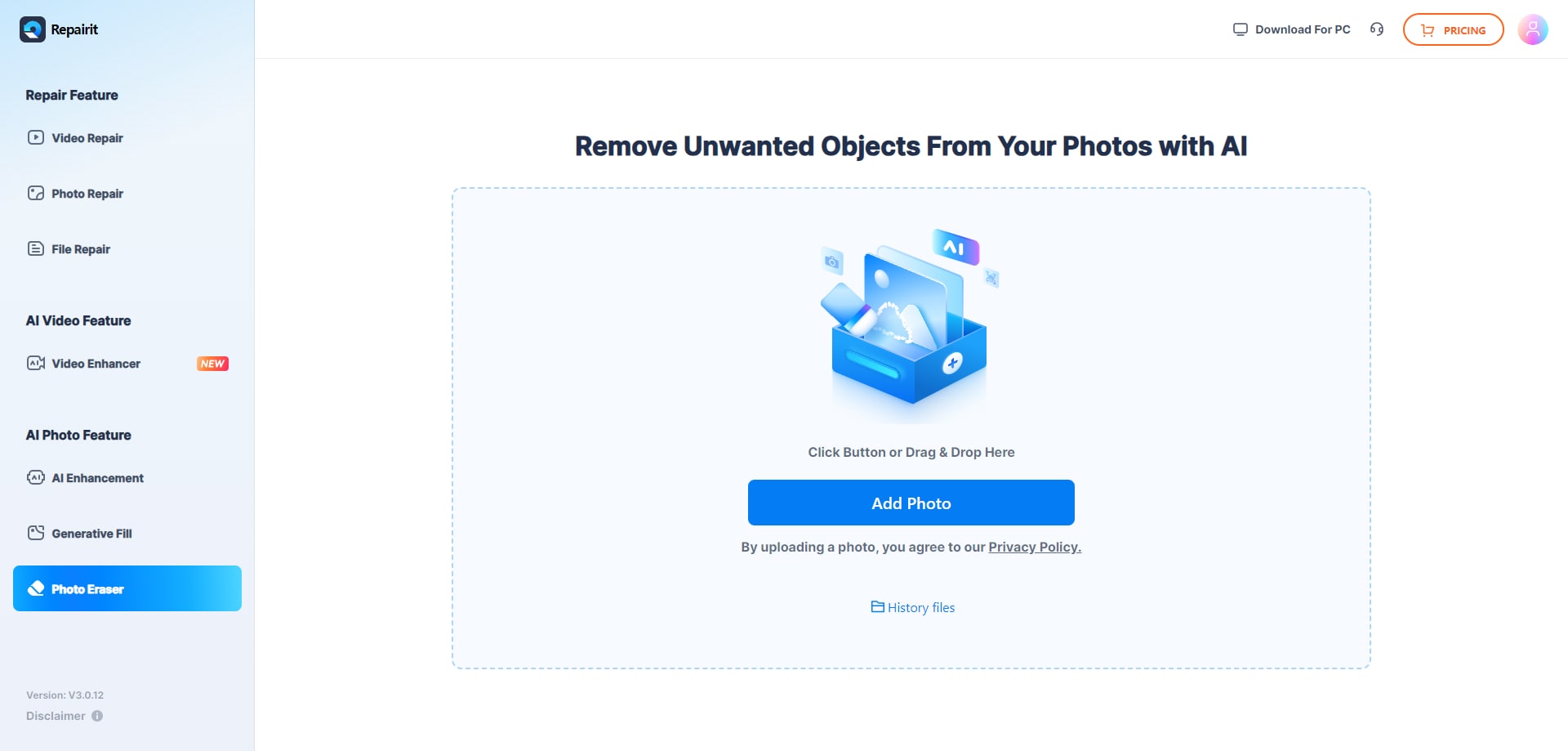
Step 1. Upload the photo you want to edit and start the object removal process.
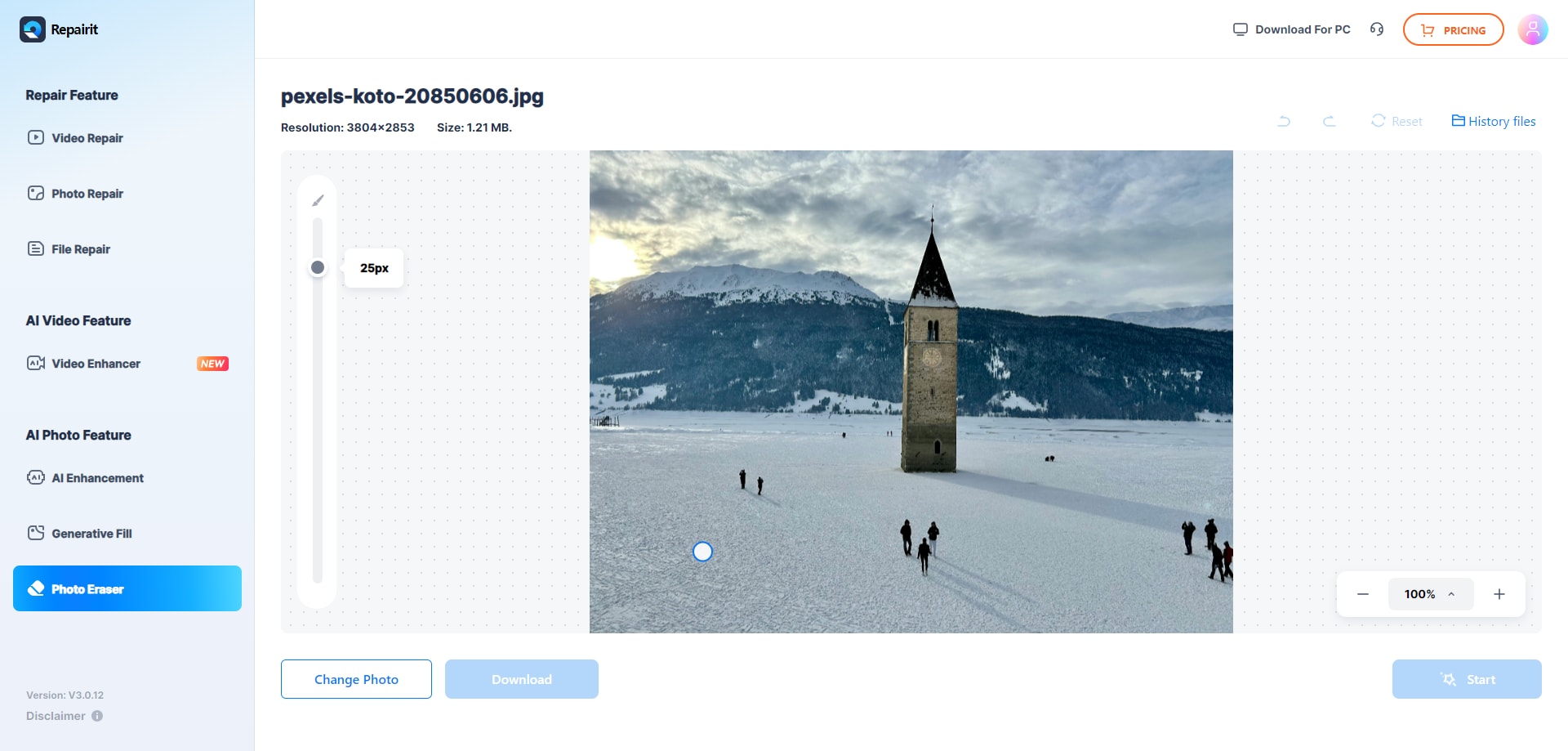
Step 2. Adjust the brush size and select the object or area you want to remove from the image.
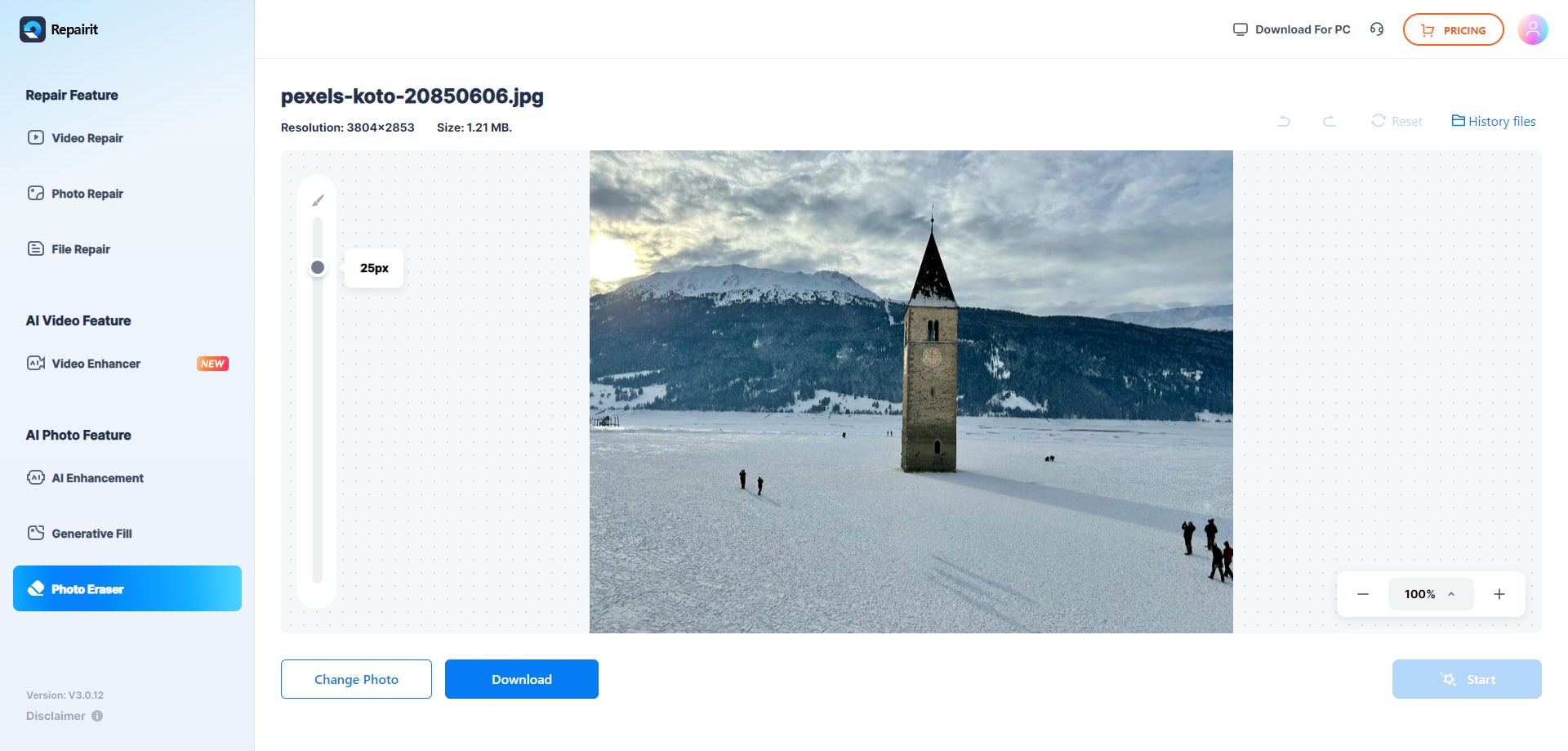
Step 3. Let the AI process the image and download the cleaned photo after the object is removed.
Final Verdict
For users whose main goal is to remove unwanted objects and clean up images quickly, Repairit Photo Eraser usually offers a more direct, time-saving path than AVCLabs PhotoPro AI. Its focused design keeps you on task: highlight distractions, erase them, and export.
AVCLabs PhotoPro AI remains a reasonable choice if you also want AI-powered enhancement and face retouch in the same app and do not mind a heavier workflow. In practice, many users will prefer Repairit for day-to-day object removal, while AVCLabs PhotoPro AI can serve as a more advanced companion when broader image editing is required.
Next: Repairit Photo Eraser vs Luminar Neo
FAQ
-
1. Is Repairit Photo Eraser better than AVCLabs PhotoPro AI for removing unwanted objects?
For typical users who mainly want to erase objects from photos quickly, Repairit Photo Eraser is often more convenient because it is dedicated to object removal and background cleanup. AVCLabs PhotoPro AI can also remove objects but is built as a larger editing suite, so the process may feel heavier for simple tasks. -
2. When does AVCLabs PhotoPro AI make more sense than Repairit Photo Eraser?
AVCLabs PhotoPro AI is more suitable if your workflow regularly combines object removal with AI-driven enhancements and face retouching. If you frequently adjust lighting, detail, or portraits alongside cleanup, having all those tools in one program can be helpful despite the added complexity. -
3. Can both tools delete watermarks or text from photos?
Both tools can technically be used to delete watermarks or text by treating them as unwanted objects, but results vary depending on the background. It is important to respect copyright and terms of use when removing watermarks, and only modify images you have the right to edit. -
4. Which tool is easier for beginners to learn for object removal?
Most beginners will find Repairit Photo Eraser easier to learn because it centers on a simple workflow: upload, mark the object, erase, and save. AVCLabs PhotoPro AI offers more features and controls, which can be helpful for experienced users but may feel more complex at the start.




