
Choosing between Repairit Photo Enhancer vs Bigjpg Desktop mainly comes down to how much control you want over AI enhancement and what types of images you process most. Bigjpg Desktop focuses on straightforward AI upscaling, especially for anime and simple photos, while Repairit Photo Enhancer aims to improve overall photo quality with more enhancement options. This guide compares them on output quality, workflow, and value so you can pick the tool that fits your everyday projects.
Enhance Photo Quality with Repairit Photo Enhancer
 Security Verified. Over 7,302,189 people have downloaded it.
In this article
- Repairit Photo Enhancer vs Bigjpg Desktop: Quick Verdict
- Repairit Photo Enhancer vs Bigjpg Desktop: Key Differences
- Repairit Photo Enhancer vs Bigjpg Desktop: Comparison Table
- What Repairit Photo Enhancer and Bigjpg Desktop Are Best For
- Repairit Photo Enhancer vs Bigjpg Desktop: AI Enhancement Features and Capabilities
- Repairit Photo Enhancer vs Bigjpg Desktop: Output Quality and Real-World Results
- Repairit Photo Enhancer vs Bigjpg Desktop: Workflow and Ease of Use
- Repairit Photo Enhancer vs Bigjpg Desktop: Pricing and Trial Options
- Who Should Choose Repairit Photo Enhancer
- Who Should Choose Bigjpg Desktop
- Pros and Cons of Repairit Photo Enhancer and Bigjpg Desktop
- How to Enhance Photos After Choosing the Right Tool
Repairit Photo Enhancer vs Bigjpg Desktop: Quick Verdict
Bigjpg Desktop is a focused AI image upscaler often used for anime and simple photos. It is designed for people who primarily want to enlarge images with minimal visible quality loss using a straightforward desktop interface. Repairit Photo Enhancer, by contrast, emphasizes improving overall photo quality: enhancing clarity, sharpening blurry photos, reducing noise, and upscaling resolution for a wider range of image types.
If your main goal is to enlarge anime-style art or clean illustrations with almost no settings to tweak, Bigjpg Desktop can be sufficient. If you regularly work with portraits, products, and everyday camera or smartphone photos and want more control over clarity and sharpness, Repairit is usually the stronger choice.
Repairit Photo Enhancer vs Bigjpg Desktop: Key Differences
The key difference between Repairit Photo Enhancer vs Bigjpg Desktop is scope. Bigjpg Desktop focuses on AI upscaling only, while Repairit combines upscaling with broader enhancement tools.
- Best for content type: Bigjpg Desktop is oriented toward anime, line art, icons, and simple photos. Repairit is built for portraits, product images, and mixed everyday photos.
- Control vs simplicity: Repairit gives you more control over clarity, denoising, and sharpening, while Bigjpg Desktop offers a minimal, upload-upscale-download workflow.
- Output goals: Bigjpg Desktop aims to enlarge images with minimal quality loss. Repairit aims to improve overall visual quality, especially for soft or low-resolution photos.
- Use cases: Bigjpg Desktop may fit occasional enlargement tasks, whereas Repairit is better suited to ongoing content creation and photo enhancement work.
Repairit Photo Enhancer vs Bigjpg Desktop: Comparison Table
| Aspect | Repairit Photo Enhancer | Bigjpg Desktop |
|---|---|---|
| Best for | Balanced AI enhancement for portraits, product photos, and general images | Enlarging anime-style art, line art, and simple photos |
| Ease of use | Guided workflow with presets and preview | Very simple, minimal settings |
| Output focus | Improved clarity, sharpness, denoising, and resolution | Upscaling with minimal visible quality loss |
| Enhancement scope | Upscaling plus portrait and general photo enhancement | Mainly scaling, limited enhancement beyond that |
| Workflow style | Import, choose enhancement options, preview, export | Upload, set scale, run, download |
| Typical user | Photographers, sellers, social media creators, small teams | Anime fans, illustrators, users needing quick enlargement |
What Repairit Photo Enhancer and Bigjpg Desktop Are Best For
The two tools shine in slightly different situations, so it helps to think about what you do most often.
- Repairit Photo Enhancer is best for: Users who need balanced AI enhancement for portraits, product photos, and general images, not just enlargement. It is particularly helpful when you need to improve clarity and sharpness in photos from phones or cameras.
- Bigjpg Desktop is best for: Users enlarging anime or simple photos with minimal quality loss and a straightforward desktop tool. It suits people who mainly scale up existing graphics without needing deeper photo adjustments.
Repairit Photo Enhancer vs Bigjpg Desktop: AI Enhancement Features and Capabilities
Looking at capabilities helps clarify which tool fits which workflow.
Repairit Photo Enhancer capabilities
- AI upscaling to increase image resolution while aiming to preserve details.
- Clarity improvement to make soft or low-resolution photos look crisper.
- Sharpening options that help sharpen blurry photos without heavily exaggerating edges.
- Denoising to reduce grain in low-light or high-ISO images.
- Portrait-focused enhancement for better skin clarity and facial details.
- Support for enhancing a variety of images, from portraits and products to scenery and social content.
Bigjpg Desktop capabilities
- AI-based image upscaling designed to enlarge images with minimal quality loss.
- Particularly suitable for anime-style art, icons, and clean illustrations.
- Focused feature set that emphasizes scaling instead of editing.
- Automatic handling of details so users do not have to tweak many settings.
- Desktop-based workflow for users who prefer a local client over a browser-first experience, depending on availability.
In most cases, if you want a single-purpose upscaler, Bigjpg Desktop is aligned with that goal. If you need both upscaling and more general photo enhancement, Repairit offers a wider toolkit.
Repairit Photo Enhancer vs Bigjpg Desktop: Output Quality and Real-World Results
Real-world results depend on image type and expectations more than any single feature list.
- Repairit Photo Enhancer output: It aims to improve overall image clarity, sharpening, and denoising across portraits, products, and everyday photos. This can be useful when dealing with soft, slightly blurry, or noisy images where you want a more polished look rather than just a larger file.
- Bigjpg Desktop output: It typically delivers good perceived quality when enlarging images, especially line art and clean illustrations. Its strengths are most visible when the source image has simple, clear edges and minimal noise.
For complex portraits or mixed scenes, Repairit usually gives you more room to balance sharpness and noise. For anime-style graphics where you mainly care about bigger dimensions without visible artifacts, Bigjpg Desktop may already do what you need.
Repairit Photo Enhancer vs Bigjpg Desktop: Workflow and Ease of Use
Both tools aim to be approachable, but they differ in how much guidance and control they provide.
Repairit Photo Enhancer workflow
Repairit centers around a guided enhancement workflow. You start by importing your photo, then choose among AI enhancement modes such as upscaling, clarity improvement, or portrait-focused enhancement. Many tasks can be handled through presets, which is helpful if you are not comfortable with manual editing sliders.
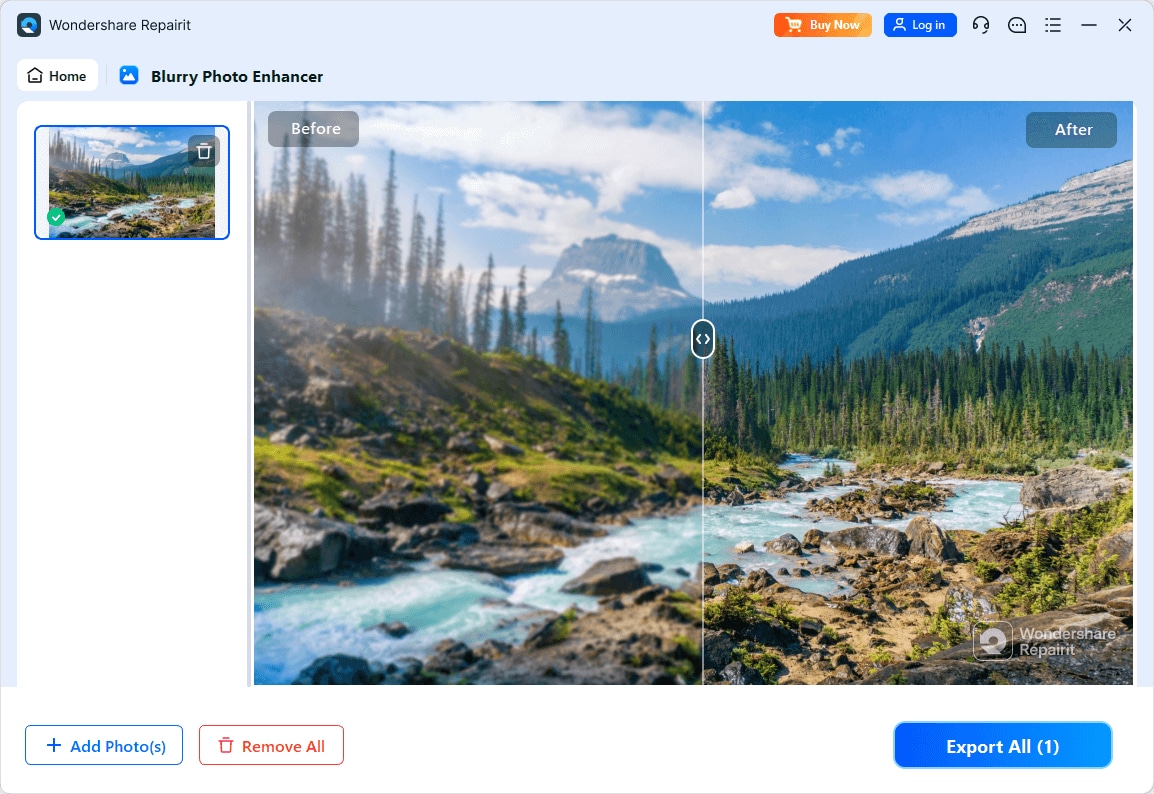
A preview step lets you compare the original and enhanced versions before exporting, so you can decide how much sharpening or denoising you want. This approach suits users who want an extra check before committing to the final file.
Bigjpg Desktop workflow
Bigjpg Desktop keeps its pipeline intentionally simple: upload, upscale, download. You pick the upscaling factor and a few basic options (depending on version) and run the AI process. There are generally fewer settings to manage, which can feel very straightforward for beginners.
The trade-off is flexibility. You get speed and simplicity instead of detailed control over noise levels, portrait refinement, or subtle clarity tweaks.
Repairit Photo Enhancer vs Bigjpg Desktop: Pricing and Trial Options
Both tools use flexible models that can change over time, so checking current details on the official sites is important.
- Repairit Photo Enhancer pricing and trial: Repairit typically offers licensing or subscriptions with ways to test core AI enhancement features before fully committing. Free or trial access can help you see how it improves clarity, sharpness, and resolution on your own images. Paid plans often raise usage limits and unlock broader features.
- Bigjpg Desktop pricing and trial: Bigjpg usually combines online and desktop usage under one pricing structure. Users can often try basic upscaling on a limited number of images, then upgrade for higher limits or larger resolutions. Exact terms may vary by time and region.
Because both pricing structures can evolve, it is wise to confirm the latest offers before choosing a long-term tool.
Who Should Choose Repairit Photo Enhancer
Repairit Photo Enhancer is a better fit if you work with a wide range of photo types and need more than simple enlargement. It suits photographers, content creators, and small businesses that regularly enhance portraits, product photos, social media visuals, and other real-world images.
If you care about improving image clarity, reducing noise, and sharpening blurry photos while also upscaling resolution when needed, Repairit generally provides a more rounded toolkit than a single-purpose upscaler. It is also practical if you prefer to preview changes step by step rather than relying on a single upscale setting.
In most cases, users who handle mixed content rather than mainly anime or illustration work will find Repairit Photo Enhancer more adaptable over time.
Who Should Choose Bigjpg Desktop
Bigjpg Desktop is well suited to users whose main priority is enlarging images with minimal setup, especially anime-style art, clean illustrations, icons, and simple photos. If your workflow is mostly about taking small web graphics or character art and making them larger for printing, slides, or sharing, its focused AI upscaling may be enough.
It also makes sense if you prefer a very simple interface and do not need extra photo enhancement features like detailed portrait refinement or flexible denoising. Users who want to avoid learning more complex editing tools and just need a fast way to upscale images from time to time can benefit from its streamlined, upload-upscale-download workflow.
Pros and Cons of Repairit Photo Enhancer and Bigjpg Desktop
Repairit Photo Enhancer Pros and Cons
Bigjpg Desktop Pros and Cons
How to Enhance Photos After Choosing the Right Tool
Once you have compared Repairit Photo Enhancer vs Bigjpg Desktop and decided which tool suits your main needs, the next step is actually enhancing your images. Bigjpg Desktop can handle focused upscaling tasks, especially for anime and illustration, while Repairit Photo Enhancer offers a guided way to improve clarity, sharpness, and resolution for a wider range of photos.
Key Features
- AI upscaling to increase resolution while preserving details where possible.
- Clarity and sharpness enhancement for soft, slightly blurry photos.
- Denoising to make high-ISO or low-light images look cleaner.
- Portrait-oriented models for faces and skin.
- A preview-driven workflow so you can evaluate changes before saving.
Step-by-step guide
Step 1. Choose an AI enhancement model based on your needs, such as general enhancement, portrait improvement, or image upscaling.

Step 2. Import your photo into Repairit Photo Enhancer to begin the enhancement process.

Step 3. Apply the enhancement settings and let the AI improve clarity, sharpness, and overall image quality.
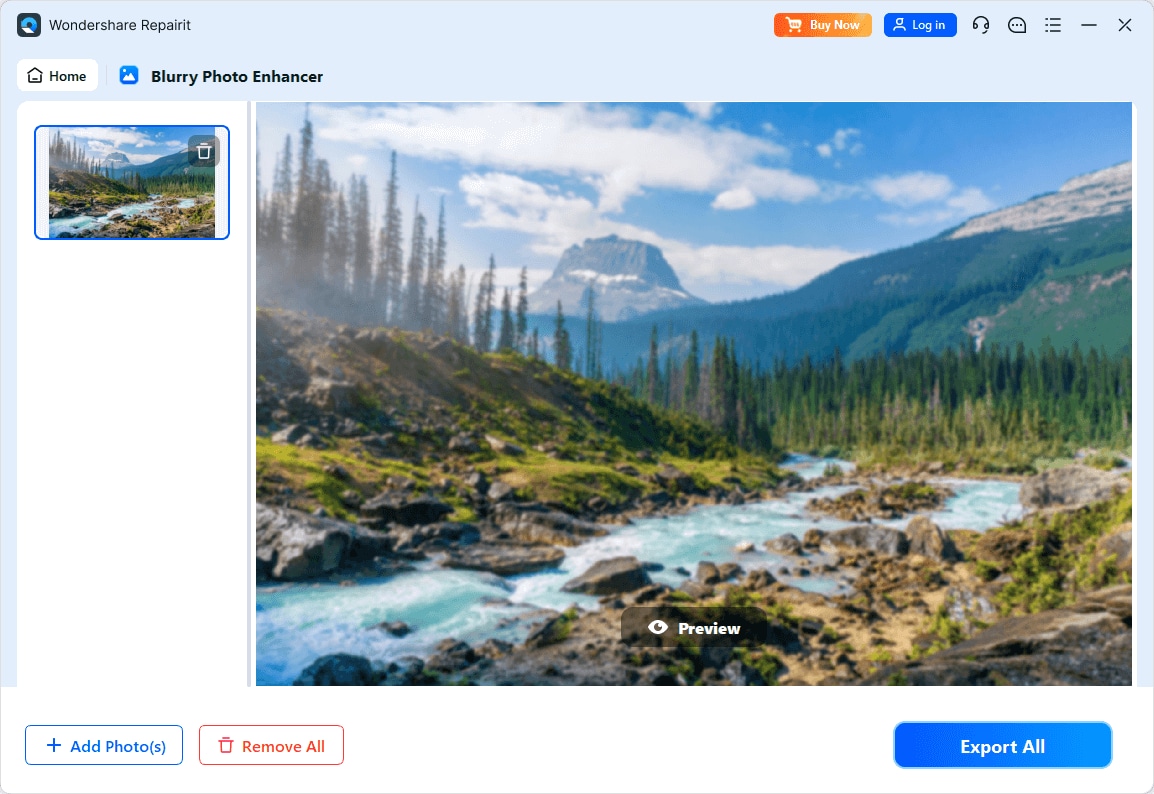
Step 4. Preview the enhanced result and save the improved photo to your device.
Final Verdict
Both Repairit Photo Enhancer and Bigjpg Desktop help users deal with low-resolution images, but they approach the problem differently. Bigjpg Desktop is primarily an AI upscaler that works well when you mainly enlarge anime or simple graphics and appreciate a minimal interface.
Repairit Photo Enhancer, on the other hand, aims to address overall photo quality: upscaling, sharpening, and denoising, along with options tailored to real-world photos like portraits and products. For users who frequently enhance everyday images and want more control over clarity and noise, this broader scope often delivers more daily value.
In practice, some workflows may even combine both: Bigjpg Desktop for focused anime upscaling and Repairit for enhancing portraits and mixed content. The best choice depends on whether you prioritize simple enlargement or more flexible photo enhancement for a variety of image types.
Next: Repairit Photo Enhancer vs Evoto Ai
FAQ
-
1. Is Bigjpg Desktop only for anime images?
Bigjpg Desktop is often used for anime-style art and illustrations, but it can also upscale simple photos. Its strengths are most visible on clean lines and relatively simple details rather than complex, noisy images. -
2. When should I choose Repairit Photo Enhancer instead of Bigjpg Desktop?
Choose Repairit Photo Enhancer if you work with portraits, product shots, and everyday photos and want AI tools that improve clarity, sharpen soft details, and reduce noise in addition to upscaling resolution. -
3. Can I use both Repairit Photo Enhancer and Bigjpg Desktop in one workflow?
Yes. Some users upscale specific artwork with Bigjpg Desktop and then refine overall clarity, noise, or portrait details in Repairit Photo Enhancer to get more balanced final results. -
4. Which tool gives more control over photo enhancement settings?
Repairit Photo Enhancer generally offers more control, with options aimed at sharpening, denoising, and clarity improvements. Bigjpg Desktop focuses on a simpler, mostly automatic upscaling process with fewer adjustable parameters. -
5. Do I need advanced editing skills to use Repairit Photo Enhancer?
No. Repairit Photo Enhancer is designed for non-experts, with presets and previews that guide you through selecting enhancement options, reviewing changes, and exporting without deep technical knowledge.




