
Choosing between Repairit Photo Enhancer vs CyberLink PhotoDirector usually depends on how much time you want to spend editing and how advanced your tools need to be. Repairit Photo Enhancer focuses on quick, AI-driven improvements to enhance photo quality, sharpen blurry photos, and upscale image resolution. CyberLink PhotoDirector, by contrast, is a broader photo editor aimed at casual users who want adjustments, effects, and organizational features in one place. This comparison looks at output quality, AI capabilities, workflow, pricing, and who each option suits so you can decide which one fits your everyday photo enhancement needs.
Enhance Photo Quality with Repairit Photo Enhancer
 Security Verified. Over 7,302,189 people have downloaded it.
In this article
- Repairit Photo Enhancer vs CyberLink PhotoDirector: Quick Verdict
- Repairit Photo Enhancer vs CyberLink PhotoDirector: Key Differences
- Repairit Photo Enhancer vs CyberLink PhotoDirector: Comparison Table
- What Repairit Photo Enhancer and CyberLink PhotoDirector Are Best For
- Repairit Photo Enhancer vs CyberLink PhotoDirector: AI Features and Capabilities
- Repairit Photo Enhancer vs CyberLink PhotoDirector: Output Quality and Results
- Repairit Photo Enhancer vs CyberLink PhotoDirector: Workflow and Ease of Use
- Repairit Photo Enhancer vs CyberLink PhotoDirector: Pricing and Trial Options
- Who Should Choose Repairit Photo Enhancer
- Who Should Choose CyberLink PhotoDirector
- Repairit Photo Enhancer vs CyberLink PhotoDirector: Pros and Cons
- How to Enhance Photos After Choosing the Right Tool
Repairit Photo Enhancer vs CyberLink PhotoDirector: Quick Verdict
In most everyday scenarios, the choice between these tools comes down to whether you want focused AI enhancement or a broader editing environment.
- Repairit Photo Enhancer is a stronger choice when your main goal is to improve image clarity, sharpen soft photos, reduce noise, and upscale image resolution with minimal manual adjustment. Its workflow is streamlined: import, choose an AI model, preview, and export.
- CyberLink PhotoDirector is better suited to casual photographers who want an all-in-one editor for organizing photos, adjusting exposure and color, adding effects, and doing more creative projects alongside basic enhancement.
If you mostly care about photo quality improvements and want to avoid complex interfaces, Repairit tends to be more efficient. If you enjoy exploring effects, layers, and guided editing inside one application, CyberLink PhotoDirector can feel more complete.
Repairit Photo Enhancer vs CyberLink PhotoDirector: Key Differences
The key difference is focus. Repairit Photo Enhancer is built around AI models that analyze and enhance images with minimal input, while CyberLink PhotoDirector combines enhancement with catalog management, adjustment tools, and creative design features.
- Positioning: Repairit is a dedicated AI enhancer; PhotoDirector is a general-purpose photo editor with enhancement included.
- Depth vs simplicity: Repairit trades deep manual control for a clean, linear workflow. PhotoDirector offers many panels, sliders, and modules, which provides flexibility but can require more learning.
- AI emphasis: Repairit focuses its AI on clarity, sharpness, denoising, upscaling, and portraits. PhotoDirector includes AI-assisted tools in the context of its wider editing feature set.
- Workflow scope: Repairit is ideal as a quick enhancement step in any pipeline. PhotoDirector is designed as a hub where you can import, organize, edit, and export from one place.
Repairit Photo Enhancer vs CyberLink PhotoDirector: Comparison Table
| Aspect | Repairit Photo Enhancer | CyberLink PhotoDirector |
|---|---|---|
| Best for | Users who want fast, AI-driven enhancement to improve image clarity, upscale low-resolution photos, and enhance portraits with minimal manual work. | Casual users and hobbyists seeking an all-in-one photo editor with guided tools, creative effects, and organizational features. |
| Ease of use | Very straightforward: upload, choose AI enhancement type, preview, and export. | User-friendly for a full editor, but the broader toolset means a longer learning curve than a focused enhancer. |
| Output focus | Emphasizes sharpness, resolution, and clean details, especially for portraits and slightly soft images. | Delivers good general adjustments and creative looks; AI enhancement is present but less specialized. |
| Workflow style | Streamlined enhancement pipeline: import, pick AI model, fine-tune intensity, export. | Complete editing workflow: import, adjust with tools and effects, optionally use layers, then export. |
| Main strengths | Focused AI enhancement, simple interface, quick results without full editing complexity. | All-in-one editing solution with guided tools, presets, and organization. |
| Main limitations | Not designed for complex, multi-layer projects or full catalog management. | AI enhancement is less specialized; interface can feel heavy if you only need quick improvements. |
What Repairit Photo Enhancer and CyberLink PhotoDirector Are Best For
Understanding where each tool shines will help you match them to your own tasks.
Repairit Photo Enhancer focuses on AI-driven photo enhancement. It is designed to quickly improve image clarity, upscale image resolution, sharpen blurry photos, reduce noise, and enhance portraits with simple controls. Rather than replacing a full editor, it fits neatly as the quality-boosting step in your workflow.
CyberLink PhotoDirector is an all-in-one photo editor for casual users and hobbyists. It combines adjustment tools, enhancement features, guided modules, filters, layers, and organizational options. Its AI features support enhancement, but the product is oriented toward general editing rather than being a dedicated enhancement engine.
In most cases, choose Repairit when your primary concern is strong, natural-looking enhancement with minimal effort, and lean toward PhotoDirector when you prefer a single application for managing and creatively editing your photos.
Repairit Photo Enhancer vs CyberLink PhotoDirector: AI Enhancement Features and Capabilities
Both tools use AI, but they apply it differently.
Repairit Photo Enhancer AI capabilities include:
- AI upscaling to increase image resolution while preserving as much detail as possible.
- Sharpening tools that make soft or slightly blurry photos appear clearer and more defined.
- Denoising features to clean up grain and noise, especially in low-light or high-ISO photos.
- Clarity and detail enhancement to emphasize textures and edges without making images look harsh when used moderately.
- Portrait-focused models that refine facial features and apply moderate skin smoothing while aiming for a natural look.
- Automatic enhancement modes that adjust multiple parameters at once based on AI analysis.
- Simple intensity controls so you can decide how subtle or strong the enhancement should be.
CyberLink PhotoDirector AI capabilities fit within a broader toolkit:
- Guided editing tools for common corrections like lighting, color, and basic clarity.
- Standard adjustment sliders for exposure, contrast, color balance, and local detail enhancement.
- AI-assisted tools for automatic or subject-aware improvements as part of its editing modules.
- Presets and effects to quickly change the overall mood or style of a photo.
- Layer-based editing for combining images, text, and design elements.
- Organizational tools for structuring and browsing your photo collection.
Overall, Repairit concentrates its AI on core enhancement tasks such as upscaling, sharpening, denoising, and portrait refinement, while CyberLink PhotoDirector spreads its capabilities across enhancement, creative editing, and management. This matters if you primarily want enhancement quality versus a wide feature set.
Repairit Photo Enhancer vs CyberLink PhotoDirector: Output Quality and Real-World Results
When you are judging results, you are usually looking for cleaner details, better sharpness, and natural-looking faces.
- Repairit Photo Enhancer is tuned for visible improvements in clarity and resolution. In many cases, soft smartphone shots, slightly blurry images, or low-resolution photos can look noticeably crisper after AI upscaling and sharpening, especially around edges and facial features. The denoising is geared toward reducing grain without overly smearing details when used with moderate settings.
- CyberLink PhotoDirector generally delivers solid everyday results for exposure, color, and basic clarity. Its enhancement tools can make images look brighter, more balanced, and more vibrant. For users who enjoy stylized looks, its presets and effects can deliver eye-catching images, though they may prioritize creative style over purely technical sharpness.
If your typical frustration is that photos look a bit soft, noisy, or low resolution, Repairit tends to provide a more focused way to address those specific issues. If you mainly want your photos to be well-exposed, colorful, and ready for sharing with some creative flair, PhotoDirector may feel sufficient.
Repairit Photo Enhancer vs CyberLink PhotoDirector: Workflow and Ease of Use
Workflow is often what determines whether you keep using a tool after the first week.
Repairit Photo Enhancer workflow is intentionally linear:
- Open the application and choose an enhancement mode (for example upscaling, sharpening, or portraits).
- Import your photo via a simple file picker.
- Select the AI model or profile if multiple options are offered.
- Preview the before and after views and adjust intensity until it looks natural.
- Apply the enhancement and export the result.
This focused flow means you mainly decide what you want to fix and how strong the effect should be. The interface is aimed at users with little or no editing background.
CyberLink PhotoDirector workflow follows a more traditional editor structure:
- Launch the software and import photos into a library or workspace.
- Choose between guided tools for step-by-step improvements or manual controls for fine-tuning.
- Use enhancement, adjustment, and creative tools together, optionally adding layers and text.
- Organize edited images and then export or share them.
For an all-in-one editor, PhotoDirector is approachable, especially with guided modules. However, if you only want quick enhancement, the additional panels and modules may feel heavier than necessary.
In practice, Repairit offers a short, AI-centered path from import to export, while PhotoDirector suits users who think in terms of complete projects and libraries.
Repairit Photo Enhancer vs CyberLink PhotoDirector: Pricing and Trial Options
Pricing and licensing can change, but there are some general patterns.
- Repairit Photo Enhancer is typically offered as a paid product, sometimes with subscription or one-time purchase options depending on promotions and bundles. A trial or limited free usage is often available so you can test enhancement quality before paying, though there may be watermarks or export limits. It tends to offer good value if you prioritize AI enhancement quality and a time-saving workflow over broad creative features.
- CyberLink PhotoDirector is generally sold via perpetual licenses, subscriptions, or as part of larger suites, depending on edition and region. CyberLink commonly offers trial versions with time or output restrictions so you can evaluate the interface and tools. For casual users who want editing, effects, and organization in one package, it can be a cost-effective all-in-one choice.
Because pricing, plans, and trial conditions for both tools evolve and can vary by country, check each vendor s official website for current details before making a purchase decision.
Who Should Choose Repairit Photo Enhancer
Repairit Photo Enhancer is well suited to users who mostly care about output quality and a straightforward process.
- People who mainly need to enhance photo quality for travel shots, social media posts, profile images, and everyday photos.
- Users who want to sharpen blurry photos from phones or older cameras without learning complex editing techniques.
- Anyone dealing with soft, low-resolution, or slightly noisy images that need upscaling and clarity improvements for printing or sharing.
- Content creators and marketers who prefer quick, repeatable AI enhancement over manual, layer-based edits.
- Beginners who feel overwhelmed by full editing suites but still care about clean, natural-looking enhancements.
Key reasons to choose Repairit include its AI-first workflow (import, choose enhancement, preview, export), focused features around upscaling, sharpening, denoising, and portrait enhancement, and its relatively low learning curve. It also works well as a companion to other editors if you already have a creative tool but want a dedicated enhancement stage.
Who Should Choose CyberLink PhotoDirector
CyberLink PhotoDirector fits users who see enhancement as just one part of their editing routine.
- Casual photographers and hobbyists who want an all-in-one space for organizing, adjusting, and creatively editing photos.
- Users who appreciate guided tools that walk them through common corrections like brightness, color, and detail.
- People who want to mix photo enhancement with overlays, text, and design elements in collages or social posts.
- Those who edit on both desktop and mobile and prefer staying within the same general ecosystem.
You might lean toward PhotoDirector if you value:
- Combining enhancement with editing, creative effects, and organization in a single application.
- Guided modules that reduce the need to understand every technical setting.
- Better support for building stylized, layered, or composition-based projects than a single-purpose enhancer can provide.
If your top priority is managing a collection of photos, applying creative looks, and performing general editing with some AI help, CyberLink PhotoDirector may be sufficient without adding another dedicated enhancer.
Pros and Cons of Repairit Photo Enhancer and CyberLink PhotoDirector
Weighing pros and cons side by side helps clarify which trade-offs matter more for your workflow.
Repairit Photo Enhancer Pros and Cons
CyberLink PhotoDirector Pros and Cons
How to Enhance Photos After Choosing the Right Tool
Once you have compared Repairit Photo Enhancer vs CyberLink PhotoDirector and decided which approach matches your workflow, the next step is actually enhancing your photos. If you prefer a guided, AI-first process focused on clarity, sharpness, and resolution, using Repairit as your enhancement stage can keep things simple while still improving visual quality.
Repairit Photo Enhancer Introduction
Repairit Photo Enhancer, available at https://repairit.wondershare.com/photo-enhancer.html, is built as an AI-driven solution for users who mainly want to enhance photo quality without dealing with a full editing suite. Instead of asking you to manage layers or complex masks, it focuses on intelligent models that analyze your images and apply targeted improvements with just a few decisions from you.
Its core capabilities revolve around improving image clarity, sharpening soft details, upscaling low-resolution photos, reducing visible noise, and enhancing portraits while aiming to preserve a natural appearance. This makes it practical for everyday smartphone photos, social media content, and older images that look a bit flat or soft on modern screens.
Key Features
- AI upscaling to increase resolution while seeking to retain important details.
- Sharpening and clarity tools to make slightly blurry photos appear more defined.
- Denoising to reduce grain and visual noise from low-light or high-ISO shots.
- Portrait enhancement tuned for faces, with moderate skin smoothing and feature refinement.
- Automatic enhancement modes that adjust multiple aspects of the image in one pass.
- Simple intensity sliders that let you decide how strong the effect should look.
- A streamlined import, enhance, and export workflow that fits into existing editing pipelines.
Step-by-step guide
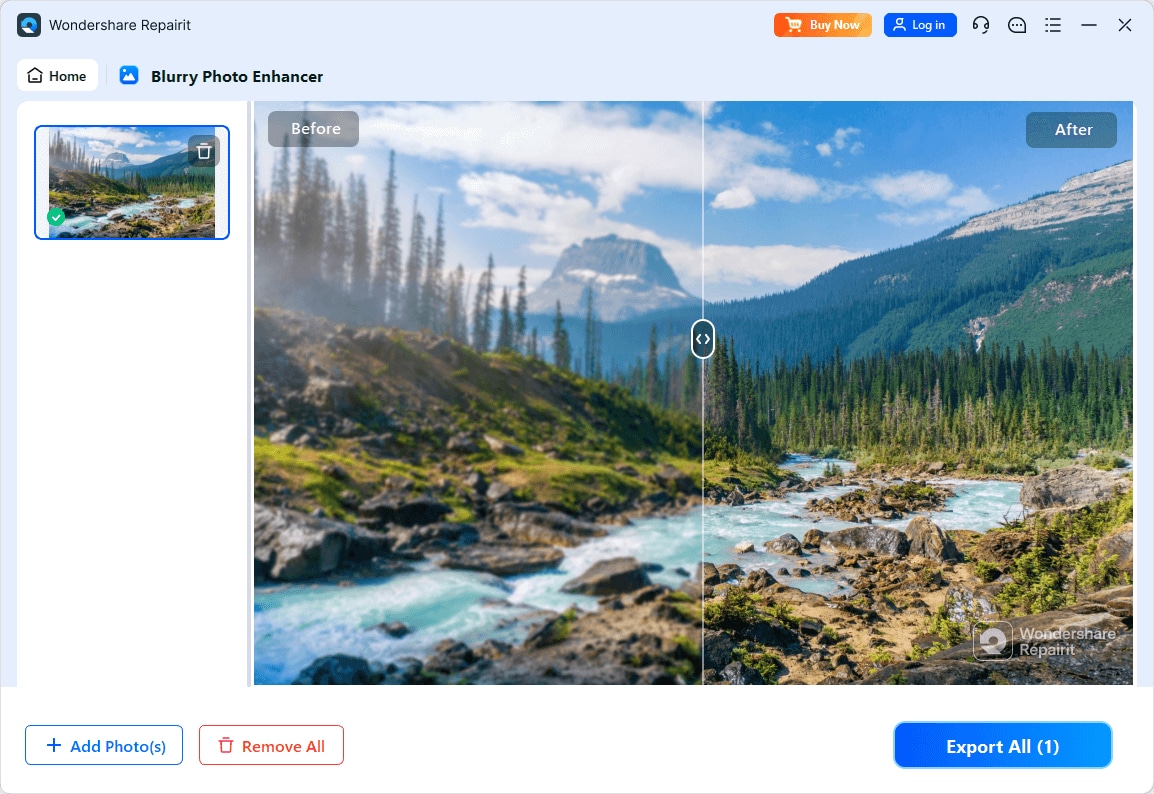
Step 1. Choose an AI enhancement model based on your needs, such as general enhancement, portrait improvement, or image upscaling.

Step 2. Import your photo into Repairit Photo Enhancer to begin the enhancement process.

Step 3. Apply the enhancement settings and let the AI improve clarity, sharpness, and overall image quality.

Step 4. Preview the enhanced result and save the improved photo to your device.
Final Verdict
Both tools address the same problem improving photo quality but from different angles. Repairit Photo Enhancer emphasizes AI-driven clarity, resolution, and portrait improvements through a clean, guided interface. It is a strong fit if you often work with soft, low-resolution, or slightly noisy images and want them to look clearer with minimal effort.
CyberLink PhotoDirector offers a broader environment that mixes adjustments, enhancement, organization, and creative effects. For casual users who enjoy guided editing and want to manage a library and build stylized images in one place, PhotoDirector can be a good all-rounder.
In many workflows, it can make sense to combine approaches: use PhotoDirector for general editing and layout, and rely on Repairit Photo Enhancer as a dedicated stage to improve image clarity and resolution before final export. The better choice depends on whether you value a focused AI enhancement workflow or a multi-purpose editing platform.
Next: Repairit Photo Enhancer vs Dxo Photolab
FAQ
-
1. Is Repairit Photo Enhancer easier to use than CyberLink PhotoDirector?
For pure enhancement tasks, most users find Repairit Photo Enhancer simpler because it centers on a short sequence: import, apply an AI model, preview, and export. CyberLink PhotoDirector is still user-friendly, but its additional modules and tools can take longer to learn if you only care about quickly improving image clarity and sharpness. -
2. Which tool is better for sharpening slightly blurry photos?
Results depend on the image, but Repairit Photo Enhancer is built around AI workflows for sharpening and clarity, so it usually offers a more focused experience for soft or slightly blurry photos. CyberLink PhotoDirector includes sharpening and clarity controls as part of a wider editing suite, which may be enough for casual users who do not need specialized enhancement. -
3. Do I need both Repairit Photo Enhancer and CyberLink PhotoDirector?
You do not have to use both, but combining them can be helpful in some workflows. Many people use CyberLink PhotoDirector to organize and edit their photos and then rely on a dedicated enhancer like Repairit when they want stronger AI-based upscaling or clarity improvements before final export or printing. -
4. Which option is better for beginners who prefer guided tools?
CyberLink PhotoDirector offers guided modules that walk beginners through common tasks like improving brightness, color, and detail, and it adds creative effects on top. However, if your main goal is just to enhance photo quality with as few decisions as possible, Repairit Photo Enhancer may feel even more approachable because it focuses on a small set of AI enhancement paths. -
5. Can these tools replace a professional editing suite?
CyberLink PhotoDirector comes closer because it combines editing, organization, and creative features, but it still targets casual and enthusiast users rather than high-end studio workflows. Repairit Photo Enhancer is designed as a specialized enhancement tool to improve clarity, sharpness, and resolution, not as a full replacement for advanced, multi-layer editing platforms.




