
Choosing between Repairit Photo Enhancer vs DxO PhotoLab usually comes down to how deep you want to edit and how much time you have. DxO PhotoLab is a powerful RAW photo editor with advanced noise reduction and manual controls, while Repairit Photo Enhancer focuses on quick, AI-driven improvements for common images. This comparison walks through output quality, AI features, ease of use, and pricing so you can decide which tool better matches your photos and workflow.
Both tools aim to enhance photo quality but in different ways. Repairit leans into automated AI enhancement to improve image clarity, sharpen blurry photos, and upscale image resolution. DxO PhotoLab, by contrast, is built around detailed RAW processing and noise reduction for photographers who want to shape every part of the image.
Enhance Photo Quality with Repairit Photo Enhancer
 Security Verified. Over 7,302,189 people have downloaded it.
In this article
- Repairit Photo Enhancer vs DxO PhotoLab: Quick Verdict
- Repairit Photo Enhancer vs DxO PhotoLab: Key Differences
- Repairit Photo Enhancer vs DxO PhotoLab: Comparison Table
- What Repairit Photo Enhancer and DxO PhotoLab Are Best For
- Repairit Photo Enhancer vs DxO PhotoLab: AI Enhancement Features and Capabilities
- Repairit Photo Enhancer vs DxO PhotoLab: Output Quality and Real-World Results
- Repairit Photo Enhancer vs DxO PhotoLab: Workflow and Ease of Use
- Repairit Photo Enhancer vs DxO PhotoLab: Pricing and Trial Options
- Who Should Choose Repairit Photo Enhancer
- Who Should Choose DxO PhotoLab
- Pros and Cons of Repairit Photo Enhancer and DxO PhotoLab
- How to Enhance Photos After Choosing the Right Tool
Repairit Photo Enhancer vs DxO PhotoLab: Quick Verdict
If you want to enhance photo quality quickly with minimal effort, Repairit Photo Enhancer tends to be the more convenient option. It is tuned for fast AI enhancement of portraits, low-resolution images, and everyday photos where you just want better clarity, sharpness, and resolution.
For photographers working with RAW files who care deeply about AI noise reduction, lens corrections, and manual control over color and tone, DxO PhotoLab can be a stronger fit. Its workflow is more advanced and usually suits users who already understand traditional editing tools.
In many setups, a practical approach is to use Repairit for fast AI improvements on common images, and DxO PhotoLab for more deliberate editing sessions on RAW photos from dedicated cameras.
Repairit Photo Enhancer vs DxO PhotoLab: Key Differences
The main difference between Repairit Photo Enhancer vs DxO PhotoLab is how much control you want over the editing process.
- Editing depth: Repairit focuses on automated AI models with a few clear choices. DxO PhotoLab offers extensive sliders and local adjustments for users who want to fine-tune exposure, color, and detail.
- File types: Repairit is oriented around common formats like JPEG and PNG, useful for smartphone shots, graphics, and web images. DxO PhotoLab is built around camera-specific RAW files with support for JPEG and TIFF as well.
- Noise reduction focus: Repairit provides AI denoising aimed at typical noisy or low-quality images. DxO PhotoLab emphasizes advanced noise reduction on RAW images shot at high ISO.
- Workflow complexity: Repairit has a short, guided flow: import, choose model, preview, export. DxO PhotoLab involves more steps and tool panels, which can be powerful but also more time-consuming.
- Target users: Repairit is aimed at casual users, content creators, and small businesses. DxO PhotoLab is targeted at enthusiasts and professionals used to full-featured photo editors.
Repairit Photo Enhancer vs DxO PhotoLab: Comparison Table
| Aspect | Repairit Photo Enhancer | DxO PhotoLab |
|---|---|---|
| Best for | Quick AI enhancement of everyday photos, portraits, and low-resolution images | RAW photographers needing detailed noise reduction and full editing controls |
| Ease of use | Simple, guided interface with a few AI enhancement modes | More complex interface with many tools and panels |
| Output focus | Improved clarity, sharpness, and resolution on common image formats | High-quality RAW output with strong noise reduction and optical corrections |
| Workflow style | Streamlined: import or drag-and-drop, choose AI mode, preview, export | Traditional editor: import RAW, adjust settings, apply noise reduction, export |
| Key strengths | Fast AI processing, beginner-friendly, strong for soft or low-resolution photos | Advanced RAW noise reduction, lens profiles, granular control over exposure and color |
| Typical user | Casual shooters, marketers, social media creators, small teams | Enthusiast and professional photographers working from RAW files |
What Repairit Photo Enhancer and DxO PhotoLab Are Best For
Repairit Photo Enhancer and DxO PhotoLab both aim to improve image quality, but they fit different types of work.
Repairit Photo Enhancer is best for:
- Enhancing photos from phones, screenshots, or older cameras where resolution is limited.
- Sharpening slightly blurry or soft images that need clearer edges and improved detail.
- Improving portraits for social media, presentations, or marketing materials.
- Users who prefer AI to handle most decisions instead of working with many sliders.
DxO PhotoLab is best for:
- RAW workflows where you want fine-grained control over exposure, color, and contrast.
- High ISO and low-light photography that benefits from advanced RAW noise reduction.
- Photographers who rely on lens profiles and camera-specific corrections.
- Projects where you need a non-destructive editing pipeline and repeatable adjustment presets.
In practice, Repairit leans towards fast, AI-powered enhancement, while DxO PhotoLab fits more deliberate editing sessions.
Repairit Photo Enhancer vs DxO PhotoLab: AI Enhancement Features and Capabilities
The AI capabilities of each tool are designed for different stages of the photo editing process.
Repairit Photo Enhancer AI features:
- AI upscaling: Increase resolution to make small or low-resolution images more usable for larger displays or prints.
- Sharpening models: Improve clarity in slightly blurry or soft images to better define details.
- Denoising: Reduce visible noise and grain in low-light or high-ISO shots on common image formats.
- Portrait enhancement: Enhance faces, skin, and overall portrait appearance while aiming to keep a natural look.
- General enhancement: Improve details and clarity in compressed or low-quality images with minimal configuration.
DxO PhotoLab AI and processing features:
- Advanced noise reduction: Algorithms oriented toward RAW files, especially from interchangeable-lens cameras shot at high ISO.
- Detail and sharpness controls: Sliders that let you tune micro-contrast and sharpness manually.
- Optical corrections: Camera and lens profiles, where supported, to correct distortion, vignetting, and other issues.
- Global and local adjustments: Tools for targeted corrections to exposure, color, and tone across the image.
For users who want AI to automatically enhance photo quality in a few clicks, Repairit is usually more straightforward. For photographers who want to mix advanced noise reduction with their own manual adjustments, DxO PhotoLab provides more control.
Repairit Photo Enhancer vs DxO PhotoLab: Output Quality and Real-World Results
Output quality depends heavily on your starting files and how much time you are willing to invest in fine-tuning.
With typical smartphone shots, screenshots, or web images, Repairit Photo Enhancer can often deliver noticeable improvements with almost no setup. Upscaling low-resolution photos, sharpening soft edges, and enhancing portraits can make them look cleaner and more professional without touching complex controls. This matters if your goal is to quickly prepare images for social media, online listings, or presentations.
With RAW files from dedicated cameras, DxO PhotoLab can offer more precise results, especially for noise reduction and tonal control. Because it operates on RAW data and allows detailed adjustments, you can push shadows, adjust highlights, and fine-tune color in ways that might not be available in a lighter AI enhancer. This is helpful if you are preparing large prints or high-end client work.
In most cases:
- Repairit is strong for fast, visible upgrades to low-quality or standard-resolution photos.
- DxO PhotoLab is stronger when you want to maximize the potential of RAW files and have time to adjust settings carefully.
Repairit Photo Enhancer vs DxO PhotoLab: Workflow and Ease of Use
Workflow and ease of use often determine whether a tool fits into your daily routine.
Repairit Photo Enhancer workflow and ease of use:
Repairit emphasizes a simple, guided path. You launch the tool, import or drag-and-drop your photo, pick an AI mode such as upscaling, denoising, sharpening, or portrait enhancement, and then preview the results before exporting. The interface keeps choices limited, which helps non-experts avoid confusion and move quickly from input to output.
DxO PhotoLab workflow and ease of use:
DxO PhotoLab follows a more traditional editor-style flow: import images (often RAW), apply automatic adjustments and noise reduction, then refine with many manual sliders for exposure, color, and detail. This can feel complex if you are new to photo editing. However, for experienced users, the range of options can be an advantage because it supports more nuanced control and repeatable editing setups.
If you value a short learning curve and minimal decisions, Repairit is usually less intimidating. If you are comfortable with multi-panel editors and want more control, DxO PhotoLab may feel more at home.
Repairit Photo Enhancer vs DxO PhotoLab: Pricing and Trial Options
Budget and licensing models are important, especially if you are a casual user or a small team.
Repairit Photo Enhancer pricing and trial:
Repairit Photo Enhancer is typically positioned as an affordable, consumer-friendly product. Pricing can vary by region and promotions, but it is usually accessible for students, content creators, and small businesses. A trial or free version is often available, letting you test AI enhancement on a limited number of photos or with feature restrictions before you decide whether to purchase.
DxO PhotoLab pricing and trial:
DxO PhotoLab is generally priced for enthusiast and professional photographers. Licenses are often sold per major version, sometimes in editions that differ in included features. It usually comes with a time-limited trial so you can evaluate its RAW noise reduction, interface, and workflow with your own files. For exact pricing and current trial terms, you should refer to the official DxO PhotoLab website.
For casual users who just want to enhance photo quality without a heavy investment, Repairit may feel more accessible. For photographers who are ready to invest in a full RAW editor, DxO PhotoLab can be worth the higher cost.
Who Should Choose Repairit Photo Enhancer
Repairit Photo Enhancer is a strong fit if your priority is getting better-looking photos quickly, without diving into complex editing concepts.
- You mainly work with JPEGs, PNGs, or similar formats from phones, screenshots, or older cameras.
- You want to upscale image resolution to make small images suitable for larger screens or prints.
- You often need to sharpen blurry photos or fix soft details in product shots, portraits, or social posts.
- You prefer AI to handle decisions about denoising and enhancement so you can stay focused on choosing images and publishing them.
- You do not need advanced color grading, layered editing, or camera-specific RAW pipelines.
Content creators, marketers, small business owners, and casual photographers who value speed and simplicity will usually find that Repairit aligns well with their daily workflows.
Who Should Choose DxO PhotoLab
DxO PhotoLab is aimed at users who want more control and are comfortable spending extra time per image.
- You regularly shoot in RAW and want to preserve as much data as possible for editing.
- You frequently work in low light or at high ISO and need strong RAW noise reduction integrated into your editing pipeline.
- You want camera and lens-specific corrections for distortion, vignetting, and sharpness, where supported.
- You prefer using manual sliders for exposure, white balance, color, and local adjustments to fine-tune your images.
- You are willing to learn a richer interface and maintain a more complex editing catalog or project structure.
Enthusiast and professional photographers, especially those producing large prints or client work, may find that DxO PhotoLab offers the depth they need to shape images precisely.
Pros and Cons of Repairit Photo Enhancer and DxO PhotoLab
Repairit Photo Enhancer Pros and Cons
DxO PhotoLab Pros and Cons
How to Enhance Photos After Choosing the Right Tool
After comparing Repairit Photo Enhancer vs DxO PhotoLab, the next step is actually enhancing your photos. Even if you plan to keep DxO PhotoLab for advanced RAW work, a guided AI enhancer can be a practical way to quickly improve everyday images before sharing or using them in projects.
Repairit Photo Enhancer offers a focused environment for users who want to improve image clarity, sharpen soft details, and upscale image resolution in just a few steps. Here is how it fits into a typical enhancement workflow.
Key Features
- Guided interface that walks you through importing, selecting AI modes, previewing, and exporting.
- AI upscaling to increase resolution while attempting to maintain or enhance detail.
- Sharpening and clarity improvement for soft or slightly blurry photos.
- Portrait enhancement tuned for faces and skin so portraits look more polished.
- Denoising options that reduce grain in low-light or noisy images.
- Simple, repeatable workflows for handling multiple images in similar ways.
Step-by-step guide
Step 1. Choose an AI enhancement model based on your needs, such as general enhancement, portrait improvement, or image upscaling.

Step 2. Import your photo into Repairit Photo Enhancer to begin the enhancement process.

Step 3. Apply the enhancement settings and let the AI improve clarity, sharpness, and overall image quality.
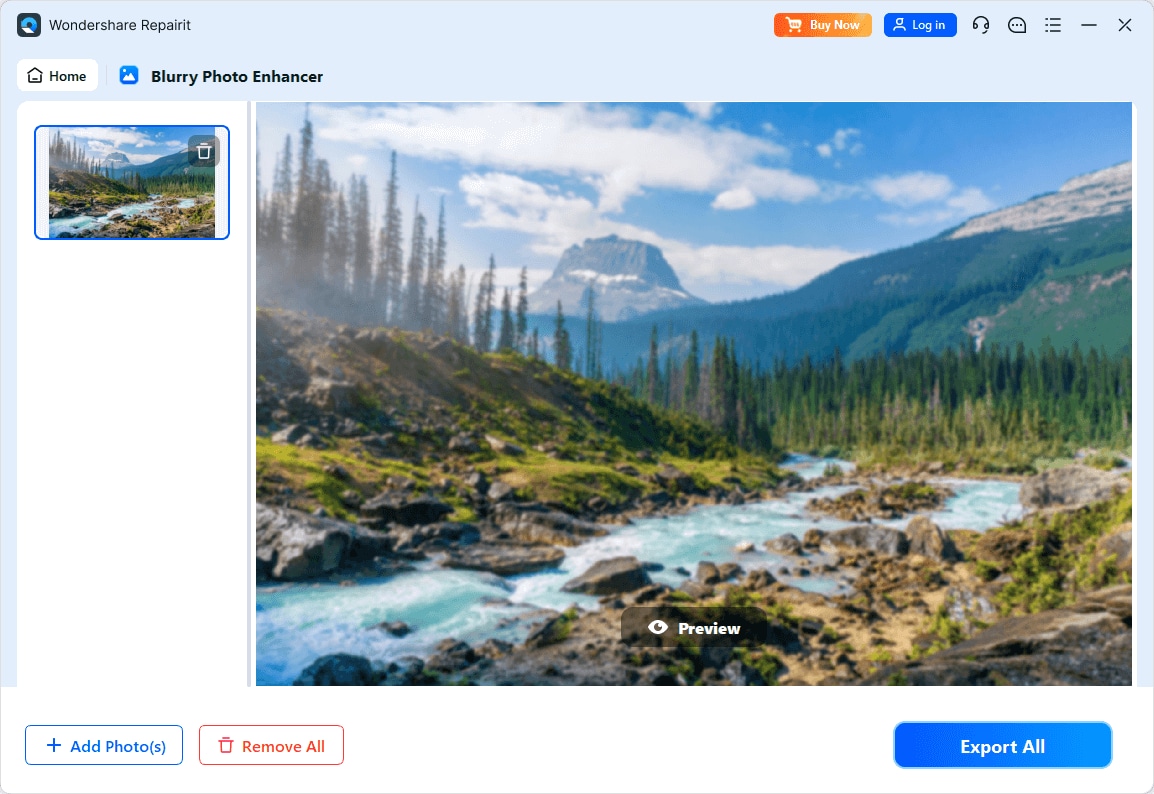
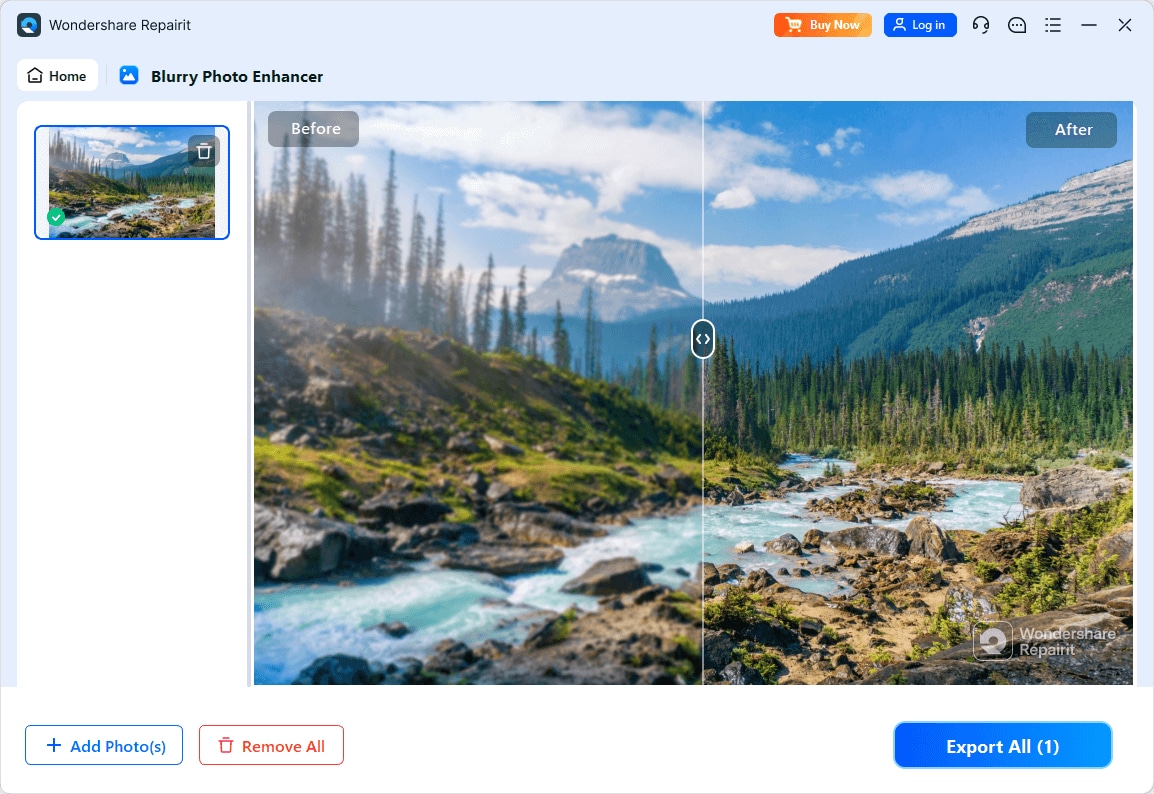
Step 4. Preview the enhanced result and save the improved photo to your device.
Final Verdict
Repairit Photo Enhancer and DxO PhotoLab both aim to improve image quality but take distinct approaches. Repairit focuses on fast, AI-guided enhancement for common image formats, making it appealing to users who want to upscale, denoise, and sharpen with minimal effort. DxO PhotoLab is a more comprehensive photo editor, especially valuable for RAW photographers who want strong noise reduction and detailed manual control.
If you mainly enhance portraits, social media images, or general photos and prefer a short, predictable workflow, Repairit is likely the more convenient choice. If you regularly shoot RAW, work in challenging lighting, and value camera-specific corrections and precise adjustments, DxO PhotoLab may be better aligned with your needs.
In many real-world workflows, using both is reasonable: Repairit Photo Enhancer for quick AI upgrades on everyday images, and DxO PhotoLab when you want to invest more time into refining RAW files.
Next: Repairit Photo Enhancer vs Upscayl
FAQ
-
1. Is Repairit Photo Enhancer a full replacement for DxO PhotoLab?
For users who mainly need to enhance photo quality quickly on common image formats, Repairit Photo Enhancer can cover most day-to-day needs. However, it is not designed as a full RAW editor, so photographers who rely on extensive manual controls, lens profiles, and detailed color workflows may still prefer DxO PhotoLab for advanced projects. -
2. Which tool is better for reducing noise in RAW images?
DxO PhotoLab is generally more suitable for noise reduction on RAW files because its workflow and algorithms are oriented toward RAW processing from dedicated cameras. Repairit Photo Enhancer focuses more on denoising and improving typical JPEG or PNG images from everyday sources. -
3. Which is easier to learn, Repairit Photo Enhancer or DxO PhotoLab?
Repairit Photo Enhancer is typically easier to learn since it centers on a few AI enhancement modes and a short, guided workflow. DxO PhotoLab offers more control but also more panels, sliders, and settings, which can require additional time for new users to understand. -
4. Can I use both Repairit Photo Enhancer and DxO PhotoLab together?
Yes. Many users may enhance images quickly with Repairit Photo Enhancer for tasks like upscaling or sharpening, then take the improved files into DxO PhotoLab or another editor for further color adjustments, local corrections, or print preparation, depending on the project. -
5. Which option is more budget-friendly for casual users?
Repairit Photo Enhancer is usually positioned as more budget-friendly for casual users and small teams that need straightforward AI enhancement. DxO PhotoLab is often priced for enthusiasts and professionals who require comprehensive RAW editing and advanced noise reduction.




