
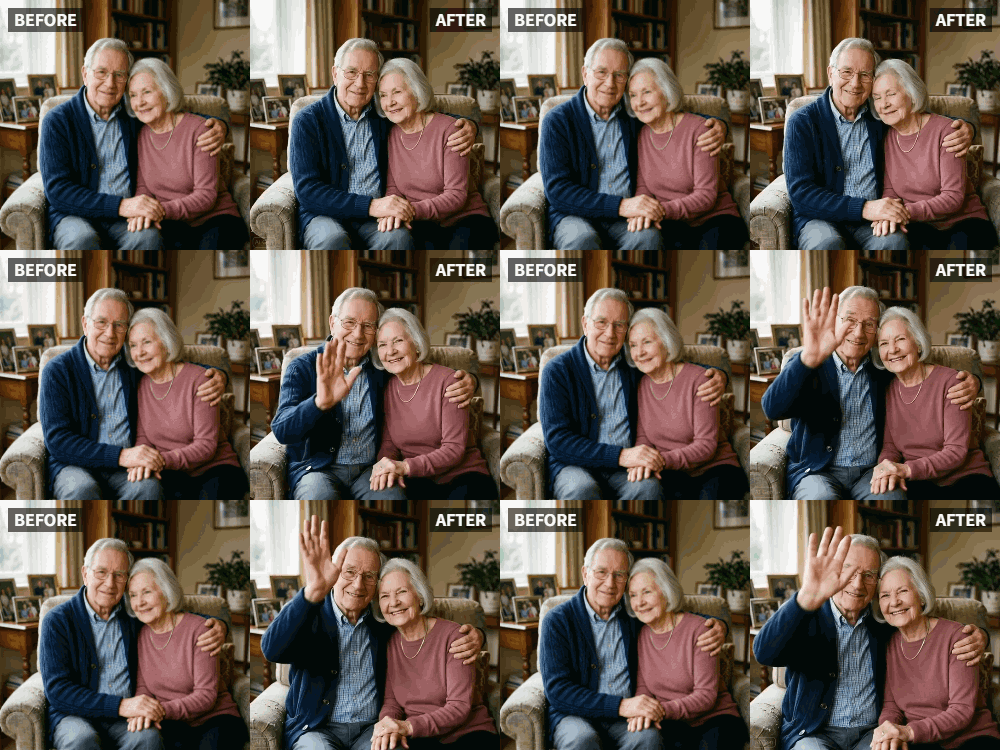
 TL;DR:
Relumi AI's Photo Animation feature transforms static heritage and black-and-white photos into lifelike videos using the specific "Old Photo Revival" preset to generate subtle, respectful facial movements like blinks and smiles.
● Images should be scanned at a minimum of 300 DPI and processed through Relumi's repair tools to fix major rips or stains before applying the animation effect.
● The generation process takes 10 to 30 seconds and exports as a visual-only MP4 file, requiring users to utilize third-party video editing applications to add audio or narration.
● Accounts on the free tier are restricted to 30 animations per month, while paid subscription plans offer higher usage limits.
Ask AI for a summary
 ChatGPT
 Perplexity
 Gemini
 Claude
 Grok
Grok
There is a heartbreaking thread on Quora that asks, "If you could bring one photo to life, which would it be?" The answers are filled with stories of grandparents, lost parents, and childhood memories. Static old photos often feel distant. They capture a face, but they lose the personality.
Relumi AI's Photo Animation feature offers a way to bridge that gap. It's not just about fixing scratches or colorizing black-and-white images; it's about restoring the humanity—the subtle blink of an eye or the hint of a smile that existed just a fraction of a second after the shutter clicked . According to memory preservation experts, seeing a loved one move—even subtly—triggers emotional responses that static photos cannot .
In this article
Part 1: The Difference Between Restoration and Animation
Traditional "old photo repair" fixes cracks and fading. But if you look at forums discussing legacy content, users often express a desire for more—they want to see their relatives move. They want to know: what was Grandma's smile like? Did Dad blink a lot? Was Great-Uncle serious or secretly playful?
When you use Relumi, you start with a restored image. But then, the Facial Expression Animation takes over. It analyzes the facial landmarks in the vintage photo and applies realistic motion. It's a profound experience to see a stoic great-grandfather in a Civil War uniform blink and look around, or a formal Victorian woman soften her expression. These aren't just animations; they're emotional time travel.
Part 2: Step-by-Step Guide to Animating a Heritage Photo
Based on tutorials for similar platforms , here is how to handle delicate old photos:


Relumi AI Photo Animation
Bring old photos to life with AI-powered animation.

 Preset motion styles — Wave, Dance, Clap, Cheers & more
-
Works on old, faded, and black-and-white photos
-
No editing skills required — generate in seconds
-
One tap turns any still image into a moving memory.
1. Scan and Enhance: First, ensure your photo is high-resolution. If it's damaged, use Relumi's repair tools first to clean up scratches and noise. Scanning at 300 DPI or higher is recommended for detailed facial features.

2. Upload to Photo Animation: Select the "Old Photo Revival" preset under Facial Expression Animation. This setting is optimized for historical images, ensuring the movements are respectful and subtle, rather than cartoonish. The AI is trained to recognize vintage photo styles and preserve their authenticity.

3. Generate and Preserve: The AI will create a short video clip. You can save this to your digital family archive. Imagine playing this video at a family reunion—seeing ancestors move for the first time. Many users report tears of joy when they see this for the first time.

Part 3: Using Animation for Storytelling
Documentary filmmakers and educators are starting to use this tech to make history more engaging. Instead of just showing a picture of a historical figure, they animate them slightly to match a voiceover .
- Family History Projects: Creating a video montage where your ancestors seem to be listening to the stories of their own lives is now possible. Imagine narrating your grandfather's immigration story while his young face—captured in a 1920s passport photo—gently nods or smiles. Genealogists are increasingly using animated photos in family history videos posted to YouTube or shared at reunions. These videos garner significantly more engagement than static slideshows because they feel alive . Some families create "talking albums" where each ancestor's photo animates briefly as their name and story are narrated.
- Emotional Connection: It helps younger generations connect with relatives they never met. Children today grow up seeing photos of great-grandparents as distant, formal figures in old-fashioned clothes. When those figures blink and smile, they become real people. Teachers report that students show more interest in history when historical figures are presented with subtle animation . A third-grade teacher shared: "When I showed my students an animated photo of Abraham Lincoln blinking, they gasped. Suddenly he wasn't just a statue—he was a person."
- Museum and Exhibition Applications: Museums are beginning to experiment with animated historical photos in exhibits. Instead of static displays, visitors see a Civil War soldier look around or a Victorian woman adjust her posture subtly. This creates immersive experiences that increase dwell time and emotional impact . Some exhibitions use QR codes next to photos; visitors scan them with their phones to see the animation, blending traditional display with modern technology.
- Funeral and Memorial Services: While somber, animated photos are increasingly used in memorial slideshows. Seeing a loved one's gentle smile or a familiar blink can be deeply comforting to grieving family members. Funeral directors report that families specifically request "lifelike" animations rather than static images for tribute videos . It preserves not just the face, but the presence of the person.
Conclusion
Memory preservation is about more than just saving a picture; it's about saving a presence. Relumi AI helps you turn static memories into living moments, ensuring that the personalities of your ancestors aren't forgotten. Whether for family archives, educational projects, or personal comfort, animated heritage photos create connections across generations that static images cannot achieve.
Frequently Asked Questions
-
Can Relumi animate extremely damaged old photos?
It's best to repair major damage (rips, stains) first using Relumi's repair tools. Once the image is clean, animation works much better. -
Will the animation look creepy or unnatural?
No. The "Old Photo Revival" preset is specifically designed for subtle, respectful motion—gentle blinks, slight head turns, soft smiles. It avoids the "horror movie" effect that some early animation tools produced. -
Does it work with black and white photos?
Yes, absolutely. Black and white images animate beautifully and can even be colorized first if desired. -
How long does the animation take?
Usually 10-30 seconds depending on image size and complexity. -
Can I add sound to the animation?
Relumi focuses on visual animation. You can export the video and add music or narration in any video editing app. -
What's the best way to share animated family photos?
MP4 format works everywhere—social media, email, digital photo frames. Some families create private YouTube playlists. -
Is there a limit to how many photos I can animate?
The free version includes 30 animations per month. Paid plans offer higher limits .



