
![GoPro Mission 1 Pro ILS: Features, Specs & Complete Guide [2026]](https://images.wondershare.com/repairit/article/gopro-mission-1-pro-ils-featured.jpg)
GoPro MISSION 1 PRO ILS is a compact 8K cinema camera with a Micro Four Thirds interchangeable-lens mount, a 50MP 1-inch sensor and GoPro’s GP3 processor. Unlike a conventional fixed-lens action camera, it asks filmmakers to manage manual lens controls while giving them flexible 8K, Open Gate and high-frame-rate recording. This guide explains its specifications, who benefits from the design and where to go next for shooting settings and editing.
In this article
Part 1: What Is the GoPro MISSION 1 PRO ILS?
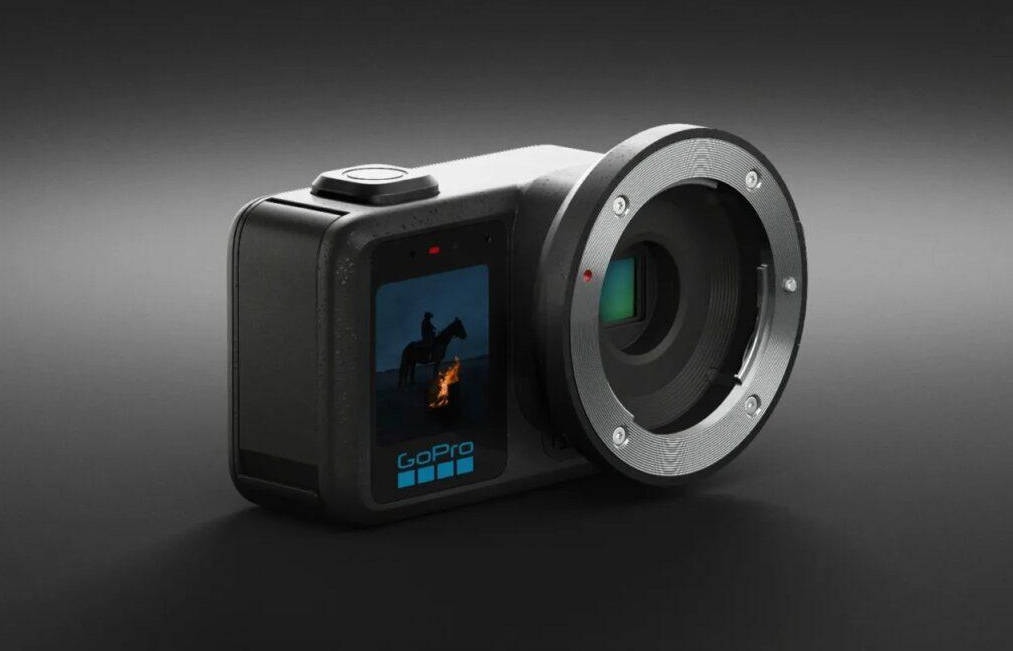
The GoPro MISSION 1 PRO ILS is a compact interchangeable-lens cinema camera built around a 50MP 1-inch sensor and GoPro GP3 processor. Its defining feature is an open Micro Four Thirds (MFT) mount: creators can choose suitable lenses instead of relying on a permanently attached wide-angle lens.
On October, 2026, GoPro announced that TIME had selected the MISSION 1 PRO ILS for its Best Inventions of 2026 list. The recognition describes the camera’s design and creative flexibility; it is not a substitute for independent video-quality or reliability testing. GoPro’s award announcement gives the exact recognition and date.
Its practical appeal is to filmmakers who need a small body in tight rigs, vehicle interiors or outdoor mounting positions while retaining manual lens choices and professional recording controls.
Part 2: Key Features and Specifications of GoPro MISSION 1 PRO ILS
| Feature | MISSION 1 PRO ILS specification | Why it matters |
| Sensor / processor | 50MP 1-inch sensor / GP3 | Detailed capture with a compact body |
| Lens mount | Micro Four Thirds, no electronic contacts | Lens must provide practical manual focus and aperture control |
| Standard 8K | 8K 16:9 up to 60 fps | High-resolution conventional widescreen footage |
| Open Gate | 8K 4:3 up to 30 fps; 4K 4:3 up to 120 fps | More vertical image area for reframing |
| High-frame-rate video | 4K up to 240 fps | Slow-motion possibilities |
| Video recording | MP4 with H.265/HEVC | Editing system must support the codec |
| Color | 8-bit or 10-bit; GP-Log2 and HLG HDR options | Flexibility for post-production |
| Maximum standard bitrate | Up to 240 Mbps | Storage planning matters |
These are published capabilities, not a claim that every option can be combined simultaneously. Actual mode combinations, lens limitations and features may change with firmware. GoPro’s product specifications should be the reference when configuring a shoot.
Part 3: MISSION 1 PRO ILS vs MISSION 1 PRO: What Changes?
The main difference is the lens system, not a simple increase in pixel count. Both models belong to the MISSION 1 family, but the ILS trades the fixed-lens convenience for an MFT mount and focus-assist tools.
| Decision | MISSION 1 PRO ILS | MISSION 1 PRO |
| Lens choice | Interchangeable, compatible manual-operation MFT lenses | Integrated lens |
| Focus workflow | Manual focusing with peaking and assist | Fixed-lens camera workflow |
| Camera setup | Requires lens selection, aperture and focus preparation | Quicker all-in-one deployment |
| Best-fit creator | Rig, focal-length and lens-character control | Fast action-cam-style deployment |
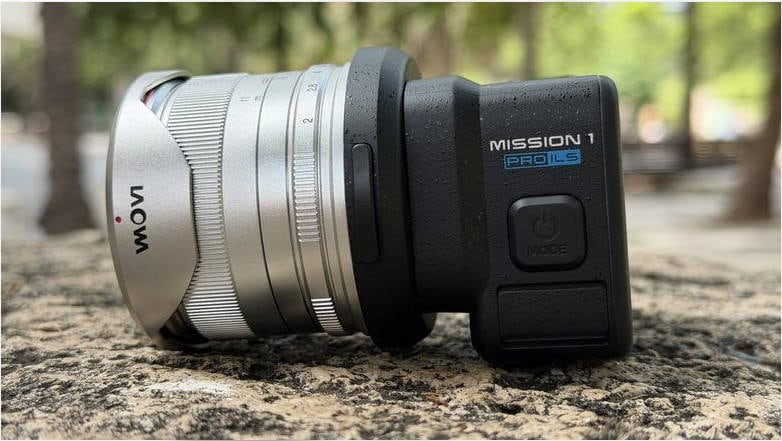
ILS is attractive when lens character and compact cinema rigging outweigh additional setup. For quick point-of-view capture with minimal setup, a fixed-lens model can be easier.
Part 4: Which Lenses Work with the MISSION 1 PRO ILS?
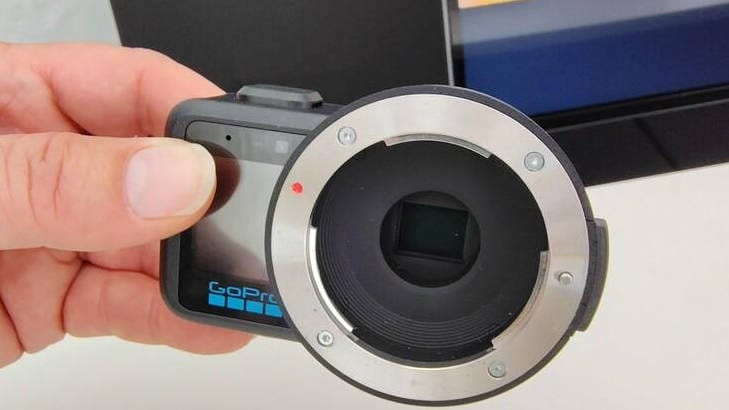
The mount accepts suitably compatible MFT lenses, but the body has no electronic lens contacts. A lens that needs camera-body electronics to focus or change aperture is not a good match. Choose lenses with manual focus and either a manual aperture ring or a usable fixed aperture; check sensor coverage and official restrictions before purchase.
- Check the candidate lens against GoPro’s current compatible-lens guidance, not only the mechanical MFT mount.
- Confirm you can set focus without electronic camera-to-lens communication.
- Confirm manual or fixed aperture operation and image coverage.
- Enter the relevant focal-length information in the camera’s lens profile before using stabilization.
Focus Assist, Focus Peaking and external monitoring are particularly useful because autofocus is not supported. See GoPro’s MISSION 1 PRO ILS field guide for current lens-setup guidance.
Part 5: Best Settings: Where Should Beginners Start?
Start by deciding what you want to deliver. For an ordinary widescreen video, choose a standard 16:9 mode. Choose Open Gate when you need room to crop for landscape and vertical versions of the same shot. Use a suitable 4K high-frame-rate mode for planned slow motion rather than recording everything in 8K.
| Goal | Starting direction | Key trade-off |
| Cinematic widescreen | 8K or 4K, appropriate project frame rate, Cinematic color | Bigger 8K files and greater editing load |
| Flexible reframing | 8K30 Open Gate (4:3) | Lower maximum frame rate than standard 8K60 |
| Professional grading | 10-bit GP-Log2 when color-managed workflow is available | Footage needs grading/LUT handling |
| Action slow motion | 4K high-frame-rate mode where available | Lighting and storage requirements rise |
These are planning starting points, not tested exposure presets. For shot-by-shot ISO, shutter, color, lens and stabilization choices, use our GoPro MISSION 1 PRO ILS shooting settings.
Part 6: 8K Recording, Storage and Editing Basics
GoPro lists 8K up to 60 fps in 16:9, and 8K Open Gate up to 30 fps in 4:3. They are separate modes. MP4 is the container while HEVC/H.265 is the compression format; an MP4 extension alone does not guarantee that an older computer or editor can decode the video.
At 240 Mbps, an illustrative maximum-rate calculation is about 1.8 GB per minute before filesystem and other variation. Actual files can be smaller depending on mode and settings. Check media capacity and editing hardware before a lengthy shoot.
For a practical post-production sequence covering offloading, codecs, proxies, color grading and playback diagnostics, follow our GoPro MISSION 1 PRO ILS 8K recording and editing.
Part 7: Common Video Problems: What to Check First
| Symptom | Most useful first check | What not to assume |
| 8K video stutters | CPU/GPU decoding, player and storage throughput | Stuttering does not automatically mean corruption |
| Editor shows audio but no picture | HEVC decoding and track interpretation | Not necessarily a damaged MP4 |
| Recording stops unexpectedly | Card compatibility, capacity, temperature, battery, firmware | One stop does not prove a camera defect |
| A copied MP4 fails in multiple applications | Compare original card file with the copy; inspect media metadata | Do not format or overwrite the source card |
If the file is genuinely damaged, our existing corrupted GoPro video files explains repair-focused next steps. The Repairit Video Repair may help with supported damaged video files, but playback compatibility and deleted footage are different problems. For broader supported media-repair options, explore Wondershare Repairit.
Part 8: Who Should Consider the MISSION 1 PRO ILS?
This model makes the most sense for creators who need a tiny mountable camera with manual lens selection, high-resolution capture and grading-oriented footage. It makes less sense if you need effortless autofocus, want an integrated-lens action camera or lack the storage and computer resources for 8K editing.
The $699.99 US MSRP announced by GoPro is a useful historical price reference, but actual offers and lens costs can differ. The MFT lens is a separate purchase.
Conclusion
The GoPro MISSION 1 PRO ILS stands out for combining an interchangeable MFT lens mount with compact 8K recording. Choose it for deliberate lens-led filmmaking, then build a reliable capture and post-production workflow around it. Start with the GoPro MISSION 1 PRO ILS camera settings and continue to the 8K video editing and playback when you are ready to work with footage.
FAQ
-
What does ILS mean on the GoPro MISSION 1 PRO ILS?
ILS designates the interchangeable-lens version, using a Micro Four Thirds mount rather than a permanent integrated lens. -
Can the GoPro MISSION 1 PRO ILS record 8K at 60 fps?
Yes, 8K60 is available in standard 16:9 capture. The 8K Open Gate 4:3 mode tops out at 30 fps under the published specifications. -
Does the MISSION 1 PRO ILS have autofocus?
No. Its MFT mount lacks electronic contacts, so compatible manual-focus lens operation, Focus Assist and Focus Peaking are important. -
What is the best color mode for MISSION 1 PRO ILS?
Cinematic or Natural can suit faster delivery; GP-Log2 is aimed at users who can manage color grading. The best option depends on the intended workflow. -
Is an unplayable GoPro MP4 always corrupted?
No. HEVC compatibility, playback hardware and editing configuration should be checked before attempting file repair.