
DivX is a digital video codec and brand that focuses on delivering high-quality video at relatively small file sizes. It is widely used for compressing movies, TV episodes, and online videos so they can be stored, streamed, or shared more easily. Thanks to its balance between quality and compression, the DivX codec became popular for playback on PCs, DVD players, and some smart TVs, as well as for basic video editing and archiving.
Repair Corrupted Files To Save Your Data
 Security Verified. Over 7,302,189 people have downloaded it.
In this article
How DivX Works
The DivX codec compresses video by removing visual information that the human eye is less likely to notice, while preserving important details like edges, motion, and color. It analyzes each frame, predicts how parts of the image will move, and stores only the changes between frames rather than every full picture.
This process drastically reduces file size while trying to maintain good visual quality. Bitrate control allows creators to choose between smaller files or better clarity. Compared with uncompressed video, a DivX video can be many times smaller, making it more efficient for downloading, streaming, and storing large libraries of movies or shows.
Key Features, Pros, and Cons
Main Features of DivX
- Support for multiple video resolutions, from standard definition up to HD.
- Good balance of compression and visual quality for typical movie content.
- Support for popular containers such as AVI, MP4, and MKV.
- DivX-branded software suite including DivX Player, converter, and web player (legacy).
- Feature support for subtitles, multiple audio tracks, and chapter points (depending on container).
Pros and Cons of DivX
| Aspect | Details |
|---|---|
| Advantages |
|
| Limitations |
|
| Real-world performance |
|
DivX vs Other Codecs
When comparing DivX with modern codecs like H.264, H.265, AV1, or VP9, several points stand out.
| Codec | Key Differences vs DivX |
|---|---|
| H.264 (AVC) |
|
| H.265 (HEVC) |
|
| VP9 and AV1 |
|
If your priority is maximum compatibility with older hardware and offline players, DivX format and H.264 are still strong options. For cutting-edge efficiency, especially at higher resolutions, H.265 or AV1 may be better, provided your devices and software can handle them.
Compatibility and Practical Use
DivX video is primarily associated with the following containers and platforms:
- Common file containers: AVI is the classic container for DivX movies, but DivX-encoded video can also be stored in MP4 and MKV files.
- Supported devices: Older DivX-certified DVD players, some Blu-ray players, media boxes, gaming consoles, and certain smart TVs. Many still recognize DivX format via USB or disc.
- Software support: DivX Player, VLC, MPC-HC, PotPlayer, and many other desktop media players can decode DivX codec streams. Popular video editors often import DivX inside AVI or MP4, though transcoding to a more editing-friendly codec is common.
- Everyday scenarios: Backing up DVD collections, sharing movies with friends, playing videos on a USB stick with an older TV, or keeping a lightweight media library on a laptop or NAS.
How to Use Repairit to Fix a Corrupted DivX File
Why Use Repairit for DivX Repair
If a DivX video refuses to play, stutters, freezes, or throws codec errors, the file itself or its structure may be damaged. Instead of trying multiple players or re-downloading large files, you can repair the clip with a reliable tool.
Repairit official website provides a dedicated video repair solution that supports many formats, including DivX video stored in AVI, MP4, and MKV containers. It analyzes corrupted data, repairs broken video and audio streams, and outputs a playable file without requiring advanced technical skills.
Key Repairit Features for DivX Videos
- Repairs a wide range of issues in DivX video files, such as not playing, black screen, choppy playback, or audio problems.
- Supports batch processing so you can fix corrupted DivX file collections in one session.
- Offers a preview of repaired clips before saving, helping you confirm that the repair DivX video result meets your expectations.
Steps to Repair a Corrupted DivX Video
- Add corrupted video
Launch Repairit on your computer and go to the Video Repair module. Click the add button and import the damaged DivX video files from your hard drive, memory card, USB stick, or other storage. You can load multiple clips at once if several of your DivX format videos show errors.

- Repair video codecs
After the files are listed, start the repair process. Repairit will scan each clip, analyze the underlying DivX codec structure, and rebuild broken headers, frames, and audio-video synchronization. During this stage, it aims to repair DivX video data while preserving as much original quality as possible.

- Save the repaired videos
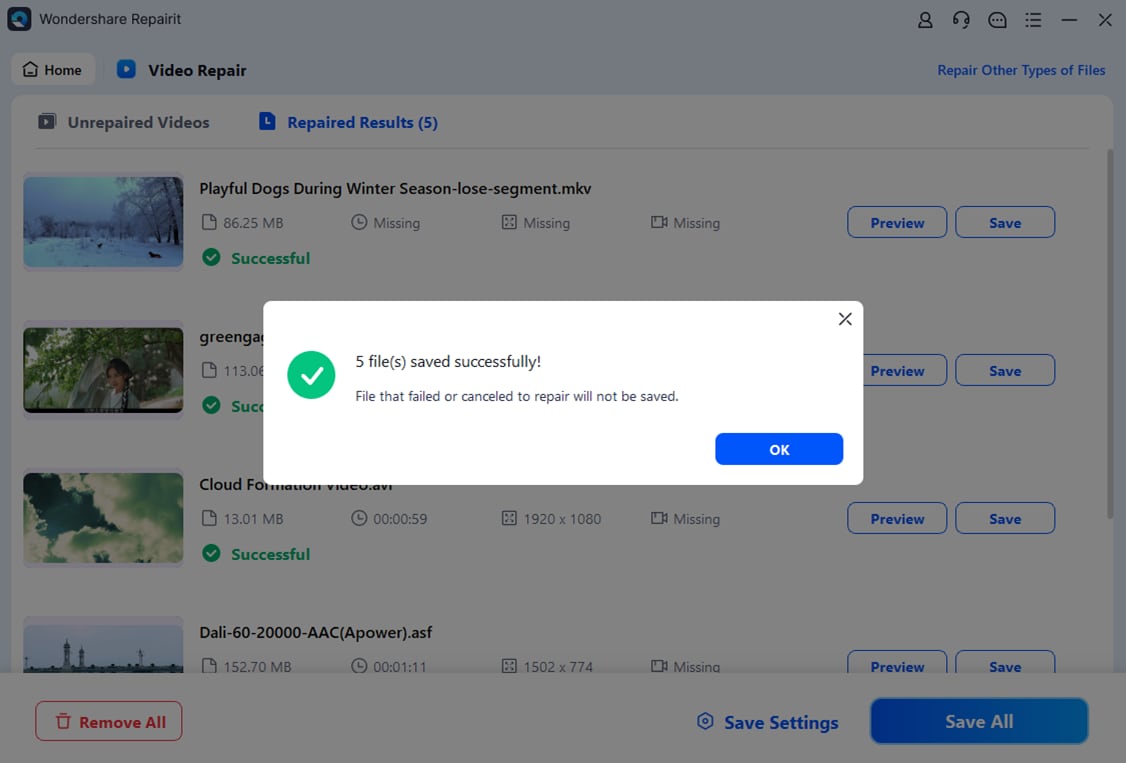
When the repair is complete, use the built-in preview to check a short segment of each video. If playback looks correct, choose a safe destination folder and save your recovered files. This way, you fix corrupted DivX file copies without overwriting the original sources, giving you a backup in case you need to try another repair pass.
Conclusion
DivX remains a recognizable name in digital video, known for delivering good-looking movies and shows in compact file sizes. While newer codecs may outperform it in pure compression efficiency, the DivX format still offers a practical blend of quality, speed, and compatibility, especially for legacy players and offline libraries.
When your DivX video files become corrupted or refuse to play, specialized tools like Repairit can restore them without complicated manual work. By understanding how DivX codec works and using the right repair workflow, you can keep your video library accessible across old and new devices alike.
Next: What is VP9 Codec?
FAQ
-
1. Is DivX still relevant today?
Yes. While newer codecs like H.264, H.265, and AV1 dominate streaming platforms, DivX is still useful for offline libraries, legacy DVD players, and some smart TVs that explicitly support DivX format playback. -
2. What is the difference between DivX and Xvid?
Both are MPEG-4 Part 2 codecs with similar goals, but DivX is a proprietary implementation, whereas Xvid is an open-source alternative. Many players that can decode DivX video can also handle Xvid, especially inside AVI files. -
3. Why will my DivX video not play on my TV?
Possible reasons include unsupported resolution, incompatible container (such as MKV instead of AVI), or a corrupted file. You can re-encode the video to a supported format or use Repairit to fix corrupted DivX file issues before copying it back to your TV or USB drive. -
4. Can I convert DivX videos to other formats without losing quality?
Any conversion involves re-encoding, which can cause some quality loss. However, using a high bitrate and a modern codec like H.264 or H.265 can keep the loss minimal. Always archive your original DivX video in case you need to retry with different settings. -
5. How can I tell if a video uses the DivX codec?
Use a media information tool such as MediaInfo or check your player's codec details while the video is playing. The video stream section will show if the file uses the DivX codec or another MPEG-4 variant.




