
VP9 is an open, royalty-free video codec created by Google to deliver high-quality video with much smaller file sizes. It is widely used for online streaming, especially on YouTube, and commonly stored in WebM or MP4 containers. Because VP9 codec offers efficient compression, it matters for smoother playback, reduced bandwidth costs, and more practical storage whether you are streaming, editing, or watching videos on your devices.
Repair Corrupted Files To Save Your Data
 Security Verified. Over 7,302,189 people have downloaded it.
In this article
How VP9 Works
The VP9 codec reduces video size by finding and removing visual redundancy frame by frame. It divides each frame into small blocks, predicts what those blocks should look like based on nearby pixels or previous frames, and then saves only the differences plus some extra details. Advanced motion compensation and flexible block sizes help keep quality high while cutting bitrate. As a result, VP9 can deliver similar or better visual quality than H.264 at noticeably smaller file sizes, making streaming more efficient on typical internet connections.
Key Features, Pros, and Cons
Main features of VP9
- Open, royalty-free video codec maintained by Google and widely used on the web.
- Supports resolutions from low SD up to 4K and beyond, with high dynamic range options in some profiles.
- Flexible block partitioning and advanced prediction modes for more efficient compression.
- Better compression efficiency than its predecessor, enabling smaller files at similar quality compared with VP8 and many H.264 encodes.
- Designed for adaptive bitrate streaming, making it suitable for modern web video workflows.
Pros, cons, and real-world performance
Pros
Higher compression efficiency than VP8 and most H.264 implementations, especially at HD and 4K.
Royalty-free licensing, which is attractive for platforms, open-source projects, and smaller publishers.
Excellent browser support in modern versions of Chrome, Firefox, Edge, and many Android apps.
Good visual quality at moderate bitrates, reducing buffering and data usage.
Cons
Hardware decoding is not universal on older TVs, set-top boxes, and budget mobile devices.
Encoding can be slower and more CPU-intensive than H.264, especially at higher quality settings.
Typical performance in real-world use
In everyday streaming scenarios, VP9 often delivers noticeably cleaner video than older H.264 streams at the same bitrate, especially for 1080p and 4K content. Users benefit from fewer compression artifacts and smoother playback at a given connection speed. On the encoding side, services with powerful servers can afford longer VP9 encode times to save bandwidth over millions of plays, while individual creators may balance speed and quality depending on their hardware.
VP9 vs Other Codecs
When comparing VP9 with other common codecs, four names typically come up: VP8, H.264, H.265 (HEVC), and AV1.
| Codec | Main differences vs VP9 |
|---|---|
| VP8 | VP9 vs VP8: VP9 generally provides 30–50% better compression at the same quality, especially at HD and higher resolutions. VP8 encodes faster and is simpler but less efficient. |
| H.264 | VP9 vs H264: H.264 has broader legacy device support and faster encoding on many systems. VP9 usually produces smaller files or higher quality at equal bitrates, particularly for streaming. |
| H.265 (HEVC) | Both aim for high efficiency at HD/4K. HEVC can match or exceed VP9 compression but involves patent licensing and has mixed browser support, while VP9 is royalty-free and strongly supported in browsers. |
| AV1 | VP9 vs AV1: AV1 is newer and typically more efficient, giving comparable quality at even lower bitrates. However, AV1 encoding is heavier and hardware support, while growing, is not as mature as VP9 on many devices. |
Overall, VP9 is often chosen as a balance between efficiency, openness, and real-world compatibility, especially for web streaming where browser playback is critical.
Compatibility and Practical Use
Supported devices and software
- Modern browsers: Chrome, Edge, Firefox, and Opera support VP9 playback, often with hardware acceleration on newer GPUs and mobile chips.
- Mobile devices: Many Android smartphones and tablets decode VP9 in hardware for smoother streaming and better battery life.
- Smart TVs and boxes: A growing range of smart TVs, Chromecast devices, and set-top boxes support VP9 for services like YouTube.
- Software players: VLC, MPV, and other popular media players can open VP9 content when compiled with the necessary libraries.
- Editing tools: Some NLEs can read VP9 in WebM or MP4, though workflows may be less polished than with H.264 or ProRes.
Common file containers for VP9
- WebM – The most typical web container for VP9, often paired with Opus or Vorbis audio.
- MP4 – Supported by some platforms and tools, though MP4 plus VP9 is less standard than MP4 plus H.264 or HEVC.
- MKV – Used for local storage and archiving because of its flexibility with multiple streams and subtitles.
In practice, you will mostly encounter VP9 when streaming on YouTube or saving web-optimized videos, while local libraries may mix VP9 with other codecs depending on playback hardware.
How to Use Repairit to Fix a Corrupted VP9 File
Why use Repairit for VP9 repair
When a VP9 video refuses to play, stutters, or shows errors, the problem may be a corrupted container or damaged video stream rather than missing codec support. Wondershare Repairit is built to handle exactly these issues, repairing damaged clips from cameras, phones, and downloads without requiring technical expertise. You can learn more on the Repairit official website and download the latest version for your system.
Key features of Repairit for VP9 video repair
- Repairs multiple corrupted or unplayable VP9 videos in a single batch, saving time on large libraries.
- Supports popular containers such as MP4, MOV, AVI, and WebM that may carry VP9 streams.
- Provides a built-in preview so you can verify that the repaired VP9 video plays correctly before exporting.
Steps to repair corrupted VP9 videos
- Add corrupted video
Install and open Wondershare Repairit on your computer, then switch to the Video Repair module. Click the add button in the interface and browse to the location of the damaged VP9 files, whether they are in WebM, MP4, or another supported container. Select all the clips that show playback errors, gray frames, or will not open, and import them into the project list.

- Repair video codecs
After your videos are loaded, highlight the VP9 clips you want to fix and start the repair process. Repairit will scan the file structure, detect inconsistencies in headers, frames, and other metadata, and then automatically rebuild the damaged sections. You can monitor progress in the interface, and once the process is finished, use the preview option to check that the repaired videos play smoothly from start to finish.

- Save the repaired videos
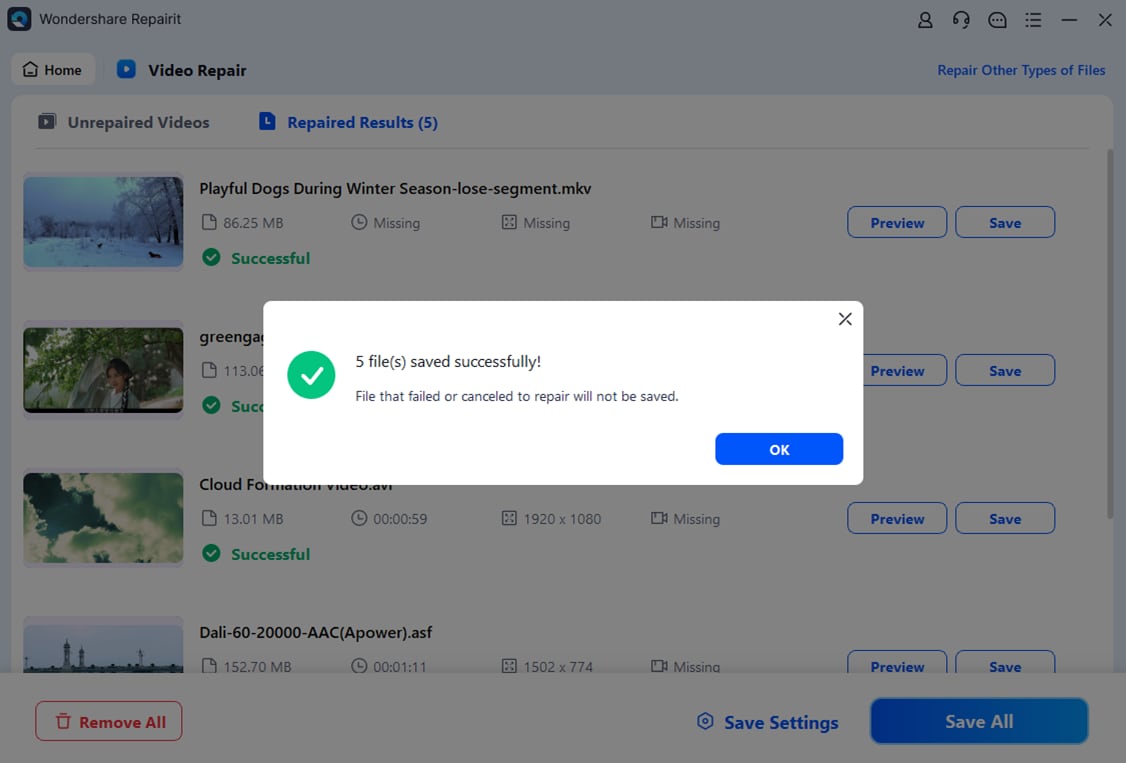
If the preview looks good and audio/video are in sync, choose a destination folder on a healthy drive where you want to store the fixed files. Click Save to export the repaired VP9 videos, keeping them separate from the original corrupted versions so you always have a fallback. You can then reopen the saved clips in your preferred media player, editor, or streaming workflow without the previous errors.
Conclusion
VP9 is a powerful, royalty-free codec that offers efficient compression for HD and 4K streaming in modern browsers and apps. It strikes a useful balance between quality, file size, and openness, making it a strong choice for web platforms and anyone building an online video library.
However, VP9 files can still suffer from corruption caused by bad downloads, storage issues, or interrupted transfers. When that happens, Wondershare Repairit provides a straightforward way to repair broken WebM or MP4 videos, preview the results, and safely save them back to your system. Keeping a tool like Repairit at hand helps ensure your VP9 videos remain watchable and secure over time.
Next: What is Vp8 Codec?
FAQ
-
1. What is VP9 used for?
VP9 is mainly used for streaming and storing HD and 4K video at smaller file sizes. It is widely adopted on the web, especially for YouTube and VP9 WebM content, and can also be used in MP4 or MKV containers when supported by the playback device or software.
-
2. Is VP9 better than H.264?
In most cases, VP9 vs H264 comparisons show that VP9 achieves better compression at the same visual quality, which means smaller files or higher quality at similar bitrates. H.264, however, still has broader legacy hardware support and may be easier to edit in some professional applications.
-
3. Does VP9 support 4K video?
Yes, VP9 codec was designed to handle high resolutions and efficiently supports 4K and even higher. Its improved compression helps keep bandwidth and storage requirements more manageable for ultra HD content, making it ideal for modern streaming platforms.
-
4. Why will my VP9 video not play?
A VP9 video may fail to play because your player or device does not support VP9, the necessary codec is missing, graphics drivers are outdated, or the file itself is corrupted from incomplete downloads or storage errors. Testing the clip in a different compatible player and, if needed, repairing it with a tool like Repairit often resolves the problem.
-
5. How can I repair a corrupted VP9 file?
To fix a corrupted VP9 file, install Wondershare Repairit and open the Video Repair feature. Add the damaged WebM, MP4, or MKV files, start the repair so the program can rebuild broken headers and frames, preview the fixed output, and finally save the repaired videos to a safe location separate from the originals.




