

When a sudden blackout happens, your CCTV system may shut down before it can save recordings correctly. This often leads to CCTV footage damaged after a power cut, leaving important security files corrupted, incomplete, or impossible to open.
Since video files need to be properly finalized after recording, any interruption can cause file errors or storage issues. In many cases, you can still repair CCTV footage after power cut problems using the right troubleshooting methods and recovery tools. This guide covers why this happens and the steps you can take to recover your footage
In this article
Why Power Disruptions Corrupt Your CCTV Footage
A sudden power cut can stop your CCTV system before it properly saves and finalizes a recording. Since DVRs and NVRs need to store file information like headers and indexes, an unexpected shutdown can leave footage incomplete, corrupted, or impossible to open.
Common Causes of Video Corruption
- Improper file saving - Recording stops before the video is fully saved.
- Power surges - Voltage spikes after an outage may damage storage devices.
- Hard drive errors - Sudden shutdowns can affect DVR or NVR storage.
- Interrupted transfers - Exporting footage during a power cut can create incomplete files.
How to Identify Signs of Video Corruptions
Before repairing your footage, it is important to check how the file was affected. Power cuts can cause different types of video corruption, from small playback issues to completely unreadable files.
Signs of Damaged CCTV Footage
- Files won't open - Video players may show errors like Cannot play file or Unsupported format.
- 0KB or unusually small file size - The file exists but has little or no readable data.
- Freezing or glitching video - The footage may play for a few seconds before freezing, crashing, or showing visual distortion.
- Missing file details - Information like video duration or resolution may be unavailable.
- Incomplete recordings - The video only plays part of the footage before stopping.
- Missing recordings - Some files may disappear or fail to save after the power cut
Basic Fixes to Repair Damaged CCTV Footage
Fix 1. Use VLC Media Player Repair
VLC Media Player can sometimes fix corrupted video files by rebuilding missing file information, especially for AVI formats. This can help make the video playable again.
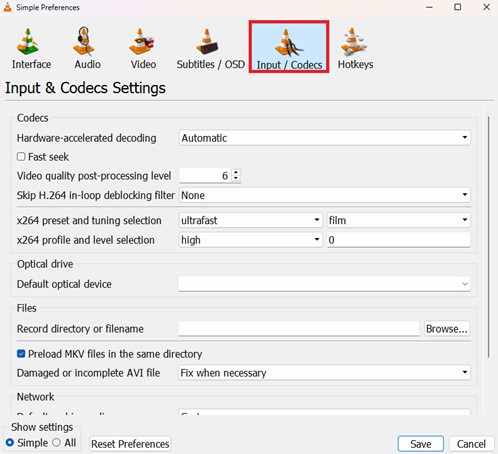
Step 1. Open VLC, navigate to Tools, Preferences, and select Input / Codecs.
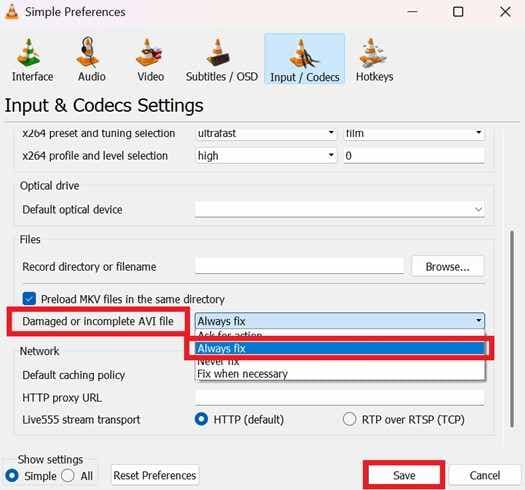
Step 2. Locate Damaged or incomplete AVI file and change the setting to Always fix before saving and opening your file.
Fix 2. Run Check Disk (chkdsk)
If the power outage affected your storage drive, Windows has a built-in tool called Check Disk that scans and fixes file system errors on your hard drive.
Step 1. Connect the storage media to a PC, open the Command Prompt as an administrator, and type chkdsk [Drive Letter]: /f.

Step 2. Press Enter to allow it to scan and fix cross-linked files that are preventing playback.
Fix 3. Convert or Re-save the Video
Opening and converting the video into a new format can sometimes repair broken file structure by creating a fresh, usable version of the footage.
Step 1. Use VLC's Convert/Save feature to select the damaged source file.
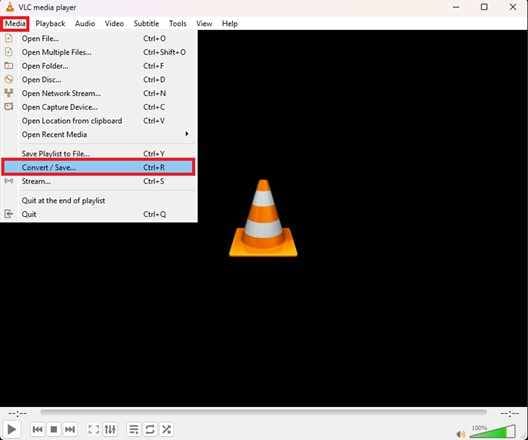
Step 2. Choose a standard output profile (like MP4 or MKV) and start the encoding process to bypass the original broken metadata.
Fix 4. Rebuild DVR/NVR Database
Some CCTV recorders have a built-in repair or recovery feature that scans the hard drive and rebuilds the recording database after a power failure.
Step 1. Access your DVR or NVR main menu, go to Storage or HDD Management, and look for a Rebuild Index or Scan option.
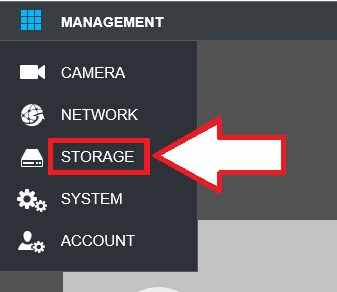
Step 2. Start the scan so the system can detect and restore videos that were not properly saved during the power outage.
Advance Fix to Restore Severely Video Corrupted
When basic fixes don't work, it usually means the video file is more seriously damaged. In this case, advanced repair tools are needed to deeply scan the file and rebuild missing or broken data, sometimes using a working sample video from the same CCTV system.
It CAN:
- Restore missing video information so the file can be recognized and played.
- Correct timing issues where sound and image don't match.
- Try to extract usable footage from corrupted parts of the hard drive.
- Fix several corrupted CCTV clips in one process if many were affected by the power cut.
If you confirm the video is corrupted, a repair tool can safely restore its functionality. One example is Repairit Video Repair, which works with common file types like MP4, MOV, MKV, and specialized formats often used by surveillance systems.
Step-by-Step (Optional)
Step 1. Upload the corrupted video file.

Step 2. Start the Repair process.

Step 3. Preview and save the restored file to a new location.

How to Prevent CCTV Footage Damage
Preventing damage is easier than recovering lost files after a power cut.
- Use a UPS - Keep your CCTV running long enough to shut down properly during outages.
- Install a surge protector - Protects your system from power spikes when electricity returns.
- Keep your storage drive healthy - Regular maintenance helps reduce errors and improves stability, especially for older CCTV systems.
- Use CCTV-grade hard drives - Designed for 24/7 recording and more reliable performance.
- Enable cloud backup - Saves important footage online in case local storage gets corrupted.
Conclusion
Fixing CCTV footage damaged after a power cut often involves simple troubleshooting steps and, in more serious cases, recovery tools. A sudden blackout can interrupt how video files are saved, leaving them incomplete or unreadable.
In many cases, tools like media repair software or system recovery features can help you repair CCTV footage after power cut issues and restore access to your recordings. For long-term protection, using a UPS and reliable CCTV storage hardware is the best way to prevent future data loss.
FAQs
-
Why won't my CCTV footage play after a power outage?
This usually happens because the file was not properly saved before the power cut, leaving it incomplete or missing important data needed for playback. -
Can I recover 0KB video files caused by a power cut?
Most 0KB files cannot be recovered because no data was saved. However, if some data exists but is unreadable, recovery tools may still help. -
Will a power surge damage my DVR's hard drive?
Yes. Power surges can damage internal parts of the hard drive or cause serious recording errors that lead to data loss. -
Does VLC really fix corrupted surveillance video?
VLC can sometimes help play or rebuild damaged video structure, but it does not always fully repair the original file. -
How does a UPS prevent footage corruption?
A UPS provides backup power during outages, allowing your CCTV system to shut down properly and save recordings safely




