
Xvid is a popular open-source MPEG-4 video codec used to compress and decompress digital video. It matters because it can dramatically shrink file sizes while keeping watchable quality, making it practical for downloading, streaming, editing, and everyday playback on older or low-powered devices. Many classic AVI videos, DVDs converted to digital, and archived movies were encoded with the Xvid codec, so understanding it helps when you run into playback or quality issues.
Repair Corrupted Files To Save Your Data
 Security Verified. Over 7,302,189 people have downloaded it.
In this article
How Xvid Works
Compression basics in Xvid
The Xvid video format is based on the MPEG-4 Part 2 standard. When you encode a video with Xvid, the codec analyzes each frame, removes visual details the eye is less likely to notice, and stores only the changes between frames instead of full images every time. It uses techniques like motion compensation and discrete cosine transform (DCT) to turn complex scenes into compact mathematical data, greatly reducing file size while trying to preserve perceived quality.
Quality, bitrate, and efficiency
The Xvid codec lets you choose bitrates, quality levels, and encoding modes. Higher bitrate means larger files but cleaner images with fewer artifacts; lower bitrate gives smaller files at the cost of blockiness or blur. Xvid can use single-pass or two-pass encoding: two-pass scans the video once to analyze complexity, then encodes it more efficiently in the second pass to balance quality and size. While not as efficient as newer codecs, it remains a practical choice where speed and wide compatibility matter.
Key Features, Pros, and Cons
Main features of Xvid
- Open-source MPEG-4 Part 2 codec with wide availability and free use.
- Supports advanced encoding options such as B-frames, global motion compensation, and quantization tuning.
- Highly configurable for different uses, from small web clips to high-bitrate archives.
- Commonly used inside AVI containers, making it familiar to many media players and older hardware devices.
Pros and cons of Xvid
Pros
Xvid offers good visual quality at moderate bitrates, especially for standard-definition and early high-definition content.
Fast encoding and decoding on older CPUs, so it runs well even on legacy PCs and set-top boxes.
Huge ecosystem of compatible players, DVD players, and editing tools that can open Xvid video format files.
Open-source nature allows transparency, community improvements, and long-term availability.
Cons
Less efficient than modern codecs like H.264, H.265, or AV1, so files are often larger for the same quality.
Primarily optimized for 8-bit SDR video; not suited for HDR, 4K streaming, or very high resolutions.
Real-world performance
In real use, Xvid performs best for SD and 720p content, offline libraries, and older hardware players that do not support newer codecs. For local archives, it gives acceptable quality at moderate sizes, but if you compare it side by side with newer formats, you will usually see larger file sizes or slightly softer images for the same bitrate.
Xvid vs Other Codecs
When evaluating Xvid vs H264, H.264 (AVC) generally wins in compression efficiency and visual quality. An H.264 file at a given bitrate usually looks cleaner and sharper than an Xvid file, while also being widely supported on modern phones, TVs, and browsers. Xvid still has the edge on very old hardware that lacks H.264 decoding.
In the xvid vs divx comparison, both are MPEG-4 Part 2 codecs and historically competed for DVD and AVI playback. DivX is more commercial and tied to certified devices, while Xvid is open-source, flexible, and widely supported in software players. Quality and file sizes can be similar when configured properly.
Against H.265 (HEVC), AV1, or VP9, Xvid is clearly a legacy option. H.265 and AV1 can deliver the same quality at dramatically smaller bitrates, especially for HD and 4K streaming, but they require more processing power and newer hardware support. VP9 is common on platforms like YouTube and also beats Xvid in efficiency. That said, Xvid can still be easier to edit or play on old operating systems and basic media setups.
| Codec | Main characteristics vs Xvid |
|---|---|
| H.264 (AVC) | Better quality and smaller files than Xvid; widely supported on modern devices and streaming platforms. |
| H.265 (HEVC) | Much higher efficiency for HD/4K; needs newer hardware and more CPU power than Xvid. |
| AV1 / VP9 | Designed for internet streaming with excellent compression; software decoding can be heavy on older machines. |
Compatibility and Practical Use
In practical terms, Xvid compatibility is still strong for offline content. Many Windows and Linux media players, like VLC and MPC-HC, play Xvid without extra codecs. Older standalone DVD or DivX/Xvid-certified players often support Xvid files burned to discs or stored on USB drives. Some smart TVs and set-top boxes also decode it, though support on the newest models is less guaranteed.
The Xvid video format is most frequently found inside AVI containers, but it can also be wrapped in formats like MP4 or MKV if encoded correctly and supported by the playback tool. For editing, many NLEs can open or convert Xvid, though professionals often transcode it to an intermediate codec to avoid generation loss. If you migrate old libraries to newer codecs, you may still keep Xvid originals as backups or for playback on legacy devices.
How to Use Repairit to Fix a Corrupted Xvid File
Why choose Repairit for Xvid repair
When an Xvid codec video refuses to play, shows errors, or suffers from glitches and frozen frames, a simple re-download is not always possible. Repairit official website provides a powerful video repair tool that can analyze damaged fix corrupted Xvid file cases, rebuild broken headers, and repair codec-related issues so you can recover your footage without advanced technical skills. It supports multiple video formats, including AVI files encoded with Xvid, and guides you through repair in a few clear steps.
Key features of Repairit for Xvid videos
- Repairs corrupted, unplayable, or choppy Xvid videos caused by transfer errors, crashes, or storage problems.
- Supports batch repair, so you can repair Xvid video files from cameras, downloads, or archives in one run.
- Offers a preview function to check the repaired Xvid file before saving it to your drive.
Steps to repair corrupted Xvid videos
Follow these three practical steps to fix a damaged Xvid video format file with Repairit.
- Add corrupted video
Launch Repairit and switch to the Video Repair module. Click the button to add files, then browse to your corrupted fix corrupted Xvid file (commonly an AVI or similar container). You can import one or several Xvid videos at once if you have multiple broken clips.

- Repair video codecs
After the files load, start the repair process. Repairit will scan the structure of each video, check stream information, and attempt to rebuild damaged headers and Xvid codec data. For severely corrupted videos, you may be prompted to use an advanced repair mode and provide a healthy sample file encoded in a similar way.

- Save the repaired videos
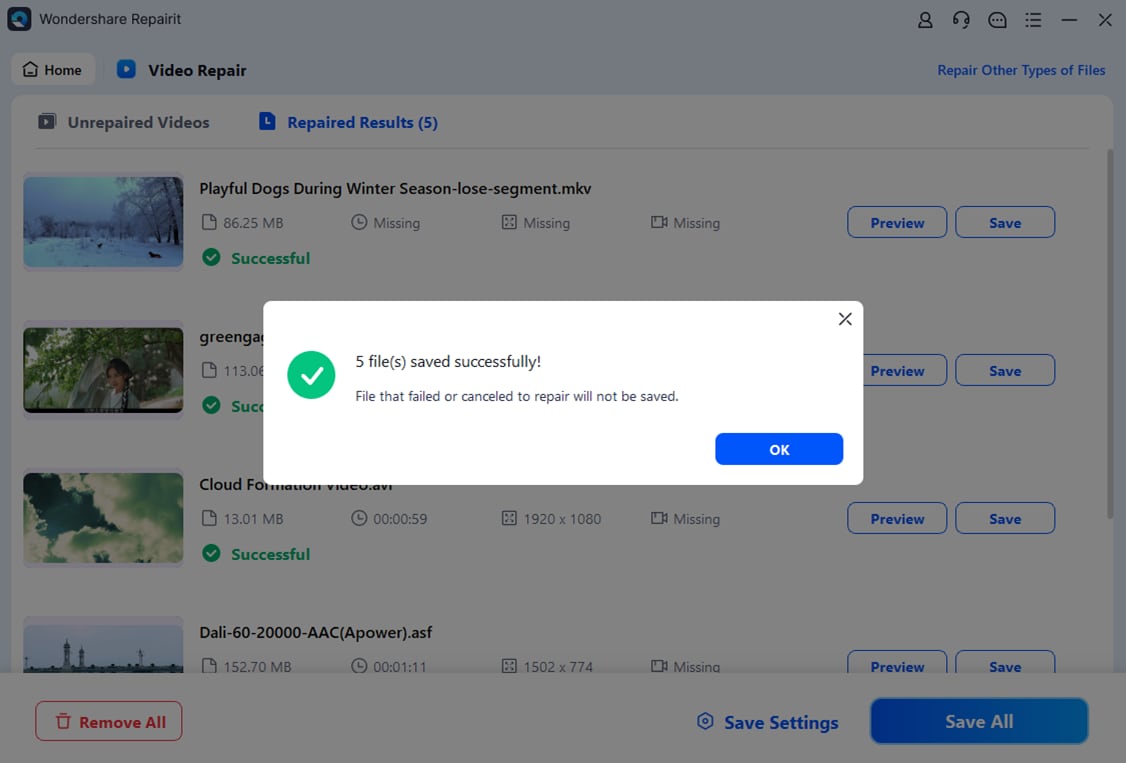
When the repair completes, use the preview option to confirm that playback is smooth, audio is in sync, and typical artifacts are gone. If you are satisfied, click Save and choose a secure location on your computer or external drive. Repairit will export a fixed version of your repair Xvid video while leaving the original file unchanged.
Conclusion
Xvid is a mature, widely recognized MPEG-4 codec that played a key role in the early days of digital video sharing. It still delivers reasonable quality, works smoothly on older devices, and remains common in AVI movie collections and archived clips.
However, Xvid is less efficient than modern codecs, so you may choose newer formats for fresh projects while keeping Xvid for compatibility with legacy players. When your valuable Xvid videos become corrupted or unplayable, using Repairit to diagnose and repair the damaged files provides a straightforward way to get your footage back without deep technical knowledge.
Next: What is VVC Codec?
FAQ
-
1. What is Xvid and is it safe to use?
Xvid is an open-source MPEG-4 Part 2 video codec used to compress and decompress digital video, typically in AVI files. It is safe to use as long as you download it from trusted sources and scan all video files for malware, just as you would with any other downloaded media. -
2. How do I play Xvid videos on my computer?
Most modern media players such as VLC can play Xvid videos out of the box. On Windows, you can also install a codec pack or standalone Xvid codec so that built-in players and editing software can decode the videos. On macOS and Linux, third-party players with built-in codecs are usually enough. -
3. Why does my Xvid video have no picture or sound?
Missing picture or sound can occur if the Xvid codec is not installed correctly, if the audio track uses an unsupported codec, or if the file is corrupted. First, try another media player; if the problem persists for a specific file, use Repairit to repair Xvid video corruption and restore normal playback. -
4. Can I convert Xvid videos to H.264 or other modern codecs?
Yes. You can use video converters or editors to transcode Xvid videos into newer codecs like H.264, H.265, or VP9 for smaller file sizes and better compatibility with modern devices. Keep in mind that converting from a compressed source may not increase quality, but it can reduce size and simplify streaming. -
5. How do I fix a corrupted Xvid file that will not open?
If an Xvid file refuses to open or shows errors, avoid repeatedly rewriting it and instead work on a copy. Open Repairit, add the corrupted video, run the repair process, and then save the fixed output. This method helps you fix corrupted Xvid file issues without risking further damage to your original data.




