
The RAR vulnerability video error usually appears when attempting to extract or play a video file stored inside a RAR archive, and the system detects a potential security issue or fails to process the file correctly. Instead of normal extraction or playback, users may encounter warnings, blocked files, incomplete extraction, or videos that refuse to play properly after being extracted.
In others, it may result from corrupted archives, incomplete downloads, or damaged video files inside the RAR container. Because of this, users often misinterpret the problem as either a playback issue or a virus warning, when it may actually involve multiple layers of failure.
This guide provides a detailed breakdown of the causes, explains how to identify the exact source of the problem, and walks through structured fixes that address both extraction issues and video playback errors.
In this article
Part 1. What to Know About the RAR Vulnerability Video Error
The vulnerability video error is a combined security and file-processing issue that occurs when a system cannot safely extract or properly interpret the contents of a RAR archive containing video files.
Unlike simple playback errors, this issue can occur at different stages:
- During archive extraction
- While scanning files for security threats
- When attempting to open the extracted video
- While decoding the video in a media player
Modern operating systems and antivirus programs actively scan compressed files because they are commonly used to distribute bundled content. If a RAR archive contains suspicious structures, outdated compression methods, or malformed data, the system may flag it as a vulnerability risk.
Part 2. Why the RAR Vulnerability Video Error Happens
The error can be triggered by multiple underlying issues, which is why it often appears inconsistent or difficult to diagnose. In reality, this error is usually the result of either a security-related restriction, archive-level corruption, or video file damage after extraction.
1. Outdated Extraction Software
Older archive tools may rely on outdated decoding libraries that contain known vulnerabilities or lack support for newer RAR compression methods. Modern operating systems and security software can detect these outdated components and block them to prevent potential exploitation.
In addition, newer RAR files may use updated compression techniques that older tools cannot fully interpret. This mismatch can result in incomplete extraction, unexpected errors, or warnings that label the file as unsafe.
2. Corrupted or Incomplete RAR Archive
RAR files are structured in compressed data blocks that must be fully intact for proper extraction. If even a small portion of the archive is missing or damaged, the extraction process may fail or produce incomplete output files.
This type of corruption commonly occurs when downloads are interrupted, file transfers fail, or storage errors occur. In such cases, the archive may still open, but the extracted video file may be broken, partially missing, or completely unusable.
3. Security or Antivirus Blocking
Compressed archives are frequently scanned by antivirus programs because they can contain hidden or bundled files. If the system detects unusual patterns, embedded scripts, or known exploit signatures, it may flag the archive as a potential vulnerability.
Sometimes this detection is a false positive, especially with heavily compressed or modified files. However, in other cases, the block is legitimate, particularly if the archive contains unsafe or suspicious content.
4. Damaged Video File Inside the Archive
Even if the RAR archive itself is intact, the video file stored inside it may already be corrupted. This can happen if the file was damaged before compression or if errors occurred during the archiving process.
When extracted, the video may appear normal in size and format but fail during playback due to missing internal data such as headers, frame sequences, or audio streams.
5. Unsupported Video Codec
Some video files use codecs that are not supported by default system media players. After extraction, the file may fail to play, display a black screen, or produce audio without video.
This issue is often mistaken for file corruption, but in reality, the file is intact, it simply requires a compatible media player or conversion to a supported format.
6. Broken File Structure After Extraction
If the extraction process is interrupted or partially completed, the resulting video file may have a broken internal structure. This includes missing metadata, incomplete headers, or truncated data streams.
Even though the file exists and has a valid extension, media players cannot interpret it correctly, leading to playback errors such as freezing, skipping, or total failure to open.
7. Mismatch Between Archive and System Environment
In some cases, the error occurs due to compatibility issues between the archive file and the system environment. Differences in file encoding, operating system handling, or extraction permissions can affect how the archive is processed.
This is more likely to happen when files are transferred between different systems or created using specialized compression settings that are not universally supported.
Part 3. How to Identify the Exact Problem
Before applying fixes, it is important to determine where the issue occurs. This helps avoid unnecessary troubleshooting steps.
If the error appears before extraction, the issue is likely related to the archive itself or system security. If the error occurs after extraction, the problem is more likely related to the video file.
Key patterns to observe:
- Extraction fails completely → archive corruption or security block
- Extraction works but video will not open → file corruption or codec issue
- Antivirus blocks the file → security-related trigger
- Only one file fails → isolated file damage
Part 4. Fix RAR Extraction and Security Issues
Below are practical solutions you can follow to resolve extraction errors and strengthen your file security.
Fix 1. Update Extraction Software
Outdated extraction tools may trigger vulnerability warnings or fail to process modern RAR formats correctly, especially if they rely on older decoding libraries.
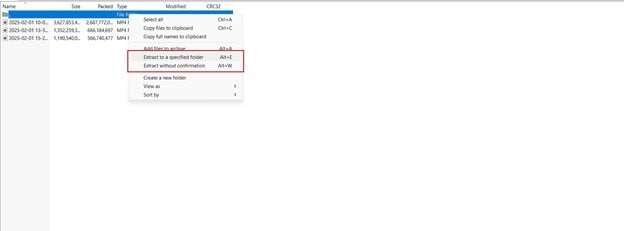
Step 1. Download the latest version of your archive tool and click Install to update the software completely.
Step 2. Open the updated tool, click Extract, and attempt to extract the RAR file again.
Fix 2. Re-download the RAR File
Incomplete downloads are one of the most common causes of corrupted archives, which can lead to extraction errors or damaged output files.
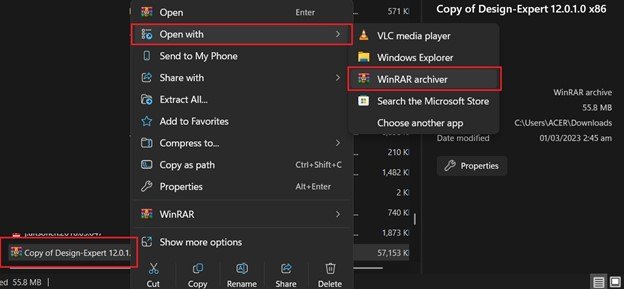
Step 1. Delete the existing RAR file and download a fresh copy from a verified source by clicking the Download button again.
Step 2. After downloading, open the file and click Extract to test if the issue is resolved.
Fix 3. Adjust Antivirus or Security Settings
Security software may block extraction due to false positives, especially with compressed files that contain unusual structures.
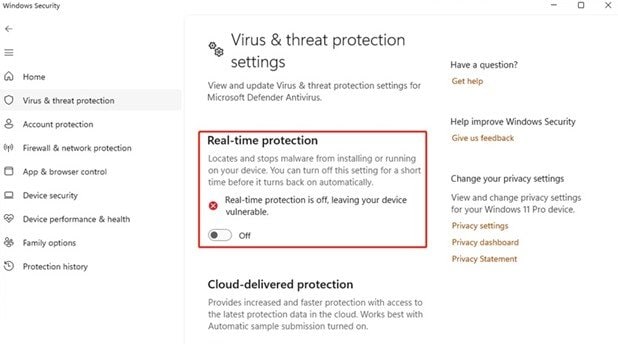
Step 1. Open your antivirus program and temporarily disable Real-Time Protection only if the file source is trusted.
Step 2. After downloading, open the file and click Extract to test if the issue is resolved.
Part 5. Repair Damaged Video Files (If Necessary)
If playback issues persist after extraction and conversion, the video file is likely structurally damaged. This means that essential components such as headers, metadata, or frame data are missing or corrupted.
This type of damage often results from incomplete extraction, interrupted downloads, or archive corruption. Even though the file appears normal, media players cannot interpret its internal structure.
Repairit Video Repair is designed to address these issues by rebuilding damaged file components. Instead of simply converting the file, the repair process reconstructs critical elements required for proper playback.
-
Repair damaged videos with all levels of corruption, such as video not playing, video no sound, out-of-sync video or audio, playback errors, header corruption, flickering video, missing video codec, etc.
-
Repair full HD, 4K, and 8K videos and support 20+ popular formats, including MOV, MP4, M2TS, MDT, RSV, WMV, MPEG, DAT, etc.
-
Repair damaged or corrupted videos caused by video compression, system crash, video format change, etc.
-
Repair critically damaged or corrupted RAW/Log/HDR videos from professional cameras such as Blackmagic Design, RED Digital, and ARRI, etc.
-
Repairit has a quick and advanced scanning mode. You can use either depending on the level of corruption the video file has undergone.
-
No limit to the number and size of the repairable videos.
-
Repaired videos are more compatible with professional editing software such as DaVinci, Composer, Final Cut Pro, and Premiere Pro.
-
Support Windows 11/10/8/7/Vista, Windows Server 2003/2008/2012/2016/2019/2022, and macOS 10.12~macOS 15.
Part 6. How to Prevent RAR Video Errors in the Future
Below are key prevention strategies:
- Download Files Only From Trusted Sources - Always download RAR archives from verified websites or official platforms. Files from unknown or untrusted sources may contain malicious code, hidden scripts, or improperly packaged data that can trigger security warnings or cause extraction failures.
- Keep Extraction Software Updated - Archive tools rely on decoding libraries to extract compressed files, and outdated versions may contain known vulnerabilities or lack support for newer compression methods. Keeping your extraction software updated ensures compatibility with modern RAR formats and prevents security systems from blocking the extraction process due to outdated components.
- Avoid Interrupting Downloads or Transfers - Interruptions during downloads or file transfers can result in incomplete RAR archives, which often leads to missing data blocks. When extraction tools attempt to process these incomplete files, they may fail entirely or produce damaged video files that cannot be played properly.
- Verify File Integrity Before Extraction - If available, use checksum values (such as MD5 or SHA) to confirm that the downloaded file matches the original version. Verifying file integrity ensures that the archive has not been altered, corrupted, or partially downloaded, reducing the likelihood of both extraction errors and playback issues.
- Scan Files Before Opening - Running a quick antivirus scan before extracting a RAR file helps detect potential threats early. This step is especially important for compressed files, as they can contain multiple hidden components that are not immediately visible until extraction.
- Use Reliable Storage Devices - Saving and extracting files on unstable or failing storage devices can lead to data corruption during read/write operations. Using reliable drives and ensuring sufficient disk health helps maintain file integrity throughout the extraction and playback process.
- Avoid Modifying Archive Contents Manually - Editing or altering files inside a RAR archive without proper tools can break the archive structure. Even small changes can make the archive unreadable or result in incomplete extraction, leading to playback errors in video files.
- Keep Media Players Updated - Modern video files often use advanced codecs that require updated media players for proper decoding. Keeping your media player updated ensures compatibility with newer formats and reduces the chance of playback errors after extraction.
- Maintain Stable System Performance During Extraction - Running too many applications during extraction can interrupt the process or cause partial file writes. Ensuring stable system performance during extraction helps prevent incomplete or corrupted output files.
Conclusion
The RAR vulnerability video error is not a single issue but a combination of security warnings, archive corruption, and file-level damage. Because it can occur at multiple stages, identifying whether the problem lies in extraction, security, or playback is essential.
Most extraction-related issues can be resolved by updating tools, re-downloading files, or adjusting security settings. If the video fails after extraction, the problem is usually related to codec compatibility or file corruption.
In cases where the video file itself is damaged, repairing the file can restore its internal structure and allow normal playback. By following a structured troubleshooting approach, users can resolve the issue efficiently without unnecessary steps.
FAQs
-
What is the RAR vulnerability video error?
It is a security or file-processing issue that occurs when extracting or playing video files from RAR archives. -
Why does my video not work after extracting from RAR?
The video may be corrupted, incomplete, or encoded with an unsupported codec. -
Is it safe to open RAR files with this error?
Only if the file comes from a trusted source; otherwise, it may pose a security risk. -
Can a corrupted RAR file damage video playback?
Yes, damaged archives can produce incomplete or broken video files. -
How do I fix a damaged video after extraction?
You can convert the format or use a video repair tool to rebuild the file structure.




