
Theora is an open, royalty-free video codec created by the Xiph.Org Foundation to offer efficient web video without patent or licensing fees. It matters because it enabled early HTML5 streaming, archiving, and distribution of unrestricted content, especially in the open-source world. You will most often see Theora codec used in older web videos, educational and archival projects, and media stored in Ogg-based containers for browser playback or basic editing.
Repair Corrupted Files To Save Your Data
 Security Verified. Over 7,302,189 people have downloaded it.
In this article
How Theora Works
The open video codec Theora compresses video by breaking each frame into blocks, then storing only the most important visual information and discarding subtle details the eye is less likely to notice. It uses motion compensation to predict how blocks move from frame to frame, saving changes instead of full images. This reduces file size while keeping watchable quality. Compared with modern codecs, Theora is simpler and less efficient, but still delivers reasonable quality at modest bitrates for basic streaming and playback.
Key Features, Pros, and Cons
Main features of Theora codec
What is Theora in practical terms? It is a lossy, DCT-based video codec derived from the older On2 VP3 technology and standardized by Xiph.Org. Theora typically appears inside Ogg containers, often labeled as Ogg Theora, and is designed to be implementation-friendly for open-source tools and platforms. Its design emphasizes openness over complexity, so it avoids patented techniques that would introduce royalties or legal barriers.
- Open, royalty-free specification suitable for commercial and non-commercial use.
- Based on a mature, well-understood VP3 core with predictable behavior.
- Optimized for software decoding on modest CPUs, including older hardware.
- Tight integration with other Xiph formats like Vorbis audio in Ogg.
- Stable bitstream format, so encoders and decoders remain compatible over time.
Pros and cons in real-world use
In practice, the Theora codec offers clear benefits but also noticeable trade-offs compared with newer standards.
Pros
Completely royalty-free, with no licensing fees or patent negotiations.
Well supported in many open-source tools, Linux distributions, and archives.
Predictable performance with simple implementation requirements.
Good enough visual quality for SD and some HD content at moderate bitrates.
Cons
Lower compression efficiency than H.264, H.265, VP9, or AV1 at the same bitrate.
Less hardware acceleration support on modern GPUs and mobile devices.
Typical performance
In real-world use, Theora delivers acceptable quality for educational videos, screencasts, and simple web clips, especially at SD resolutions. However, to match the visual quality of H.264, Theora usually needs a higher bitrate, which means larger files and more bandwidth. For this reason, it has largely been replaced by more modern codecs in mainstream streaming, though it remains important in legacy and open-source environments.
Theora vs Other Codecs
When comparing Theora vs H264, H.264 usually offers better quality at a lower bitrate, stronger hardware acceleration, and broader device support. H.264 is the default choice for many cameras, editors, and streaming sites, while Theora is more common in older web archives and open-source collections.
Compared with H.265 (HEVC) and AV1, Theora is much simpler but far less efficient. H.265 and AV1 can deliver high-quality 4K video at relatively low bitrates, whereas Theora is best suited to SD or modest HD resolutions and is rarely used for high-end streaming today.
Against VP9, which is widely used on modern platforms for web video, Theora codec again falls behind in compression efficiency and 4K/8K readiness. However, Theora has an advantage in its purely royalty-free, long-established status and its deep integration into older Xiph-based toolchains.
In terms of compatibility, H.264 and VP9 dominate modern browsers, smart TVs, and mobile devices, while Theora support is strongest in open-source media players, some browsers, and Linux-based systems. Encoding and decoding speed for Theora is usually fast on CPUs because of its simpler design, but for most users, hardware-accelerated H.264 will still be quicker and more battery-friendly.
Compatibility and Practical Use
Today, Theora is primarily found in legacy web content, open-source projects, and archives that favored royalty free codec options. Many desktop media players such as VLC, MPV, and other FFmpeg-based tools can decode Theora codec without issue. Some browsers still support Theora, especially when it is delivered in the Ogg container, though this is less common than MP4/H.264 or WebM/VP9.
The most typical file container for Theora is Ogg, producing files with extensions like .ogv or .ogg when used with video. It can also be carried in Matroska (.mkv) and other containers via FFmpeg and similar tools, but Ogg Theora remains the most recognizable combination.
In practical workflows, Theora often appears when you download older educational videos, open course materials, or free media resources from open-content repositories. When compatibility is a concern, you can convert these files to MP4 or WebM for smoother playback on modern devices.
How to Use Repairit to Fix a Corrupted Theora File
Why choose Repairit
When a theora video becomes corrupted, will not open, or plays with errors, a dedicated repair tool can save you from losing valuable footage. Wondershare Repairit is designed to handle damaged videos from many formats and containers, including files that carry Theora codec streams. It analyzes the file structure, repairs broken headers and data segments, and then exports a healthy copy you can watch or convert. You can learn more on the Repairit official website.
Key features of Repairit for Theora videos
- Repairs multiple corrupted or unplayable videos in one batch to save time.
- Handles various levels of damage, from container issues to playback glitches.
- Provides a preview window so you can confirm the repaired output before saving.
Steps to repair Theora videos
Follow these steps to repair Theora file issues and restore playback.
- Add corrupted video
Install and launch Wondershare Repairit on your computer, then choose the Video Repair module. Click the button to add files and browse to the corrupted Ogg, MKV, or other container that stores your open video codec Theora stream. You can load more than one damaged video if you want to process a batch in a single run.

- Repair video codecs
After the videos are listed, start the repair process. Repairit will scan the file headers, container structure, and embedded streams, then attempt to rebuild any corrupted sections related to Theora codec playback. Depending on file size and damage level, this may take a few moments. When the first pass is done, you can view the status for each video and decide whether to run an advanced repair if prompted.

- Save the repaired videos
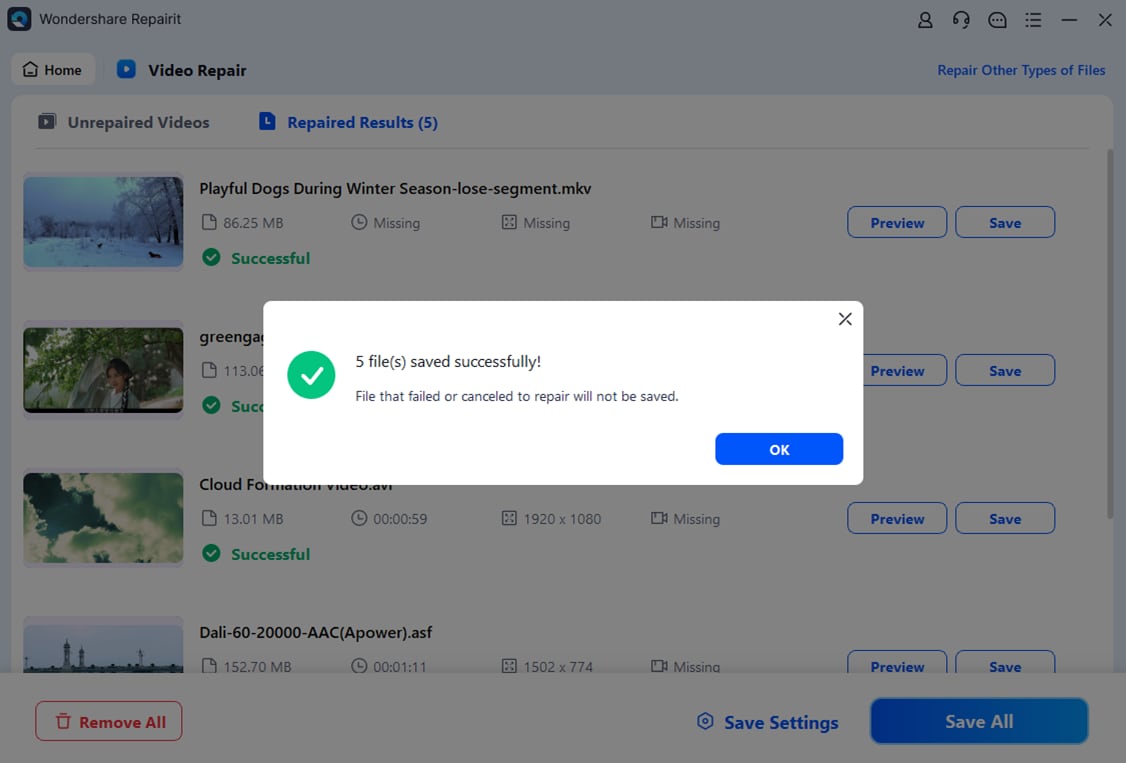
Once Repairit completes the repair, use the built-in player to preview the output and make sure both video and audio behave correctly. If the preview looks good, click the Save button, choose a safe destination folder, and export the repaired files. It is a good idea to keep the restored copy separate from the original in case you need to retry or convert the video to another format later.
Conclusion
Theora played a key role in the evolution of web video by offering an open video codec that anyone could use without royalties or patent worries. While it has largely been replaced by more efficient standards like H.264, VP9, and AV1, it still appears in legacy collections, open-source repositories, and older HTML5 implementations.
Understanding how Theora codec works, how it compares to newer options, and how to fix corrupted Theora video files ensures you can continue to access and preserve older content. Tools like Wondershare Repairit make it practical to repair Theora file issues, preview the results, and keep important recordings playable on modern systems.
FAQ
-
1. What is Theora used for today?
Theora is mainly used in legacy web video, open-source projects, educational and archival collections, and older Ogg-based distributions that prioritized a fully royalty-free stack. You may encounter it when accessing historic HTML5 demos, Linux distributions, and free culture archives. -
2. Is Theora still supported by modern browsers and players?
Many desktop media players that rely on FFmpeg, such as VLC and MPV, can still decode Theora without issue. Some browsers also support Ogg Theora playback, but overall support is less universal than for H.264 or VP9, so converting to MP4 or WebM is often recommended for broad compatibility. -
3. How does Theora compare to H.264 in quality and size?
At the same bitrate, H.264 typically delivers better visual quality and smaller file sizes than Theora thanks to more advanced compression tools and widespread hardware acceleration. Theora favors openness and royalty-free use over maximum compression efficiency, which is why it is less common on modern streaming platforms. -
4. Can I convert Theora videos to another format?
Yes. You can use tools like FFmpeg, VLC, or other video converters to transcode Theora videos (for example, Ogg Theora) into MP4 with H.264 or WebM with VP9. This improves compatibility with TVs, smartphones, and browsers, but be aware that re-encoding lossy video may slightly reduce quality. -
5. How can I fix a corrupted Theora video file?
First, try opening the video in a different player to rule out a simple playback issue. If the problem persists, use a specialized repair tool like Wondershare Repairit to scan the damaged file, rebuild the container and streams, preview the repaired result, and save a restored copy to a safe location.




