
MPEG-4 is a digital multimedia standard that compresses video, audio, and related data so files are smaller and easier to share. It matters because it delivers watchable quality at modest bitrates, which is ideal for streaming, mobile recording, online video platforms, editing, and everyday playback. Common formats like MP4 are built on the MPEG-4 format, so you rely on it whenever you watch web videos, download movies, or share clips from your phone.
Repair Corrupted Files To Save Your Data
 Security Verified. Over 7,302,189 people have downloaded it.
In this article
How MPEG-4 Works
The MPEG-4 codec compresses video by removing visual information the human eye is less sensitive to and by avoiding repeated data between frames. Each frame is split into small blocks, which are analyzed and stored more efficiently, while motion estimation predicts how objects move from one frame to the next. This significantly reduces file size while maintaining acceptable video quality. Audio is compressed in a similar way, using psychoacoustic models to discard inaudible details. As a result, MPEG-4 video codec streams smoothly over the internet and fits comfortably on phones and memory cards.
Key Features, Pros, and Cons
Main features of MPEG-4
- Supports both video and audio compression in a single MPEG-4 format stream.
- Offers multiple profiles and levels to balance quality, bitrate, and device capability.
- Works well with common containers such as MP4, MOV, and 3GP.
- Enables streaming, downloadable content, and interactive multimedia.
- Compatible with a wide range of bitrates, from low-bandwidth mobile video to higher-quality web content.
Pros and cons of MPEG-4
Pros
Good compromise between file size and quality for everyday use.
Extremely broad compatibility across devices, browsers, and media players.
Efficient enough for streaming over average home and mobile connections.
Mature, well-documented standard with extensive software support.
Cons
Less efficient than newer codecs like H.264, H.265, AV1, or VP9 at the same quality level.
Can produce visible artifacts at very low bitrates or with fast-moving scenes.
Real-world performance
In real-world use, basic mpeg4 video often appears slightly softer or more blocky than H.264 or H.265 at the same file size, especially on large screens. However, its reliability and compatibility mean many legacy cameras, DVRs, and online platforms still rely on it. For casual recording, social sharing, and simple editing workflows, MPEG-4 continues to provide stable, predictable performance.
MPEG-4 vs Other Codecs
| Codec | Key differences compared to MPEG-4 |
|---|---|
| H.264 (AVC) | More efficient compression and better quality at the same bitrate. It is now the default choice for web streaming and HD video, still using containers like MP4. H.264 generally encodes and decodes faster on modern hardware because it is heavily optimized and widely accelerated. |
| H.265 (HEVC) | Provides roughly 30–50% smaller files than MPEG-4 at similar quality, especially for 4K and HDR content. However, it requires more processing power and is not as universally supported, particularly on older devices and some browsers. |
| AV1 / VP9 | Next-generation codecs focused on streaming efficiency. They can outperform traditional mpeg-4 and H.264 in terms of bitrate savings, but encoding can be slower, and full hardware support is still rolling out across devices and platforms. |
In summary, the MPEG-4 codec is no longer the most efficient option, but it remains relevant because so many systems, editors, and players can decode it without issues. Newer codecs are better when you need maximum quality at minimal bitrates, while MPEG-4 shines in scenarios where simplicity and compatibility come first.
Compatibility and Practical Use
The MPEG-4 video codec is supported on Windows, macOS, Linux, iOS, Android, smart TVs, game consoles, and countless standalone players. Most major software, including VLC, Windows Media Player (with proper codecs), QuickTime, and common NLEs, can open or export MPEG-4 content.
Typical file containers include:
- MP4 (.mp4) for web, mobile, and general distribution.
- MOV (.mov) for many cameras and editing workflows.
- 3GP (.3gp) for legacy mobile devices and low-bitrate recordings.
In practice, you will see MPEG-4 used in older camcorders, CCTV systems, video downloads, training materials, and embedded media in presentations. Its solid support makes it a safe choice when you must ensure that a video plays on as many systems as possible with minimal configuration.
How to Use Repairit to Fix a Corrupted MPEG-4 File
About Repairit
When an MPEG-4 or MP4 file becomes corrupted, it may refuse to open, freeze during playback, or lose sound. Wondershare Repairit is a dedicated repair tool that focuses on bringing damaged media back to life. It analyzes broken compressed video format structures, reconstructs playable streams, and lets you preview the result before saving. You can learn more and download the latest version from the Repairit official website.
Key features
- Repairs corrupted MPEG-4 and other widely used video formats from computers, memory cards, and external drives.
- Handles multiple damaged clips at once, so you can repair mpeg4 video files in batches instead of one by one.
- Provides a built-in preview window so you can confirm that fix corrupted mpeg-4 attempts have restored both image and sound.
Step-by-step repair guide
- Add corrupted video
Install and open Wondershare Repairit, then choose the Video Repair module. Click the add button and browse to the folder where your broken MPEG-4 format files are stored. Select one or more clips that will not play and load them into the project list, ready for repair.

- Repair video codecs
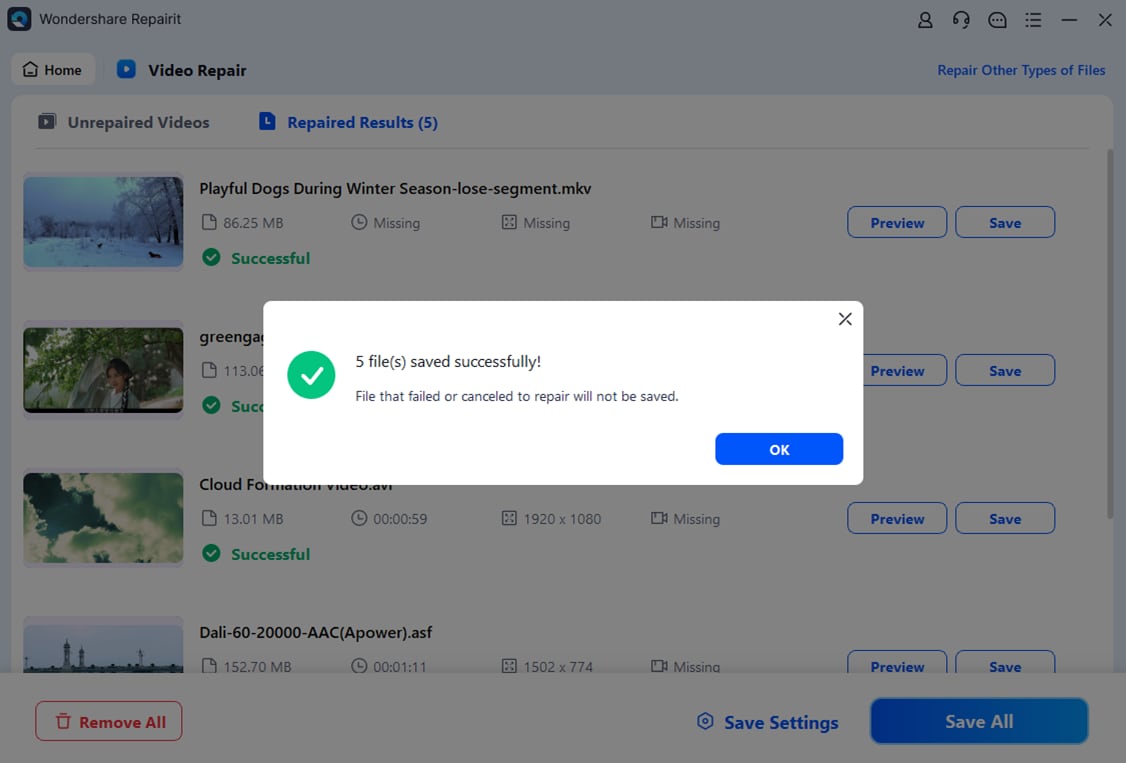
After the damaged clips are listed, start the process to fix corrupted MPEG-4 content. Repairit will scan the file headers, container, and video codec data, then rebuild a consistent structure so players can decode it again. When the analysis is complete, use the preview option to check that video and audio play smoothly from start to finish.

- Save the repaired videos
If the preview looks correct, choose a safe output folder that is different from the original location. Click Save to export the repaired MPEG-4 files. You can now open them in your usual media player, import them into an editor, or upload them to streaming platforms without encountering errors.
Conclusion
The MPEG-4 format remains a versatile, widely supported way to store and deliver video and audio. It offers a practical balance of quality, file size, and performance, which is why it continues to power everyday streaming, editing, and playback workflows despite newer codecs on the market.
Because mpeg4 files can still be damaged by interrupted transfers, storage failures, or software crashes, having a reliable way to repair them is essential. Wondershare Repairit provides an accessible path to restore corrupted clips so you do not lose important recordings, projects, or memories.
Next: What is Apple ProRes Codec?
FAQ
-
1. What is MPEG-4 used for?
MPEG-4 is used to compress and deliver digital video and audio for online streaming, downloads, video calls, mobile recording, and multimedia storage. It underlies common formats such as MP4, making it suitable for web platforms, smartphones, cameras, and TVs.
-
2. Is MPEG-4 the same as MP4?
MPEG-4 is a multimedia standard that defines how video and audio are compressed, while MP4 is a container format that stores that compressed content along with subtitles and metadata. An MP4 file often contains MPEG-4 codec or H.264 video plus audio and other tracks.
-
3. Why will my MPEG-4 video not play?
A mpeg4 video may fail to play if the file is corrupted, the specific profile is not supported by your player, or the required codecs are missing. Try another media player, update your codec pack, or use Wondershare Repairit to fix corrupted mpeg-4 files.
-
4. Can I repair a corrupted MPEG-4 file for free?
You can try free media players and basic tools first, but they often cannot repair serious damage. Wondershare Repairit offers a guided process to analyze, rebuild, and preview repaired clips, giving you a more reliable way to repair mpeg4 video files.
-
5. Is MPEG-4 still a good choice today?
Yes. While newer codecs like H.264, H.265, and AV1 are more efficient, MPEG-4 format is still a good option when you need maximum compatibility and simple workflows. It remains widely supported across legacy devices, editing tools, and embedded media environments.




