
When a recording becomes corrupted or will not play, an online repair tool can often save the footage without installing extra software. This guide compares Repairit Video Repair Online and Stellar Online Video Repair, focusing on how they handle browser-based uploads, cloud video repair workflows, preview options, and real-world limitations so you can choose the tool that matches your skills, expectations, and damaged video files.
In this article
- Repairit Video Repair Online vs Stellar Online Video Repair: Quick Verdict
- Repairit Video Repair Online vs Stellar Online Video Repair: Key Differences
- Repairit Video Repair Online vs Stellar Online Video Repair: Comparison Table
- What Repairit Video Repair Online and Stellar Online Video Repair Are Best For
- Repairit Video Repair Online vs Stellar Online Video Repair: Online Video Repair Capabilities
- Repairit Video Repair Online vs Stellar Online Video Repair: Supported Video Formats and Use Cases
- Repairit Video Repair Online vs Stellar Online Video Repair: Upload Workflow and Ease of Use
- Repairit Video Repair Online vs Stellar Online Video Repair: Cloud Repair, Privacy, and File Handling
- Repairit Video Repair Online vs Stellar Online Video Repair: Repair Quality and Limitations
- Who Should Choose Repairit Video Repair Online
- Who Should Choose Stellar Online Video Repair
- Pros and Cons of Repairit Video Repair Online and Stellar Online Video Repair
- How to Repair Corrupted Videos Online After Choosing the Right Tool
Repairit Video Repair Online vs Stellar Online Video Repair: Quick Verdict
The main difference is that Repairit Video Repair Online emphasizes a guided, step-by-step browser workflow, while Stellar Online Video Repair focuses on a simple sequence for users who just want a quick cloud repair with preview. In most real-world cases, Repairit Video Repair Online is more suitable when you prefer clear online guidance for repairing corrupted or unplayable clips, and Stellar Online Video Repair may be enough if you only need occasional, straightforward fixes with free limits.
Both services run repairs in the cloud, so your choice often comes down to how much structure you want in the online interface, how frequently you repair broken videos, and how comfortable you are with a workflow that depends on internet speed.
Repairit Video Repair Online vs Stellar Online Video Repair: Key Differences
The key difference is how each tool balances online guidance, repair depth expectations, and limitations for very damaged files. Repairit Video Repair Online focuses on walking users through uploading, repairing, and previewing within the browser, while Stellar Online Video Repair presents a simple upload, repair, preview, and download path with noted free repair limits and less advanced repair depth.
In practice, this matters if you rarely handle corrupted footage and want the interface to explain each step, or if you simply want to upload a broken clip, run a quick repair in the cloud, and check whether it plays again without spending time on additional options.
Repairit Video Repair Online vs Stellar Online Video Repair: Comparison Table
This comparison table highlights how Repairit Video Repair Online and Stellar Online Video Repair differ in workflow, capabilities, and ease of use when you repair corrupted videos online.
| Dimension | Repairit Video Repair Online | Stellar Online Video Repair |
| Best for | Users who want a guided, browser-based workflow to repair corrupted, damaged, or unplayable videos with clear steps. | Users wanting a simple cloud repair workflow with preview support for common damaged video formats. |
| Online workflow | Structured online process with upload, guided repair steps, and web-based preview before download. | Straightforward cloud video repair flow: upload damaged video online, repair, preview repaired file, then download. |
| Repair capability | Designed to repair corrupted or broken clips online in typical scenarios without deep manual tweaking. | Handles common damaged video formats with a focus on practical online repair rather than very advanced repair depth. |
| Ease of use | Beginner friendly layout that walks users through uploading, repairing, and checking results in the browser. | Beginner friendly interface with a clear preview before saving, suitable for users who want simple controls. |
| Privacy and file handling | Uses a cloud video repair workflow; users upload files to remote servers for processing and then download results. | Runs as a browser-based cloud repair service; videos are uploaded, processed online, and then downloaded by the user. |
| Strengths | Guided online repair experience, convenient browser access, preview-driven workflow for checking repaired clips. | Beginner friendly interface, preview before saving, and support for common damaged video formats in a simple sequence. |
| Weaknesses | Cloud workflow depends on internet speed; extremely damaged files may not repair fully in a single pass. | Free repair limits and less advanced repair depth, so heavily corrupted or complex issues may require another approach. |
What Repairit Video Repair Online and Stellar Online Video Repair Are Best For
Repairit Video Repair Online and Stellar Online Video Repair are both best suited for users who want to repair corrupted or unplayable video files directly in a browser without installing separate software. In most real-world cases, they are chosen when a clip refuses to play, shows playback errors, or stops abruptly.
Stellar Online Video Repair is positioned as a guided online corrupted video repair utility best for users wanting a simple cloud repair workflow with preview support. It is particularly suitable for beginners who prefer a straightforward way to upload a damaged video, repair it in the cloud, preview the result, and then save the fixed version.
Repairit Video Repair Online targets users who want a similarly convenient browser-based experience, but with a more guided flow that walks you through each online repair step. This can be more helpful if you often deal with broken MP4, MOV, or similar files and want the interface to clearly indicate what to do next each time a video becomes unplayable.
Repairit Video Repair Online vs Stellar Online Video Repair: Online Video Repair Capabilities
The main difference in online video repair capabilities is how structured and guided the browser workflows feel rather than dramatic differences in raw repair depth. Both tools aim to repair corrupted videos online through the cloud, but users should set realistic expectations for very severe damage.
Repairit Video Repair Online focuses on providing a clear, browser-based flow so non-technical users can repair corrupted or unplayable videos without digging into complex settings:
- Guides users through a browser-based upload, repair, and preview flow for corrupted or unplayable videos.
- Focuses on practical online video repair for typical issues without requiring technical knowledge.
- Lets users quickly check repaired clips online so they can decide whether to keep or rerun the repair.
Stellar Online Video Repair provides a similarly simple cloud repair sequence but highlights beginner-friendly operation and common format coverage over deeper manual control:
- Provides a simple online workflow: upload damaged video, repair, preview, and download.
- Is beginner friendly, making it easier for non-technical users to repair damaged video files.
- Supports common damaged video formats, but with less advanced repair depth and free repair limits in many scenarios.
Repairit Video Repair Online vs Stellar Online Video Repair: Supported Video Formats and Use Cases
In most real-world cases, both Repairit Video Repair Online and Stellar Online Video Repair are used to repair corrupted or unplayable MP4, MOV, AVI, MKV, or similar files recorded on phones, cameras, or screen captures. Users often notice that these tools are most helpful when a video refuses to play, shows errors, or stops abruptly, and they want a quick browser-based repair attempt without installing extra software.
The key difference is not so much about specific exotic formats, but about typical usage patterns. Repairit Video Repair Online tends to fit creators and regular users who frequently repair broken MP4 or MOV files and want a repeatable, guided browser workflow. Stellar Online Video Repair may be sufficient for people who only occasionally need to repair damaged video files online and are dealing with common formats in a straightforward way.
Repairit Video Repair Online vs Stellar Online Video Repair: Upload Workflow and Ease of Use
The main difference in upload workflow and ease of use is how much on-screen guidance you see as you move from adding a corrupted file to previewing the repaired result. Both services handle everything in the browser, but the sequence feels slightly different.
Stellar Online Video Repair follows a clear cloud workflow: upload the damaged video online, run the repair, preview the repaired file, and download the result. This linear sequence is easy to understand and works well if you simply want to fix an unplayable file with minimal decisions during the process.
Repairit Video Repair Online offers a similarly straightforward browser-based upload and repair process, but it emphasizes guidance at each step. The interface walks you through adding files, starting the online repair, and checking the outcome in the web preview, which matters if you do not repair videos often and prefer the tool to explain what is happening as you go.
Repairit Video Repair Online vs Stellar Online Video Repair: Cloud Repair, Privacy, and File Handling
The key similarity between Repairit Video Repair Online and Stellar Online Video Repair is that both rely on cloud video repair, which means your corrupted clips are uploaded to remote servers, processed, and then made available for download. The difference for users is less about the underlying technology and more about how comfortable they feel sending footage to the cloud.
Both tools use a browser-based workflow where you select broken or unplayable videos on your device, upload them, wait for the repair to complete online, and then download repaired versions. This becomes important when you handle personal or client footage, because your files temporarily leave your device, and users should consider internet speed and file size as practical factors.
Since detailed policies can change, users should review each tool's upload and privacy terms before submitting sensitive or confidential videos for online repair. In most scenarios, people choose the service whose workflow they trust and whose explanations around file handling are clear enough for their comfort level.
Repairit Video Repair Online vs Stellar Online Video Repair: Repair Quality and Limitations
The key difference in repair quality expectations is how each tool sets limits around very severe corruption, free usage, and advanced repair depth. Both are designed for practical, everyday online fixes rather than unlimited reconstruction of badly damaged files.
Stellar Online Video Repair has free repair limits and less advanced repair depth, so very damaged or complex files may not fully recover in one pass. Users who only need occasional help with lightly corrupted clips may find this acceptable, but those frequently facing severe damage might require multiple attempts or another strategy.
Repairit Video Repair Online also faces natural limits when metadata is missing, recordings were interrupted, or corruption is severe. In such cases, neither service can guarantee that every frame or audio segment will be restored, and users should expect that some files will repair partially or not at all despite being processed through a browser-based workflow.
Who Should Choose Repairit Video Repair Online
Repairit Video Repair Online is more suitable when you want a guided, browser-based experience for repairing corrupted or unplayable videos and you prefer to preview the results online before saving them. In most real-world cases, it fits people who often repair broken clips and appreciate a structured flow.
- Users who want a guided, step-by-step browser workflow to repair corrupted or unplayable videos online.
- People who prefer checking repaired clips in a web preview before downloading the final file.
- Creators who regularly repair broken MP4 or MOV files from phones, cameras, or screen recordings.
- Non-technical users who want a clear online interface rather than manual, technical repair settings.
If this describes your situation, Repairit Video Repair Online can be a practical option for handling repeated corrupted video incidents directly in the browser.
Who Should Choose Stellar Online Video Repair
Stellar Online Video Repair may be enough if you mainly need a simple, cloud-based way to repair damaged videos every now and then and do not require deeper repair adjustments. Its straightforward online flow is aimed at users who want to get in, fix a clip, preview it, and get out without learning technical terms.
- Users wanting a simple cloud repair workflow with preview support and minimal configuration.
- Beginners who need a straightforward way to repair damaged video files without learning technical terms.
- People dealing with common damaged video formats who mainly need a practical online fix rather than deep repair depth.
- Users who are comfortable with free repair limits and only occasionally repair corrupted videos online.
This tool tends to fit people who rarely encounter broken videos and simply want a one-off or occasional repair for typical MP4, MOV, or similar files.
Pros and Cons of Repairit Video Repair Online and Stellar Online Video Repair
When choosing between Repairit Video Repair Online and Stellar Online Video Repair, weighing pros and cons helps match the tool to how often you repair videos, how bad the corruption is, and how much you value guidance versus simplicity.
Repairit Video Repair Online Pros and Cons
Stellar Online Video Repair Pros and Cons
How to Repair Corrupted Videos Online After Choosing the Right Tool
After comparing Repairit Video Repair Online and Stellar Online Video Repair, the next step is to actually repair your corrupted or unplayable videos using a browser-based workflow. Once you understand which service better fits your repair habits and file conditions, you can follow a clear sequence to upload damaged clips, let the cloud process them, and then review the results.
For users who want a guided, practical online option, Repairit Video Repair Online provides a structured flow that is easy to repeat whenever a new recording becomes broken or will not play. Below is an overview of how this online repair process works.
Key Features
When you use Repairit Video Repair Online to repair corrupted videos online, the workflow focuses on simple, repeatable steps rather than complex manual tuning.
- Online workflow to upload, repair, and download videos directly in the browser.
- Guided interface that helps beginners repair corrupted or broken clips with minimal setup.
- Preview of repaired videos online so users can confirm playback before saving the file.
Step-by-step guide
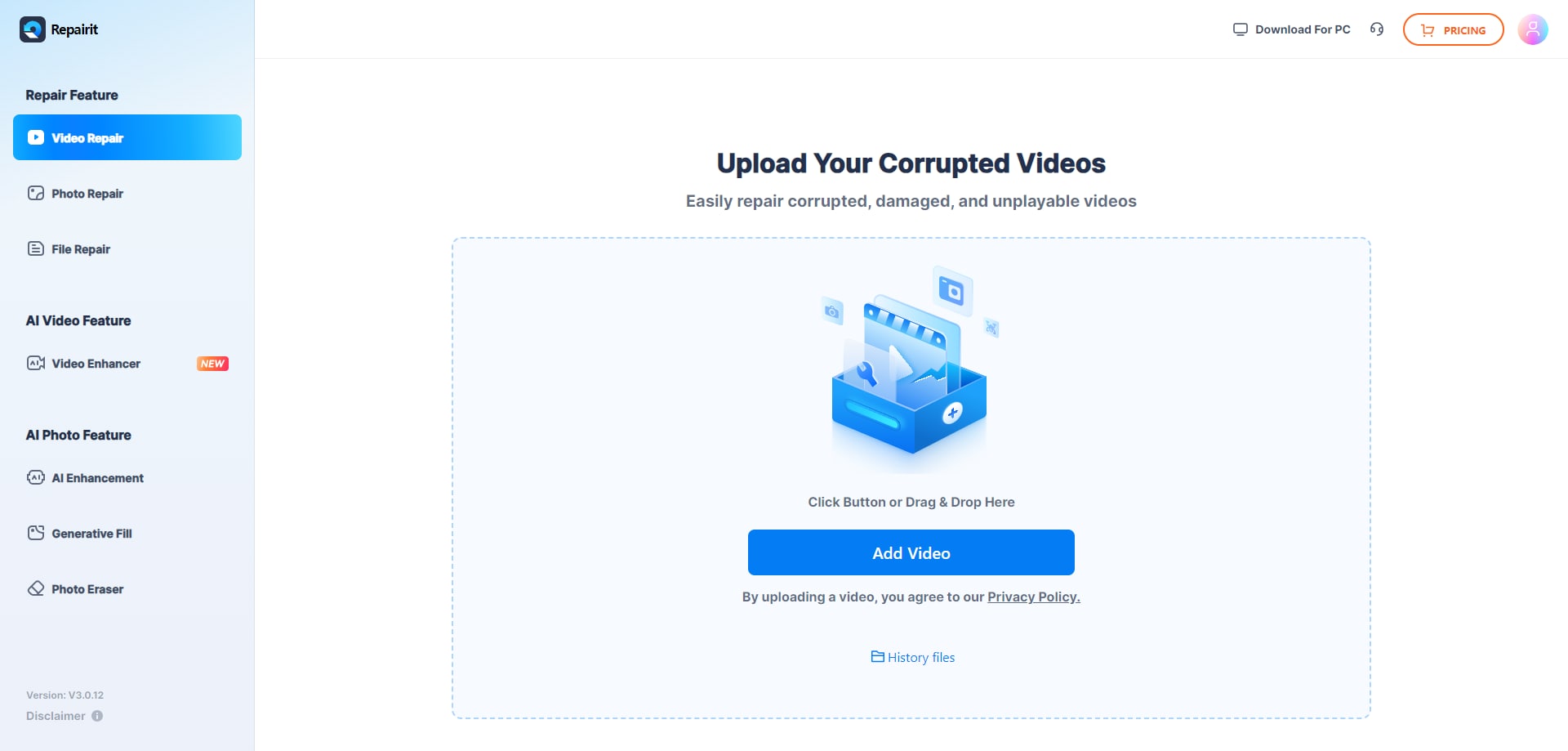
Step 1. Upload the damaged or unplayable videos you want to repair through Repairit Video Repair Online.
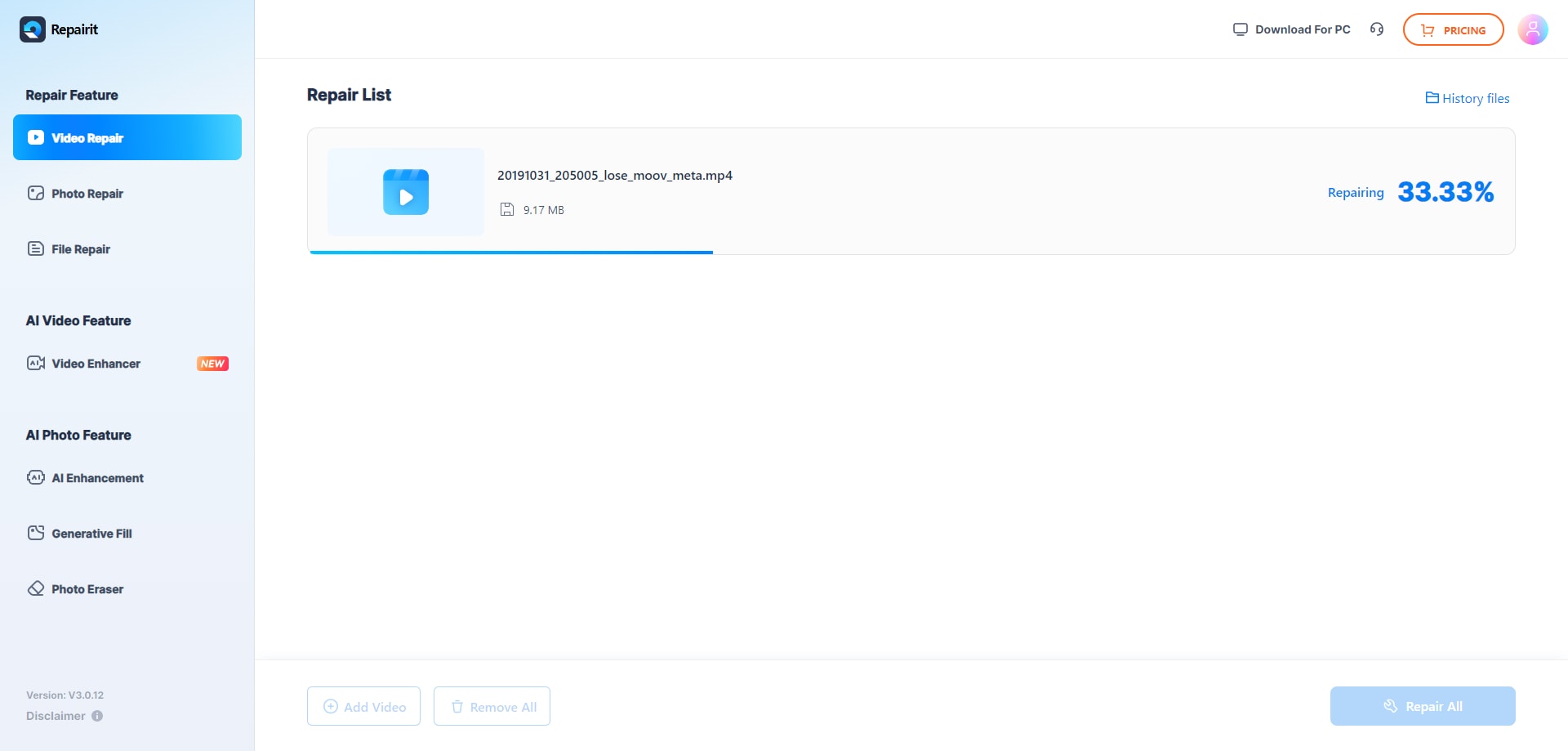
Step 2. Start the online repair process and let Repairit Video Repair Online analyze the corrupted video files.
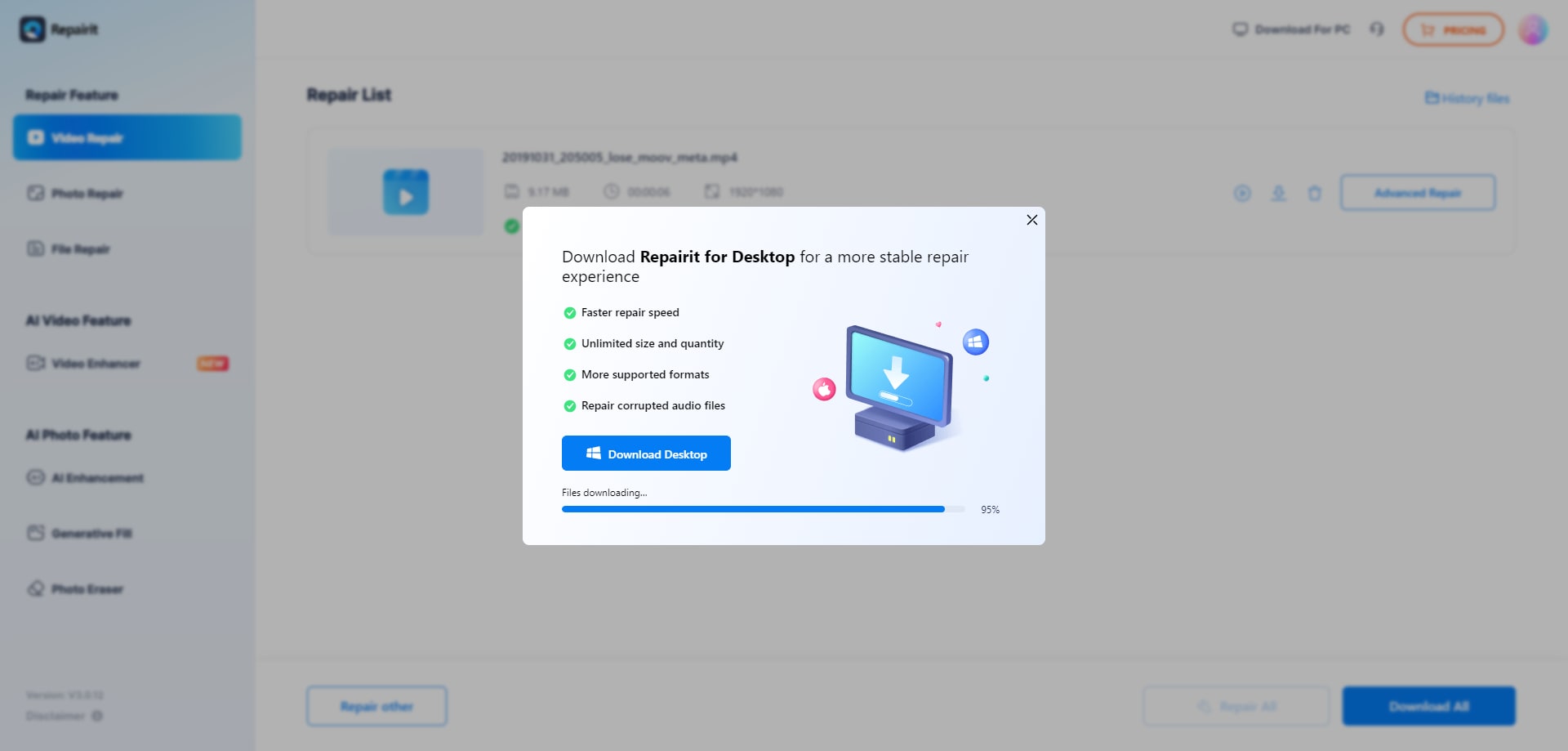
Step 3. Preview the repaired video result when available, then save the repaired videos to your device.
Final Verdict
The key difference between Repairit Video Repair Online and Stellar Online Video Repair is how they balance guided workflow, preview usage, and realistic limitations when fixing corrupted or unplayable clips in the cloud. Repairit Video Repair Online is more suitable when you want a step-by-step, browser-based experience with clear guidance and an online preview before saving the repaired file.
Stellar Online Video Repair may be enough if you prefer a very simple cloud repair workflow with preview support for common damaged video formats and you only need occasional fixes within free limits. In most real-world cases, choosing between them comes down to how often you repair videos, how comfortable you are with online tools, and how severe the corruption is in your broken clips.
Next: Repairit Video Repair Online vs Videorepair By Grau Gmbh
FAQ
-
1. Which is better for repairing corrupted videos online, Repairit Video Repair Online or Stellar Online Video Repair?
Neither tool is universally better for every situation. Repairit Video Repair Online is more suitable when you want a guided browser workflow with a clear repair path and online preview, while Stellar Online Video Repair may be enough if you just need a simple, preview-based cloud fix for common damaged video files. -
2. How do the online workflows differ between Repairit Video Repair Online and Stellar Online Video Repair?
Both tools use cloud video repair, but the main difference is guidance. Repairit Video Repair Online emphasizes a structured, step-by-step flow for uploading, repairing, and previewing in the browser, while Stellar Online Video Repair focuses on a simple sequence of upload, repair, preview, and download with beginner-friendly controls. -
3. Can these tools fix severely corrupted or completely broken video files?
Both Repairit Video Repair Online and Stellar Online Video Repair can help in many everyday corruption cases, but a common limitation is that severe corruption, missing metadata, interrupted recordings, or very damaged files may not fully repair, regardless of the tool used.




